proxmox-stuff backs up PVE node configuration, and warns you before it does
This is a collection of stuff that I wrote for Proxmox.
At a glance
- What is it?
- DerDanilo's proxmox-stuff is a shell script collection and a small set of Ansible roles for Proxmox administration, with the bulk of it a backup and restore pair for standalone Proxmox VE node configuration. The project describes itself as a personal reference with no update guarantees, and its restore script stops core services and overwrites system files with no undo.
- Who is it for?
- proxmox-stuff suits a homelab or small infrastructure operator who runs standalone Proxmox VE hosts and wants a configuration backup that captures the files a rebuild would forget, and it suits Ansible users who want a starting point for Proxmox Backup Server roles.
- Can I use it commercially?
- Yes. MIT is a permissive licence: you can use, modify and sell software built on it, as long as you keep its copyright and licence notices.
- Is it still maintained?
- Yes. The repository last received commits 6 days ago.
- What is it written in?
- Mainly Shell, according to GitHub's language statistics.
Answers come from the project's GitHub data, last synced on November 7, 2026, and from our analysis. They are not legal advice.
Star history
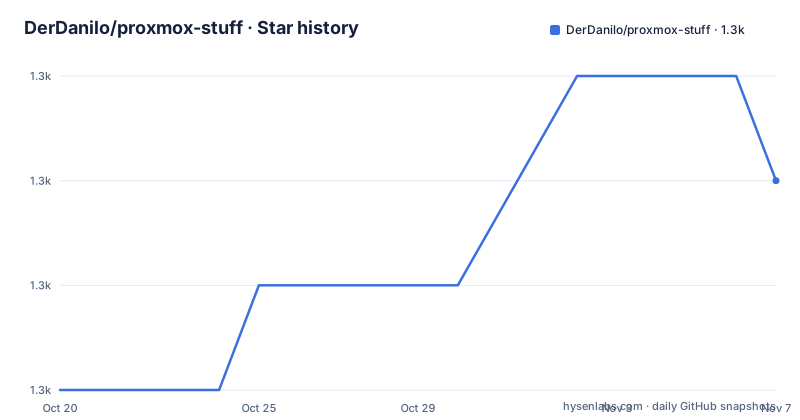
- DerDanilo/proxmox-stuff1,339 ★ · +2
| Repository | 2026-10-20 | 2026-11-07 |
|---|---|---|
| DerDanilo/proxmox-stuff | 1.3k | 1.3k |
2 Stars in the last 18 days, measured from the daily GitHub snapshot. Compare with other projects
Editorial analysis
The project tells you not to depend on it
The framing note at the top of this repository is unusual and worth reading before the code. It says the repository is shared as a personal reference, not as a fully maintained open source project. The code reflects real configurations that were used in production environments at some point, but there are no guarantees regarding update frequency, compatibility, or long term support. Everything in it is offered as a foundation to build upon and adapt to your own environment. Pull requests are welcome, although responses or reviews may sometimes take a while.
The reason given is candid. The author writes that the motivation to maintain large amounts of reusable boilerplate infrastructure code has become smaller over time, that AI assisted development has changed how infrastructure and automation projects are approached, and that in many cases a good prompt and a clear understanding of your own environment are more valuable than digging through someone else's partially maintained repository. Time is limited, and the preference is to spend the remaining hobby time building and experimenting rather than polishing repositories.
There is also an explicit warranty disclaimer. Everything is provided as-is, without any warranty of any kind, express or implied, and the authors and contributors are not responsible for data loss, downtime, broken systems, or damage of any kind resulting from the use of the code.
So the correct way to read this project is as a set of working examples from a real Proxmox installation, offered with the author's blessing and without any promise that they will track the next Proxmox release. The licence is MIT, and the last push was on 2026-07-02, with no tagged releases noted at review time; the Git commit history remains available for inspecting changes.
Five Ansible roles cover the Proxmox product line
The Ansible side is a small role collection, and the table in the project documentation is the whole catalogue. The pbs role is Proxmox Backup Server setup, pbs_client_backups configures PBS client backups on PVE nodes, pve is a Proxmox VE base setup, pmg is Proxmox Mail Gateway setup, and pmg_domain_mgmt handles PMG domain management. Individual role READMEs live under the Ansible/ directory.
One of those roles comes with an honest assessment that is more useful than the rest of the list. For backing up PVE cluster and node configuration to a Proxmox Backup Server, the documentation says the pbs_client_backups role is the better fit than the shell scripts described later. It has been used in production across many clusters for years, primarily backing up /etc/pve, the PVE cluster config, and it is extensible to individual node configs as well.
The same note then says something that deserves attention from anyone automating infrastructure: in practice a solid infrastructure as code setup often makes per-node config backups redundant, because your Ansible inventory is the documentation. The author adds that nothing replaces clear, well-maintained documentation, and that the role itself is shared on a best-effort basis and may not receive regular updates.
That is the real architectural advice in the repository. If you already describe your Proxmox hosts in Ansible, the value of a configuration backup shrinks, because the inventory and the roles already encode the intended state. The scripts earn their place in the gap: a host that was configured by hand, or whose configuration drifted away from the playbook, is exactly the case where a file level backup is the only record of what was actually running.
What the configuration backup captures, and what it ignores
The backup script targets the node configuration of a standalone Proxmox VE host, and the list of captured paths is the part to read carefully. The system configuration under /etc/ is included. The Proxmox VE configuration under /etc/pve/ is archived explicitly and separately. The cluster and node database in /var/lib/pve-cluster/ is included. Hook scripts and cloud-init snippets under /var/lib/vz/snippets/ are included when that directory is not empty. Cron jobs in /var/spool/cron/ are included. The root home directory /root/ is included, and local scripts and binaries in /usr/local/bin/ are included when that directory is not empty. Custom GPU vBIOS files matching /usr/share/kvm/*.vbios are included when present.
Three more items are conditional. The /opt/ folder is optional and enabled with BACKUP_OPT_FOLDER=true. The list of manually installed APT packages is captured as the output of apt-mark showmanual. And the full pvereport output is stored as a text file.
The resulting archive is a compressed .tar.gz, and the documentation says it is typically 1 to 5 MB. That size is the design in one number. This is not a disk image backup and it is not a VM backup; it is a small archive of the files that define a host, which is why it can be run monthly from cron without thinking about capacity, and why it can be restored onto a freshly installed machine in a way a full disk image could not.
What it deliberately does not capture is the part you must not confuse it with: VM and LXC disk images and container data are not backed up by these scripts. The documentation states this in a caution box, and it is the first thing to internalise before scheduling the job.
The installer pipes a shell script from the internet
There are two ways to set this up, and the documented quick start is a single command that fetches and runs an installer from the repository's raw file URL:
bash <(curl -fsSL https://raw.githubusercontent.com/DerDanilo/proxmox-stuff/master/pve_backup_and_restore/install.sh)If you already have the repository cloned, you run the same installer from disk:
bash /root/proxmox-stuff/pve_backup_and_restore/install.shThe installer clones or updates the repository to /root/proxmox-stuff, asks for the backup target directory, asks how many backups to retain, and optionally creates a monthly cron job at /etc/cron.monthly/proxmox-config-backup.
The manual path is worth knowing because it is the one that gives you a reviewable script rather than a piped download, and it is short. You clone the repository, make the two scripts executable, and run the backup with the target directory set as an environment variable:
git clone https://github.com/DerDanilo/proxmox-stuff /root/proxmox-stuff
chmod +x /root/proxmox-stuff/pve_backup_and_restore/prox_config_backup.sh
chmod +x /root/proxmox-stuff/pve_backup_and_restore/prox_config_restore.sh

BACK_DIR="/mnt/pve/media/backup" /root/proxmox-stuff/pve_backup_and_restore/prox_config_backup.sh
The environment variable approach is also how you override settings for a single run, and the documentation shows the two forms:
BACK_DIR="/mnt/nas/proxmox-backups" ./prox_config_backup.sh
export BACK_DIR="/mnt/nas/proxmox-backups"
The configuration variables sit at the top of prox_config_backup.sh and can also be overridden through the environment at runtime. The documented defaults are BACK_DIR and DEFAULT_BACK_DIR at /mnt/pve/media/backup, MAX_BACKUPS at 5, BACKUP_OPT_FOLDER false, HEALTHCHECKS 0 with a HEALTHCHECKS_URL for a healthchecks.io check URL, and TMP_DIR at /var/tmp for temporary files during the backup. The healthchecks option is the small operational touch: a ping to a healthchecks.io URL turns a monthly job into something that can raise an alert when it silently stops running.
The restore path stops services and has no undo
The restore side carries the caution labels, and the list is specific enough to act on.
The scripts back up node configuration only. You must always restore on the same node and the exact same Proxmox VE version you backed up from, and restoring onto a different PVE version or a freshly installed system of a different version might break your installation. Clusters are not supported at all: running the restore script on a cluster node will corrupt the cluster state, and if you are running a cluster you should not use these scripts. The restore script stops core PVE services and overwrites system files, there is no undo, and you should make sure you have console access before running it. The restore section repeats the version rule and asks you to have console access in the form of IPMI, iDRAC or iKVM ready before you start.
The invocation takes the archive name:
/root/proxmox-stuff/pve_backup_and_restore/prox_config_restore.sh pve_myhostname_2026-05-17.12.00.00.tar.gzThe filename pattern is worth noting because it tells you the archive is named after the host and the moment it was taken, which is what makes the retention policy work. The script stops PVE services and restores all files, and the file names under /etc/pve/ and /var/lib/pve-cluster/ are the reason the version and node rules exist: they are internal cluster state, and writing the wrong one of those onto a live node is the failure mode the caution is about.
The practical reading is that this tool is for a standalone host that you are rebuilding, with a console available, and for a version match you have verified. It is not a tool for recovering a live cluster, and the documentation is unambiguous about that.
Scheduling it monthly and testing the schedule without waiting
The cron integration is a monthly job, and the documentation shows the file you create at /etc/cron.monthly/proxmox-config-backup:
#!/bin/bash
BACK_DIR="/mnt/pve/media/backup" MAX_BACKUPS=5 /root/proxmox-stuff/pve_backup_and_restore/prox_config_backup.sh
It is then made executable, and the schedule is tested without waiting for the month to turn over. run-parts is the tool for that, first in test mode to see what would run, then for real:
chmod +x /etc/cron.monthly/proxmox-config-backup
run-parts -v --test /etc/cron.monthly
run-parts -v /etc/cron.monthly
Choose a backup cadence based on how often configuration changes and how much recovery work you can accept losing. With one successful run per month, a retention count of five keeps roughly five monthly snapshots; test restoration separately. The healthchecks.io ping option exists for the case where a monthly job fails silently, which is the normal failure mode for a job that runs when nobody is looking.
The installer can create this file for you, optionally, and asks for the target directory and the retention count when it runs. So the full path from nothing to a monthly job is a single command, a couple of answers, and a test with run-parts, and the manual path exists for the case where you want to read the script before it touches a host.
Licence, maintenance reality and where to send a fix
The licence is MIT, which is permissive and puts no obligation on you beyond keeping the notice. The repository carries a LICENSE file alongside the README, the Ansible/ directory, the pve_backup_and_restore/ directory and a standalone umount-stale-mount.sh script, which is a small utility for clearing stale mounts and is an example of the sort of one-off operational tool this repository collects.
The maintenance picture needs no embellishment. The repository is not archived, and the last push was on 2026-07-02, with no GitHub releases. The author has said directly that update frequency, compatibility and long term support carry no guarantees, that reviews of pull requests may take a while, and that the remaining time goes to building and experimenting rather than to polishing. The last push being a few months old is consistent with that statement rather than evidence of abandonment.
The advice the project gives for your own use is to treat the content as a foundation and adapt it to your environment. For an Ansible user that means reading the role READMEs, deciding whether the pbs_client_backups role or the shell scripts fit your setup better, and keeping the versions of Proxmox Backup Server, Proxmox VE and Proxmox Mail Gateway in mind as you adapt. For a shell script user it means reading prox_config_backup.sh and prox_config_restore.sh before either runs on a host you care about, and confirming your Proxmox VE version before you rely on a restore.
If you do find a problem, the project asks for issues and pull requests and says they are welcome. The realistic expectation, based on the author's own note, is that a well described pull request is the most useful contribution here.
Editorial conclusion
proxmox-stuff suits a homelab or small infrastructure operator who runs standalone Proxmox VE hosts and wants a configuration backup that captures the files a rebuild would forget, and it suits Ansible users who want a starting point for Proxmox Backup Server roles. It is the wrong choice if you run a cluster, because the documentation states the restore script will corrupt cluster state, and a poor match if you need a maintained project with compatibility guarantees, because the author explicitly offers none. Before running anything, take a console path to the host, confirm you can restore onto the same node and the same Proxmox VE version, and read the role READMEs under Ansible/ to decide whether the Ansible route fits you better than the scripts.
Frequently asked questions
Does the proxmox-stuff backup include VM and container disks?
No. The scripts back up node configuration only, not VM or LXC disk images or container data. The captured paths include /etc/, /etc/pve/, /var/lib/pve-cluster/, /var/spool/cron/, /root/ and several optional directories, producing a .tar.gz typically 1 to 5 MB.
Can I use the proxmox-stuff restore script on a Proxmox cluster?
No. The documentation states that clusters are not supported and that running the restore script on a cluster node will corrupt the cluster state. It also requires restoring onto the same node and the exact same Proxmox VE version, and warns that the restore stops core PVE services and overwrites system files with no undo.
How do I install the Proxmox configuration backup?
The documented quick start runs the installer from the repository's raw file URL with bash <(curl -fsSL ...), which clones or updates the repository to /root/proxmox-stuff, asks for the target directory and retention count, and can create a monthly cron job. You can also clone the repository manually, make the two scripts executable and run prox_config_backup.sh with BACK_DIR set.
What does the proxmox-stuff repository say about its own maintenance?
It is shared as a personal reference rather than a fully maintained project, with no guarantees on update frequency, compatibility or long term support, and it is provided as-is without warranty. Pull requests are welcome, although reviews may take a while, and the last push was on 2026-07-02.
Official sources
Add this badge to your README
If you maintain this project, the badge below links readers to this analysis and shows its maintenance status from the daily GitHub snapshot. Paste the markdown into your README; add ?metric=license or ?metric=stars to the image URL for a different field.

[](https://hysenlabs.com/projects/derdanilo-proxmox-stuff)Star history chart for your README
[](https://hysenlabs.com/projects/derdanilo-proxmox-stuff)Was this useful?