Xray_onekey ships two install URLs on two branches and a WebSocket path Xray has deprecated
A one-click, Nginx-based VLESS + XTLS installation script for Xray.
At a glance
- What is it?
- Xray_onekey is a Shell script that installs Xray with Nginx on a Linux server, offered in a Nginx-in-front variant served from the nginx_forward branch and an Xray-in-front variant served from main. Its README is unusually honest about the bugs it has shipped, including a TLS field Xray silently ignored and a deprecation warning that never reaches the error log.
- Who is it for?
- Use Xray_onekey if you already run a Linux server, have a domain with an A record pointing at it, and want Xray with Nginx and `xtls-rprx-vision` flow control, and read the version notes before you do, because the script has shipped a configuration where no certificate loaded at all.
- Can I use it commercially?
- Yes. MIT is a permissive licence: you can use, modify and sell software built on it, as long as you keep its copyright and licence notices.
- Is it still maintained?
- Yes. The repository last received commits 91 days ago.
- What is it written in?
- Mainly Shell, according to GitHub's language statistics.
Answers come from the project's GitHub data, last synced on November 14, 2026, and from our analysis. They are not legal advice.
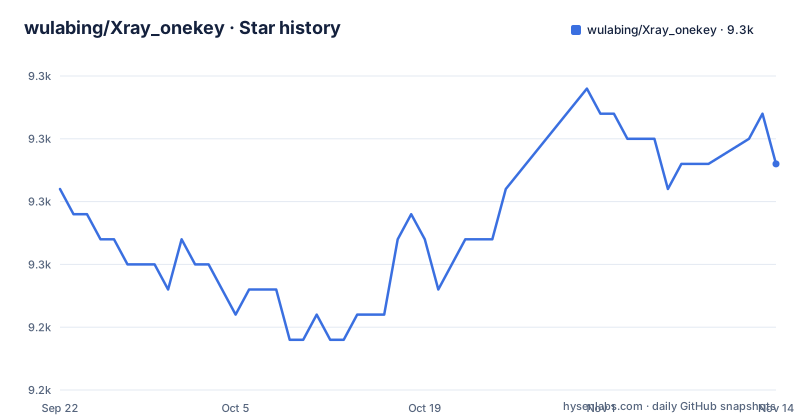
Star history
- wulabing/Xray_onekey9,254 ★ · +1
| Repository | 2026-09-22 | 2026-11-14 |
|---|---|---|
| wulabing/Xray_onekey | 9.3k | 9.3k |
1 Stars in the last 53 days, measured from the daily GitHub snapshot. Compare with other projects
Editorial analysis
Two install URLs point at two different branches
The Nginx-in-front variant is not served from main. Its command pulls the script from a branch named nginx_forward:
wget -N --no-check-certificate -q -O install.sh "https://raw.githubusercontent.com/wulabing/Xray_onekey/nginx_forward/install.sh" && chmod +x install.sh && bash install.shThe Xray-in-front variant is the one on main:
wget -N --no-check-certificate -q -O install.sh "https://raw.githubusercontent.com/wulabing/Xray_onekey/main/install.sh" && chmod +x install.sh && bash install.shBoth are labeled Installation / Update, so the same command doubles as an upgrade path, and both are one line that downloads, marks executable, and runs. One detail is worth noting before you paste either. The download runs with certificate checking switched off (`--no-check-certificate`), so the transfer is not authenticated by TLS.
The prerequisites are short and specific: prepare a domain name and add its A record, and have wget installed. Everything else, including the certificate, is the script's problem to solve.
The WebSocket deprecation warning never reaches the error log
Since Xray-core v26.1.23, using the ws transport prints a deprecation warning at startup:
The feature WebSocket transport (with ALPN http/1.1, etc.) is deprecated, not recommended for using and might be removed.Here is the part that trips people up. That warning is emitted before the log file is created, so it shows up in `journalctl -u xray` and never appears in `/var/log/xray/error.log`. Anyone auditing a node by reading the error log, which is the obvious file to read, sees a clean log and concludes the transport is fine.
The consequence is that the deprecation is effectively invisible to anyone checking the file path most deployments point their monitoring at. If your configuration still depends on the WebSocket fallback path, the only reliable way to know is to read the journal, and the message tells you the feature is not recommended and might be removed in a future release, which means the configuration that works today is not guaranteed to work after the next Xray upgrade.
Combined with the transport still being offered by this script as a coexistence mode, you have a supported-by-this-project option that the upstream runtime discourages.
xtlsSettings was silently ignored, so older nodes never loaded a certificate
The most serious bug this project has documented is one where nothing failed loudly. If your node was installed with v1.3.11 or earlier, the inbound TLS configuration never actually loaded any certificate, so clients cannot complete the TLS handshake.
The cause is a field name. `xtlsSettings` has not been a valid field since Xray-core v1.8.1, and unknown JSON fields are silently ignored. So `security: "tls"` fell back to an empty TLS configuration and `certificates` never took effect. There was no error, no warning, and a service that started and listened.
The maintenance release v1.4.0 renamed the field to `tlsSettings` in the template, and existing users are told to reinstall, or to rename `"xtlsSettings"` to `"tlsSettings"` in `/usr/local/etc/xray/config.json` and then run `systemctl restart xray`.
The lesson for anyone evaluating the script is about verification rather than trust. Silent acceptance of an unknown JSON key is a property of Xray-core, not of this project, and it will do the same thing to any hand-edited config. Check the field name in your live config rather than assuming the installer wrote a working one.
One package name broke the whole apt install on Debian 13
Debian 13 removed `libpcre3-dev`. The script still asked for it, as part of a single `apt install` command, so the entire command failed and the packages listed alongside it, `openssl` among them, were never installed. Issue 487 tracks it.
The reason the package was there at all is the interesting part. Those pcre, zlib, and openssl development packages were leftovers from the days when Nginx was compiled from source on the target machine. Nginx is now installed as a binary from the official repository, so none of them are needed, and all of them were removed rather than replaced with a version-specific name.
This is a failure mode worth internalizing: a batch installer that installs a list of packages in one command has a single point of failure, and a name that no longer exists takes down every other package in the same line, including the one that actually mattered. If you are adapting this script for your own provisioning, splitting the install into the packages the service needs and the packages that are merely nice to have removes the coupling.
The fix landed in v1.4.1.
The port 80 check used to kill whatever held the port with kill -9
Before v1.4.1, the port-in-use check ran `kill -9` against whatever occupied port 80. When that was a running Nginx, `nginx.service` was left in `failed (Result: signal)` state. Issue 469 documents the change.
The new behavior is to try `systemctl stop nginx` first and only fall back to `kill -9` if the port is still held. That ordering is the whole fix, and it is a good illustration of what a naive port check does on a shared host: an unrelated service that happens to own port 80 gets terminated without its supervisor being told, so the service manager records a signal failure rather than a clean stop.
For anyone running this on a machine with a real web server already on port 80, the practical advice is to read that section of the script before running it, and to know that `kill -9` can still be reached. A forced kill gives the Nginx process no chance to close connections or flush state, so on a host with traffic in flight it is the worse of the two options.
limits.conf needed a trailing newline before the tuning could be appended
The file descriptor tuning is the string `* soft nofile 65536` appended to `/etc/security/limits.conf`. If that file does not end with a newline, as happens on some distributions and cloud images, the appended line is concatenated onto the previous line. Both the existing limit and the new one are corrupted, and the line-anchored cleanup logic that is supposed to remove old copies is defeated as well.
The consequences compound quietly. Repeated installs kept accumulating garbage lines, and the file descriptor tuning never actually took effect. So a node could be running with the default descriptor limit while the operator believed they had raised it, and the file that was supposed to hold one setting held a pile of mangled ones. A newline is now added before appending.
This one is worth remembering for a general reason. If your server came from a cloud image, check that file before you trust any tuning script that appends to it. A single missing trailing byte is the kind of thing that passes every manual test on the developer's machine and fails on exactly the machines you care about.
CentOS 7 is in the support table with a warning instead of a block
The support table covers Debian 10+ with Debian 12 and 13 recommended, Ubuntu 20.04+, Rocky Linux 8+, AlmaLinux 8+, Oracle Linux 7+, and CentOS 7+ or Stream. CentOS 7 carries its own warning: it reached EOL on 2024-06-30, official repositories have moved to vault.centos.org, the script prints a warning and continues, and dependency installation may fail. Switching to another distribution is recommended.
That is an honest entry, and it also describes a specific behavior. The script does not stop. It prints a line and keeps going, so on a CentOS 7 host a failure can appear later, at a step that has nothing to do with the package repository, and the warning scrollback is the only clue. If you are on CentOS 7, treat the warning as a hard stop rather than a notice.
The BBR step still fetches and runs a script from another repository
Enabling BBR means pulling a script from a third-party project, and the README documents the failure this caused. When the upstream `ylx2016/Linux-NetSpeed` repository misbehaves, it may serve an outdated script. Issue 490 records it.
The response is source validation: the script now validates the source and prints its version before executing, and aborts if validation fails. That is a real improvement, because it turns a silent wrong-version execution into a visible abort with a version in the log.
It is worth being clear about what validation does and does not do. It does not remove the dependency. Your server still downloads and executes code from a third-party repository as part of an installation, and the validation is described only as catching an outdated script.
If BBR tuning is not required for your deployment, the safest thing to do is read exactly what that step fetches before you run the installer at all.
Editorial conclusion
Use Xray_onekey if you already run a Linux server, have a domain with an A record pointing at it, and want Xray with Nginx and `xtls-rprx-vision` flow control, and read the version notes before you do, because the script has shipped a configuration where no certificate loaded at all. Do not start a new deployment on the Nginx-in-front path if you can avoid it, since the project's own header calls that nested TLS structure blockable and points at wulabing/xray_docker and REALITY instead. Before running anything, check whether your distribution is CentOS 7, accept that support is limited to Telegram community answers, and remember the repository publishes no GitHub releases, so the only version record is the README text and the last commit on 2026-08-15.
Frequently asked questions
How to install Xray on Linux?
For this project, prepare a domain name and add its A record, make sure wget is installed, then run one of the two documented commands. The Nginx-in-front variant downloads install.sh from the nginx_forward branch and the Xray-in-front variant from main, and both are labeled Installation / Update.
What is Xray-core?
Xray-core is the runtime this script installs, and its configuration file is /usr/local/etc/xray/config.json. This project is not the core itself: it is a Shell script that installs the core together with Nginx on a Linux server.
Which Linux distributions does Xray_onekey support?
Debian 10+ with Debian 12 and 13 recommended, Ubuntu 20.04+, Rocky Linux 8+, AlmaLinux 8+, Oracle Linux 7+, and CentOS 7+ or Stream. CentOS 7 reached EOL on 2024-06-30 and its repositories moved to vault.centos.org, so the script prints a warning and continues and dependency installation may fail.
Why does Xray_onekey recommend moving away from the Nginx-in-front setup?
Because placing Nginx in front creates a nested TLS structure that can be targeted and blocked. The project's header calls REALITY the recommended option now and points to wulabing/xray_docker, and the known limitations section recommends migrating to REALITY or XHTTP for the long run.
My node was installed with v1.3.11 or earlier and clients cannot complete the TLS handshake. What happened?
The inbound TLS configuration never loaded a certificate, because `xtlsSettings` has not been a valid field since Xray-core v1.8.1 and unknown JSON fields are silently ignored, leaving an empty TLS configuration. Reinstall, or rename "xtlsSettings" to "tlsSettings" in /usr/local/etc/xray/config.json and run `systemctl restart xray`.
Official sources
Add this badge to your README
If you maintain this project, the badge below links readers to this analysis and shows its maintenance status from the daily GitHub snapshot. Paste the markdown into your README; add ?metric=license or ?metric=stars to the image URL for a different field.

[](https://hysenlabs.com/projects/wulabing-xray-onekey)Star history chart for your README
[](https://hysenlabs.com/projects/wulabing-xray-onekey)Was this useful?