Cursor Skills for 1C:Enterprise: Building and Parsing 1C Source Without the Configurator
116 скилов и 40 правил для Cursor IDE: агент собирает исходники 1С (метаданные, формы, расширения, роли, СКД, обработки) из компактного JSON и разбирает обратно. Базовые операции - без Конфигуратора.
At a glance
- What is it?
- A set of 116 skills and 40 rules for Cursor IDE that compiles 1C metadata, forms, extensions, roles, and data composition schemas from compact JSON, then parses them back. It targets developers who keep sources in git and want an agent to handle routine scaffolding and reviews without launching the platform.
- Who is it for?
- Adopt it if you are a 1C developer who keeps sources under git and wants an agent to scaffold objects, parse foreign .epf files, or review changes without opening the Configurator. Skip it if you need semantic BSL analysis or query plan validation, because the set only checks names and structure.
- Can I use it commercially?
- Yes. MIT is a permissive licence: you can use, modify and sell software built on it, as long as you keep its copyright and licence notices.
- Is it still maintained?
- Yes. The repository last received commits 14 days ago.
- What is it written in?
- Mainly Python, according to GitHub's language statistics.
Answers come from the project's GitHub data, last synced on October 22, 2026, and from our analysis. They are not legal advice.
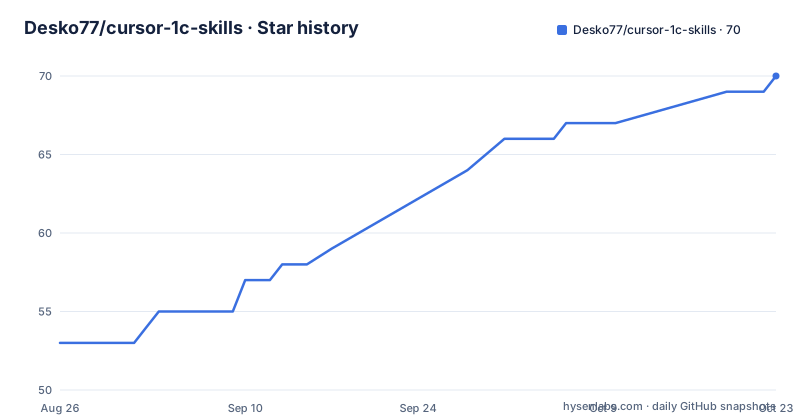
Star history
- Desko77/cursor-1c-skills69 ★ · +16
| Repository | 2026-08-26 | 2026-10-22 |
|---|---|---|
| Desko77/cursor-1c-skills | 53 | 69 |
16 Stars in the last 57 days, measured from the daily GitHub snapshot. Compare with other projects
Editorial analysis
What Problem This Solves and Who It Is For
Most 1C development still depends on the Configurator, a desktop tool that is slow to start and awkward to script. This project gives Cursor IDE an agent a set of skills and rules so it can edit 1C source files directly. The agent assembles metadata objects, forms, roles, extensions, data composition schemas, and even external reports and processors from compact JSON definitions. It then parses them back to JSON when needed. The README is explicit about the audience: a 1C developer who keeps sources under git and wants to hand the agent routine work like scaffolding objects, parsing foreign .epf files, unloading and loading configurations, reviews, and tests. The core promise is that basic operations work without a running platform, without the Configurator, and without a database. That makes it a fit for CI pipelines and for developers who prefer text-based workflows over clicking through the IDE.
How the Agent Builds and Validates Source Files
The mechanism is a set of skills, each tied to a specific operation. For example, the skill 1c-meta-compile takes a JSON description of a catalog and produces the full object on disk. The README shows a fifteen-line JSON input for a catalog with attributes and a tabular section. The output includes Catalogs/Контрагенты.xml with 345 lines, all required sections, standard attributes, and generated UUIDs, plus a stub object module and an entry in Configuration.xml so the object is part of the configuration, not an orphan. The agent does not guess the file format or copy from other exports; the format is hard-coded into the skill. Validation also runs on the export without external tools. Fourteen validators parse the XML of objects, forms, roles, data composition schemas, templates, and extensions. A separate index, 1c-config-index, builds a configuration index so validators can check the object against the rest of the configuration: reference types of attributes, data paths in forms, subsystem composition, role rights, SKD data sets, table and field names in queries, and calls to common modules. A borrowed extension form is checked against the main configuration the same way. The README draws a clear boundary: this is name and structure checking. Expression types, BSL semantics, and query plans are not available without the platform.
Installation and Configuration Options
There are two installation paths. The first is to ask the agent itself. You copy a prompt that tells the agent to clone the repository, read skills/claude-env-setup/SKILL.md and references/safety.md, ask where to install, show a plan in a table, wait for your choice, and then run install.ps1 from the repository root. The agent only installs what you select and does not overwrite files silently. The second path is manual. The install.ps1 script supports flags: -ProjectDir to target a specific project, -Global to install into ~/.cursor/, -RulesOnly to install only the 40 .mdc rules, and -SkillsOnly to install only the skills. Without the script, you can copy files manually, though the README advises that only if you know what you are doing. The same agent prompt works for updates: it pulls the repository and installs missing pieces while leaving your local edits untouched.
The Role of Rules and API References
Beyond the skills, 40 rules in .mdc format are loaded once and apply to all tasks without being mentioned in each prompt. They cover BSL coding standards, anti-patterns like queries in loops, optimization, review checklists, XML form requirements, MDO integrity, EDT export restrictions, and the use of standard BSP mechanisms instead of custom implementations. The rules also include process guidance for the agent itself, such as SDD workflow, model selection, working memory, and git safety. The set also includes API references. The BSP reference, 1c-bsp-api, contains 2624 methods across 284 modules of BSP versions 3.1.11 and 3.2.1, with signatures, parameter types, execution contexts, and 372 overridable handlers. A check command rejects a call that is not in the library. There is also a ZUP reference, zup-hr-api-reference, covering HR records, average earnings, accruals, benefits, exchange with the Social Fund, and regulated reporting. The point is that the agent does not guess method names from memory; it looks them up and verifies the call before writing code.
Scope of Operations and Coverage
The skill count is 116, grouped by function. The router skill tells the agent which skill to use for a given task. Configuration skills handle creating from scratch, changing properties, analyzing, indexing, and reading support status. Metadata object skills assemble and parse catalogs, documents, and other objects. Managed form skills build forms from DSL or from object metadata. Extension skills create extensions, borrow objects, set method interceptors, and compare with the main configuration. Processing and report skills build .epf and .erf files from sources and parse them back. Database and storage skills create, unload, and load .cf, .dt, and XML files, update, run, and work with the configuration repository. Roles, subsystems, templates, SKD, and XDTO each have their own DSL for assembly and parsing. Web publishing and testing skills publish a database through Apache and run browser scenarios. There are also skills for BSP, 1C 7.7, and exchange rules for KD 2.0 and 3.1. The remaining group covers platform documentation, API references, transcription, and docx and xlsx handling. The README states that the full list with descriptions is in the Skills section, which is not fully included in the provided material, so the exact breakdown of all 116 is not fully verifiable here.
Limitations and Failure Modes
The most obvious limitation is that validation is structural only. The README says directly that expression types, BSL semantics, and query plans are unavailable without the platform. That means the agent can catch a wrong field name in a query but cannot tell you if the query will be slow or if a type mismatch will fail at runtime. Another constraint is that the agent edits XML exports directly. If your team uses a version of the platform that changes the XML schema, the skill's hard-coded format may become stale. The project does not specify a platform version range in the provided material, so you must verify compatibility yourself. Also, the license is listed as unknown. The README links to a LICENSE.md, but the actual license text is not provided. That is a real risk for adoption in a commercial setting. You should check the license file before using the set in a product that you distribute. Finally, the project is an adaptation of claude-code-skills-1c, so the skills and rules are identical, only the connection format differs. If you already use Claude Code, you might not need this Cursor-specific version.
Alternative and Comparison
The direct alternative is the source project, claude-code-skills-1c, which the README explicitly names as the basis for this set. The difference is the integration format: claude-code-skills-1c is built for Claude Code, while this project adapts the same skills and rules for Cursor IDE. The skills and rules themselves are the same, so the choice between them depends on which editor you use. There is also the companion plugin AI-EDT, which the README mentions as giving the agent a semantic model of 1C:EDT itself. That plugin is a separate project and is not included in this repository. If you need semantic analysis beyond structural checks, AI-EDT might be a complementary tool, but it is not a drop-in replacement for this skill set. The README does not describe any other alternative, so for a direct comparison, the only real one is the Claude Code variant.
Maintenance and Upgrade Considerations
The repository shows recent releases, with v1.8.1 on 2026-08-28, v1.8.0 on 2026-08-27, and v1.7.0 on 2026-08-24. That is a fast release cadence, which suggests active maintenance. The update path is built into the installation prompt: you can ask the agent to pull the repository and install missing pieces, and it will not touch your local edits. That is a practical upgrade mechanism. However, because the skills hard-code the XML format, each new platform release may require a new skill version. The release notes mention specific changes like 'Forbidden characters in texts of the set and skill loading' for v1.8.1 and 'Platform arguments, form and layout schema by export' for v1.8.0. This indicates the project tracks platform changes closely. The license is unknown, which is a maintenance risk in itself. Without a clear license, you cannot legally redistribute modified versions or incorporate the skills into a commercial product without checking with the author. The README does not provide a changelog or upgrade guide beyond the install script, so you should test new versions against your own configuration exports before adopting them.
Editorial conclusion
Adopt it if you are a 1C developer who keeps sources under git and wants an agent to scaffold objects, parse foreign .epf files, or review changes without opening the Configurator. Skip it if you need semantic BSL analysis or query plan validation, because the set only checks names and structure. Before relying on it, verify that the generated XML matches your platform version and that your team accepts agent-written configuration files. The boundary is explicit: no platform, no EDT, no running database, so use it for mechanical tasks, not for deep correctness.
Frequently asked questions
What are the best cursor skills?
The repository does not rank skills for Cursor in general. It ships 116 skills and 40 rules for 1C:Enterprise work, including a router skill that suggests which skill to solve a task, plus API references so a method name is looked up and checked rather than recalled before code is written.
Do you need coding skills for cursor?
For 1C work this set is exactly that, covering metadata objects, managed forms, extensions, data processors and reports, databases and storage, roles, subsystems, layouts and composition schemas, and web publishing. Nothing in the repository addresses skills for other kinds of work.
Does cursor-1c-skills need the 1C platform or the Configurator?
Not for the basic operations. The scripts edit the XML export directly, so no platform and no Configurator are needed, and validation also runs on the export, so neither the editor nor a running database is required. A separate plugin, AI-EDT, is what adds the semantic model of the 1C:EDT editor.
How far does cursor-1c-skills validation go?
Names and structure. Fourteen validators parse the XML of objects, forms, roles, composition schemas, layouts and extensions, and a configuration index lets them check reference types, form data paths, subsystem composition, role rights, data sets, table and field names in a query, and common module calls. Expression types, BSL semantics and the query plan need the platform.
How do I install the cursor-1c-skills set?
Either by hand, or by handing the agent a prepared prompt that makes it clone the repository, show a plan as a table, wait for your choice and only then run install.ps1 from the repository root, into either the project's .cursor/ directory or the global one. The same path handles updates without touching your edits.
Official sources
Add this badge to your README
If you maintain this project, the badge below links readers to this analysis and shows its maintenance status from the daily GitHub snapshot. Paste the markdown into your README; add ?metric=license or ?metric=stars to the image URL for a different field.

[](https://hysenlabs.com/projects/desko77-cursor-1c-skills)Star history chart for your README
[](https://hysenlabs.com/projects/desko77-cursor-1c-skills)