OpenOats lists concealment as its first feature and then asks you to accept the liability
A meeting note-taker that talks back.
At a glance
- What is it?
- A macOS meeting note-taker that transcribes both speakers locally, searches your own notes mid-call, and hides its window from screen sharing by default. The page is unusually explicit about what leaves the machine, unusually quiet about where the transcripts land, and sponsored by a commercial desktop recording API.
- Who is it for?
- Decide the legal question before the technical one, because the app is built so that the other participants cannot see it and the burden of consent is placed entirely on you, with an acknowledgement gate before the first recording. If your calls are one-party consent and you say so, this is a capable tool: transcription runs on your own machine, the suggestion model can run locally too, and the note search is scoped to a folder you choose.
- Can I use it commercially?
- Yes. MIT is a permissive licence: you can use, modify and sell software built on it, as long as you keep its copyright and licence notices.
- Is it still maintained?
- Yes. The repository last received commits 4 days ago.
- What is it written in?
- Mainly Swift, according to GitHub's language statistics.
Answers come from the project's GitHub data, last synced on November 14, 2026, and from our analysis. They are not legal advice.
Star history
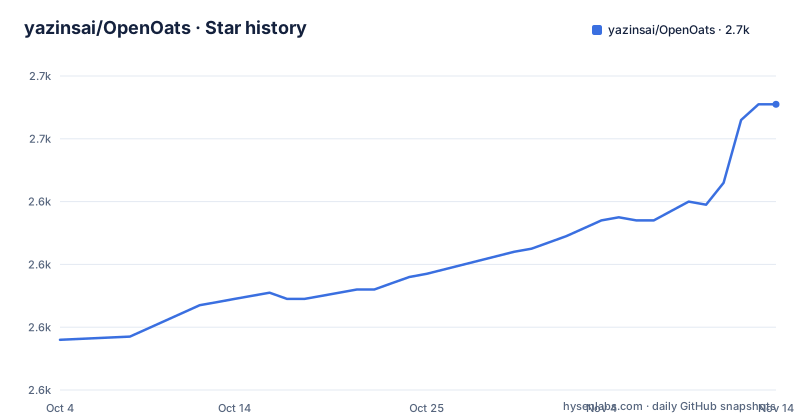
- yazinsai/OpenOats2,671 ★ · +75
| Repository | 2026-10-04 | 2026-11-14 |
|---|---|---|
| yazinsai/OpenOats | 2.6k | 2.7k |
75 Stars in the last 41 days, measured from the daily GitHub snapshot. Compare with other projects
Editorial analysis
The first feature is that the other side cannot tell
The feature list does not begin with transcription. It begins with concealment: the application window is hidden from screen sharing by default, so that nobody in the call knows you are using it. The same property is repeated in the privacy section as a bullet, which tells you it is load-bearing rather than incidental. Everything else in the list is built around it: a live transcript of both sides of the conversation, automatic saving of every session, and a knowledge base search that surfaces your own notes when the conversation hits a question, a decision point, or a claim worth backing up. The four-step description of how it works is three mechanical steps and one line of sales copy, and the pipeline they describe is the reason the concealment is offered, because a tool that only wrote notes after the call would not need to hide at all.
The consent gate and the liability waiver sit directly underneath
The very next section is a recording consent and legal disclaimer, and it is the most specific text on the page. It says the application records and transcribes audio from your microphone and from system audio, and that many jurisdictions require consent from some or all participants before a conversation may be recorded, naming two-party and all-party consent states in the United States and the European data protection regulation as examples. Then three acknowledgements, each in bold: you are solely responsible for determining whether recording is lawful where you are and for obtaining any required consent before starting; the developers provide no legal advice and make no representations about legality anywhere; and they accept no liability for unauthorised or unlawful recording done with the software. The final instruction is not to use it to record without consent where the law requires it. And the application enforces the acknowledgement: it asks before your first recording session. That is the shape of the product in two adjacent sections.
Audio never leaves; text does, and the chunking is specified
The privacy section draws a line that is easy to miss and worth quoting exactly. Speech is transcribed locally and audio never leaves the machine. With cloud providers configured, two kinds of text do leave: chunks of your knowledge base files go to an embedding endpoint, and conversation context goes to the cloud model provider for suggestions. With a fully local setup, nothing touches the network at all. The documentation then specifies the embedding request in detail, including that the knowledge base is split by markdown headings into chunks of roughly eighty to five hundred words with the header breadcrumb prepended to each one, which tells you both what a third party receives and how much context each retrieved note carries. The remote path is offered through two hosted services, one for the model and one for embeddings, and the embedding side is replaceable with any server implementing the standard embeddings endpoint, with three named local implementations offered as examples.
Every conversation is written to your documents folder as plain text
Two bullets in the privacy list deserve more attention than they get. The first is that API keys are stored in the system keychain, which is the right place and is the only thing on the page protected by the operating system rather than by convention. The second is that transcripts are saved locally to a folder inside your documents directory. Combined with the automatic-saving feature, which says every conversation is saved as a plain-text transcript plus a structured session log with no manual export needed, the result is that a searchable, unencrypted archive of every meeting you have recorded sits in a well-known location in your home folder, outside any container or protected directory the application controls. Nothing on the page says the transcripts are encrypted at rest, and the reset story is not described either. For a tool whose selling point is that the audio never leaves, the transcript is the more sensitive artefact, because it is the readable one.
A saved model choice silently becomes a different model on an older system
There is a section on operating system support that describes a substitution most applications would not admit to. Two of the transcription models work from the oldest supported system version, while a third requires a newer one and is only offered where it is supported. If you have selected that third model and save the choice, it resolves to a different model on the older system, including for batch transcription, and the page advises choosing a multilingual model instead if that matters to you. What makes this acceptable rather than merely surprising is the last sentence of the section: the model that actually ran is shown in the settings screen and written into the session metadata. So the behaviour is deterministic and auditable after the fact, and you can tell from a session record which engine produced a transcript. It is a good pattern, and it is also an argument for reading the metadata rather than trusting the setting.
Three provider configurations and a six hundred megabyte first run
The setup is three mutually exclusive shapes and the page lists them as such. Cloud mode needs a key for the model router and a key for the embedding service. Local mode needs a local model runtime running with a model for suggestions and a model for embeddings, and the page suggests two specific ones. A third option points the embedding provider at any server implementing the standard embeddings endpoint, with three local implementations named as examples, and the recent release history shows that the model provider side now accepts endpoints speaking the OpenAI-compatible shape too. Whatever you choose, the first run downloads a speech model of roughly six hundred megabytes. The system requirement is an Apple Silicon machine on a recent system version, and the release build deliberately needs no development tools at all, with the toolchain requirement marked as applying only to building from source.
Installing means trusting a personal tap or a disk image
Three installation paths, and the first one asks you to change where your package manager looks:
brew tap yazinsai/openoats https://github.com/yazinsai/OpenOats
brew install --cask yazinsai/openoats/openoats
Later upgrades go through the same tap, so the tap becomes a permanent part of your package manager configuration for as long as you use the app. The second path is a disk image from the releases page, dragged into the applications folder like any other Mac application. The third builds from source with a single script in the repository. The cask lives in the repository, so the two paths are not really independent: a reader who wants to know what a disk image contains has to look at the packaging in the same place. None of this is unusual for a project of this size, and all of it is worth stating plainly because the application asks for microphone and system audio recording permissions on first launch.
The page is sponsored by a company selling hosted recording
Between the tagline and the feature list sits a sponsorship block for a hosted application programming interface for desktop recording, described as recording the major video conferencing platforms plus in-person meetings, with a referral link. That is worth reading alongside the rest of the page rather than skipping. The application is built around recording meetings and transcribing them on your own machine, and the sponsor is a service that does the recording for you in someone else's infrastructure. Neither of those is a problem on its own, and the local-first claims are stated specifically and in detail, including which text goes where. But a reader deciding whether to trust the local-first claim with their own conversations is entitled to notice who is paying for the page that makes it.
Editorial conclusion
Decide the legal question before the technical one, because the app is built so that the other participants cannot see it and the burden of consent is placed entirely on you, with an acknowledgement gate before the first recording. If your calls are one-party consent and you say so, this is a capable tool: transcription runs on your own machine, the suggestion model can run locally too, and the note search is scoped to a folder you choose. Two things to check first. Every conversation is written to a known folder in your documents as plain text, so the recordings outlive the app and are not protected by anything but your user account. And a saved speech model choice is not necessarily the model that runs, because the app substitutes one on an older system, which it does at least record in the session metadata. Note also that the page carries a sponsor who sells a hosted recording API.
Frequently asked questions
What is OpenOats?
It is an MIT licensed macOS meeting note-taker. It sits next to your call, transcribes both speakers in real time on your own machine, shows a live transcript, saves every session automatically as a plain-text transcript plus a structured log, and searches a folder of your own notes to surface relevant talking points during the conversation. Its window is hidden from screen sharing by default.
Does OpenOats send my audio anywhere?
No. Speech recognition runs entirely on your Mac and the page states repeatedly that no audio is ever sent. What can leave the machine in cloud mode is text: chunks of your knowledge base files go to an embedding endpoint, and conversation context goes to the cloud model provider for suggestions. In fully local mode nothing touches the network. API keys are stored in the system keychain.
What do I need to run OpenOats?
An Apple Silicon Mac on a recent macOS version; two of the supported speech models need that version and a third needs a newer one still. For cloud mode you need a key for the model router and one for the embedding service. For local mode you need a local model runtime running, with a model for suggestions and one for embeddings. The first run downloads a speech model of roughly six hundred megabytes, and the release build needs no development tools.
Official sources
Add this badge to your README
If you maintain this project, the badge below links readers to this analysis and shows its maintenance status from the daily GitHub snapshot. Paste the markdown into your README; add ?metric=license or ?metric=stars to the image URL for a different field.

[](https://hysenlabs.com/projects/yazinsai-openoats)Star history chart for your README
[](https://hysenlabs.com/projects/yazinsai-openoats)Was this useful?