devcontainers/features: adding tools through devcontainer.json
A collection of Dev Container Features managed by Dev Container spec maintainers. See https://github.com/devcontainers/feature-starter to publish your own
At a glance
- What is it?
- devcontainers/features is a collection of installable Dev Container Features maintained alongside the Dev Container specification. It suits projects that need repeatable Go, .NET, or Docker tooling in a supported base container without building a custom image.
- Who is it for?
- Adopt this collection when a compatible Dev Container implementation can build from a Debian-based image and the available Features match your toolchain needs. Do not choose it when you require unsupported platforms, hidden global image mutations, or controls absent from each Feature's README.
- Can I use it commercially?
- Yes. MIT is a permissive licence: you can use, modify and sell software built on it, as long as you keep its copyright and licence notices.
- Is it still maintained?
- Yes. The repository last received commits 14 days ago.
- What is it written in?
- Mainly Shell, according to GitHub's language statistics.
Answers come from the project's GitHub data, last synced on October 23, 2026, and from our analysis. They are not legal advice.
Star history
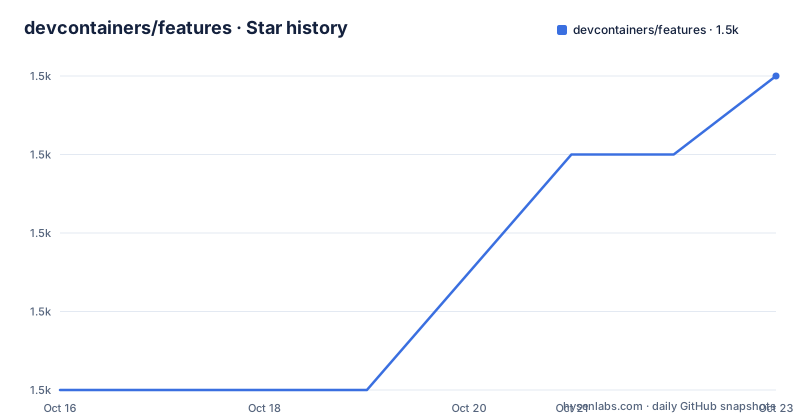
- devcontainers/features1,549 ★ · +4
| Repository | 2026-10-16 | 2026-10-23 |
|---|---|---|
| devcontainers/features | 1.5k | 1.5k |
4 Stars in the last 7 days, measured from the daily GitHub snapshot. Compare with other projects
Editorial analysis
Why the devcontainers/features collection exists
Development container images often provide a runtime and a small set of utilities, but a project may still need a language runtime, CLI, or container tooling. The devcontainers/features repository addresses that gap with self-contained units of installation code and Dev Container configuration. Each Feature is designed to install on top of a broad range of base container images rather than requiring every project to maintain a separate image.
The intended audience is developers who already use `devcontainer.json` and a tool that supports the Dev Container specification. The collection is not a container runtime by itself. The README requires a supporting implementation, such as the reference `devcontainer` CLI, to build the environment and process the Features declared by the configuration.
The collection includes Features under `src`, including Go and `docker-in-docker` in the documented example. It also includes .NET. Each Feature directory contains at least `devcontainer-feature.json` and `install.sh`. That separation makes the Feature metadata and installation script visible to tools that implement the specification. It also gives adopters a defined place to inspect supported options instead of relying on an unexplained image layer.
How Feature resolution reaches a Dev Container build
A project references a Feature through the `features` property in `devcontainer.json`. The reference uses an OCI-style identifier under `ghcr.io/devcontainers/features`, followed by a version label. When no label is supplied, the README says that `:latest` is added implicitly. More specific labels can pin a major, minor, or patch version because Features follow semantic versioning conventions.
The build does not begin with this repository as a conventional application dependency. Instead, a supporting tool reads the Dev Container configuration, resolves the declared Feature, and executes its installation behavior in the container build flow. The repository structure reinforces this boundary: installation logic resides in an `install.sh` file, while `devcontainer-feature.json` declares the Feature. Options such as the Go `version` or the `moby` setting are passed in the Feature's object and interpreted according to that Feature's documentation.
This mechanism is useful when the desired state is declarative. The configuration names the tool and its options, while the Feature owns the installation steps. However, the README does not claim that every Feature can run on every image. The documented example uses `mcr.microsoft.com/devcontainers/base:ubuntu` and describes it as a generic Debian-based image, so base-image compatibility remains part of the adoption decision.
Referencing Go and Docker-in-Docker in devcontainer.json
Start with a project that already has a `devcontainer.json`. Add the Feature identifiers to `features`, preserving the major version label after each identifier. The README's example selects `go:1` with package `version` set to `1.18`, and `docker-in-docker:1` with `version` set to `latest` and `moby` set to `true`. Reader should see a configuration that names both installations and exposes each Feature's documented option.
{
  "name": "my-project-devcontainer",
  "image": "mcr.microsoft.com/devcontainers/base:ubuntu",
  "features": {
    "ghcr.io/devcontainers/features/go:1": {
      "version": "1.18"
    },
    "ghcr.io/devcontainers/features/docker-in-docker:1": {
      "version": "latest",
      "moby": true
    }
  }
}
The omitted `:latest` annotation would normally make the selection implicit, but spelling out the desired major or package version makes review easier. For example, the repository also documents a patch-pinned Go reference. This does not change the option supplied to the Feature. The final segment after the colon selects the Feature distribution version, while the object controls installation options defined by that particular Feature.
"features": {
  "ghcr.io/devcontainers/features/go:1.0.0": {
    "version": "1.18"
  }
}
Check the README inside the selected Feature directory before copying its options. The top-level README explicitly directs users there for supported options, which matters because identifiers for different tools do not necessarily accept the same settings.
Building the first configured environment with devcontainer
Building requires the reference `devcontainer` CLI or another supporting implementation. The documented workflow clones the project containing the Dev Container configuration and passes its workspace directory to `devcontainer build`. Reader should see the build delegated to the installed CLI rather than invoking `install.sh` directly.
git clone <my-project-with-devcontainer>
devcontainer build --workspace-folder <path-to-my-project-with-devcontainer>
The placeholders come directly from the README's build example. Replace them with the local path of the project that contains the completed `devcontainer.json`. The CLI reads that configuration and handles the declared Features through the Dev Container implementation.
This is not a package-manager installation guide. There is no documented command for installing the entire collection, because the reusable units are referenced individually from configuration. Nor does this repository present itself as a standalone server with its own startup command. Its use occurs during a supported Dev Container build.
For repeated builds, pinning matters because an omitted annotation resolves to `:latest`. The repository documents semantic version labels from major through patch level, but it does not promise that changing the Feature version preserves every installation result. Teams should treat the Feature identifier, its options, and the base image as one configuration decision. That combination defines which implementation and environment the supporting tool is expected to assemble.
Repository layout and CI test boundaries for each Feature
The `src` directory contains one subdirectory per Feature. Every Feature is expected to include `devcontainer-feature.json` and `install.sh`. The `test` directory mirrors that organization and contains a folder per Feature with at least `test.sh`. Some test folders also contain `scenarios.json` and scenario-specific JSON files, as shown for Go.
The documented CI path is concrete: the `devcontainer` CLI executes these tests, and the repository links that execution to `.github/workflows/test-all.yaml`. This establishes a test location and execution mechanism, but the README does not enumerate every tested base image or describe the assertions in each `test.sh`. Consequently, the existence of a test directory is not enough to infer that a Feature has been validated for every environment a consumer might select.
This limitation is material for adoption. A project's base image may differ from the image shown in the README, and a Feature may depend on assumptions such as a Debian package model or available container privileges. The Docker-in-Docker example also makes permission and runtime requirements worth checking before it is added to a hosted development service. The documentation names the Feature and options, but it does not provide a general compatibility matrix in the top-level README.
Contributors can improve maintained Features through pull requests, while people creating separate collections can use the Feature distribution specification, `devcontainers/feature-template`, and `devcontainers/action`. The repository accepts improvement and bug-fix contributions related to its current `src` Features. It is a distribution and maintenance collection, not a universal registry for every possible Feature.
License, maintenance, and upgrade responsibilities
The repository declares the MIT license. That identifies the license associated with the collection's code, but this review does not infer how that license interacts with every installed package or with a separate Dev Container base image. An adopter still needs to account for the licenses of the tools selected by each Feature if those terms matter to the organization.
The repository is not archived, and its last push was on 2026-10-09. There are no GitHub releases listed for this repository, so users cannot infer release history from GitHub release entries. Feature selection instead relies on the version labels documented for the distribution, including major, minor, patch, and implicit `latest` forms.
Upgrade work includes more than changing a container image. A project may need to review changes in the Feature's `install.sh`, metadata in `devcontainer-feature.json`, supported options, and associated tests. The top-level README does not document rollback, migration notes, or a stable-release channel for this collection. It also does not promise compatibility across all Feature versions. A controlled upgrade therefore starts by comparing the configured Feature label with the currently selected one and reviewing that Feature's own README.
The repository is a good fit for reproducible declarations when a supporting tool and acceptable base image already exist. It is the wrong choice for an environment that cannot permit the installation model, for an operating system outside the Feature's documented assumptions, or for teams that require an independently documented upgrade and rollback process.
Editorial conclusion
Adopt this collection when a compatible Dev Container implementation can build from a Debian-based image and the available Features match your toolchain needs. Do not choose it when you require unsupported platforms, hidden global image mutations, or controls absent from each Feature's README. Verify the base image, Feature version, installation options, and CI coverage before committing devcontainer.json.
Frequently asked questions
How do I install a Feature from devcontainers/features?
Add its `ghcr.io/devcontainers/features` identifier and options to the `features` property in `devcontainer.json`, then build the project with the `devcontainer` CLI or another supporting tool. The selected Feature's README documents its available options.
Which Dev Container image is used in the devcontainers/features example?
The README example uses `mcr.microsoft.com/devcontainers/base:ubuntu` and describes it as a generic Debian-based image. The README does not state that this exact image is mandatory.
How are Feature versions pinned in devcontainers/features?
The version label follows the Feature identifier. The repository documents major, minor, and patch labels such as `:1`, `:1.0`, and `:1.0.0`; if the label is omitted, `:latest` is added implicitly.
Official sources
Add this badge to your README
If you maintain this project, the badge below links readers to this analysis and shows its maintenance status from the daily GitHub snapshot. Paste the markdown into your README; add ?metric=license or ?metric=stars to the image URL for a different field.

[](https://hysenlabs.com/projects/devcontainers-features)Star history chart for your README
[](https://hysenlabs.com/projects/devcontainers-features)Was this useful?