docker-rollout: one shell script, and your service may not define ports
🚀 Zero Downtime Deployment for Docker Compose
At a glance
- What is it?
- A Docker CLI plugin that replaces docker compose up with a scale, wait and remove cycle so a Compose service can be replaced without downtime. The mechanism needs twice the instances, which is why the caveats forbid container_name and ports and make a proxy mandatory, and the install instructions pull the script from the main branch rather than a tag.
- Who is it for?
- docker-rollout is the right shape of answer for a single-server Compose deployment that cannot afford a restart window and does not want an orchestrator, and the file is unusually honest about what that costs you. Before adopting it, accept three conditions rather than discovering them later.
- Can I use it commercially?
- Yes. MIT is a permissive licence: you can use, modify and sell software built on it, as long as you keep its copyright and licence notices.
- Is it still maintained?
- Yes. The repository last received commits 17 days ago.
- What is it written in?
- Mainly Shell, according to GitHub's language statistics.
Answers come from the project's GitHub data, last synced on November 14, 2026, and from our analysis. They are not legal advice.
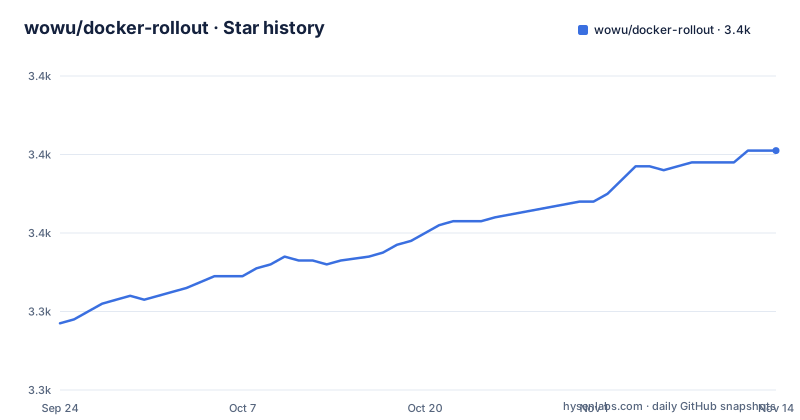
Star history
- wowu/docker-rollout3,381 ★ · +44
| Repository | 2026-09-24 | 2026-11-14 |
|---|---|---|
| wowu/docker-rollout | 3.3k | 3.4k |
44 Stars in the last 51 days, measured from the daily GitHub snapshot. Compare with other projects
Editorial analysis
The whole plugin is one shell script, installed from the main branch
The repository root contains a single file called docker-rollout, which is the plugin. Everything else at the top level is supporting material: docs/, a test directory, a run entry point, AGENTS.md, and a .gitmodules file.
The install instructions make three moves:
# Create directory for Docker cli plugins
mkdir -p ~/.docker/cli-plugins

# Download docker-rollout script to Docker cli plugins directory
curl https://raw.githubusercontent.com/wowu/docker-rollout/main/docker-rollout -o ~/.docker/cli-plugins/docker-rollout

# Make the script executable
chmod +x ~/.docker/cli-plugins/docker-rollout
The URL points at the main branch rather than at a tag, so what you install is whatever that branch holds at the moment you run the command. The project does tag releases, with v0.14 from July 2026 the newest, but nothing in the install path lets you pin to one. There is also a second location for people who run docker with sudo or want the plugin available to every user, which is /usr/local/lib/docker/cli-plugins/.
Your service cannot define container_name or ports
This is the first caveat and the one that decides whether the tool applies to you at all. A service cannot have container_name or ports defined in docker-compose.yml, because the mechanism scales the service to twice its current number of instances, and you cannot run multiple containers with the same name or the same port mapping.
So the constraint is arithmetic rather than stylistic. Two containers exist at once, therefore they need two names, therefore no fixed container_name, and they cannot both bind the host port, therefore no ports entry.
The second caveat follows from the first: a proxy such as Traefik or nginx-proxy is required to route traffic, because once the containers are behind a proxy the proxy is what decides which one receives a request. That is also what makes the rest of the file work, since draining relies on a proxy noticing a container become unhealthy.
The number in the container name increments on every deployment
The third caveat is easy to skim past and easy to be bitten by. Each deployment increments the number in the container name, with the example given being project-web-1 becoming project-web-2.
That counter is a direct consequence of running two generations at once, and it means container names are not stable across deployments. Anything that refers to a container by name, whether a debugging habit, a script, a log query or another service, has to account for a suffix that changes every time you deploy.
The fourth caveat is the one the file calls slightly more complex setup: to avoid dropping requests that are currently being processed when the old container stops, you need container draining, which is described separately. The distinction matters, because the headline claim is zero downtime, and without draining what you get is no connection refused rather than no lost request.
Two wait defaults, and the one without a healthcheck is ten seconds
Readiness is handled by three separate options, and which one applies depends on whether your container declares a healthcheck.
The timeout option waits for the new container to become healthy and applies when a healthcheck is defined in the Dockerfile or the compose file, with a default of 60 seconds. The wait option applies when no healthcheck is defined, and its default is 10 seconds. A third option waits after the container is healthy and before the old one is removed, and it only works when a healthcheck is defined, with a default of 0.
That gap is the one to notice. A container with a healthcheck gets up to a minute of evidence before the old generation is removed. A container without one gets a flat ten seconds and no evidence at all, because there is nothing to check. A service that boots slowly and declares no healthcheck will have its old container removed on a timer.
The sample script migrates the database before the new code is up
The deployment script is four steps, and the order is the interesting part:
# Download latest code
git pull
# Build new app image
docker compose build web
# Run database migrations
docker compose run --rm web rake db:migrate
# Deploy new version without downtime
docker rollout web
Migrations run third, before the new version is deployed. At that moment the previously deployed containers are still serving traffic, because they are only replaced by the final step. So for the duration of the rollout, old application code is running against a schema that has already been migrated forward.
That is safe only if your migrations are backwards compatible with the code still running, which is a property of your migrations rather than of this tool. The file presents the script as a sample and does not raise the question.
Draining is a healthcheck trick, and a label takes effect one deployment late
The draining mechanism uses a file as a signal. Add a healthcheck that fails while a file at /tmp/drain exists, so that a container can be marked unhealthy on purpose:
   services:
     web:
       image: myapp:latest
     healthcheck:
       test: test ! -f /tmp/drain
       interval: 5s
       retries: 1
If your service already has a healthcheck, the test is combined with it using &&, so the existing check keeps running.
Then either pass the hook on the command line or set it as a label:
docker rollout web --pre-stop-hook "touch /tmp/drain && sleep 10" services:
web:
image: myapp:latest
labels:
docker-rollout.pre-stop-hook: "touch /tmp/drain && sleep 10"Two rules come with it. Command line options have higher priority than container labels, so the label can be overridden. And docker-rollout reads labels from the old container, which means a label added today only takes effect on the next deployment, not this one.
The sleep time is arithmetic, and the two examples use different numbers
The draining guidance ends with a formula rather than a constant. The sleep has to be longer than the healthcheck interval multiplied by retries, plus the time it takes to finish processing open requests. The worked example uses interval 10s, retries 3 and an additional 5 seconds, giving a sleep of 35.
That is a calculation the reader performs against their own compose file, and getting it wrong is the failure mode that matters: too short a sleep and the proxy never sees the container go unhealthy before it is removed, so requests in flight are dropped anyway.
It is worth noticing that the two examples in the file use different numbers. The compose snippets set interval 5s with retries 1, which totals five seconds, while the arithmetic example assumes interval 10s with retries 3. So the sample you would copy and the guidance you would apply to it are not using the same healthcheck.
Editorial conclusion
docker-rollout is the right shape of answer for a single-server Compose deployment that cannot afford a restart window and does not want an orchestrator, and the file is unusually honest about what that costs you. Before adopting it, accept three conditions rather than discovering them later. Your service must stop declaring container_name and ports, so routing moves to a proxy you operate. Container names gain a counter that increments every deployment, so nothing should depend on a stable name. And zero downtime means requests are not dropped only if you set up draining, where the sleep time is arithmetic you compute yourself from your healthcheck interval and retries. If you have no proxy, or your compose file needs fixed host ports, this tool does not apply and a purpose-built script or Dokku is the shorter path.
Frequently asked questions
How does docker-rollout deploy without downtime?
It scales the service to twice the current number of instances, waits for the new containers to become ready, then removes the old ones. In a deployment script you replace docker compose up -d <service> with docker rollout <service>.
Why does docker-rollout need a proxy?
Because your service cannot define container_name or ports in docker-compose.yml, since multiple containers cannot share one name or one port mapping. The file names Traefik or nginx-proxy as the required way to route traffic to the running containers.
What are the default timeouts in docker-rollout?
The timeout option defaults to 60 seconds and applies when the container has a healthcheck defined in the Dockerfile or compose file. The wait option defaults to 10 seconds and applies when no healthcheck is defined. A third option, for waiting after healthy before removal, defaults to 0.
How do I drain requests from old containers with docker-rollout?
Add a healthcheck that fails while a file at /tmp/drain exists, then pass a pre-stop hook of touch /tmp/drain and a sleep, or set the docker-rollout.pre-stop-hook label. The sleep must exceed the healthcheck interval times retries plus the time to finish open requests.
Is rolling update better than blue/green deployments?
The file does not compare the two. It positions docker-rollout between plain docker compose up, which needs the old container stopped first, and orchestrators such as Kubernetes or Nomad, which it calls overkill for a single-server Compose setup, and it names Dokku as an alternative with less flexibility.
Official sources
Add this badge to your README
If you maintain this project, the badge below links readers to this analysis and shows its maintenance status from the daily GitHub snapshot. Paste the markdown into your README; add ?metric=license or ?metric=stars to the image URL for a different field.

[](https://hysenlabs.com/projects/wowu-docker-rollout)Star history chart for your README
[](https://hysenlabs.com/projects/wowu-docker-rollout)Was this useful?