Tidewater: a WebGPU fishing game with a hand written rendering engine
Coastal town built with Opus 5.5
At a glance
- What is it?
- Tidewater is a browser island fishing game that runs on WebGPU and WGSL with its own rendering engine and no framework, combining an FFT ocean, a physically based sky and a line tension fishing mechanic. It is a graphics and world building showcase that happens to be a game, and the first load cost of compiling several hundred shaders is the price of admission.
- Who is it for?
- Tidewater suits a developer studying real time graphics in the browser, since the engine, ocean simulation, sky model and post chain are all readable in one repository with no engine dependency, and it suits a player who wants a quiet fishing loop on a capable GPU.
- Can I use it commercially?
- Yes. MIT is a permissive licence: you can use, modify and sell software built on it, as long as you keep its copyright and licence notices.
- Is it still maintained?
- Yes. The repository last received commits 44 days ago.
- What is it written in?
- Mainly JavaScript, according to GitHub's language statistics.
Answers come from the project's GitHub data, last synced on November 7, 2026, and from our analysis. They are not legal advice.
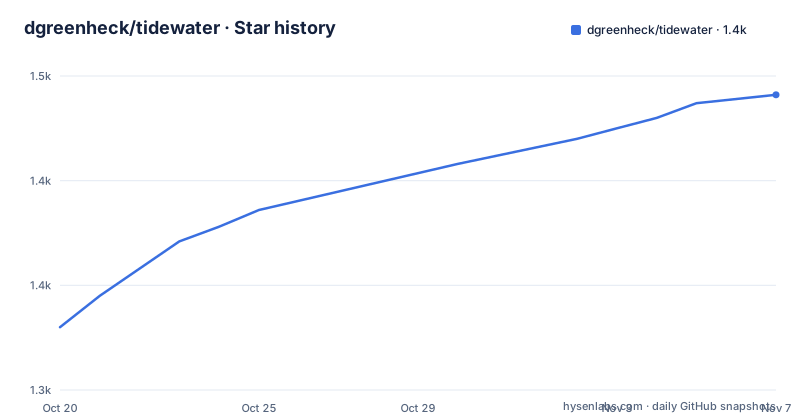
Star history
- dgreenheck/tidewater1,441 ★ · +111
| Repository | 2026-10-20 | 2026-11-07 |
|---|---|---|
| dgreenheck/tidewater | 1.3k | 1.4k |
111 Stars in the last 18 days, measured from the daily GitHub snapshot. Compare with other projects
Editorial analysis
No framework underneath, just WGSL and a hand written pipeline
The most important line in the documentation is that the game runs directly on WebGPU and WGSL with its own small rendering engine, no framework. There is no Three.js, no Babylon layer and no engine abstraction sitting between the code and the GPU. The project layout shows the consequence. src/engine/ holds the math, the scene graph and geometry, GPU resources, WGSL shader composition, materials, lighting and shadows. src/ocean/ holds the FFT ocean, the water surface and material, shore waves, breakers, swash, wake, caustics and underwater lighting. src/sky/ handles the atmosphere, clouds, sky and environment. src/post/ is the post chain with ambient occlusion, the underwater composite, haze, temporal upscaling, motion blur, bloom, lens flare and droplets. src/materials/ holds the shared lighting work, and src/player/ covers walking, swimming, the boat and the free camera. The engine is small by design, and the fact that you can read the whole of it in a browser project is the reason the project exists as a public repository.
The ocean is an FFT simulation with a shoreline built on top
The water is the centrepiece. It is described as a four cascade FFT ocean using Tessendorf spectra, with foam, whitecaps, wind streaks and swell. Underneath that sit a set of individually written systems, each of which is a separate piece of simulation work. Breaking waves are depth aware, with peeling shoulders, whitewater, spray and foam lace, and a shallow water simulation runs the swash up and down the sand. Boat wake and bow spray are modelled, and so is a whale wake. Light is handled with caustics on the seabed and in the water plus light shafts, and the surface refracts the seabed, including the parts hidden behind the pier and the boats. The view splits at the waterline into an underwater and an above water view, and the lens picks up water droplets after you surface. The sky above is a physically based atmosphere following Hillaire 2020, with sun, moon and stars, volumetric cumulus and wispy cirrus casting cloud shadows on the land, aerial perspective, sea haze, god rays and an occlusion aware lens flare. Whether all of this holds together at 60 fps depends on the hardware, and the documentation is specific that it targets that frame rate at 2560x1267 on an Apple M5 Pro.
The fishing mechanic is a line tension fight, not a timing press
The game loop is fishing, and the core of it is a physical contest rather than a button press. You cast from the pier, the beach or your own boat, and a bite depends on the water you are in, the depth, and the time of day, across 18 Caribbean species. The shallows, the pier, the reef, the bay and deep water each hold different fish, and some bite best at dawn, dusk or night. The fight itself is about line tension: keep it in the green band and ease off when the fish runs. The rod and reel are animated through it, with the bail, rotor and crank moving, and the reel audibly dragging. When you land one, a full screen catch card shows the fish's length and weight, and the fish log keeps your records, with a cooler holding what you have caught. Money comes from Joe at the fish stand on the beach by the pier, and spending happens at Marta's chandlery by the boathouse, where line, reels, rods, a bigger hold, fuel, a rebuilt engine, a fish finder and deck floodlights for night fishing are sold. The boat burns diesel at the helm and you fill up at the chandlery, and you can walk the deck and the wheelhouse while the boat drifts.
URL options are the performance escape hatch
Because the rendering budget is heavy, the project exposes a set of URL options that turn individual systems off. Adding them to the URL, for example ?fly&noAudio, changes how the game starts and what it loads.
?fly&noAudioThe available switches are fly to start in the free camera, noAudio to disable sound, noClouds to skip the volumetric clouds, noHaze to skip the haze and sun shafts, noCaustics to skip caustics, noVeg to skip vegetation, and noSim to skip the swash simulation. They matter for more than curiosity. The volumetric clouds, the haze and sun shafts, the caustics, the vegetation and the swash simulation are all among the more expensive systems in the frame, and on a machine that cannot hold the target frame rate, disabling one of them is the first lever to pull. There is also a settings panel on H that exposes the sea state, time of day, sun azimuth, clouds, haze and post processing, and a T key to pause time, which turns out to be the easiest way to appreciate the lighting rather than a way to cheat. The full control list is available on F1 or the question mark key, and the game also has a photo mode on P and a free camera on F.
Running it locally and how it reaches the web
The project is a Vite application with two dependencies, both in devDependencies, which tells you the runtime has no package dependencies at all.
npm install
npm run dev      # http://127.0.0.1:5189
npm run build    # static build in dist/
The dev script pins the host and port, and the build produces a static bundle in dist/. There is a test script as well, which runs a game logic test and then an engine smoke test.
npm testThe two are different in kind and that distinction is useful. The game logic test exercises the game rules headlessly, and the engine smoke test is described in the project layout as a headless engine smoke test, which suggests it is checking that the engine initialises rather than rendering a frame. Deployment is the simplest part: every push to main deploys to GitHub Pages through the workflow file at .github/workflows/deploy.yml, and the live build is hosted at the project site address given in the README. The repository also carries a CREDITS.md file, which is where the asset provenance lives, and that turns out to matter for the third party assets the world is built from. The vendor stalls come from Poly Haven scans, the vendor characters are from the Microsoft Rocketbox, and the audio is positional and taken from real CC0 field recordings, with surf timed to each breaking wave, wind, birds, the boat engine, footsteps by surface, underwater ambience, whale song, and the rod and reel sounds.
The first load compiles hundreds of shaders, and that is the real cost
The requirements section is short and the second line is the important one. The game needs a browser with WebGPU, a recent Chrome, Edge or Safari, and a capable GPU, with dynamic resolution scaling the render down on slower machines. Then there is the cost that catches people out. The first load compiles several hundred shaders, which can take a minute or more, and later visits are faster because the browser caches them. That is a design consequence of the no framework approach. Each material in this world is a distinct WGSL program, and a scene with water, clouds, terrain, foliage, characters, the boat and a post chain has a lot of them, and the browser has to compile each one before the first frame. The trade-off is deliberate and reasonable for a distributed demo, where the alternative would be shipping a general purpose engine with a much larger download, and it is the reason the URL options exist. It also means the first impression on a modest laptop is a loading screen, and a first time visitor may conclude the page is broken. The MIT licence keeps the reuse question simple, and the repository has no GitHub releases, so the deployed site is the artifact rather than a tagged version, with the last push on 2026-09-25.
Editorial conclusion
Tidewater suits a developer studying real time graphics in the browser, since the engine, ocean simulation, sky model and post chain are all readable in one repository with no engine dependency, and it suits a player who wants a quiet fishing loop on a capable GPU. It does not suit a machine without WebGPU, since the game requires a recent Chrome, Edge or Safari and a GPU that can hold 60 fps at 2560x1267 on an M5 Pro, and it does not suit anyone impatient with a first load that compiles several hundred shaders. Before you commit, open the live build at dgreenheck.github.io/tidewater and check the first load time on your own hardware, then use the URL options such as noClouds and noVeg to see how much of the cost each system carries.
Frequently asked questions
What browser does Tidewater need?
A browser with WebGPU, described as a recent Chrome, Edge or Safari, plus a capable GPU. The target is 60 fps at 2560x1267 on an Apple M5 Pro, with dynamic resolution scaling the render down on slower machines.
Why does Tidewater take a minute to load the first time?
The first load compiles several hundred shaders, which the documentation says can take a minute or more. Later visits are faster because the browser caches them.
How do I run Tidewater locally?
Run npm install and then npm run dev, which serves the game at http://127.0.0.1:5189. npm run build produces a static build in dist/, and npm test runs the game logic and engine smoke tests.
What URL options does Tidewater support?
Options include fly to start in the free camera, noAudio, noClouds, noHaze, noCaustics, noVeg to skip vegetation and noSim to skip the swash simulation, and they can be combined, for example ?fly&noAudio.
Official sources
Add this badge to your README
If you maintain this project, the badge below links readers to this analysis and shows its maintenance status from the daily GitHub snapshot. Paste the markdown into your README; add ?metric=license or ?metric=stars to the image URL for a different field.

[](https://hysenlabs.com/projects/dgreenheck-tidewater)Star history chart for your README
[](https://hysenlabs.com/projects/dgreenheck-tidewater)Was this useful?