Dillo: a small FLTK browser whose real home moved off GitHub
NO LONGER UPDATED!, see https://dillo-browser.org/news/migration-from-github/. New repo at https://git.dillo-browser.org/dillo/
At a glance
- What is it?
- Dillo is a multi-platform graphical web browser built with the FLTK 1.3 toolkit, known for speed and a small footprint with a focus on privacy. The GitHub repository you are reading is no longer the canonical source, since development moved to the project's own git server, which is the first thing to check before you clone anything.
- Who is it for?
- Adopt Dillo if you want a browser that loads quickly on modest hardware, that does not run a large engine, and that keeps a minimal presence on the network, and if you are willing to build it yourself from the project's own git server rather than from a package repository. Do not adopt it if you need modern web applications, or if your requirement is a browser with a large extension ecosystem.
- Can I use it commercially?
- Yes, with conditions. GPL-3.0 is a copyleft licence: if you distribute software that includes it, you must release that software's source code under the same licence. Running it internally without distributing it does not trigger that obligation.
- Is it still maintained?
- Activity is slowing. The repository last received commits 6 months ago.
- What is it written in?
- Mainly C++, according to GitHub's language statistics.
Answers come from the project's GitHub data, last synced on November 7, 2026, and from our analysis. They are not legal advice.
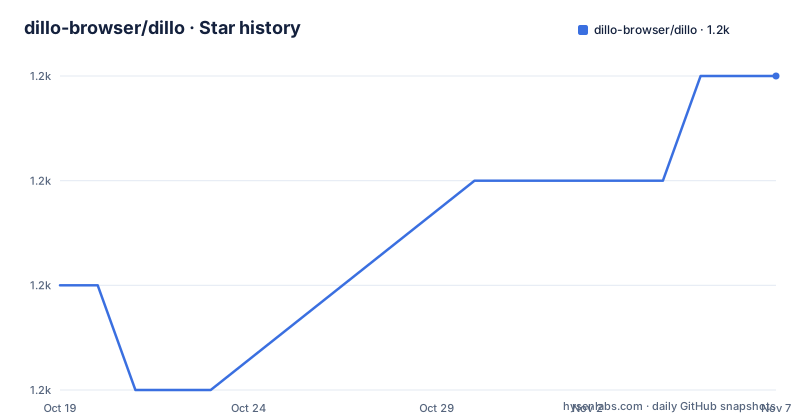
Star history
- dillo-browser/dillo1,165 ★ · +2
| Repository | 2026-10-19 | 2026-11-07 |
|---|---|---|
| dillo-browser/dillo | 1.2k | 1.2k |
2 Stars in the last 19 days, measured from the daily GitHub snapshot. Compare with other projects
Editorial analysis
The GitHub repository is a mirror, and that changes where you clone from
The most important operational fact about this project is in the repository description, which reads NO LONGER UPDATED and points to a migration notice, followed by a new repo address at git.dillo-browser.org. The README says the same thing in a more polite form: you can clone the latest version of Dillo directly from the project's own git server.
So this repository is not where development happens. It is a copy. The README lists the canonical location and two mirrors kept in case the git server fails:
* <https://git.dillo-browser.org/dillo> * <https://codeberg.org/dillo/dillo> * <https://git.sr.ht/~dillo/dillo>
That list is a resilience strategy, and the reason to read it carefully is that the mirrors can be at different points in history. The repository is not archived, and the last push here was on 2026-04-19, but the release list in the metadata tells the other half of the story. v3.2.0 was published on 2025-01-18, preceded by v3.2.0-rc1 on 2025-01-12, and v3.1.1 on 2024-06-08. Those tags exist here, so the mirror does carry the release history, but the development of the next version is happening elsewhere.
The consequence for a user is concrete. If you clone this GitHub repository, you get a snapshot that may be behind the current development state, and you will not receive new commits without changing where you fetch from. If you are following the project over time, the git server is the right remote. If you only want a released version to build once, either works, provided you check the tags.
The README also mentions that the commits are signed with the same OpenPGP used for the releases, which is a meaningful detail in a project where the canonical host has moved: a signed history is what lets you check that a mirror is serving you the same commits the maintainers signed.
What Dillo is: a small browser built on FLTK 1.3
Dillo is a multi-platform graphical web browser, known for its speed and small footprint, developed with a focus on personal security and privacy. It is built with the FLTK 1.3 GUI toolkit, and the primary language of the repository is C++.
The design centre of Dillo is smallness, and everything follows from that constraint rather than from a feature list. A browser that is small cannot bundle a large rendering engine, so it does not have one. It cannot ship a complex script runtime, so its JavaScript support is limited. It cannot implement the full set of modern web platform features, so it does not attempt to. What it does is render ordinary web pages quickly, on hardware where a heavier browser would struggle.
The emphasis on privacy in the description is worth reading as a design property rather than a slogan. A browser built for a small footprint has little reason to ship telemetry, to integrate with advertising networks, or to maintain a profile of what you visit. The README's own framing is a browser for a specific purpose, not a general-purpose browser trying to be good at everything.
The repository structure is what a mature C++ project with a specific architecture looks like. There is a src/ directory for the browser itself, a dw/ directory, a dlib/ directory, a lout/ directory, a dpi/ directory for what Dillo calls DPI, a dpid/ and a dpip/ pair, a doc/ directory, a devdoc/ directory for developer documentation, a test/ directory, and a scripts and icons arrangement at the top. There is a dillo.desktop file and a dillorc, which is the runtime configuration file, and a dillo-install-hyphenation helper, which suggests hyphenation support for text rendering.
The top level also carries the autotools build: configure.ac, Makefile.am, autogen.sh, INSTALL, and a Doxyfile for generating the developer documentation from the source comments.
The DPI architecture, and why it is the interesting part of the tree
Dillo's directory layout points at an architecture that is unusual among small browsers, and it is the part of the codebase that explains how the browser can be small without being a toy.
The dpi, dpid and dpip directories are the plugin mechanism. DPI stands for the plug-in protocols the browser uses to handle the things a core browser cannot do by itself, and the design separates a per-request protocol handler from a long-lived daemon. The dpip directory holds the individual protocol handlers, and dpid is the daemon that supervises them, starting them on demand and keeping them around. The dpi directory holds the shared interface code the browser and the handlers use to talk to each other.
This is the same family of design as the browser helper application model: rather than one monolithic process, the browser delegates to small helper processes that speak a simple protocol, and the helpers can be written in any language and replaced independently. A protocol handler for a particular scheme does not need to be linked into the browser binary, so the browser's own size stays small and adding support for something new does not mean rebuilding the world.
The separation also has a security consequence, and the project's privacy focus makes it relevant. A helper process that handles untrusted content is a process you can confine, and the browser core never has to parse the untrusted data itself. There is also a d_size.h header at the top level, which is the shared header that defines the structures passed across that boundary, and the install-dpi-local script at the top level is how local protocol handlers get registered.
For an adopter, the practical point is that Dillo is extensible in a specific way. If your workflow needs a protocol handler that the browser does not ship, you write a DPI for it rather than patching the browser. That is a much smaller commitment than maintaining a fork, and it is the same reason the README points at related forks, dillo-plus, dilloNG, the D+ browser and Mobilized Dillo, each of which took the base and went in a different direction.
Building it: FLTK 1.3 and the autotools chain
Dillo is not distributed as a binary package that you can install with a package manager in the general case, so building it is the normal path. The README points at the installation guide at doc/install.md for the procedure, and the top-level INSTALL file covers the details.
The dependency that matters is FLTK 1.3, and the version is specified rather than floating. The project targets FLTK 1.3 rather than the 1.4 line, and the README names that version explicitly.
The build uses autotools, which is visible in the top-level listing. autogen.sh generates the configure script, configure.ac holds the configuration logic, and Makefile.am holds the build definitions. The typical sequence is to run autogen.sh, then configure, then make, and the INSTALL file documents the options. There is a dillo-install-hyphenation script for the hyphenation data, and a devdoc/ directory plus a Doxyfile, so the developer documentation is generated with Doxygen from comments in the source.
A few other top-level files explain what the project is to itself. NEWS is the release notes file, and ChangeLog is the historical change log, both of which are traditional for a project of this age and style. COPYING holds the GPL-3.0 licence text, AUTHORS lists contributors, FUNDING.yml points at funding options, and dillo.desktop is the desktop entry that registers the browser with the system.
The last point worth noting is the licence, GPL-3.0. For a browser, that matters in a way it does not for a library. GPL-3.0 covers the program, and a distributor who modifies and redistributes the binary has obligations under it. That does not affect personal use or running the unmodified program, but it is the fact to have in mind if you are considering a fork that you intend to distribute.
Where Dillo fails you, and where it is the right tool anyway
The honest case against Dillo is modern web applications, and it is not a minor gap.
A browser with a small footprint cannot implement the full web platform, and the sites that break first are the ones that assume a modern engine: applications that depend on complex JavaScript, on WebAssembly, on modern CSS layout, or on the API surface a current Chromium or Gecko provides. A page that is a static document renders fine. A page that is a single page application with a framework behind it often does not. Since a large share of the web is now the second kind, Dillo is a browser for a shrinking part of it, and this is not a future problem that a release will fix, it is a consequence of the size constraint.
The second limit is the extension ecosystem. A browser with a tiny codebase does not have a mechanism for installing extensions at the scale a modern browser has, and the README does not describe one. If your workflow depends on an ad blocker, a password manager or a privacy extension, you have to look for Dillo-specific solutions or lose that capability.
The third is the migration itself, which sounds trivial and is not. The canonical host moved, the project description says NO LONGER UPDATED, and the historical website domain dillo.org was no longer under the control of the developers as of December 2023. The README warns about that last point directly, and points to an archived copy of the old site and to the Wayback Machine. A project whose hosting has moved once may move again, and following it means following the notice, which means reading the repository description before you clone.
The case for it is equally concrete. For a machine with modest memory, for a reader who wants the web as documents rather than as applications, for a system where running a heavy browser in the background is a real cost, and for anyone who wants a browser with a small network and disk footprint, Dillo does that job in a way nothing else does. The screenshot in the README of the Dillo website rendered in Dillo is exactly the demonstration: a text site, fully rendered, by a browser that fits in a small footprint.
Dillo against the alternatives
The comparison that matters here is not between small browsers, it is between a small browser and a large one, and the difference in approach is architectural.
A mainstream browser is a platform. It ships a multi-process sandboxed architecture, a JavaScript engine with a JIT compiler, a full CSS engine, media codecs, a PDF viewer, an extension system, and a synchronisation service. The result is fast on modern hardware and heavy everywhere else. The two goals, small footprint and modern web compatibility, are in direct tension, and the industry resolved that tension by choosing compatibility.
Dillo resolves it the other way. There is no engine to grow, no process isolation to build, no extension system to secure. The consequence is that Dillo either loads a page or it does not, and the set of pages it loads is smaller and more predictable. That predictability has its own value. A page that loads in Dillo is a page you can read, and the absence of a scripting engine means a hostile page has a much smaller attack surface.
The middle ground is the fork ecosystem the README points at. dillo-plus, dilloNG, the D+ browser and Mobilized Dillo each take the Dillo codebase in a different direction. The approach is the same in each case: you keep the small footprint and add exactly what your use case needs, rather than waiting for it to be added upstream. For someone who wants a modern-enough browser for a specific set of sites, one of these forks may be a better fit than either Dillo itself or a mainstream browser.
So the decision is about which set of pages you need to load. If you need the modern web, use a modern browser and accept its weight. If you need a fast, small, private browser for the web as documents, and you are willing to build it yourself and to check that its protocol handlers are current, Dillo is the better tool and there is nothing else in the category that does this.
Editorial conclusion
Adopt Dillo if you want a browser that loads quickly on modest hardware, that does not run a large engine, and that keeps a minimal presence on the network, and if you are willing to build it yourself from the project's own git server rather than from a package repository. Do not adopt it if you need modern web applications, or if your requirement is a browser with a large extension ecosystem. Verify first that you clone from git.dillo-browser.org or one of the listed mirrors rather than from this GitHub repository, that the FLTK 1.3 dependency is available on your system, and that the version you build matches the release notes you intend to follow.
Frequently asked questions
Where should I clone Dillo from?
The GitHub repository description says it is no longer updated and points to the new repo at git.dillo-browser.org. The README lists that git server as well as mirrors on codeberg.org and git.sr.ht, and notes that commits are signed with the same OpenPGP used for the releases.
What does Dillo need to build?
Dillo is built with the FLTK 1.3 GUI toolkit, and the README points to doc/install.md for the installation guide. The repository uses autotools, with autogen.sh, configure.ac and Makefile.am at the top level, plus an INSTALL file describing the procedure.
What is the DPI plugin system in Dillo?
The repository has dpi/, dpid/ and dpip/ directories, which hold the plug-in protocol interface, the daemon that supervises protocol handlers, and the individual handlers themselves. A local handler can be registered with the install-dpi-local script.
Is Dillo suitable for modern web applications?
Dillo is built for speed and a small footprint, which means it does not carry a large rendering engine or a full JavaScript runtime. The README's own demonstration is the Dillo website rendered in Dillo, a text site, and the project's related forks exist for people who need more than the base browser provides.
Official sources
Add this badge to your README
If you maintain this project, the badge below links readers to this analysis and shows its maintenance status from the daily GitHub snapshot. Paste the markdown into your README; add ?metric=license or ?metric=stars to the image URL for a different field.

[](https://hysenlabs.com/projects/dillo-browser-dillo)Star history chart for your README
[](https://hysenlabs.com/projects/dillo-browser-dillo)Was this useful?