Goo Engine for Blender NPR and Anime Rendering
Custom build of blender with some extra NPR features.
At a glance
- What is it?
- Goo Engine is DillonGoo Studios' custom Blender build for NPR and anime-style work, centered on four Eevee shader nodes and Light Groups. It suits studios willing to use a studio-specific branch and prioritize Eevee workflows over compatibility with every Blender renderer.
- Who is it for?
- Goo Engine is appropriate for artists who specifically need its Eevee shader nodes and Light Groups and can accept a Blender-derived distribution rather than an unmodified release. It is a poor fit for workflows that require Cycles parity, official Blender support, or a clearly classified custom license.
- Can I use it commercially?
- Check first. The repository uses a licence we do not classify automatically, so read its LICENSE file before any commercial use.
- Is it still maintained?
- Yes. The repository last received commits 54 days ago.
- What is it written in?
- Mainly C++, according to GitHub's language statistics.
Answers come from the project's GitHub data, last synced on November 7, 2026, and from our analysis. They are not legal advice.
Star history
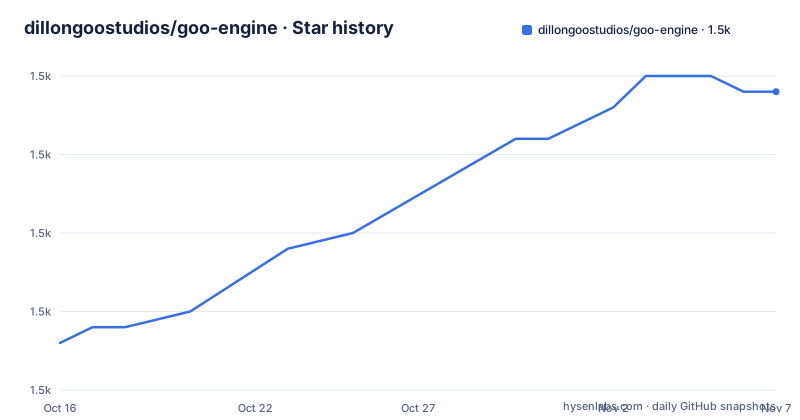
- dillongoostudios/goo-engine1,479 ★ · +16
| Repository | 2026-10-16 | 2026-11-07 |
|---|---|---|
| dillongoostudios/goo-engine | 1.5k | 1.5k |
16 Stars in the last 22 days, measured from the daily GitHub snapshot. Compare with other projects
Editorial analysis
Why DillonGoo Studios Forked Blender
Goo Engine addresses a specific conflict between an anime-focused production pipeline and Blender's broader development model. Blender supports modeling, rigging, animation, simulation, rendering, compositing, motion tracking, and video editing. The Goo Engine fork changes that general-purpose foundation so DillonGoo Studios can concentrate on NPR, meaning non-photorealistic rendering, and anime-style output. The README identifies four custom Eevee Shader nodes and Light Groups as its principal additions.
The intended users are therefore not limited to Blender developers. The clearest audience is an animation or rendering team that works primarily in Eevee and values studio-specific shading controls. A technical artist might evaluate whether the added nodes simplify an NPR look, while a studio operator would also have to consider the cost of maintaining a custom application fork.
The project does not present these changes as a general Blender enhancement package. The README says the studio has not submitted them to Blender's master branch because they might not be accepted and could destabilize features such as Cycles. That boundary matters. Goo Engine is intentionally opinionated, not a neutral extension intended to work equally well across every renderer. Its advantages are strongest where those compromises are acceptable.
Eevee Shader Nodes and Light Groups
Goo Engine's rendering focus is concentrated in Eevee. According to the README, the fork adds four custom Shader nodes to Eevee. It also adds Light Groups, but the README does not define their controls, shader behavior, UI locations, or supported render operations. It points readers to the Professor Goo YouTube channel for learning about the features, so the channel is the named source for their detailed operation.
The distinction between Shader nodes and Light Groups is visible in the project's documentation, although their implementation details are not included in the README. Shader nodes operate within the material and Eevee shading context. Light Groups are presented as a separate organizational feature, but the README does not say how lighting data is stored, how groups affect materials, or whether they are limited to particular Eevee features. Those are important adoption questions because an artist cannot assess a custom light-classification workflow from their names alone.
This limited documentation also changes how the fork should be evaluated. It is clear that Goo Engine changes Eevee's available shading vocabulary and introduces a way to organize lighting. It is not clear whether all four nodes support every Eevee version, whether Light Groups interact with standard Blender light linking, or how compatibility is handled during upstream merges. Engineers should inspect `source/`, `intern/`, and `release/` for the relevant implementations and user documentation rather than assuming feature parity with upstream Blender.
Upstream Blender Tracking and Renderer Trade-offs
Goo Engine is not designed to remain frozen at an arbitrary Blender revision. The README states that DillonGoo Studios actively updates the fork to keep up with the native Blender branch so the two codebases can evolve side by side. The repository was not archived, and its last push was on 2026-09-15. That is evidence of recent repository activity, but it does not establish a release cadence because the repository has no GitHub releases.
Tracking Blender upstream reduces the long-term gap between the fork and the official application, but it creates recurring merge work. Developers must reconcile Blender's changes with the custom shader nodes and Light Groups while checking that studio-specific behavior still works. The README explicitly says the studio can develop and test quickly because it does not need compromises acceptable to the Blender Institute. That speed comes at the expense of a broader compatibility burden.
Cycles is the clearest boundary. The README identifies possible destabilization of Cycles as one reason the changes were not sent upstream. It does not claim that Goo Engine supports Cycles. For a studio with existing Cycles assets, lighting, and output expectations, adopting the fork requires a separate compatibility review. For an Eevee-focused NPR pipeline, that limitation may be easier to accept because it aligns with the production path the customizations target.
Obtaining Goo Engine and Starting an Eevee Evaluation
The README provides no Goo Engine-specific `git clone`, build command, dependency command, or documented installation script. It gives prebuilt downloads through DillonGoo Studios' Patreon page. It also links to Blender's Build Instructions, which are relevant because the repository contains `CMakeLists.txt`, `GNUmakefile`, `make.bat`, `build_files/`, and the standard top-level Blender source directories. The safe first step for an end user is therefore to obtain the listed prebuilt distribution rather than invent a build recipe from the generic upstream instructions.
For an engineer who intends to compile the repository, start by opening the linked Blender build instructions and comparing them with this repository's layout. The documented path outside Goo Engine is:
https://developer.blender.org/docs/handbook/building_blender/This is a documentation link, not a runnable installation command. The README does not identify the supported platform, build preset, library set, compiler version, or exact Blender revision for a Goo Engine release, so no defensible first compilation command can be supplied from the available documentation.
For a first real use, open the prebuilt application and inspect the Eevee material environment for the four custom Shader nodes. Then examine the lighting interface for Light Groups. The expected first result is access to the added Goo Engine features, not a particular rendered image. A meaningful production test would compare a small NPR scene between ordinary Blender Eevee and Goo Engine, but the README does not define scene settings, node parameters, or Light Group procedures. Those details must come from the linked Professor Goo material and the repository's end-user read-me.
Build Scope, Dependencies, and Upgrade Cost
The repository layout identifies Goo Engine as a full C++ Blender source tree, not a small rendering plugin. Directories such as `source/`, `intern/`, `extern/`, `tests/`, `scripts/`, `build_files/`, and `release/` show the breadth carried by the fork. `GNUmakefile` and `make.bat` indicate build entry points inherited from Blender, while `.clang-format`, `.clang-tidy`, `.editorconfig`, and `pyproject.toml` expose project-wide development configuration. C++ changes sit alongside Python tooling and third-party source trees.
The `requirements.txt` file lists pinned Python packages, including `requests==2.26.0`, `protobuf==3.17.3`, `six==1.16.0`, `cachetools==4.2.2`, and `codaio==0.6.10`. The README does not state that installing this file alone builds or runs Goo Engine. It should therefore be treated as repository dependency metadata, not as a complete installation tutorial. Likewise, the listed build entry points do not establish which targets are valid without Blender's platform-specific instructions and compatible dependencies.
Upgrade cost comes from upstream synchronization and regression testing. A pull from Blender may touch broad areas of the application even when the visible product change is a merge. The studio must preserve its four shader nodes, Light Groups, and project behavior while accepting upstream changes elsewhere. Teams that patch Goo Engine themselves also risk diverging from DillonGoo Studios' version. A prebuilt user avoids compiling effort but still inherits the custom license and custom-branch compatibility questions.
Goo Engine Versus Unmodified Blender
The real alternative is unmodified Blender from the official project. Both applications cover the same broad 3D pipeline, and Goo Engine tracks the native branch rather than replacing Blender's entire model. The difference is scope and support. Upstream Blender distributes a general-purpose application with official project processes and documentation. Goo Engine adds studio-specific Eevee features that DillonGoo Studios prioritizes for NPR production.
That difference favors Goo Engine when its added nodes or Light Groups directly remove friction from an established anime rendering workflow. It favors upstream Blender when compatibility across render engines, official support paths, predictable releases, or familiar extension packaging matter more than the custom shading tools. It also fits users who do not want to manage a downstream application fork.
The README does not provide a feature-by-feature comparison, migration procedure, or compatibility matrix. It also does not state that Goo Engine can load every `.blend` file without changes. Because `.blend` portability depends on the implementation and version, files should be checked after moving between applications. Upstream Blender is the safer default when no Goo Engine feature has been proven necessary.
License Boundaries for Studios
License treatment requires care. GitHub classifies the repository license as other because the custom `LICENSE` file cannot be assigned to one of its standard categories. The README separately says that Blender as a whole is licensed under the GNU General Public License, Version 3, with individual files potentially carrying different compatible licenses. The top-level repository includes `COPYING`, but the README does not reproduce Goo Engine's custom terms.
Consequently, it is unsafe to conclude solely from the inherited Blender statement that every Goo Engine distribution carries an unchanged GPL notice. A studio planning commercial production should read `LICENSE`, `COPYING`, and any notices associated with the exact prebuilt build. Those documents may impose terms beyond the upstream Blender licensing summary. This review does not interpret the custom terms or provide legal advice.
The no-release state adds another practical point. There is no GitHub release record from which to identify a stable package, a changelog, or a fixed upstream revision. A user who downloads a prebuilt file should record its provenance and compare it with the repository's custom license document before distributing it internally or externally.
Editorial conclusion
Goo Engine is appropriate for artists who specifically need its Eevee shader nodes and Light Groups and can accept a Blender-derived distribution rather than an unmodified release. It is a poor fit for workflows that require Cycles parity, official Blender support, or a clearly classified custom license. Before adoption, verify the exact license in `LICENSE`, confirm that the available build matches the required Blender version, and inspect the Professor Goo material for the four shader nodes.
Frequently asked questions
What is Goo Engine used for in Blender?
DillonGoo Studios uses Goo Engine for NPR and anime-style rendering. Its stated additions are four custom Eevee Shader nodes and Light Groups.
How do I install Goo Engine?
The README directs end users to a prebuilt download on DillonGoo Studios' Patreon page. For source builds, it links to Blender's official Build Instructions but gives no Goo Engine-specific build command or supported-platform list.
Does Goo Engine keep up with official Blender?
The README states that DillonGoo Studios actively updates Goo Engine to keep up with Blender's native branch. The repository's last push was on 2026-09-15, although it has no GitHub releases.
Can Goo Engine replace Cycles for a studio pipeline?
The README does not establish that. It identifies possible destabilization of Cycles as a reason the custom features were not submitted upstream and says DillonGoo Studios uses Eevee for NPR.
Official sources
Add this badge to your README
If you maintain this project, the badge below links readers to this analysis and shows its maintenance status from the daily GitHub snapshot. Paste the markdown into your README; add ?metric=license or ?metric=stars to the image URL for a different field.

[](https://hysenlabs.com/projects/dillongoostudios-goo-engine)Star history chart for your README
[](https://hysenlabs.com/projects/dillongoostudios-goo-engine)Was this useful?