One codex app-server per workspace, and the shell around it
An app to monitor the (Codex) situation
At a glance
- What is it?
- CodexMonitor is a Tauri desktop shell that spawns a separate codex app-server process for every workspace you add, then layers git, GitHub and file tooling on top of those agent threads. It is aimed at people running several Codex agents at once, and building it from source depends on a local Rust and native dependency toolchain.
- Who is it for?
- Adopt CodexMonitor if you regularly drive several Codex threads across separate local checkouts and want git, worktree agents and GitHub pull requests in one window. Skip it if you cannot supply Node.js, a stable Rust toolchain, CMake and LLVM on Windows, or if a single agent run is all you need.
- Can I use it commercially?
- Yes. MIT is a permissive licence: you can use, modify and sell software built on it, as long as you keep its copyright and licence notices.
- Is it still maintained?
- Activity is slowing. The repository last received commits 7 months ago.
- What is it written in?
- Mainly TypeScript, according to GitHub's language statistics.
Answers come from the project's GitHub data, last synced on November 14, 2026, and from our analysis. They are not legal advice.
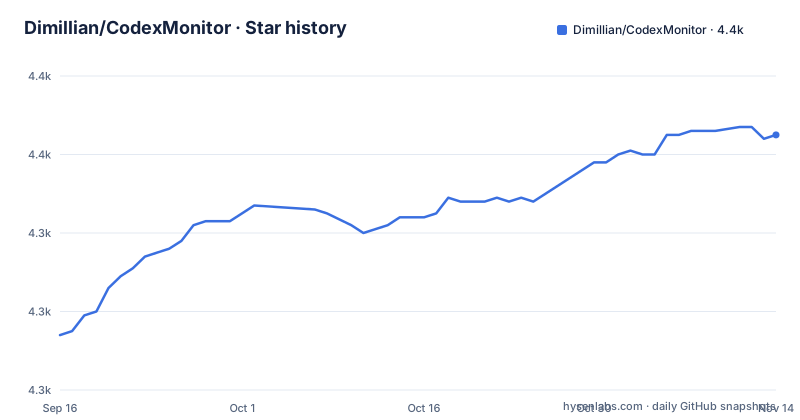
Star history
- Dimillian/CodexMonitor4,365 ★ · +51
| Repository | 2026-09-16 | 2026-11-14 |
|---|---|---|
| Dimillian/CodexMonitor | 4.3k | 4.4k |
51 Stars in the last 59 days, measured from the daily GitHub snapshot. Compare with other projects
Editorial analysis
A separate codex app-server process per workspace
The architectural decision in CodexMonitor is that a workspace is not a folder you browse but a running Codex process. Adding a workspace spawns one `codex app-server` for it, and the conversation view talks to that process over the Codex app-server protocol. Threads inside a workspace are resumed through the same server, and the sidebar tracks unread and running state per thread. Because the process boundary is per workspace, two agents working in unrelated directories never share a session, and the app can show which thread is still executing.
Everything above that layer is desktop shell. A home dashboard surfaces recent activity, the sidebar groups and sorts workspaces, and thread actions cover pin, rename, archive, copy, per-thread drafts, plus stop and interrupt for a turn already in flight. One detail worth catching: the settings offer a configurable follow-up behaviour of `Queue` or `Steer` while a run is active, and the send shortcut is inverted. `Shift+Cmd+Enter` on macOS, `Shift+Ctrl+Enter` on Windows and Linux, sends whichever of the two actions is not currently selected.
Worktree and clone agents put the checkout somewhere you did not choose
Isolated work agents are the reason to keep two workspaces apart in the first place. CodexMonitor creates git worktrees for this, and they do not land in a directory of your choosing. The README places them under the app data directory, while keeping support for a legacy `.codex-worktrees` location, so a workspace created by an older build and one created now can point at different trees. Git CLI has to be on PATH for those operations to work at all.
The clone variant is the heavier option: you are paying for a second full checkout of the repository on disk, plus the app-server process attached to it. Branch handling covers checkout and creation, and the branch list shows upstream ahead and behind counts, which is the cheapest way here to tell whether an agent has actually pushed anything. If your repositories are large, that disk cost is the deciding factor, not the interface. Note that a self-hosted path exists too, with a remote backend daemon mode for running Codex on another machine and Tailscale detection helpers for TCP connectivity.
Git, GitHub and the gh binary decide how much of this works
GitHub features are gated on an external tool. The README lists diff stats, staged and unstaged file diffs, stage and revert controls, the commit log and branch checkout, and says the Git CLI is used for worktree operations. GitHub Issues and Pull Requests go through the GitHub CLI, which the requirements list as optional: with no authenticated gh installation, that panel has nothing to show while the git side still works. The PR composer sends PR context into a new agent thread through an `Ask PR` action.
Files and prompts are local and need no CLI. The file tree carries search, file-type icons and Reveal in Finder or Explorer, and the prompt library holds global and workspace prompts you can create, edit, delete, move and run in the current thread or a new one. Autocomplete in the composer reaches the same structures, with a dollar sign for skills, a slash followed by /prompts: for prompts, a /review keyword for reviews, and an at sign for file paths. Any workflow that assumes GitHub is available should check gh first, since that integration is the one the project marks optional.
Building from source needs CMake, and Windows needs LLVM on top
Node.js and npm are needed, plus a stable Rust toolchain, and CMake is called out as required for native dependencies, with dictation built on Whisper as the stated reason. On Windows you also need LLVM and Clang, because the dictation dependencies go through bindgen. That is the concrete cost of building this native desktop app from source.
Install dependencies and start the dev build with the two commands the README gives. Install dependencies:
npm installThat runs a postinstall script that syncs material icons, then hand you to the dev mode command:
npm run tauri:dev`tauri:dev` runs `doctor:strict` first and refuses to start if the preflight script finds a problem, which is the same script you would otherwise chase errors with later. When a native build breaks, the documented escape hatch is the standalone diagnostic, `npm run doctor`.
npm run doctor is the gate every tauri command walks through
The doctor script is wired into the package lifecycle rather than left as advice. Both the dev and build commands prefix themselves with `doctor:strict`, and there is a Windows variant, `doctor:win`, which shells out to `node scripts/doctor.mjs --strict`. The Windows dev and build scripts pass the Windows config file, src-tauri/tauri.windows.conf.json, on top of that check.
Run it on its own when a native build fails:
npm run doctorA second script worth knowing is the strict dry run for the design system codemods, `codemod:ds:dry`, which prints the modal, panel and toast shell migrations without writing them. It is a way to see how much churn a design system pass would create before you commit to it. Regular checks are `lint`, `typecheck` via `tsc --noEmit`, and `test` through vitest.
iOS is a remote client, and the desktop daemon must stay alive
The mobile story is a proxy, not a port. iOS support is marked work in progress: the mobile layout runs and the remote backend flow is wired, and iOS defaults to remote backend mode rather than running Codex locally. Terminal and dictation are unavailable on mobile builds. Desktop behaviour is unchanged, and macOS, Linux and Windows stay local-first unless you explicitly select remote mode.
The connection needs the desktop daemon running for the whole session. On desktop you set a remote backend token in `Settings > Server`, start the daemon under the Mobile access daemon section, then use `Detect Tailscale` in the Tailscale helper to pick up a suggested host. On the phone you enter that host and the same token, then tap `Connect & test`. The canonical runbook lives at `docs/mobile-ios-tailscale-blueprint.md`.
The daemon can outlive the desktop window through codex_monitor_daemonctl
When you want iOS remote mode without the desktop app open, the control CLI is the answer. Two binaries are built from `src-tauri`, and each takes its own subcommand. Build them first:
cd src-tauri
cargo build --bin codex_monitor_daemon --bin codex_monitor_daemonctl
Then check status, start from the host and token already in `settings.json`, stop it, or print the equivalent command without running it:
./target/debug/codex_monitor_daemonctl status
./target/debug/codex_monitor_daemonctl start
./target/debug/codex_monitor_daemonctl stop
./target/debug/codex_monitor_daemonctl command-preview
Overrides exist for each assumption those subcommands make: `--data-dir` for the app data directory holding `settings.json` and `workspaces.json`, `--listen` for the bind address, `--token`, `--daemon-path` for an explicit `codex-monitor-daemon` binary, and `--json` for machine-readable output. Build targets are debug paths, so a release daemon needs the release directory named explicitly. Licensing is MIT, and the last push landed on 2026-03-26, with the package version in `package.json` sitting at 0.7.68 against a newest tagged release of v0.7.67.
Editorial conclusion
Adopt CodexMonitor if you regularly drive several Codex threads across separate local checkouts and want git, worktree agents and GitHub pull requests in one window. Skip it if you cannot supply Node.js, a stable Rust toolchain, CMake and LLVM on Windows, or if a single agent run is all you need. Verify first that `codex` is on your PATH or configured as a custom binary in settings, since every workspace depends on spawning that binary, and confirm your native build passes `npm run doctor` before you import real work.
Frequently asked questions
What is the difference between CodexMonitor and the Codex app?
CodexMonitor is a separate Tauri desktop client that spawns its own `codex app-server` process for each workspace you add, rather than a replacement for the Codex app itself. It layers a sidebar, worktree agents, git tooling and a prompt library on top of those agent threads.
How do you install and run CodexMonitor?
To build from source, you install dependencies with `npm install` and start the dev build with `npm run tauri:dev`, which first runs a strict preflight check through the doctor script.
Does CodexMonitor work on iOS?
iOS support is work in progress. The mobile layout runs and the remote backend flow is wired, and iOS defaults to remote backend mode, with terminal and dictation unavailable on mobile builds. The desktop daemon has to stay running while the phone is connected.
Codex monitor vs codex app
CodexMonitor wraps the Codex app-server protocol in its own desktop interface, one server process per workspace, with worktree and clone agents, a prompt library and GitHub integration through `gh`. It is not a fork of that CLI. The codex binary has to be on PATH, or configured as a custom Codex binary in app or workspace settings.
Official sources
Add this badge to your README
If you maintain this project, the badge below links readers to this analysis and shows its maintenance status from the daily GitHub snapshot. Paste the markdown into your README; add ?metric=license or ?metric=stars to the image URL for a different field.

[](https://hysenlabs.com/projects/dimillian-codexmonitor)Star history chart for your README
[](https://hysenlabs.com/projects/dimillian-codexmonitor)Was this useful?