OpenPencil reads Figma files without Figma, then hands the same file to a terminal
AI-native design editor. Open-source Figma alternative.
At a glance
- What is it?
- A TypeScript design editor that opens .fig and .pen files, an installable CLI that walks the node tree with XPath, evaluates the Figma Plugin API headlessly, and reports in plain numbers what its own lint and analysis pass can and cannot tell you.
- Who is it for?
- OpenPencil fits designers who need to read and rewrite .fig files from a script or an agent, and teams that want an editor they can drive from CI. It does not fit anyone who needs AI that works before you supply a provider key.
- Can I use it commercially?
- Yes. MIT is a permissive licence: you can use, modify and sell software built on it, as long as you keep its copyright and licence notices.
- Is it still maintained?
- Yes. The repository received new commits within the last day.
- What is it written in?
- Mainly TypeScript, according to GitHub's language statistics.
Answers come from the project's GitHub data, last synced on November 14, 2026, and from our analysis. They are not legal advice.
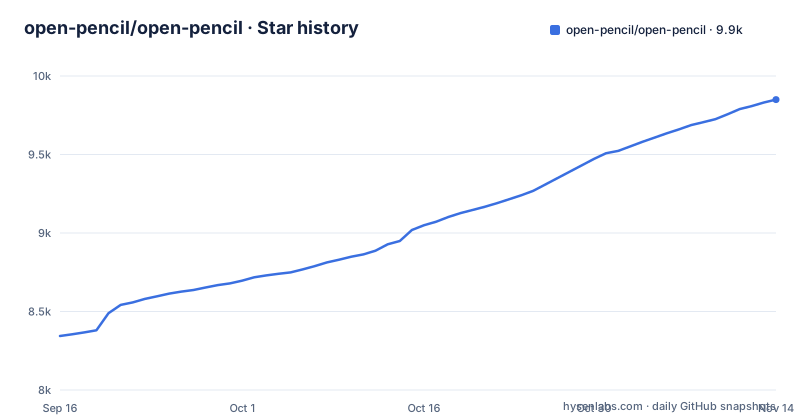
Star history
- open-pencil/open-pencil9,850 ★ · +1,506
| Repository | 2026-09-16 | 2026-11-14 |
|---|---|---|
| open-pencil/open-pencil | 8.3k | 9.9k |
1,506 Stars in the last 59 days, measured from the daily GitHub snapshot. Compare with other projects
Editorial analysis
Homebrew cask, npm CLI, or a browser tab, and the floor each one sets
Three entry points ship with the project and they do not carry the same requirements. On macOS the cask installs the Tauri desktop build:
brew install --cask openpencilThe headless CLI is a separate npm package, and a bun equivalent sits on the next line:
npm install -g @open-pencil/cli
# or: bun add -g @open-pencil/cli
The desktop app is Tauri v2 for macOS, Windows and Linux at about 15 MB, and the same editor also runs in the browser as a PWA, so installation is optional. The floors differ by route. The desktop app wants macOS 13 or later with current Safari updates, Windows 10 or later, or Linux with WebKitGTK 2.40 or later. The web app wants Chrome 111, Edge 111, Firefox 128, or Safari 16.4 or later. On an older Linux distribution that has not reached WebKitGTK 2.40, the native build is out of reach and the browser route is the only one left, which puts your design files in a tab whose storage and file permissions belong to the browser.
Reading a .fig file with no editor running
Four commands make the format scriptable. They take a path and print structure, so a design file can be inspected in a terminal or captured in a CI log:
openpencil tree design.fig
openpencil find design.pen --type TEXT
openpencil node design.fig --id 1:23
openpencil info design.fig
Tree output indents one level per node and tags each row with its kind, so pages hold sections, sections hold frames, and the node id sits at the end of every line. A short run looks like this:
[0] [page] "Getting started" (0:46566)
  [0] [section] "" (0:46567)
    [0] [frame] "Body" (0:46568)
      [0] [frame] "Introduction" (0:46569)
None of these four commands writes. A pipeline can count frames, diff two revisions and print a subtree, but it cannot repair a file it finds broken, and the CLI section does not describe what the tool prints when a .fig cannot be parsed, so a batch run needs its own error handling around that case.
XPath is the query language, and it reads names rather than text
When a name search is not specific enough, the CLI takes XPath selectors, which query node type, attributes and structure:
openpencil query design.fig "//FRAME[@width < 300]"                # Frames under 300px
openpencil query design.fig "//SECTION//TEXT"                       # Text inside sections
The two documented forms are a numeric attribute comparison and a descendant path.
eval exposes the Figma Plugin API, and -w is the only safety net
eval runs JavaScript against a file with Figma's Plugin API plus an `openpencil` API, so opacity sweeps and node edits are one command:
openpencil eval design.fig -c "figma.currentPage.selection.forEach(n => n.opacity = 0.5)" -wThe command mutates and passes `-w` to write the result back, so mutating scripts against files on disk belong on a copy. The same verbs reach a running editor: omit the file argument and the CLI works on the document open in the editor, where `openpencil undo` undoes the newest automation change.
Lint and analyze print numbers instead of failing a build
Two report generators sit on the same file. Lint covers naming, layout and accessibility, with a preset flag:
openpencil lint design.fig --preset strictAnalyze counts what the file holds rather than what it should hold:
openpencil analyze colors design.fig
openpencil analyze typography design.fig
openpencil analyze spacing design.fig
openpencil analyze clusters design.fig
openpencil variables design.fig
The colors report prints each value with a usage count, for example #1d1b20 at 17155×, and every command supports `--json`. Check the CLI reference for lint's exit status before using it as a blocking gate in a pipeline.
The chat needs a provider key, and vectorization leaves the app
The AI side advertises more than 100 tools that create and modify nodes, and it reaches no model until you connect OpenRouter, Anthropic, OpenAI, Google AI, DeepSeek, Z.ai, MiniMax or a compatible endpoint. Two consequences are concrete. A fresh install has an empty chat panel until a provider key is pasted, and that key belongs to whichever vendor you chose, so the bill for every generated design lands on that account rather than on the project. Image vectorization has the same shape: turning an image layer into editable vector layers is done with Recraft or fal.ai. The desktop app does not trace the artwork itself. When those accounts are unreachable or unpaid, the conversion is unavailable and the layer stays a bitmap, which matters for teams whose asset pipeline treats traced artwork as a reviewable, versioned layer.
Collaboration is peer to peer, so presence exists and history does not
Real time collaboration can run as a peer-to-peer room over WebRTC with no server and no account, carrying cursors, presence, follow mode and voice calls, and Cloud documents can also be edited together. In the peer-to-peer mode, the gaps follow from the transport. With no server in the middle, the session exists only while both peers are connected, so a reviewer who closes the tab is gone rather than offline with a queued message. With no account, there is nothing to hang a share link, a comment thread or a version history on, and nothing that records who changed a layer afterwards. Teams that want documents kept on a server can use the optional OpenPencil Cloud, on their own server or on the hosted service once it opens, and share them by invitation.
Twelve packages under one Bun workspace, and the checks guarding them
The repository is a Bun workspace whose package list explains why the CLI reaches so far without one giant module. `packages/scene-graph`, `packages/fig` and `packages/pen` sit beside `packages/core`, with `packages/cli`, `packages/mcp`, `packages/vue` and `packages/design-jsx` layered on top, plus `packages/harness` and `packages/docs`. DOM and CSS input arrives through `@open-pencil/dom-css`, which is what turns HTML plus authored CSS into editable layers, for example:
openpencil import card.html --css card.cssAlongside them, `tools/checks` holds nine check targets (architecture, cloud-off, docs, i18n, lint, package-quality, secret-scan, test-homes, type-shapes), and the root config files (.gitleaks.toml, commitlint.config.ts, knip.json, oxlint.json, steiger.config.ts, playwright.config.ts, wdio.conf.ts) describe what the project refuses to merge. Version 0.17.0-beta.1 in package.json matches the v0.17.0-beta.1 pre-release from 2026-11-02, following v0.16.0 on 2026-10-14 and v0.16.0-beta.3 on 2026-10-13, and the last push landed on 2026-11-01.
Editorial conclusion
OpenPencil fits designers who need to read and rewrite .fig files from a script or an agent, and teams that want an editor they can drive from CI. It does not fit anyone who needs AI that works before you supply a provider key. Before moving a Figma workflow over, check the platform floor (macOS 13 or later, Windows 10 or later, Linux with WebKitGTK 2.40 or later), pin the version because v0.16.0-beta.3 and v0.16.0 landed a day apart and v0.17.0-beta.1 followed on 2026-11-02, and confirm on your own files which .pen documents actually open.
Frequently asked questions
What is OpenPencil?
OpenPencil is an MIT licensed, open-source design editor written in TypeScript. It opens .fig and .pen design files, includes built-in AI, and ships as a programmable toolkit with a headless Vue SDK for building custom editors.
Is OpenPencil a Figma alternative?
It describes itself as an open-source Figma alternative that reads and writes native Figma files, so .fig documents open without Figma installed. The desktop app is Tauri v2 for macOS, Windows and Linux and also runs as a browser PWA.
How do you use OpenPencil?
Install the desktop app with `brew install --cask openpencil`, or open the web app with nothing installed, or install the CLI with `npm install -g @open-pencil/cli` and run commands such as `openpencil tree design.fig` against a file path.
What is the difference between OpenPencil and Pencil?
OpenPencil opens supported Pencil documents through the app or the OS file browser alongside .fig files. Its installation covers a Homebrew cask, the releases page and the web app, and its CLI section names no other editor called Pencil.
Does OpenPencil have a Visual Studio Code extension?
The repository has a .vscode directory at the top level for the codebase itself. The shipped editor is a Tauri v2 desktop app for macOS, Windows and Linux that also runs as a browser PWA, and the installation options are the cask, the releases page and the web app.
Official sources
Add this badge to your README
If you maintain this project, the badge below links readers to this analysis and shows its maintenance status from the daily GitHub snapshot. Paste the markdown into your README; add ?metric=license or ?metric=stars to the image URL for a different field.

[](https://hysenlabs.com/projects/open-pencil-open-pencil)Star history chart for your README
[](https://hysenlabs.com/projects/open-pencil-open-pencil)Was this useful?