docker-agent: Declarative YAML Agents as a Docker CLI Plugin
AI Agent Builder and Runtime by Docker Engineering
At a glance
- What is it?
- Docker Engineering's docker-agent turns agent definitions into versionable YAML and ships them through OCI registries, running as a docker CLI plugin. The design is coherent; the release cadence is the part to think about before you depend on it.
- Who is it for?
- Adopt docker-agent if your team already runs Docker Desktop 4.63+ or installs CLI plugins deliberately, and you want agent definitions reviewed as YAML in the same repository as the rest of your infrastructure. Skip it if you need a stable configuration schema, cannot accept anonymous telemetry, or want to pin a version and leave it alone for a year.
- Can I use it commercially?
- Yes. Apache-2.0 is a permissive licence: you can use, modify and sell software built on it, as long as you keep its copyright and licence notices.
- Is it still maintained?
- Yes. The repository received new commits within the last day.
- What is it written in?
- Mainly Go, according to GitHub's language statistics.
Answers come from the project's GitHub data, last synced on November 14, 2026, and from our analysis. They are not legal advice.
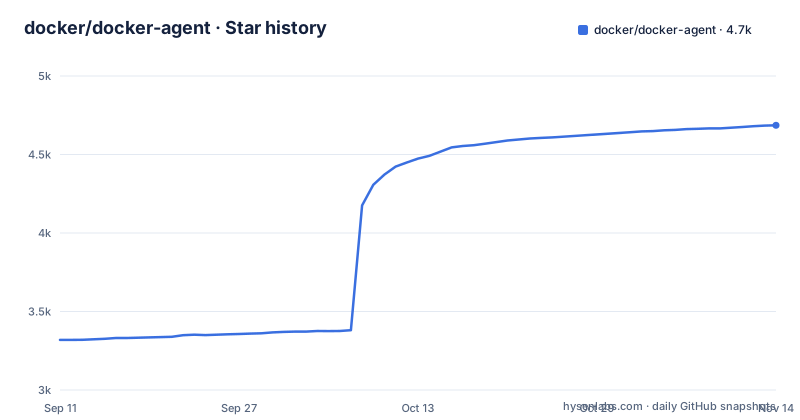
Star history
- docker/docker-agent4,686 ★ · +1,367
| Repository | 2026-09-11 | 2026-11-14 |
|---|---|---|
| docker/docker-agent | 3.3k | 4.7k |
1,367 Stars in the last 64 days, measured from the daily GitHub snapshot. Compare with other projects
Editorial analysis
The Problem: Agent Logic Trapped in Python Scripts and Notebooks
Most agent setups start as a script. Someone wires a model client to a few functions, adds a loop, and commits it. The prompt lives in a string literal. The tool list lives in a dictionary three files away. Six weeks later nobody can say which model the staging agent used or why the production prompt has an extra paragraph. docker-agent targets exactly that failure: it moves the agent definition into YAML, which means the definition is diffable, reviewable, and shippable as an artifact. The README frames the pitch as building, running, and sharing agents with a declarative config, a tool ecosystem, and multi-agent orchestration, and states that no code is required. That last claim deserves scrutiny, because YAML with embedded instructions and tool references is still configuration programming, but the audience is clear: platform and infrastructure engineers who already treat Dockerfiles and compose files as source of truth, and who would rather review a pull request against agent.yaml than read a Python module. The secondary audience is teams that want to hand an agent to a colleague without also handing them a virtualenv.
What Actually Runs: A CLI Plugin, Not a Library You Import
The distribution model is the first thing to internalize. docker-agent is a Docker CLI plugin, so the invocation is docker agent rather than a standalone binary in your PATH, though the README notes you can symlink the binary into ~/.docker/cli-plugins/docker-agent or run docker-agent directly. Docker Desktop 4.63 and later ships the plugin pre-installed. Homebrew users get it with brew install docker-agent. This matters because it changes where the tool sits in your stack. It is not a Go library you embed in a service, and the README gives no indication of a public Go API for programmatic embedding. It is a runtime you invoke, configured by files. The configuration surface visible in the README is an agents map keyed by name. The root agent carries a model string in provider/model form, a description, an instruction block, and a toolsets list. A toolset entry is typed; the example uses type: mcp with ref: docker:duckduckgo, which points at an MCP server rather than a hardcoded built-in tool. That indirection is the interesting architectural choice: tools are resolved through the Model Context Protocol, so the same agent file can reference local, remote, or Docker-based servers according to the feature list. The README also lists built-in think, todo, and memory tools, and RAG with BM25, embeddings, hybrid search, and reranking, though it does not show the YAML keys for those, so treat the RAG configuration as documented elsewhere and verify it against the configuration reference before you plan around it.
Getting an Agent Running: The Commands in the README
The install path is short. With Docker Desktop 4.63 or later, run docker agent. With Homebrew, brew install docker-agent, then either invoke docker-agent directly or symlink it to ~/.docker/cli-plugins/docker-agent to get the docker agent subcommand. Binary releases are on the GitHub releases page, with the same symlink option. Before anything runs you need a model. The README shows export OPENAI_API_KEY=sk-... and notes ANTHROPIC_API_KEY, GOOGLE_API_KEY, and others as alternatives, or Docker Model Runner for local models. Then the four commands that define the workflow: docker agent run with no argument runs the default agent, docker agent run myorg/agent:tag pulls from an OCI registry, docker agent new generates a new agent interactively, and docker agent run agent.yaml runs your own config. The OCI path is the one worth pausing on. Pushing agents to any OCI registry and pulling them anywhere means an agent version is an image tag, which gives you the same promotion and pinning mechanics you already use for containers. The README does not show the push command, only run against a registry reference, so confirm the publish side in the CLI documentation before designing a release process around it. The contributing section notes the project uses itself to build itself, with docker agent run ./golang_developer.yaml, which is the most concrete evidence available that the tool is used on non-trivial work.
Multi-Agent Delegation and the Cost of Automatic Routing
The feature list leads with multi-agent architecture: teams of specialized agents that delegate tasks automatically. The README does not describe the delegation mechanism, whether it is a router model, a planner, or explicit handoff rules in YAML. That is a real gap. Automatic delegation is the kind of behavior where the failure mode is silent: a request goes to the wrong specialist, the specialist answers plausibly, and nobody notices the routing was wrong. Without a documented routing model you cannot reason about latency or token spend either, since each hop is another model call. My read is that this feature is best treated as opt-in per workflow rather than the default posture. Start with a single root agent and a small toolset, confirm the behavior, then add specialists when you have a task that genuinely splits. The same caution applies to the built-in think, todo, and memory tools. They are listed as features, not explained as mechanisms, so the README does not describe their token overhead or persistence behavior. Memory in particular is a word that means five different things across agent frameworks, and the README does not say which one it means here.
Release Cadence, Telemetry, and the Maintenance Bill
Three releases in one day, v1.155.0, v1.156.1 and v1.156.2, all on November 2, 2026. The version numbers are past 1.156, which tells you the project ships often and does not treat minor versions as stability markers. Fast iteration on a young tool is normal, and it is also a maintenance cost you are signing up for. If your agent YAML encodes behavior you depend on, a config key that shifts between v1.156.1 and v1.156.2 is a production incident, and nothing in the README promises schema stability. Pin your version, read release notes before bumping, and keep your agent files in a repository where the diff is visible. The telemetry section is one sentence: anonymous usage data is collected to improve the tool, with a link to the telemetry documentation. The README does not say whether collection can be turned off; the linked telemetry documentation is the place to check. For a tool that runs inside your network with your API keys, this is the first thing to check, not the last. On licensing, the repository is Apache-2.0, which permits commercial and internal use and includes an explicit patent grant. I am not a lawyer and this is not legal advice, but the practical implication is that Apache-2.0 is a permissive choice with fewer corporate review hurdles than a copyleft license, and it does not impose obligations on the agent files you write. If you redistribute a modified docker-agent binary, the notice and attribution requirements in the license apply to that binary.
Where docker-agent Is the Wrong Tool
If you need a stable, frozen agent runtime that will not change under you, this is the wrong project today. The release cadence and the absence of a stated compatibility policy make long-horizon pinning the only sane approach, and pinning works against the reason to use a Docker plugin in the first place. If your environment is locked to a Docker Desktop version below 4.63 and you cannot install CLI plugins, the pre-installed path is closed and you are managing a symlink yourself, which is fine but is now your problem. If you need to embed agent execution inside a Go service, the README shows a CLI, not a library, so you would be shelling out to docker agent, which is an awkward integration boundary. And if your team has no Docker footprint at all, the OCI registry distribution model is a benefit you cannot collect, and you are paying the plugin indirection for nothing. The comparison that makes the trade-off concrete is against a code-first framework such as LangGraph or the OpenAI Agents SDK. Those give you a program, so you can unit test a routing function, mock a model call in CI, and step through a debugger when delegation misbehaves. docker-agent gives you a file and an interactive generator, which is faster to start and easier to hand to a non-programmer, but leaves you testing behavior through the runtime. The honest split is that declarative wins when the agent is infrastructure and code-first wins when the agent is an application with logic you must test.
Who Should Adopt It, and What to Check First
The fit is a platform team already standardized on Docker, comfortable reviewing YAML, and willing to track a fast-moving dependency in exchange for agent definitions that live next to their other config. The registry distribution fits organizations that already promote artifacts by tag and want agents to follow the same path. The misfit is a team that wants to define an agent once and forget it, or that cannot accept anonymous telemetry, or that needs to call agent execution from inside a running service. The verification list is short and specific. Run docker agent new and read the generated YAML to see which keys the current version actually emits, since the README example is minimal and the configuration reference is where the rest lives. Run docker agent run agent.yaml against Docker Model Runner so the first execution costs nothing and you can watch the resolved toolset. Read the telemetry documentation and determine whether the collection is acceptable. Then decide whether your agent files belong in the same repository as the rest of your infrastructure, because that decision is the one that determines whether the declarative model pays off or just adds a file.
Editorial conclusion
Adopt docker-agent if your team already runs Docker Desktop 4.63+ or installs CLI plugins deliberately, and you want agent definitions reviewed as YAML in the same repository as the rest of your infrastructure. Skip it if you need a stable configuration schema, cannot accept anonymous telemetry, or want to pin a version and leave it alone for a year. Before committing, run docker agent new, then docker agent run agent.yaml with a local model through Docker Model Runner so you can inspect the resolved config without spending API budget, and read the telemetry documentation to decide whether the collection is acceptable in your environment.
Frequently asked questions
what is docker agent
A command line tool, distributed as a plugin for the docker command, for defining and running teams of collaborating AI agents from a declarative YAML file with no code required. Agents are given tools, can delegate to each other automatically, and can be distributed by pushing them to any OCI registry and pulling them anywhere. It works with several model providers including a local model server, supports retrieval with lexical, embedding, hybrid and reranking strategies, and its configuration has a published JSON Schema.
how to install docker agent
Three routes. In a recent desktop application version the plugin is already present, so you only run the command. There is a package manager route with a single install command, and a route that downloads a build artefact from the releases page. Both of the latter two say the same thing afterwards: run the binary directly, or link it into the CLI plugins directory so that the docker subcommand form works.
Is Docker still used in 2026?
This repository does not address that question. It is a single tool built by one company's engineering organisation, described as an agent builder and runtime, and it says nothing about the platform's adoption or standing. Questions about the container platform itself have to be answered from elsewhere.
what is docker agent in jenkins
The repository does not mention that build server anywhere. It does list integration surfaces of its own: a terminal interface, a command line interface, a mode for running as a protocol server, retrieval tooling, and a list of supported model providers. Its own continuous integration and its build are not covered in the readme.
Official sources
Where developers are discussing it
Posts on Hacker News, dev.to and Lobsters that link to this repository, found by our scan of those communities. 0 in the last 30 days; newest first.
- A Weekend Project With Docker Agent: Four Agents, Two Config Files, One Permissions Trapdev.to · Oct 13, 2026 · 3 points · 1 comments
- Docker just shipped the agent wall I wanted. It's off by default.dev.to · Oct 9, 2026 · 16 points · 21 comments
- Docker AgentHacker News · Oct 7, 2026 · 303 points · 144 comments
Add this badge to your README
If you maintain this project, the badge below links readers to this analysis and shows its maintenance status from the daily GitHub snapshot. Paste the markdown into your README; add ?metric=license or ?metric=stars to the image URL for a different field.

[](https://hysenlabs.com/projects/docker-docker-agent)Star history chart for your README
[](https://hysenlabs.com/projects/docker-docker-agent)Was this useful?