docker-easyconnect: Running Sangfor EasyConnect and aTrust in a Container
Runs Sangfor's proprietary VPN software EasyConnect and aTrust inside Docker or Podman, acting as a gateway and/or providing SOCKS5 and HTTP proxy services.
At a glance
- What is it?
- A community image that wraps Sangfor's proprietary Linux VPN clients and exposes them as socks5, http or gateway access from the host. Useful when your employer's VPN has no Linux client you can install, less useful if you can install the deb directly.
- Who is it for?
- Adopt docker-easyconnect if you need Sangfor EasyConnect or aTrust on a Linux host, a headless server, or a machine where installing the vendor deb is not an option, and you are comfortable with a container holding NET_ADMIN and /dev/net/tun. Do not adopt it if your organisation forbids redistributing Sangfor binaries or if a native client already works for you.
- Can I use it commercially?
- Yes. WTFPL is a permissive licence: you can use, modify and sell software built on it, as long as you keep its copyright and licence notices.
- Is it still maintained?
- Activity is slowing. The repository last received commits 8 months ago.
- What is it written in?
- Mainly Shell, according to GitHub's language statistics.
Answers come from the project's GitHub data, last synced on November 15, 2026, and from our analysis. They are not legal advice.
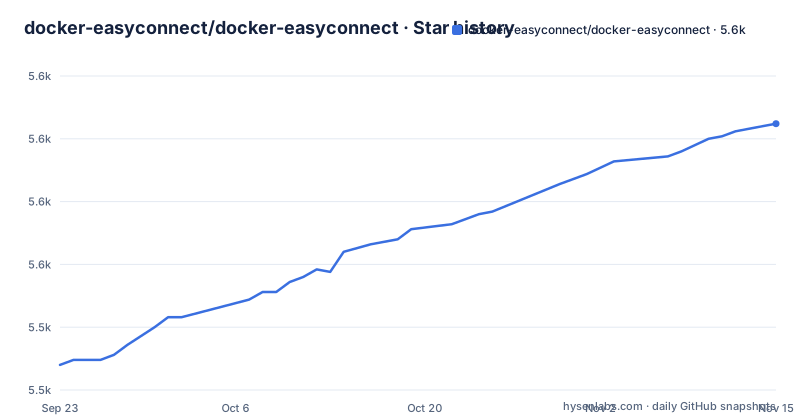
Star history
- docker-easyconnect/docker-easyconnect5,606 ★ · +96
| Repository | 2026-09-23 | 2026-11-15 |
|---|---|---|
| docker-easyconnect/docker-easyconnect | 5.5k | 5.6k |
96 Stars in the last 53 days, measured from the daily GitHub snapshot. Compare with other projects
Editorial analysis
What docker-easyconnect actually solves
Sangfor ships EasyConnect and aTrust as proprietary clients. The Linux builds exist as deb packages. docker-easyconnect takes those deb packages, installs them into a Debian bookworm-slim image, and starts the client in a way that the host can use without touching the host's own network configuration.
The intended audience is narrow and specific. You are connecting to a corporate or campus VPN that only speaks Sangfor, you are on Linux or macOS, and you want the tunnel to live in one disposable container rather than in your desktop session. The README is explicit that this is not a Sangfor project and that the bundled deb packages remain Sangfor's copyright. The maintainers are also openly recruiting help, with issue #275 used as the recruitment thread, which tells you something about the project's resourcing.
How the container exposes the tunnel to the host
The container does not try to be transparent. It runs the VPN client inside its own network namespace and then publishes two proxy endpoints on the host: socks5 on port 1080 and http on port 8888, both bound to 127.0.0.1 in the documented examples. Anything on the host that can speak a proxy can then reach resources behind the VPN.
For cases where a proxy is not enough, the documentation also describes an IP forward gateway mode, where the container forwards traffic for the host. The run commands carry --device /dev/net/tun and --cap-add NET_ADMIN because the client needs to create a tunnel interface, and that requires both the tun device and network administration capability inside the container.
The image family is split by interface and by EasyConnect version. Tag latest and the version tags 7.6.3 and 7.6.7 include a VNC server so you can drive the graphical client. The vncless variants drop the VNC server and are smaller. Tag cli is the multi-version command line build, which the README says supports only username plus password and hardware fingerprint login methods. There is a separate hagb/docker-atrust image for aTrust, and a CHROMIUM build argument adds Chromium for web-based login flows.
Running the CLI image against a Sangfor gateway
The quickest path is the cli tag, which needs no VNC client. The README's example passes the VPN address, username and password through CLI_OPTS and selects an EasyConnect version with EC_VER. Note that the surrounding prose mentions 7.6.7 while the command itself sets 7.6.3, so pick one deliberately rather than copying the line verbatim.
docker run --rm --device /dev/net/tun --cap-add NET_ADMIN -ti \
  -p 127.0.0.1:1080:1080 -p 127.0.0.1:8888:8888 \
  -e EC_VER=7.6.3 \
  -e CLI_OPTS="-d vpnaddress -u username -p password" \
  hagb/docker-easyconnect:cli
After the client authenticates, the README states that 127.0.0.1:1080 and 127.0.0.1:8888 serve socks5 and http respectively. Point a browser or curl at the http proxy to confirm the tunnel is up before wiring it into anything else.
For the graphical client, the equivalent run publishes VNC on 5901 and sets a VNC password through PASSWORD. Persisting $HOME/.ecdata to /root keeps login state across restarts.
docker run --rm --device /dev/net/tun --cap-add NET_ADMIN -ti \
  -e PASSWORD=xxxx -e URLWIN=1 \
  -v $HOME/.ecdata:/root \
  -p 127.0.0.1:5901:5901 -p 127.0.0.1:1080:1080 -p 127.0.0.1:8888:8888 \
  hagb/docker-easyconnect:7.6.7
The README notes that arm64 and mips64el builds need -e DISABLE_PKG_VERSION_XML=1 added. The repository also ships a docker-compose.yml that encodes the same settings, including the tun device, NET_ADMIN and the three port bindings, if you prefer compose over a long docker run line.
Where this approach breaks down
The container needs NET_ADMIN and access to /dev/net/tun. On a managed cluster, a shared host, or any environment with a restrictive pod security policy, that combination is often disallowed outright, and there is no documented alternative that avoids it.
The cli tag is the sharpest limitation. It supports only username plus password and hardware fingerprint logins, so any gateway that requires SMS verification, a one-time code, a certificate prompt or a web-based SSO handshake cannot be driven from it. Those flows need the VNC image, which means a human at a VNC client, or the Chromium variant for web login. The aTrust image is a separate image with its own quirks, including a sysctl for route_localnet and an extra published port 54631 in the documented command.
Version matching is another failure mode. The documentation treats EasyConnect version selection as something you must get right, and the image tags are version-specific. If your gateway rejects a client version, the fix is a different tag, or a different `EC_VER` value on the cli tag. Finally, the README does not document rollback or upgrade procedures for the persisted $HOME/.ecdata volume.
Alternatives and how they differ
The README itself lists several neighbouring projects, which is more useful than a generic comparison. shmilee's easyconnect-in-docker shares one container across multiple EasyConnect versions, which addresses the version-matching problem above by letting several versions coexist rather than pinning one tag per container.
ultranity/minimal-EasyConnect takes the opposite direction: a minimal command line EasyConnect on Alpine. If you never need VNC, that trade is worth examining.
Mythologyli/ZJU-Connect is a different kind of alternative entirely. It is an open source reimplementation of EasyConnect and aTrust clients rather than a wrapper around Sangfor's binaries, so it sidesteps the redistribution question. The cost is protocol coverage: a reimplementation follows the vendor's protocol only as far as its authors have reverse engineered it.
zhangt2333/actions-easyconnect targets GitHub Actions specifically, running code with the VPN inside a workflow, which is a different deployment shape from a long-lived gateway container.
Licence, maintenance and upgrade cost
The project's own code is under the WTFPL version 2, which is about as permissive as a licence gets. That permissiveness does not extend to the payload. The image contains deb packages built by Sangfor, plus a command line client deb from shmilee, and the README states plainly that those packages' copyright belongs to Sangfor and asks users not to abuse the project. Redistributing or running these images inside a company is therefore a policy question for your organisation, not something the WTFPL settles. This is not legal advice.
The last push to the repository was on 2026-03-11, and the repository is not archived. The repository has no published GitHub releases, so the practical upgrade path is pulling a new image tag rather than tracking versioned releases. Because tags encode EasyConnect versions, an upgrade usually means changing the tag in your run command or compose file and re-testing the login flow, not running a package manager inside a running container. Budget time for that re-test on every bump, and keep the $HOME/.ecdata volume backed up before you switch tags.
Editorial conclusion
Adopt docker-easyconnect if you need Sangfor EasyConnect or aTrust on a Linux host, a headless server, or a machine where installing the vendor deb is not an option, and you are comfortable with a container holding NET_ADMIN and /dev/net/tun. Do not adopt it if your organisation forbids redistributing Sangfor binaries or if a native client already works for you. Before rolling it out, verify which image tag matches your server's required EasyConnect version, confirm whether your login flow needs the graphical client or the cli tag, and check that the host kernel exposes /dev/net/tun.
Frequently asked questions
Is EasyConnect a VPN?
Yes. The README describes EasyConnect and aTrust as VPN software developed by Sangfor, and docker-easyconnect exists to run those clients inside a container and expose their tunnel as a proxy or gateway.
Is EasyConnect free to use?
The README does not describe EasyConnect's own pricing. It does state that the EasyConnect and aTrust deb packages are non-free and that their copyright belongs to Sangfor, and that docker-easyconnect is not an official Sangfor project.
What is Docker and why would I need it?
For this project, the README says to install Docker and run it, then start one of the hagb/docker-easyconnect images to get the VPN client without installing it on the host.
Official sources
Add this badge to your README
If you maintain this project, the badge below links readers to this analysis and shows its maintenance status from the daily GitHub snapshot. Paste the markdown into your README; add ?metric=license or ?metric=stars to the image URL for a different field.

[](https://hysenlabs.com/projects/docker-easyconnect-docker-easyconnect)Star history chart for your README
[](https://hysenlabs.com/projects/docker-easyconnect-docker-easyconnect)Was this useful?