docker-pi-hole: running Pi-hole's DNS sinkhole as a container, and the settings it leaves to you
The official Pi-hole Docker image from pi-hole.net
At a glance
- What is it?
- The official Pi-hole Docker image packages network-wide ad blocking as a Compose service. It starts quickly, but persistence, capabilities and update timing are decisions the image does not make for you.
- Who is it for?
- Use docker-pi-hole if you already run containers and want Pi-hole on hardware you control, with releases arriving every few weeks (2026.09.0, 2026.10.0 and 2026.10.1 in recent months). Skip the nightly tag unless you want development builds.
- Can I use it commercially?
- Check first. The repository uses a licence we do not classify automatically, so read its LICENSE file before any commercial use.
- Is it still maintained?
- Yes. The repository last received commits 12 days ago.
- What is it written in?
- Mainly Shell, according to GitHub's language statistics.
Answers come from the project's GitHub data, last synced on November 25, 2026, and from our analysis. They are not legal advice.
Star history
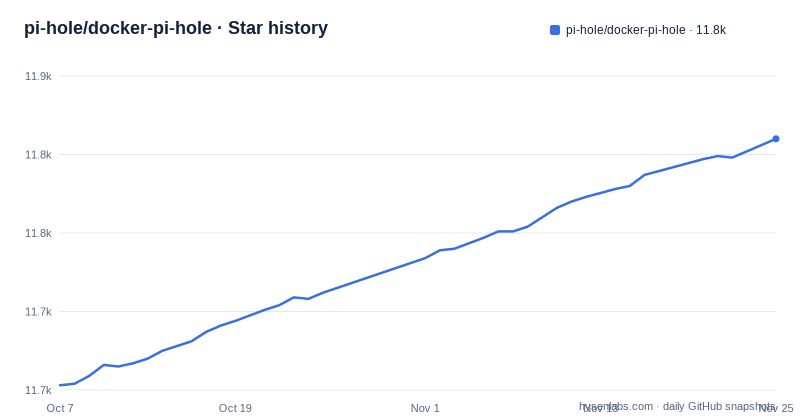
- pi-hole/docker-pi-hole11,810 ★ · +157
| Repository | 2026-10-07 | 2026-11-25 |
|---|---|---|
| pi-hole/docker-pi-hole | 11.7k | 11.8k |
157 Stars in the last 49 days, measured from the daily GitHub snapshot. Compare with other projects
Editorial analysis
The Compose service maps DNS, HTTP and HTTPS straight onto the host
The quick start is a single Compose service called pihole built from the pihole/pihole:latest image. It publishes DNS on both TCP and UDP port 53, the web interface on port 80, and HTTPS on port 443:
services:
  pihole:
    container_name: pihole
    image: pihole/pihole:latest
    ports:
      # DNS Ports
      - "53:53/tcp"
      - "53:53/udp"
      # Default HTTP Port
      - "80:80/tcp"
      # Default HTTPs Port. FTL will generate a self-signed certificate
      - "443:443/tcp"
The certificate on 443 is one that FTL, Pi-hole's DNS engine, generates and signs itself, not one issued by a public authority. Two more port lines ship commented out: 67/udp if Pi-hole will act as your DHCP server, and 123/udp if it will serve NTP. Leaving them commented means the container answers DNS and serves the dashboard and nothing else. Once the file is edited, start it with:
docker compose up -dOn older systems the command is spelled docker-compose.
Without volumes, every image update starts from an empty Pi-hole
The sample compose file stops at the environment block and does not declare any volumes. The project's own note is that volumes are recommended for persisting data across container re-creations for updating images. The consequence is direct: upgrading a container means pulling a new image and re-creating the container, and if your configuration, block lists and query history live only inside the old container, they go away with it. Anyone copying the quick start verbatim gets a working resolver on day one and a blank one after the first upgrade. The Upgrading, Persistence, and Customizations page on docs.pi-hole.net is where the persistence layout is covered, so read it before the first pull of a new tag rather than after.
Granting --privileged breaks more than it fixes
A container that runs DNS and possibly DHCP needs some elevated permissions, and the shortcut many people reach for is the --privileged flag. The project warns against it: some users reported issues using --privileged on 2022.04 and later images. The guidance is to avoid that mode entirely and, if extra permissions are needed, list the permitted capabilities explicitly as described in the configuration documentation's note on capabilities. In practice that means a compose file copied from an older tutorial that sets privileged mode can misbehave on current images, and the fix is to remove the flag and add only the specific capabilities your setup needs, such as those required for serving DHCP.
Date-based tags say when, not what changed
Images are tagged by date, for example 2022.04.0, with an incremented patch number when more than one release lands in the same month. Recent releases are 2026.09.0, 2026.10.0 and 2026.10.1, the last published on 31 October 2026. These numbers are explicitly not semantic versions; the date only separates a newer build from an older one. That limits what you can infer from a tag: a jump from 2026.10.0 to 2026.10.1 tells you nothing about whether a breaking change is inside. To find out which versions of Pi-hole Core, Web and FTL a tag contains, you have to open the GitHub release notes, which carry full details of container changes and core component changes. The latest tag always points at the newest release, so pinning a dated tag is the way to control when an upgrade happens.
The nightly tag tracks the development branch
Alongside latest and the dated tags there is nightly. It is built and pushed whenever the development branch changes, and also by a scheduled nightly job. These are the most experimental images the project produces and may change frequently. For a resolver that every device on your network depends on, running nightly means accepting that a fresh build can change behaviour without a dated release or release notes to warn you. It suits testing a fix before it ships, not a household DNS server.
A built-in cron job refreshes lists and flushes logs every Sunday
cron is baked into the image. Once per week, in the small hours of Sunday morning, it fetches the newest versions of your block lists and flushes your logs. You do not need a host-side scheduler for list updates. The trade-off is timing you do not choose: list changes published upstream on a Monday wait until the following Sunday unless you trigger an update yourself, and log history is cleared on the same weekly schedule, so anyone who wants longer query records needs to account for that flush.
Watchtower users get a separate warning
The upgrade notes open with a pointer for people running Watchtower, the tool that updates containers automatically, to a Note on Watchtower in the tips-and-tricks documentation. Combined with the persistence point above, automatic re-creation of a Pi-hole container without volumes would wipe its state on each update. Read that note before letting any automation replace this container.
Docker bugs go to GitHub, Pi-hole questions go to Discourse
The project splits support by cause. Problems you suspect are Docker-specific belong in issues on the pi-hole/docker-pi-hole GitHub repository; questions about Pi-hole itself or general Docker use belong in the Docker category of the Discourse forum. The repository holds build.sh, src/ and test/, plus an examples/ folder with a Caddyfile and docker-compose-caddy-proxy.yml for putting the web interface behind a Caddy reverse proxy. The last push to the master branch was on 2 November 2026.
Editorial conclusion
Use docker-pi-hole if you already run containers and want Pi-hole on hardware you control, with releases arriving every few weeks (2026.09.0, 2026.10.0 and 2026.10.1 in recent months). Skip the nightly tag unless you want development builds. Before relying on it, add volumes so settings survive image updates, drop the --privileged flag in favour of explicit capabilities, and read the Watchtower note if containers on your host update themselves.
Frequently asked questions
Is Pi-hole still relevant in 2026?
The docker-pi-hole image shipped releases 2026.09.0, 2026.10.0 and 2026.10.1 in autumn 2026, and its repository was last pushed on 2 November 2026.
How do I update docker-pi-hole?
Pull the newer image and re-create the container. Mount volumes first, because the project recommends them for persisting data across container re-creations, and check the Watchtower note if you automate updates.
How do I install docker-pi-hole?
Copy the sample Docker Compose file using the pihole/pihole:latest image, adjust ports and environment, then run docker compose up -d (docker-compose on older systems).
Official sources
Add this badge to your README
If you maintain this project, the badge below links readers to this analysis and shows its maintenance status from the daily GitHub snapshot. Paste the markdown into your README; add ?metric=license or ?metric=stars to the image URL for a different field.

[](https://hysenlabs.com/projects/pi-hole-docker-pi-hole)Star history chart for your README
[](https://hysenlabs.com/projects/pi-hole-docker-pi-hole)Was this useful?