docker-library/wordpress: The Generator Behind the Official WordPress Image
Docker Official Image packaging for WordPress
At a glance
- What is it?
- The docker-library/wordpress repository does not contain the WordPress image itself. It holds the templates, version lists and update scripts that produce it, while the user facing documentation lives on Docker Hub and the canonical source of truth is the library/wordpress file in the official-images repository.
- Who is it for?
- This repository fits a maintainer who wants to contribute a build change to the official WordPress image, since it is where the templates, version metadata and update automation live, and it is the wrong place to look for how to run WordPress in Docker, since that documentation is on Docker Hub and generated from the docker-library/docs repository.
- Can I use it commercially?
- Yes, with conditions. GPL-2.0 is a copyleft licence: if you distribute software that includes it, you must release that software's source code under the same licence. Running it internally without distributing it does not trigger that obligation.
- Is it still maintained?
- Yes. The repository last received commits 3 days ago.
- What is it written in?
- Mainly Shell, according to GitHub's language statistics.
Answers come from the project's GitHub data, last synced on October 23, 2026, and from our analysis. They are not legal advice.
Star history
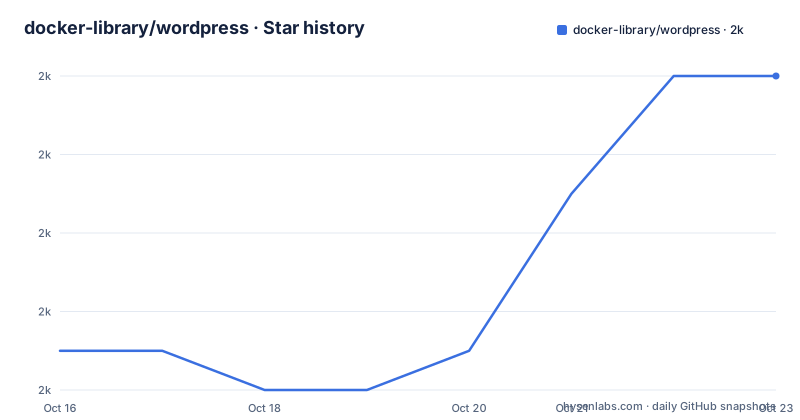
- docker-library/wordpress1,990 ★ · +7
| Repository | 2026-10-16 | 2026-10-23 |
|---|---|---|
| docker-library/wordpress | 2k | 2k |
7 Stars in the last 7 days, measured from the daily GitHub snapshot. Compare with other projects
Editorial analysis
A Generator Repository Rather Than the Image Itself
The first thing to understand about docker-library/wordpress is that it does not contain WordPress, and it does not contain the Docker image either. It is the Git repository behind the Docker Official Image for wordpress, and the README says so plainly, adding a parenthetical warning not to confuse it with any official wordpress image provided by the upstream WordPress project.
The repository is a machine for producing a Docker Hub image. The top level is a set of generators and templates rather than a running application:
Dockerfile.template
versions.json
versions.sh
update.sh
apply-templates.sh
generate-stackbrew-library.sh
cli-entrypoint.sh
cli/
docker-entrypoint.sh
wp-config-docker.php
latest/
beta/
.test/
The primary language of the repository is Shell, which matches the shape of what it does. There is a template for the Dockerfile, a JSON file of versions, shell scripts that fetch, apply and publish, and directories that hold the generated variants. The maintenance model is stated as the Docker Community, and the licence recorded for the repository is GPL-2.0, with a LICENSE file at the root and a README that notes it is itself generated.
The Documentation and the Source of Truth Are Elsewhere
This is the detail that most confuses people who arrive at the repository looking for documentation. The README states that the full readme on how to use the Docker image, and information regarding contributing and issues, lives on the Docker Hub page for the image, not in this repository.
The reason is that the Docker Hub page is itself generated. The full image description is maintained over in the docker-library/docs repository, specifically in the wordpress directory of that repository, and the stub README you are reading was produced by a script, generate-repo-stub-readme.sh, hosted in that same docs repository. The HTML comment marking it as generated is in the file.
So there are three places, and each has a different role. The docs repository holds the prose. This repository holds the build inputs. And the official-images repository holds the file that is the current source of truth for the published wordpress image, the library/wordpress file. The README points at that file explicitly for anyone who needs to know what is actually shipped, and it also points at the pull requests on the official-images repository carrying the library/wordpress label, which is where outstanding changes for this image are tracked.
versions.json and the Shell Scripts That Drive the Updates
The generation pipeline is visible in the file names. versions.json holds the version data, versions.sh and update.sh are the scripts that work with it, and apply-templates.sh applies the templates to produce the concrete build files. A separate script, generate-stackbrew-library.sh, generates the library file listing for the image.
The separation between metadata and templates is the part worth pausing on. The Dockerfile is a template, so a change to the way the image is built is expressed once and applied to every variant, and the version list is data, so adding a new WordPress release or a new PHP version is a data change rather than a code change. That is why the repository has a beta/ directory as well as a latest/ one: the image is published in channels, and a build can be staged in one before it is promoted to the other.
The.test/ directory at the root is where the automated checks live, and the.github/ directory holds the workflow configuration.
The CLI Variant and the WordPress Configuration Template
Two files in the root stand out for what they imply about the image. There is docker-entrypoint.sh, the classic entrypoint pattern, and there is cli-entrypoint.sh alongside a cli/ directory, which is the WordPress command line variant of the image, the one that gives you the wp command rather than a web server. The repository is a packaging project for WordPress and therefore also a packaging project for the WordPress command line tool, and it ships both in one image family.
The other file, wp-config-docker.php, is the configuration template that the image uses to produce a wp-config.php for a WordPress installation. Shipping a template rather than a finished config is the usual approach for containerised PHP applications, because the database host, salts and other values are only known at run time, and the entrypoint fills them in when the container starts.
That combination, the CLI variant and a config template, is what tells you this image family is aimed at running a real site rather than just demonstrating that WordPress can start. The README in this repository does not describe the entrypoint behaviour, so the operational details come from the Docker Hub page, which is generated from the docs repository.
A Change Here Does Not Show Up on Docker Hub Immediately
The FAQ section of the README addresses the question that trips up new contributors: what happens after you see a change merged here that does not show up on Docker Hub yet. The answer points at the Docker library FAQ, in the entry about an image's source changed in Git, now what, which describes the full official images change lifecycle.
The lifecycle has two halves, and this repository is only one of them. Changes to the build inputs land here and are reviewed, and the official-images repository is where the published image definition is tracked, with pull requests labelled library/wordpress. The Docker Hub page is then regenerated from the docs repository.
That means the latency between a merged change and a visible image update is real and by design. It also means the naming is confusing if you are new: this repository is not where the image is published from, and the library/wordpress file in the official-images repository is the current source of truth for what is shipped. For outstanding work on this image, the README directs you to the labelled pull requests rather than to the issues here.
Continuous Maintenance Without Tagged Releases
The repository publishes no GitHub releases, and the update mechanism is the scheduled scripts rather than a versioned artifact. A change to the image is a change to the definitions in this repository, and the resulting images are versioned by the WordPress and PHP versions they carry, which live in the version data rather than in tags here.
That is a sensible arrangement for a rolling image, and it has a practical consequence for anyone auditing what they run. There is no tag in this repository that corresponds to the image you deployed; the audit trail runs through the commit history of the definitions and the official-images record of what was published when.
The maintenance activity itself is current. The repository is not archived, and the last push was on 2026-10-06. Because this is community maintained rather than vendor maintained, the practical question for a team running WordPress in production is not who owns the build but how quickly a new upstream WordPress release or a PHP change is picked up, and the scheduled update scripts are the mechanism for that, with the .test/ directory guarding the output.
Editorial conclusion
This repository fits a maintainer who wants to contribute a build change to the official WordPress image, since it is where the templates, version metadata and update automation live, and it is the wrong place to look for how to run WordPress in Docker, since that documentation is on Docker Hub and generated from the docker-library/docs repository. Before opening a pull request, read the change lifecycle FAQ in docker-library/faq, because a change merged here does not appear on Docker Hub immediately, and remember that the source of truth for the published image is the library/wordpress file in the official-images repository rather than this tree. The repository is GPL-2.0 licensed, publishes no GitHub releases, and the last push was on 2026-10-06.
Frequently asked questions
Where is the documentation for the official WordPress Docker image?
On Docker Hub. The README states that the full readme on how to use the image, and information regarding contributing and issues, is on the Docker Hub page. The image description itself is generated and maintained in the docker-library/docs repository, in its wordpress directory.
What is the source of truth for the published WordPress image?
The library/wordpress file in the docker-library/official-images repository, which the README points to for the current source of truth. Outstanding changes for the image are tracked as pull requests with the library/wordpress label on that repository.
Why does my merged change not appear on Docker Hub yet?
Because the official images change lifecycle has several stages, and the README refers to the Docker library FAQ entry titled an image's source changed in Git, now what for the full description. A change merged in this repository is not the same thing as a published image update.
What do the files in the docker-library/wordpress repository do?
The tree holds the build inputs for the image: a Dockerfile.template, versions.json with the version data, versions.sh, update.sh and apply-templates.sh to drive generation, generate-stackbrew-library.sh for the library file, docker-entrypoint.sh and cli-entrypoint.sh with a cli/ directory for the command line variant, wp-config-docker.php as the configuration template, and latest/ and beta/ directories for the published channels.
Is the official WordPress image released with version tags?
The repository publishes no GitHub releases. The image is versioned by the WordPress and PHP versions it carries, which are defined in the version data, and the update scripts handle the rest. The repository is not archived and the last push was on 2026-10-06.
Official sources
Add this badge to your README
If you maintain this project, the badge below links readers to this analysis and shows its maintenance status from the daily GitHub snapshot. Paste the markdown into your README; add ?metric=license or ?metric=stars to the image URL for a different field.

[](https://hysenlabs.com/projects/docker-library-wordpress)Star history chart for your README
[](https://hysenlabs.com/projects/docker-library-wordpress)Was this useful?