dorny/test-reporter: test results as a GitHub check run
Displays test results from popular testing frameworks directly in GitHub
At a glance
- What is it?
- The test-reporter action takes the XML or JSON your test framework already writes and turns it into a GitHub check run or a job summary, with annotations on the failing lines and counts of passed, failed and skipped tests as outputs. It covers a long list of frameworks, and its sharpest constraint is that pull requests from forks run with a read-only token, which the project solves with a two workflow pattern.
- Who is it for?
- Adopt test-reporter if your test framework already emits a result file and you want the failures visible in the pull request rather than buried in the job log, and if you are willing to add the two workflow files needed for fork based contributions. Do not adopt it if your framework already publishes a native GitHub report, or if you want a single step to work everywhere including forks.
- Can I use it commercially?
- Yes. MIT is a permissive licence: you can use, modify and sell software built on it, as long as you keep its copyright and licence notices.
- Is it still maintained?
- Yes. The repository last received commits 9 days ago.
- What is it written in?
- Mainly TypeScript, according to GitHub's language statistics.
Answers come from the project's GitHub data, last synced on November 6, 2026, and from our analysis. They are not legal advice.
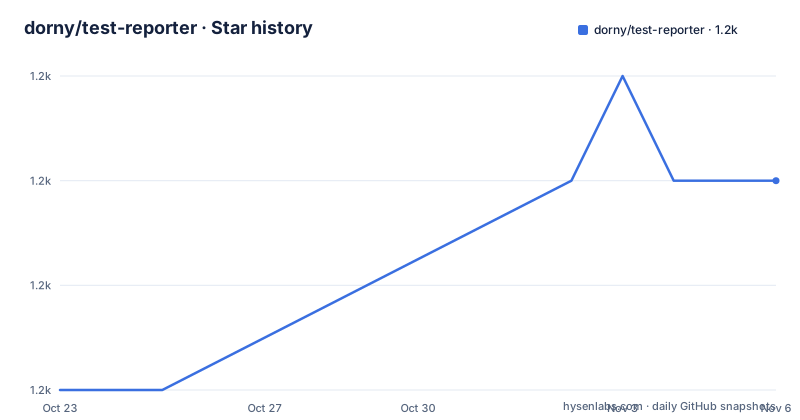
Star history
- dorny/test-reporter1,185 ★ · +2
| Repository | 2026-10-23 | 2026-11-06 |
|---|---|---|
| dorny/test-reporter | 1.2k | 1.2k |
2 Stars in the last 14 days, measured from the daily GitHub snapshot. Compare with other projects
Editorial analysis
From result file to check run
The action's job is narrow and its job is worth stating precisely, because a lot of CI tooling tries to do more than this.
It parses test results in XML or JSON format and creates a report as a GitHub Check Run or a GitHub Actions job summary. It annotates code where it failed based on the message and stack trace captured during test execution. And it provides the final conclusion together with counts of passed, failed and skipped tests as output parameters.
Three capabilities, and the third one is what makes it composable. The counts are not just for display. The action sets a conclusion on the check run, so a failing test suite can fail the check, and it exposes the numbers as outputs that later steps in the job can read. That is what allows a workflow to branch on the result rather than parsing a log.
The annotation part is the feature that changes how a pull request reads. Instead of a wall of text in the job output, the failing line is marked in the diff itself, with the error message and the stack trace attached to it. For a reviewer that is the difference between scrolling a log and looking at the code.
The repository is MIT licensed, the default branch is main, and the last push was on 2026-10-14. The published releases are v3.0.0 and v2.7.0, both on 2026-03-21, with v2.6.0 on 2026-03-03, and the version in package.json is 3.2.0, which is ahead of the newest tag.
The one step setup and where it stops working
The simple form of the workflow runs the tests and then reports them:
on:
  pull_request:
  push:
permissions:
  contents: read
  actions: read
  checks: write
jobs:
  build-test:
    name: Build & Test
    runs-on: ubuntu-latest
    steps:
      - uses: actions/checkout@v6     # checkout the repo
      - run: npm ci                   # install packages
      - run: npm test                 # run tests (configured to use jest-junit reporter)

      - name: Test Report
        uses: dorny/test-reporter@v3
        if: ${{ !cancelled() }}       # run this step even if previous step failed
        with:
          name: JEST Tests            # Name of the check run which will be created
          path: reports/jest-*.xml    # Path to test results
          reporter: jest-junit        # Format of test results
Three details in that snippet carry most of the meaning.
The permissions block is not optional decoration. The action needs checks: write, and contents: read and actions: read alongside it. Without those permissions the action cannot create the check run.
The if: ${{ !cancelled() }} condition is the detail people leave out. The report step must run even when the test step failed, because a failed test suite is exactly when you want the report. Without the condition, the step is skipped and the pull request shows no failure detail at all.
And the path points at a result file, reports/jest-*.xml, with a reporter name that tells the action how to interpret it. The comment in the example says the test command is configured to use the jest-junit reporter, which is the usual arrangement: your framework writes a machine readable file, and this action reads it.
Fork pull requests and the two workflow pattern
The README is explicit that the simple setup does not work in workflows triggered by a pull request from a forked repository, and it explains why in one sentence: workflows triggered by pull requests from forked repositories are executed with a read-only token and therefore cannot create check runs.
This is a GitHub security restriction, not a bug in the action, and it affects the exact case most open source projects care about, a contributor opening a pull request from a fork.
The workaround the project documents is two workflows.
The first, CI, runs in the context of the pull request head branch with the read-only token. It executes the tests and uploads the results as a build artifact:
name: 'CI'
on:
  pull_request:
jobs:
  build-test:
    runs-on: ubuntu-latest
    steps:
      - uses: actions/checkout@v6         # checkout the repo
      - run: npm ci                       # install packages
      - run: npm test                     # run tests (configured to use jest-junit reporter)
      - uses: actions/upload-artifact@v7  # upload test results
        if: ${{ !cancelled() }}           # run this step even if previous step failed
        with:
          name: test-results
          path: jest-junit.xml
The second runs in the context of the repository's default branch with a read/write token. It downloads the artifact and creates the report:
name: 'Test Report'
on:
  workflow_run:
    workflows: ['CI']                     # runs after CI workflow
    types:
      - completed
permissions:
  contents: read
  actions: read
  checks: write
jobs:
  report:
    runs-on: ubuntu-latest
    steps:
    - uses: dorny/test-reporter@v3
      with:
        artifact: test-results            # artifact name
        name: JEST Tests                  # Name of the check run which will be created
        path: '*.xml'                     # Path to test results (inside artifact .zip)
        reporter: jest-junit              # Format of test results
The trigger is workflow_run on the completed event, which is what gives the second workflow the write token, since it belongs to the default branch. The consequence, stated in the README, is that the second workflow only runs after the change has been merged into the default branch, and it will not run in a pull request unless the workflow file is already part of that branch.
So the fork case is a real trade-off rather than a free fix. The report arrives later and against the default branch context, not against the pull request.
The reporter name decides how the file is read
The usage block is where the configuration surface is, and most of it is the reporter input.
The action supports these formats:
reporter: ''with the documented options listed alongside it: dart-json, dotnet-nunit, dotnet-trx, flutter-json, golang-json, java-junit, jest-junit, mocha-json, phpunit-junit, python-xunit, rspec-json, swift-xunit and unreal-json.
That list maps onto the framework list in the README, which covers .NET with dotnet test under xUnit, NUnit and MSTest, Dart, Flutter, Go with go test, Java with JUnit, JavaScript with JEST and Mocha, Python with pytest and unittest, PHP with PHPUnit and Nette Tester, Ruby with RSpec, Swift with xUnit, and Unreal Engine automation tests. The mapping is not one to one, since Python's pytest and unittest both produce xunit style output, and Java's JUnit has its own entry.
The path input is a comma-separated list of paths to test results, and it supports wildcards through the fast-glob library. The README adds the constraint that all matched result files must be of the same format, which is a sensible restriction, since one report step has one reporter name and mixing formats would mean guessing.
There is also a summary-only mode, which is described as allowing you to generate only the summary, so that the report contains a table listing each test results file and the number of passed, failed and skipped tests, without the per test detail.
The artifact input can be a regex that names the report
The artifact input is the least obvious of the options and the one with the most specific documentation.
The comment block explains that the value is the name or a regex of the artifact containing test results, that a regular expression must be enclosed in slashes, and that values from captured groups replace occurrences of $N in the report name. The example given is:
    artifact: /test-results-(.*)/
    name: 'Test report $1'
    -> Artifact 'test-result-ubuntu' would create report 'Test report ubuntu'
So the mechanism is a two stage substitution. The regex selects which artifact to read, and the capture group feeds the name of the check run that gets created. The reason to do this is a matrix build, where the same workflow runs on several platforms and each run produces its own artifact. With a regex and a $1 in the name, one step configuration produces several distinctly named check runs, one per platform, without duplicating the workflow.
The path input has a matching wrinkle for Windows. The action documents that the fast-glob library it uses internally interprets backslashes as escape characters, and that the path-replace-backslashes option, which defaults to the string value 'false', can be enabled so that all backslashes in the provided path are replaced with forward slashes and act as directory separators. The README explains when that is useful, and it is when the path input variable is composed dynamically from existing directory paths on Windows.
The distinction between the two path-like inputs is worth keeping straight. The artifact input names where the results came from, the path input says which files inside it to read.
A committed dist/ directory and a fixture project per framework
The repository layout shows two things about how the project is built and tested.
First, the dist/ directory is committed, and the package script explains why. The build chain is tsc for the TypeScript compilation, ncc build with a license file for bundling, and an eolConverter step that converts line endings to LF in the dist output. The version script runs the build and the package step and then adds the dist output to the index, so the bundled action is committed as part of the release rather than built on the runner. That is the convention for a JavaScript GitHub Action, since the runner uses the committed bundle instead of installing dependencies.
Second, the reports/ directory holds a sample project for each supported framework, and the package scripts run them to produce fixture files. There is a dart-fixture script that runs the Dart test with a json file reporter into the __tests__/fixtures directory, a golang-json-fixture script that runs go test with the json flag and a timeout and pipes the result into the fixtures directory, a dotnet-fixture script that runs dotnet test with the trx logger, and separate scripts for the NUnit and xUnit v3 variants, plus jest-fixture and mocha-fixture scripts for the JavaScript frameworks.
That is a lot of machinery, and it is the reason the framework list can be taken seriously. Each supported format has a real project that produces a real result file, and the test suite compares the action's output against those files.
The rest of the repository is a normal TypeScript project: src/ for the sources, __tests__/ for the tests, action.yml for the action metadata, an assets/ directory for the screenshots in the README, and the usual tooling files including a .nvmrc, a jest.config.cjs, an eslint.config.mjs and a tsconfig.json. The test script itself runs jest with the jest-junit reporter, so the project's own test suite produces the same kind of file the action consumes.
Check run or job summary: two outputs, two audiences
The action can deliver its report in two ways, as a GitHub Check Run or as a GitHub Actions job summary, and the difference is not cosmetic.
A check run is a separate entity on the commit. It has its own name, its own status, and it appears in the checks list next to the other statuses of that commit. It can be required by branch protection, it can carry annotations that point at specific lines in the diff, and it has a conclusion that a workflow can act on. A job summary, by contrast, is Markdown rendered into the output of the job it belongs to, which means it is visible to whoever reads the log of that run, and it is not a first class object that branch protection can require.
The difference in approach is therefore who the report is for. The check run targets the commit and the review, it is the thing a reviewer sees on the pull request and the thing a merge rule can block on. The job summary targets the person debugging a run, and it is the fallback when creating a check run is not possible, which is exactly the fork situation where the token is read-only.
The same file feeds both, and the same summary-only mode applies to both. The choice is a question of where the failure should appear, and for a project that accepts outside pull requests the answer is often that you want both, with the job summary as the fallback and the check run, when the token allows it, as the primary.
Editorial conclusion
Adopt test-reporter if your test framework already emits a result file and you want the failures visible in the pull request rather than buried in the job log, and if you are willing to add the two workflow files needed for fork based contributions. Do not adopt it if your framework already publishes a native GitHub report, or if you want a single step to work everywhere including forks. Verify first which reporter name matches your framework's output format, that all files matched by path are in the same format because the action requires that, and that the workflow declares the checks: write permission the action needs.
Frequently asked questions
How do I add the dorny/test-reporter action to a workflow?
Add a step that uses dorny/test-reporter@v3 with a name, a path to the result files and a reporter that matches the format, and give the job the checks: write permission. The README recommends adding if: ${{ !cancelled() }} so the report still runs when the test step failed.
Why does the test reporter not create a check run for pull requests from forks?
The README explains that workflows triggered by pull requests from forked repositories are executed with a read-only token and therefore cannot create check runs. The documented workaround is two workflows, one that uploads the results as an artifact and a second that runs on the default branch with a write token and reports them.
Which reporter should I use for my test framework?
The action lists the supported formats: dart-json, dotnet-nunit, dotnet-trx, flutter-json, golang-json, java-junit, jest-junit, mocha-json, phpunit-junit, python-xunit, rspec-json, swift-xunit and unreal-json. All files matched by the path input must be in the same format.
What do the artifact and path inputs do?
The artifact input is the name or a slash enclosed regular expression of the artifact holding the results, and captured groups replace $N in the report name. The path input is a comma-separated list of paths inside that artifact, with wildcards through fast-glob, and path-replace-backslashes set to 'true' turns backslashes into directory separators for dynamically composed Windows paths.
Official sources
Add this badge to your README
If you maintain this project, the badge below links readers to this analysis and shows its maintenance status from the daily GitHub snapshot. Paste the markdown into your README; add ?metric=license or ?metric=stars to the image URL for a different field.

[](https://hysenlabs.com/projects/dorny-test-reporter)Star history chart for your README
[](https://hysenlabs.com/projects/dorny-test-reporter)Was this useful?