Cook (来做菜): a Chinese-only recipe picker whose data lives in Feishu and whose Docker image ships with analytics turned on
OK, Let's Cook!
At a glance
- What is it?
- YunYouJun/cook is a Nuxt and Ionic web app that suggests home dishes from a deliberately small set of ingredients. It is at v2.0.0-beta.18, has dropped its WeChat mini program and PWA support, and needs attention to analytics settings and port mapping before you self-host it.
- Who is it for?
- Cook fits Chinese-speaking users who want a quick dish idea from what is in the kitchen, and developers who want a working Nuxt recipe app with a CSV and Feishu data pipeline to study or fork. It does not fit anyone who needs an English interface, an installable mobile app today, or a stable release, since the project is still on 2.0 betas.
- Can I use it commercially?
- Yes. MIT is a permissive licence: you can use, modify and sell software built on it, as long as you keep its copyright and licence notices.
- Is it still maintained?
- Yes. The repository received new commits within the last day.
- What is it written in?
- Mainly TypeScript, according to GitHub's language statistics.
Answers come from the project's GitHub data, last synced on November 14, 2026, and from our analysis. They are not legal advice.
Star history
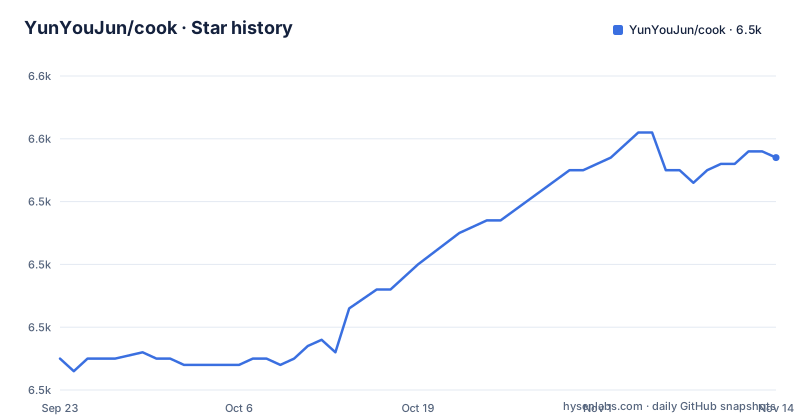
- YunYouJun/cook6,547 ★ · +32
| Repository | 2026-09-23 | 2026-11-14 |
|---|---|---|
| YunYouJun/cook | 6.5k | 6.5k |
32 Stars in the last 52 days, measured from the daily GitHub snapshot. Compare with other projects
Editorial analysis
The interface and recipe data stay in Chinese on purpose
Cook states up front that it is primarily a Chinese project and that there are no plans to translate it into English, because the ingredients the maintainers know are all named in Chinese. This is a design decision rather than a missing feature. The recipe data, the ingredient picker and the documentation at cook.yunle.fun are all in Chinese.
The recipe scope is also narrow by design. The project began as a tool for people isolated at home during a special period with limited ingredients, so the recipes are kept to a limited range of materials. If you expect a large general recipe database, Cook will feel small. If you want something that answers what can I make with these few things, that restriction is the point. More background sits on the app's about page at cook.yunyoujun.cn/about.
The Docker example maps port 8080 but tells you to open 3333
The published image runs on Docker Hub as yunyoujun/cook. The container commands are:
docker pull yunyoujun/cook:latest
docker run -it -d --name cook -p 8080:80 yunyoujun/cook:latest
The comment above the run command says to open http://localhost:3333 afterwards. That does not match the command. The Dockerfile builds the site in a node:24.22.2-alpine stage, copies the static dist output into nginx:stable-alpine, and exposes port 80. With -p 8080:80, the site is reachable on host port 8080, not 3333. Port 3333 is where pnpm dev serves the development server.
If you follow the comment literally you get a connection refused page and may assume the container failed. Use the host side of the -p mapping you chose. The container can then be controlled by name with docker start cook and docker stop cook.
Self-built images report to the upstream Clarity project unless you change two variables
Cook uses Microsoft Clarity for site statistics, configured through NUXT_PUBLIC_CLARITY_PROJECT_ID and NUXT_PUBLIC_CLARITY_DOMAINS. No analytics server or database is needed. The catch is the defaults. Both the Dockerfile and .env.example set the project ID to ks1ebw03i5 and the domains to cook.yunyoujun.cn,cook.yunle.fun, which belong to the upstream Cook deployment.
In the Dockerfile these are build arguments, and the comment there notes that public analytics settings are compiled into the static site. Changing an environment variable on a running container does nothing; the values must be set before the build. .env.example tells forks to use their own project ID and domains, and setting the project ID to an explicit empty value turns statistics off.
For anyone self-hosting, the consequence is that a plain docker build from the repository carries the maintainer's analytics settings into your build. Pass your own values, or an empty ID, as build arguments.
Recipe data is pulled from a Feishu sheet, and the pull needs app credentials
The recipes are maintained in a Feishu spreadsheet, and the development workflow can refresh local data from it or build from a local CSV instead:
pnpm install
pnpm fetch
pnpm convert
pnpm dev
pnpm fetch runs the fetch script in packages/cook and needs FEISHU_APP_ID and FEISHU_APP_SECRET, obtained by creating or selecting an app on the Feishu open platform and copying the App ID and App Secret from its credentials page. Without those values the fetch step is not available to you, which is why it is optional; pnpm convert turns a local CSV into JSON with no credentials.
Some recipe steps and images come from Anduin2017/HowToCook, under the Unlicense, and a howtocook script imports from it. A set of checks guards the data: validate, amounts:check, dietary:validate and check:videos, each a tsx script under scripts/.
The mini program is gone, PWA install is withdrawn, and the native apps are unfinished
Cook used to have a WeChat mini program called 来做菜. It was removed after being judged a traffic-diversion violation for jumping to Bilibili videos, and the project will no longer offer a mini program. The PWA feature, which let browser users add Cook to the home screen for a near-native experience, is struck through in the feature list, with a note that a new app version is in development.
The app plan is split by platform. The web app stays on Nuxt and Ionic. A native iOS app uses SwiftUI and lives in apps/ios. The old Capacitor shell has been removed, and native Android is planned with Kotlin and Jetpack Compose according to a phased roadmap in docs/dev/android-roadmap.md. A dev:pwa script still exists in package.json.
For users, the result today is a website. There is no shipped mobile app to install from the project front page.
Exact toolchain pins: Node 24 and pnpm 11.21.0
The root package.json declares engines of node ^24.11.0 and pnpm 11.21.0, with packageManager set to [email protected]. The Dockerfile installs that same pnpm version globally and runs pnpm install --frozen-lockfile before pnpm run build, so the lockfile must match exactly.
The repository is a pnpm workspace with apps/, packages/ and docs/, plus cloudfunctions/ and workers/ directories. Deployment configs exist for several targets: cloudbaserc.json for Tencent CloudBase, edgeone.json, and a Vercel development build at cook.yunle.app. Netlify auto-deployment is no longer configured, and current deployment notes are in docs/dev/docs-site.md.
Other environment variables cover optional workflows: APPLE_DEVELOPMENT_TEAM for iOS signing, COOK_FEEDBACK_URL and COOK_FEEDBACK_TOKEN for pnpm feedback:pull, and COS credentials plus a bucket, region ap-shanghai and prefix cook/ for pnpm images:upload. The COS key is meant to be a sub-account limited to PutObject and HeadObject on that prefix.
Version 2.0 is still in beta even though the site is live
package.json reports version 2.0.0-beta.18, matching the latest release v2.0.0-beta.18 from 2026-10-18. The two releases before it, beta.16 and beta.17, both landed on 2026-08-17. The last push to the main branch was on 2026-11-02. Releases are cut with bumpp through the release script and built by a release workflow in GitHub Actions.
Three public addresses serve different roles: cook.yunle.fun for the official site and documentation, cook.yunyoujun.cn for the web app, and cook.yunle.app for the development build on Vercel. Recipe contributions go through a Feishu data sheet, a Tencent Docs submission form, and a Tencent feedback board.
The code is MIT licensed. Anyone forking it should keep in mind that parts of the recipe content carry HowToCook's Unlicense terms, and that the 2.0 beta label means behaviour can still shift between releases.
Editorial conclusion
Cook fits Chinese-speaking users who want a quick dish idea from what is in the kitchen, and developers who want a working Nuxt recipe app with a CSV and Feishu data pipeline to study or fork. It does not fit anyone who needs an English interface, an installable mobile app today, or a stable release, since the project is still on 2.0 betas. Before self-hosting, set or clear the Clarity analytics variables before the build and map the container's port 80 to the port you actually intend to open.
Frequently asked questions
Does Cook have an English version?
No. Cook is primarily a Chinese project and the maintainers do not intend to translate it into English, because the ingredients they work with are named in Chinese.
Which port do I open after running the Cook Docker image?
The container serves on port 80 through nginx, and the documented command maps it with -p 8080:80, so open port 8080 on the host. Port 3333 is the pnpm dev server.
Can I still use the Cook WeChat mini program?
No. The 来做菜 mini program was taken down as a traffic-diversion violation for linking to Bilibili videos, and Cook will no longer offer a mini program version.
How do I turn off analytics in a self-hosted Cook build?
Set NUXT_PUBLIC_CLARITY_PROJECT_ID to an explicit empty value before building. For static and Docker builds the setting is compiled in, so it has to be set before the build runs.
Official sources
Add this badge to your README
If you maintain this project, the badge below links readers to this analysis and shows its maintenance status from the daily GitHub snapshot. Paste the markdown into your README; add ?metric=license or ?metric=stars to the image URL for a different field.

[](https://hysenlabs.com/projects/yunyoujun-cook)Star history chart for your README
[](https://hysenlabs.com/projects/yunyoujun-cook)Was this useful?