dotnet/extensions: The Production Toolkit Behind Microsoft Teams
This repository contains a suite of libraries that provide facilities commonly needed when creating production-ready applications.
At a glance
- What is it?
- A suite of C# libraries covering AI, resilience, telemetry, and compliance, born from Microsoft's internal services. This review examines its scope, how to use it, and where it may not fit.
- Who is it for?
- Adopt dotnet/extensions if you build .NET services that need resilience, telemetry, or compliance features and want Microsoft's battle-tested code. Skip it if you need a single cohesive framework or if your project avoids the .NET ecosystem.
- Can I use it commercially?
- Yes. MIT is a permissive licence: you can use, modify and sell software built on it, as long as you keep its copyright and licence notices.
- Is it still maintained?
- Yes. The repository last received commits 2 days ago.
- What is it written in?
- Mainly C#, according to GitHub's language statistics.
Answers come from the project's GitHub data, last synced on November 14, 2026, and from our analysis. They are not legal advice.
Star history
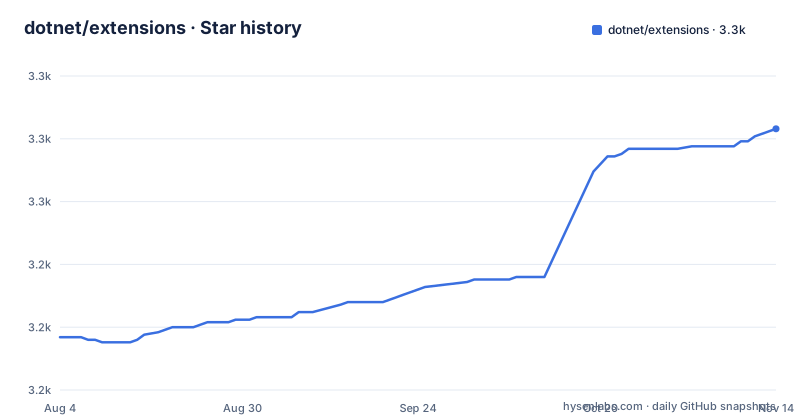
- dotnet/extensions3,279 ★ · +83
| Repository | 2026-08-04 | 2026-11-14 |
|---|---|---|
| dotnet/extensions | 3.2k | 3.3k |
83 Stars in the last 102 days, measured from the daily GitHub snapshot. Compare with other projects
Editorial analysis
A Repository Born from Microsoft Teams
The dotnet/extensions repository is a collection of C# libraries that solve common problems in production applications. The README states it was initially developed to support high-scale and high-availability services within Microsoft, such as Microsoft Teams. That origin matters. These are not academic examples or toy utilities. They are the building blocks used by one of the largest real-time communication platforms in the world. The target audience is clear: .NET developers building services that must handle heavy load, tolerate failures, and operate under regulatory scrutiny. The repository covers eight major areas: AI, compliance, diagnostics, contextual options, resilience, telemetry, ASP.NET Core extensions, static analysis, and testing. That is a wide net. It is not a single framework but a toolbox. You pick the pieces you need.
How the Libraries Fit Together
Each functional area operates independently, but they share a common philosophy: extend the .NET base abstractions rather than replace them. For example, the resilience area builds on top of Polly, a popular transient-fault-handling library. The README says it provides 'sophisticated resilience pipelines.' That means you get Polly's retry, circuit breaker, and timeout policies, but with additional configuration and integration that Microsoft found necessary internally. Similarly, the telemetry area enhances logging, metering, tracing, and latency measuring. It does not introduce a new logging framework. It augments the existing ILogger and related abstractions. The testing area simplifies testing around ILogger and TimeProvider, which are core .NET abstractions. This approach reduces the learning curve if you already know .NET. You are not learning a new paradigm. You are getting production-hardened extensions to the standard APIs.
Running It: Commands and Configuration
The README does not provide installation commands, but the repository is a standard .NET project. You would add individual NuGet packages to your project. For example, to use the resilience libraries, you would install a package like Microsoft.Extensions.Http.Resilience. The exact package names are not listed in the README, but the codebase is organized by area. You can clone the repository and build it using the instructions in docs/building.md. The README points to CONTRIBUTING.md and docs/building.md for build and test instructions. The configuration keys depend on the specific library. For instance, the Options area extends the .NET Options model, so you would use the standard IOptions pattern with additional experiment-related keys. The documentation is sparse in the README, so you will need to consult the API reference docs linked in the Useful Links section. That is a limitation: getting started requires digging into the source or external docs.
The Compliance and AI Areas: Underdocumented but Present
Two areas stand out as less common in open-source .NET libraries: compliance and AI. The compliance area includes a data annotation framework, audit report generation, and telemetry redaction. These are tools for managing data according to privacy regulations. The README does not show examples or explain the annotation syntax. You would need to explore the source code to understand how to annotate your data models. The AI area provides abstractions and middlewares for working with generative AI models. Again, the README gives no code samples. This lack of documentation is a genuine limitation for a repository this large. The breadth is impressive, but the entry barrier is higher than it needs to be. You are expected to be comfortable reading source code and inferring usage patterns.
Where It Is the Wrong Tool
This repository is not a good fit for small projects or prototypes. The libraries are designed for production-scale services. If you are building a simple CRUD API, adding resilience pipelines and compliance frameworks is overkill. It adds complexity and dependency bloat. Another case where it is the wrong tool: if you need a cohesive, all-in-one framework. dotnet/extensions is a collection of independent libraries, not a unified platform. You must assemble the pieces yourself, and the integration is not always seamless across areas. For example, the AI abstractions may not integrate with the compliance redaction out of the box. You will need to write your own glue code. If you prefer a single-vendor solution like ASP.NET Core's built-in features, this repository may frustrate you.
Alternatives: Polly and the .NET Base Class Library
The most direct alternative is Polly itself. The README explicitly states that the resilience area builds on top of Polly. If you only need resilience, you can use Polly directly without the extensions. The difference is that dotnet/extensions provides additional integration and configuration that Microsoft found useful, but Polly has a larger community and more documentation. For telemetry, the .NET Base Class Library includes System.Diagnostics.Metrics and ILogger. If you do not need the enhanced latency measuring or redaction, the built-in APIs may suffice. The alternative approach is to use the standard .NET abstractions and write your own extensions. That gives you full control but requires more effort. The choice depends on whether you want Microsoft's curated defaults or a more hands-on approach.
Maintenance and License: What to Expect
The repository is active. The last push was August 2026, with releases v10.9.0, v10.8.4, and v10.8.3 in the weeks before. That indicates a steady release cadence, but it also means frequent updates. You should plan for regular upgrades to stay current. The license is MIT, which is permissive. You can use the libraries in commercial products without paying royalties, and you can modify the source. However, note that the project is a .NET Foundation project, and contributions follow the Contributor Covenant code of conduct. The security policy directs issues to Microsoft's Security Response Center. That is a clear process. The maintenance cost is moderate: you need to track releases and test for breaking changes, but the active community and Microsoft backing reduce the risk of abandonment.
Editorial conclusion
Adopt dotnet/extensions if you build .NET services that need resilience, telemetry, or compliance features and want Microsoft's battle-tested code. Skip it if you need a single cohesive framework or if your project avoids the .NET ecosystem. Before adopting, verify that the specific library you need is stable and supported in your .NET version, and check the release cadence for breaking changes. The repository's breadth is its strength and its weakness: it offers many pieces, but you must assemble them yourself.
Frequently asked questions
what is the extensions repository for dotnet
It is a suite of libraries providing facilities commonly needed to build production-ready applications, originally developed to support high-scale, high-availability services inside Microsoft, with a named product given as the example. The readme titles the page Enriched Capabilities rather than the repository name.
what areas does the dotnet extensions suite cover
Nine: abstractions and middleware for generative AI models and services; compliance mechanisms for privacy regulation, including a data annotation framework, audit report generation and telemetry redaction; diagnostics APIs; contextual options extending the options model for production experiments; resilience pipelines built on an existing resilience library; telemetry for logging, metering, tracing and latency; middleware for the web stack; curated static analysis settings; and testing helpers for abstractions such as the logger interface and the time provider.
how do I report a security issue in the dotnet extensions repository
Privately by email to the vendor's security response centre rather than through the issue tracker. The page commits to a response within 24 hours and asks you to follow up by email if you do not hear back, links the response centre's key, repeats the instructions in the repository's security document, and also links the runtime's bug bounty programme.
what does the dotnet extensions build need
A global manifest pinning the SDK, a directory-level packages file for central package management, paired Windows and Unix scripts for restore, build and launch, an engineering directory for the build tooling, a benchmark directory, a dev container, and a spelling dictionary that the build checks prose against.
why does the dotnet extensions repository have three pipeline files
One is the ordinary build, one is described as public, and the third is named unofficial, which reads as an invitation to community builds. Alongside them the repository keeps an engineering directory, a test environment descriptor and a metadata file, which is the shape of a project whose build definitions are part of what it maintains.
what licence applies to the dotnet extensions libraries
The MIT licence, stated in wording that covers the runtime repository as well, with a third-party notices file at the root alongside the licence. The project is a foundation project and has adopted an external code of conduct.
Official sources
Add this badge to your README
If you maintain this project, the badge below links readers to this analysis and shows its maintenance status from the daily GitHub snapshot. Paste the markdown into your README; add ?metric=license or ?metric=stars to the image URL for a different field.

[](https://hysenlabs.com/projects/dotnet-extensions)Star history chart for your README
[](https://hysenlabs.com/projects/dotnet-extensions)Was this useful?