Microsoft.Data.SqlClient: the .NET driver that outgrew its own legacy twin
Microsoft.Data.SqlClient provides database connectivity to SQL Server for .NET applications.
At a glance
- What is it?
- Microsoft.Data.SqlClient is the .NET data provider for SQL Server and Azure SQL, formed from the two System.Data.SqlClient implementations. It now targets .NET Framework 4.6.2+ and .NET 10.0+, and it is the only place new server features land.
- Who is it for?
- Adopt Microsoft.Data.SqlClient when your application targets.NET Framework 4.6.2 or.NET 10.0 and talks to SQL Server or Azure SQL, since new server capabilities are only implemented here. Do not adopt it for a project on an older.NET target.
- Can I use it commercially?
- Yes. MIT is a permissive licence: you can use, modify and sell software built on it, as long as you keep its copyright and licence notices.
- Is it still maintained?
- Yes. The repository received new commits within the last day.
- What is it written in?
- Mainly C#, according to GitHub's language statistics.
Answers come from the project's GitHub data, last synced on November 7, 2026, and from our analysis. They are not legal advice.
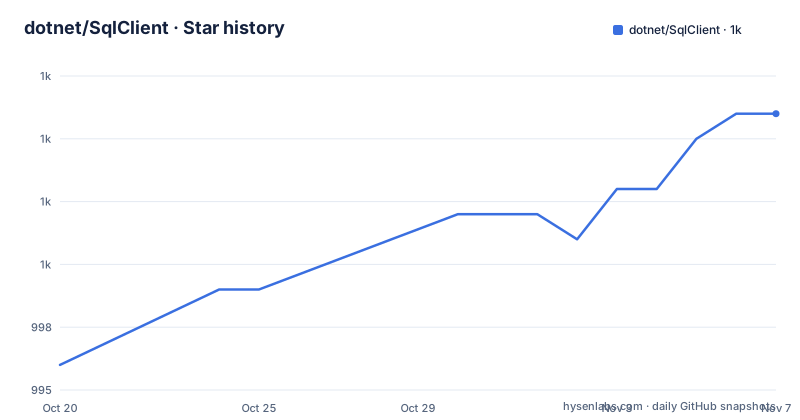
Star history
- dotnet/SqlClient1,006 ★ · +10
| Repository | 2026-10-20 | 2026-11-07 |
|---|---|---|
| dotnet/SqlClient | 996 | 1k |
10 Stars in the last 18 days, measured from the daily GitHub snapshot. Compare with other projects
Editorial analysis
Two old components merged into one driver namespace
Microsoft.Data.SqlClient did not begin life as a single library. According to the project description, it grew from a union of the two System.Data.SqlClient components that live independently in .NET and .NET Framework. In other words, the same public API existed in two boxes with two different shipping schedules, and the merge put one namespace in front of them.
The consequence that matters to an adopter is stated plainly in the project documentation: support for new SQL Server and Azure SQL features will only be implemented in Microsoft.Data.SqlClient. Any table type, protocol improvement or authentication work the team ships reaches the merged package, not the framework in-box copies. If you keep using System.Data.SqlClient, you are choosing to sit on a compatibility surface that will not grow.
For a team maintaining an existing .NET Framework application, that is an argument for migration rather than for a rewrite. The project publishes a porting cheat sheet specifically for people moving from System.Data.SqlClient, and it asks those users to improve the guide as they go, which is an unusually open invitation for a platform driver.
The scope is narrow on purpose. This is a data provider for one database family, the SQL Server and Azure SQL line, and it ships as a NuGet package rather than a service, an ORM or an abstraction layer. If you are looking for a general purpose data access framework, this package is not that.
The support floor excludes most .NET versions in the wild
The supportability statement in the README is short and blunt. The package supports.NET Framework 4.6.2+ and.NET 10.0+. There is no line for.NET Core 3.1, no line for.NET 5 through.NET 9, and no line for.NET Standard.
That gap is the single most consequential fact for anyone evaluating this driver. Applications in maintenance mode, often running on.NET Framework 4.6.2 through 4.8, are inside the supported range and will keep working. Applications on.NET Core or on.NET 5 through.NET 9 are not listed as a supported target here, which means you are picking up a package whose own support matrix does not claim your runtime. A team mid-way through upgrading from.NET Framework to.NET 8 should read that as a decision point rather than a detail.
Two consequences follow. First, the driver ties you to a specific shape of runtime, so a library that needs to serve many target frameworks may have to multi-target and take a dependency on the in-box System.Data.SqlClient for the older half. Second, the supported list is the environment list, not a promise about which SQL Server versions are reachable. The documentation gives no server version matrix, no minimum service pack requirement and no encryption or TLS floor, so the compatibility surface on the database side has to be confirmed by hand against the release notes folder rather than assumed from the package version.
The support policy lives in a separate SUPPORT.md file at the root, alongside CHANGELOG.md and the release-notes directory. A team that cares about how long a given version receives fixes will find the answer there, not in the README.
SNI and SNI.runtime decide which native DLL lands in your output
SQL Server connectivity on Windows depends on a native layer, and this project packages that layer two different ways depending on your target framework. The distinction is the kind of detail that turns into a support ticket at 2am, so it is worth understanding before the first build.
When targeting .NET Framework on Windows, a package reference to Microsoft.Data.SqlClient.SNI loads native Microsoft.Data.SqlClient.SNI.<platform>.dll libraries into the client's build directories. The platform placeholder in that file name is filled in per target, which is why the package ships several flavours at once.
When targeting .NET on Windows, a package reference to Microsoft.Data.SqlClient.SNI.runtime loads arm64, x64 and x86 native Microsoft.Data.SqlClient.SNI.dll libraries into subdirectories in the client's build directory. The three architectures coexist in the output, and the runtime picks the right one, which matters for anything that ships a multi-platform installer or runs on mixed hardware.
Neither package is described for Linux or macOS in the README, and no equivalent is named for those platforms. The supported environment list mentions framework versions rather than operating systems, so the operating system story has to be read out of the packaging and release notes rather than assumed. If your build is Windows only, the choice between the two packages is a framework decision. If it is not, you need to verify the native story yourself before committing.
Note also that these are package references, not runtime configuration. You are choosing an assembly version at build time, so a multi-targeted solution needs the reference per target framework rather than one reference for the whole solution.
Getting the package: a NuGet download and a porting guide
There is no installation script in this project, because there is nothing to install. The driver is a NuGet package, and the README points to NuGet.org as the download location:
https://www.nuget.org/packages/Microsoft.Data.SqlClient/That is the whole acquisition story. The package id is Microsoft.Data.SqlClient, and the two native companions described earlier are Microsoft.Data.SqlClient.SNI for .NET Framework on Windows and Microsoft.Data.SqlClient.SNI.runtime for .NET on Windows. The README documents no command line invocation, no configuration file and no environment variable, so there is nothing to copy into a terminal to reproduce a first use.
For an existing System.Data.SqlClient codebase, the first real use is a port rather than a greenfield call. The project points at porting-cheat-sheet.md for what it calls a safe porting experience from System.Data.SqlClient to Microsoft.Data.SqlClient. That is a document in the repository root, and the request attached to it is worth taking seriously: the team asks porting developers to enhance the guide with their own experience, so a migration that turns up a rough edge is an expected contribution rather than a defect report.
The other entry points for a first real use are documentation rather than code. A FAQ wiki answers common questions and the project asks that anything still unanswered become a new issue. For a first connection, the practical order is: install the package, open a connection against your server, then read the changelog for the version you pinned to see whether any behaviour you depend on changed.
A build system that ships as part of the repository
The root of the repository tells you this is a driver built with the same machinery as the .NET runtime itself. The top level includes build.proj, Directory.Packages.props, global.json, NuGet.config and NuGet.analysis.config for dependency and package management, plus eng/, tools/ and a .devcontainer/ directory for the development environment. Coverage is wired through azurepipelines-coverage.yml, and CodeQL.yml sits at the root for static analysis.
None of that is user facing, but two of it are. Directory.Packages.props and NuGet.config together indicate a centrally managed dependency set, which is the mechanism behind the central package version management some .NET teams adopt. And the presence of a packaging analysis configuration, a code analysis pipeline and a code scanning configuration says something about how the maintainers expect changes to be reviewed, even though the README does not spell out the rules.
The review process, coding style and coding best practices all live under policy/ as separate documents, and the repository also carries AGENTS.md, TESTGUIDE.md and CONTRIBUTING.md for automated and human contributors. A contributing-workflow.md file sits beside them. For a maintainer taking a patch, that documentation set is the real entry point, and it is unusually complete for a driver project.
For a user of the package, the useful takeaway is narrower. The build system tells you the driver is produced by Microsoft's own engineering pipeline and released on a defined cadence, and it tells you that packaging regressions are something the project checks for. It does not tell you anything about your application's connection behaviour, and readers looking for that should not get it from the repository layout.
Three releases in September 2026 and a push on 2026-10-19
The release history is dense and recent. Stable release v7.0.3 shipped on 2026-09-10, v7.1.0 followed on 2026-09-18, and v7.1.1 on 2026-09-29. The last push to the repository was on 2026-10-19, and the project is not archived. The README states that all preview and stable driver release notes are available under the release-notes directory, and release milestones are tracked as GitHub milestones.
Two readings are possible and you should pick deliberately. A patch level that moves from 7.0.3 to 7.1.1 within three weeks suggests a fast path for small fixes, but the project does not publish a schedule, so do not plan around a cadence that is not documented. More importantly for an adopter, three releases in one month means the version you pin will age, and a pinned version that is not the latest patch may or may not be in the support window. The SUPPORT.md and CHANGELOG.md files exist to answer that, and the release notes folder is where behaviour changes are described.
The migration angle deserves one more note. Because new SQL Server and Azure SQL capabilities are implemented only in Microsoft.Data.SqlClient, a team that stays on System.Data.SqlClient cannot pick them up by upgrading the framework. The driver has to move first. That is the practical argument for planning a port during a normal dependency update cycle rather than during an incident.
Licensing is straightforward. The driver is licensed under the MIT license, with the LICENSE file and a NOTICE.txt at the repository root and copyright details in COPYRIGHT.md. That is a permissive license, but this review is a technical read, not legal advice, and specific obligations around NOTICE.txt handling are for your own counsel to confirm.
Where the README stops and the wiki has to take over
The documentation is strongest on packaging and weakest on behaviour. The README covers supportability, the SNI packages, where to download, the helpful links table, the security reporting path and the license. It does not document connection string configuration, the authentication modes the driver accepts, retry or transient fault handling, connection pooling behaviour, cancellation and timeout semantics, or how encrypted connections are negotiated.
That is not unusual for a provider that predates much of the current .NET ecosystem, but it leaves a reader with two specific obligations. The first is to read the changelog and the release notes folder for the version you intend to pin, because those are the only places where behaviour changes are recorded. The second is to treat the FAQ wiki and the issue tracker as the place where questions get answered: the README explicitly says that if the FAQ does not answer your question, create an issue to ask it. There is no support channel described other than those two.
Two failure modes are visible from the documentation itself. The first is target framework mismatch, where an application on a .NET version outside the supported list will be running the driver outside the matrix the project claims. The second is native library packaging on Windows, where choosing the wrong SNI package reference leaves the expected DLLs absent from the build output, and the README gives no diagnostic procedure for that case.
The alternative to this driver is the in-box System.Data.SqlClient that ships with .NET and .NET Framework, and the difference in approach is explicit: the new package receives all new server feature work, while the in-box copies remain as they are. A team that only needs a stable path to an existing SQL Server and has no interest in upcoming features can justify staying put. A team that wants new SQL Server or Azure SQL behaviour has one destination, and the porting cheat sheet is the route to it.
Editorial conclusion
Adopt Microsoft.Data.SqlClient when your application targets.NET Framework 4.6.2 or.NET 10.0 and talks to SQL Server or Azure SQL, since new server capabilities are only implemented here. Do not adopt it for a project on an older.NET target. Before committing, check the porting cheat sheet for your existing System.Data.SqlClient usage, confirm whether your Windows build needs the SNI or SNI.runtime package, and read the support policy and changelog for the version you pin, because the README leaves authentication, connection resilience and encryption defaults undocumented.
Frequently asked questions
How do I add Microsoft.Data.SqlClient to a .NET project?
The driver ships as the Microsoft.Data.SqlClient NuGet package, and the README points to NuGet.org for the download. The project documents no command line installation, so add the package reference through your usual NuGet tooling.
Which .NET versions does Microsoft.Data.SqlClient support?
The supportability section lists .NET Framework 4.6.2+ and .NET 10.0+. The README does not list .NET Core or the intermediate .NET releases, so confirm your target framework against that list before adopting the package.
What is the difference between Microsoft.Data.SqlClient and System.Data.SqlClient?
Microsoft.Data.SqlClient grew from a union of the two System.Data.SqlClient components that live independently in .NET and .NET Framework. Support for new SQL Server and Azure SQL features is implemented only in Microsoft.Data.SqlClient, and the repository ships a porting cheat sheet for moving an existing codebase across.
Do I need the Microsoft.Data.SqlClient.SNI packages?
On Windows, a package reference to Microsoft.Data.SqlClient.SNI loads native Microsoft.Data.SqlClient.SNI.<platform>.dll libraries for .NET Framework targets, while Microsoft.Data.SqlClient.SNI.runtime loads arm64, x64 and x86 native libraries into subdirectories for .NET targets. The README names no equivalent for other operating systems.
Is Microsoft.Data.SqlClient still being worked on?
The repository is not archived and the last push was on 2026-10-19. Recent stable releases include v7.0.3 on 2026-09-10, v7.1.0 on 2026-09-18 and v7.1.1 on 2026-09-29, with all release notes kept in the release-notes directory.
Official sources
Add this badge to your README
If you maintain this project, the badge below links readers to this analysis and shows its maintenance status from the daily GitHub snapshot. Paste the markdown into your README; add ?metric=license or ?metric=stars to the image URL for a different field.

[](https://hysenlabs.com/projects/dotnet-sqlclient)Star history chart for your README
[](https://hysenlabs.com/projects/dotnet-sqlclient)Was this useful?