StyleCop.Analyzers pins each C# version to a package version, and the newest line is still beta
An implementation of StyleCop rules using the .NET Compiler Platform
At a glance
- What is it?
- A Roslyn implementation of the StyleCop rules with code fixes where possible. The README is short: installation lives on a separate site, and the version table shows that current C# support ships only as beta releases.
- Who is it for?
- Adopt StyleCop.Analyzers if your team wants StyleCop rules enforced by the compiler and is prepared to run the 1.3.0-beta line for C# 9.0 and later. Do not adopt it expecting a stable release for current C#, or expecting the README to answer editor questions such as VS Code.
- Can I use it commercially?
- Yes. MIT is a permissive licence: you can use, modify and sell software built on it, as long as you keep its copyright and licence notices.
- Is it still maintained?
- Yes. The repository last received commits 1 day ago.
- What is it written in?
- Mainly C#, according to GitHub's language statistics.
Answers come from the project's GitHub data, last synced on November 26, 2026, and from our analysis. They are not legal advice.
Star history
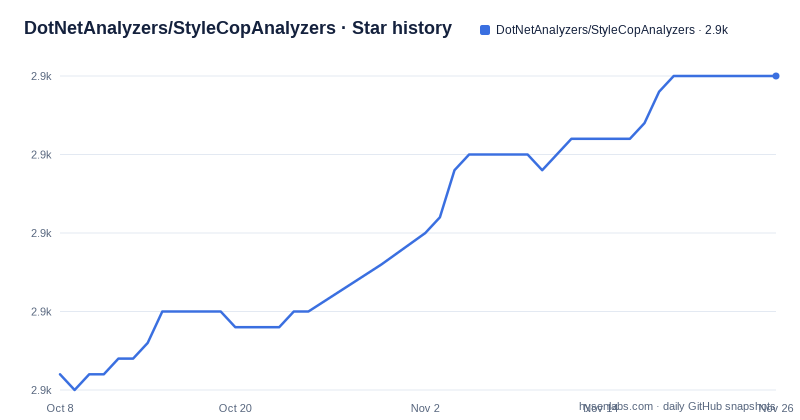
- DotNetAnalyzers/StyleCopAnalyzers2,875 ★ · +19
| Repository | 2026-10-08 | 2026-11-26 |
|---|---|---|
| DotNetAnalyzers/StyleCopAnalyzers | 2.9k | 2.9k |
19 Stars in the last 49 days, measured from the daily GitHub snapshot. Compare with other projects
Editorial analysis
The StyleCop rules run as Roslyn analyzers instead of a separate tool
StyleCop.Analyzers is an implementation of the StyleCop rules using the .NET Compiler Platform. In practice that means the rules are analyzers that the C# compiler loads, so violations appear as ordinary compiler diagnostics in the build and in the editor. The package is published on NuGet as StyleCop.Analyzers, which is the name the repository badges point at.
The README makes one further promise: where possible, code fixes are also provided to simplify the process of correcting violations. The words where possible matter. Some rules come with an automatic fix and some do not, and the README does not list which is which. The repository does not claim that every violation can be fixed with one click, so budget manual edits for the rest when you first switch the rules on in an existing codebase.
Installation is delegated to a guide on a separate site
The Installation section of the README is a single link to a getting started guide at dotnetanalyzers.github.io/StyleCopAnalyzers. It contains no command, no package reference snippet and no version number. That means the README alone cannot take you from an empty project to a working rule set.
The repository does carry the files such a guide would rely on. The top level includes Directory.Packages.props, Directory.Build.props, NuGet.config and a docfx folder next to docs and documentation, which suggests the guide is generated from within the repository. The project says where to get the package, NuGet, and where to read how to wire it in. Everything beyond that has to come from the guide.
Severity follows the standard Roslyn route, with extra options on top
Severity of individual rules may be customised in the standard way for Roslyn analyzers. If your team already sets severities through a ruleset or editor configuration for other analyzers, the same mechanism applies here, and no StyleCop specific file is needed for that part.
On top of that, the README points to a Configuration page on the same documentation site that lists many options for tailoring the analyzers to your team's tastes. The repository root also contains stylecop.json and two ruleset files, StyleCop.Analyzers.ruleset and StyleCop.Analyzers.Internal.ruleset. Their contents are not shown in the README, and nothing in it states what they set, so do not assume they are templates for your own project. Read them before copying them.
The C# version table decides which package you can install
StyleCop.Analyzers does not use one version for every language level. The README maps C# versions to analyzer versions in a table. C# 1.0 through 6.0 pairs with v1.0.2. C# 7.0 through 7.3 pairs with v1.1.0. C# 8.0 pairs with v1.2.0-beta. C# 9.0 through 15.0 pairs with v1.3.0-beta.
The README also says the project generally recommends the latest version of StyleCop.Analyzers, especially with recent C# language versions. The practical consequence is that choosing an older package for stability costs you language support. A project on C# 9.0 or later cannot pair with the v1.0.2 or v1.1.0 releases and stay within the table.
Current C# support has only shipped as beta so far
Every release the repository lists recently carries a beta suffix. The newest three are 1.3.133-beta on 2026-10-19, 1.3.149-beta on 2026-10-20 and 1.3.151-beta on 2026-10-21. The last push to the repository was on 2026-10-25, so the project is moving, with several versions in a three day window.
The table has the same pattern. Both rows above C# 7.3 end in beta: v1.2.0-beta for C# 8.0 and v1.3.0-beta for C# 9.0 through 15.0. If your organisation forbids prerelease packages, this project cannot meet that rule for any recent language version, and the README offers no stable alternative for it. Pin an exact version in Directory.Packages.props style central management rather than floating, because the version number advances quickly.
How the repository is laid out for people who want to contribute
The Contributing section points to CONTRIBUTING.md. The top level shows the working parts. The analyzer source sits in StyleCop.Analyzers, tests in test, and the solution is StyleCopAnalyzers.slnx. Build scaffolding includes global.json, dotnet-tools.json, version.json, init.ps1, a build folder and a tools folder. Continuous integration is shown by a build workflow badge, a Codecov badge and an appveyor.yml file. Dependency updates are configured through renovate.json.
The repository also holds AGENTS.md and CLAUDE.md, files for AI coding agents, and a .agents folder. The README says nothing about how they are used. The license is MIT, and THIRD-PARTY-NOTICES.txt covers bundled components. A chat room on Gitter is linked from the badges, so questions have a place to go.
What the README does not answer
A reader who searches for this project often asks what StyleCop Analyzers is, and whether it works in VS Code. The first question has a clear answer in the README's opening sentence. The second does not, because the README never mentions VS Code or any editor. Since it is a set of Roslyn analyzers, the guide on the documentation site is the place to confirm editor behaviour.
The README also does not list the rules, their identifiers or which have code fixes. It does not describe how the rules differ from the original StyleCop tool beyond using the compiler platform. If you need that detail, expect to read the documentation site or the docs folder in the repository, not this page.
Editorial conclusion
Adopt StyleCop.Analyzers if your team wants StyleCop rules enforced by the compiler and is prepared to run the 1.3.0-beta line for C# 9.0 and later. Do not adopt it expecting a stable release for current C#, or expecting the README to answer editor questions such as VS Code. Before rolling it out, open the getting started guide, check which version matches your C# language level, and decide on severities in your ruleset.
Frequently asked questions
What is StyleCop Analyzers?
It is an implementation of the StyleCop rules using the .NET Compiler Platform. Where possible, code fixes are provided to simplify correcting violations.
Does StyleCop Analyzers work in VS Code?
The README does not mention VS Code or any editor. It sends readers to a getting started guide at dotnetanalyzers.github.io/StyleCopAnalyzers for installation.
Which StyleCop.Analyzers version matches which C# version?
C# 1.0 to 6.0 uses v1.0.2, C# 7.0 to 7.3 uses v1.1.0, C# 8.0 uses v1.2.0-beta, and C# 9.0 to 15.0 uses v1.3.0-beta.
Official sources
Add this badge to your README
If you maintain this project, the badge below links readers to this analysis and shows its maintenance status from the daily GitHub snapshot. Paste the markdown into your README; add ?metric=license or ?metric=stars to the image URL for a different field.

[](https://hysenlabs.com/projects/dotnetanalyzers-stylecopanalyzers)Star history chart for your README
[](https://hysenlabs.com/projects/dotnetanalyzers-stylecopanalyzers)Was this useful?