ricosuter/nswag: the template name decides your client, and the release title carries NJsonSchema
The Swagger/OpenAPI toolchain for .NET, ASP.NET Core and TypeScript.
At a glance
- What is it?
- NSwag is a C# toolchain that generates Swagger 2.0 and OpenAPI 3.0 specifications from ASP.NET controllers and then generates clients back from those specifications, combining what Swashbuckle and AutoRest do separately. Its release tags embed the matching NJsonSchema version, its TypeScript client generator selects a named template, and seven integration paths are offered with exactly one marked recommended.
- Who is it for?
- NSwag fits a team that wants one tool to go from controllers to specification to typed client in either C# or TypeScript, and that wants inheritance and enum handling beyond what the specification describes. It does not fit a project committed to one of the tools it replaces, or one that needs OpenAPI 3.1, which the readme's summary and feature list do not name.
- Can I use it commercially?
- Yes. MIT is a permissive licence: you can use, modify and sell software built on it, as long as you keep its copyright and licence notices.
- Is it still maintained?
- Yes. The repository last received commits 3 days ago.
- What is it written in?
- Mainly C#, according to GitHub's language statistics.
Answers come from the project's GitHub data, last synced on November 14, 2026, and from our analysis. They are not legal advice.
Star history
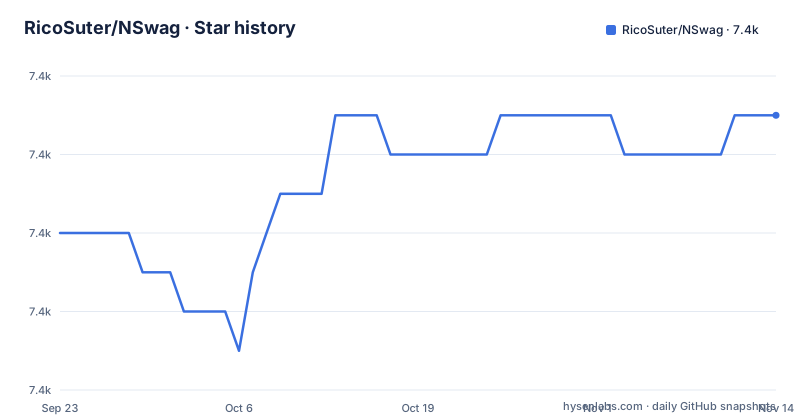
- RicoSuter/NSwag7,369 ★ · +3
| Repository | 2026-09-23 | 2026-11-14 |
|---|---|---|
| RicoSuter/NSwag | 7.4k | 7.4k |
3 Stars in the last 52 days, measured from the daily GitHub snapshot. Compare with other projects
Editorial analysis
One toolchain in place of Swashbuckle and AutoRest
The pitch is consolidation. NSwag combines the functionality of Swashbuckle, which generates OpenAPI and Swagger specifications, and AutoRest, which generates clients, into a single toolchain, and the readme states plainly that those two libraries are then not needed. The argument for one tool is compatibility: having both ends in one place avoids a class of incompatibilities between a spec writer and a client writer. The second argument is coverage of what the specifications describe badly. Inheritance, enums and reference handling are named as the cases that get better support, and they get it because NSwag leans on NJsonSchema for JSON Schema handling and for generating C# and TypeScript classes and interfaces. NJsonSchema is a separate project with its own site, and it is the dependency that shapes most of NSwag's behaviour. The scope covers .NET, .NET Core, Web API and ASP.NET Core on the server side and TypeScript on the client side, with the older browser frameworks such as jQuery, AngularJS, Aurelia and KnockoutJS still named as targets, which dates the compatibility list.
Every release title carries the NJsonSchema version it ships with
The tag names look longer than a version number because they carry two. The latest is v14.7.1, titled NSwag v14.7.1 with NJsonSchema v11.6.1, published 2026-04-20. Before it, v14.7.0 shipped with NJsonSchema v11.6.0 on 2026-04-08, and v14.6.3 shipped with NJsonSchema v11.5.2 on 2025-11-20. That pairing is a practical signal for anyone pinning a version: the two packages move together, and a mismatch between an NSwag release and an NJsonSchema reference is not a combination the project advertises. It also shows the two version lines at different places, with NSwag on 14 and NJsonSchema on 11, so an upgrade that reads as a minor bump in one is a minor bump in both. The project is developed and maintained by Rico Suter and other contributors. The default branch is named master, the licence is MIT, and the last push to the repository was 2026-09-07, so the gap between that push and the April releases is commits that have not produced a tagged build yet.
Four ways to produce a specification, each starting from something different
The generator list is where the practical differences sit. `AspNetCoreOpenApiDocumentGenerator` and `WebApiOpenApiDocumentGenerator` read controllers inside the running or referenced ASP.NET and ASP.NET Core project, and the second one produces a specification for Web API controllers specifically. `WebApiToOpenApiCommand` goes one step further out, generating a specification for controllers in an external Web API assembly, with separate support for loading .NET Core assemblies since those cannot be read the same way as full framework ones. `TypesToOpenApiCommand` is the narrowest: it generates a specification containing only types from .NET assemblies, with no controllers involved at all. Middleware sits alongside these to serve the specification, optionally with Swagger UI or ReDoc in front of it. Choosing between them is a question about where the truth lives: a controller generator reflects the code as written, a types generator reflects the contracts you already have, and an external assembly generator reflects a service someone else maintains.
TypeScript clients are chosen by template name, and one is preview
Client generation is not a single output format, it is a menu with stable internal names. The TypeScript generator offers JQuery with Callbacks named `JQueryCallbacks`, JQuery with promises named `JQueryPromises`, AngularJS using $http named `AngularJS`, Angular version 2 and later on the http service named `Angular`, the window.fetch API with ES6 promises named `Fetch`, which the readme recommends inside a React or Redux app, and Aurelia using the HttpClient from aurelia-fetch-client named `Aurelia`, which is based on the Fetch template. Axios is listed last and marked preview. On the C# side the generator produces either plain objects or classes implementing INotifyPropertyChanged so the DTOs can bind, and the generated clients are stated to work with full .NET, .NET Core, Xamarin and .NET Standard 1.4. The same menu of choices exists on the server side in reverse: `CSharpControllerGenerator` produces Web API controllers from a specification for contract first or schema first development, which is the workflow where the specification is written before the code.
Seven ways in, and only one of them is recommended
The ways to use the toolchain are listed as a menu with a verdict attached to exactly one entry. The recommended route is the OpenAPI or OpenAPI UI middleware for OWIN and ASP.NET Core, which can also serve Swagger UI. Above it sits NSwagStudio, a Windows GUI; below it is the command line, which runs on Windows, Mac and Linux through Mono or a .NET Core console binary and is also published as an NPM package. Below it are the in-code NuGet route and MSBuild targets for build automation. The remaining two carry their own warnings: ServiceProjectReference tags in a csproj file are marked preview, and the Azure Functions v2 integration is an external project that might not use the latest NSwag version. The CLI itself is configured through a JSON file or through the Windows UI. Two tutorials anchor the recommended path, one on adding NSwag to an ASP.NET Core application and one on integrating the toolchain into an ASP.NET Web API project, with a separate walkthrough for generating an Angular TypeScript client from an existing web assembly API and a five minute video for the quick version.
Three build scripts, Nuke, and two CI systems in one tree
The repository is set up like a product rather than a sample. There are three build entry points, `build.cmd`, `build.ps1` and `build.sh`, and a `.nuke/` directory indicating the build itself is driven by Nuke. Version management is centralised through `Directory.Build.props` and `Directory.Packages.props`, the latter being where package versions are pinned in one file, and `global.json` pins the .NET SDK the build expects. Two continuous integration systems appear side by side, `azure-pipelines.yml` at the root and a `.github/` directory with the build workflow badge the readme links. Alongside them sit `docs/`, `CHANGELOG.md`, `CONTRIBUTING.md` and a `src/` directory. `assets/` holds the project images and the sponsors section at the top of the readme is backed by a backers link, which is the usual sign of a project with funding rather than a company budget behind it.
The specification target stops at OpenAPI 3.0
Across the readme the stated targets are Swagger 2.0 and OpenAPI 3.0, in the summary and again in the feature list, and OpenAPI 3.1 is not named in either place. That matters for anyone whose upstream tooling has already moved, because the specification version a generator emits constrains what a consumer can do with it. The same file also carries news of a separate product, an announcement of Apimundo as an API documentation system based on NSwag and NJsonSchema, linked from issue 3077, alongside Namotion.Reflection as a related project of the same author. The reference detail is thin here by design: parameter tables and per-generator options live in the GitHub wiki rather than the repository, with Stack Overflow questions tagged nswag and a Discord server as the two community routes.
Editorial conclusion
NSwag fits a team that wants one tool to go from controllers to specification to typed client in either C# or TypeScript, and that wants inheritance and enum handling beyond what the specification describes. It does not fit a project committed to one of the tools it replaces, or one that needs OpenAPI 3.1, which the readme's summary and feature list do not name. Before adopting it, pick the integration path that matches your build, since the recommended middleware and the preview csproj tags carry different maintenance promises, and read the wiki rather than the readme for reference detail.
Frequently asked questions
What is NSwag?
A C# toolchain for Swagger 2.0 and OpenAPI 3.0 that generates specifications from ASP.NET and ASP.NET Core controllers and generates C# or TypeScript clients from those specifications. It combines what Swashbuckle and AutoRest do separately, so those two are not needed.
How do I install NSwag?
Take it from NuGet in code, as the nswag NPM package for the command line tools, or download NSwag.zip for the command line and NSwagStudio, or NSwagStudio.msi for the Windows desktop application, from the GitHub releases.
how to use nswag studio
NSwagStudio is the Windows desktop application, installed from the MSI. It is one of the ways to run the toolchain, and it can also configure the command line, which is otherwise configured through a JSON file.
how to use nswag msbuild
NSwag ships MSBuild targets so the whole toolchain can run during a build rather than by hand. The same automation is possible with the CLI as a NuGet tool or build target, or through the NPM package.
what is nswag c#
It is the C# implementation of the toolchain. Its CSharpClientGenerator produces clients from an OpenAPI specification as either plain objects or classes implementing INotifyPropertyChanged, usable with full .NET, .NET Core, Xamarin and .NET Standard 1.4.
Official sources
Add this badge to your README
If you maintain this project, the badge below links readers to this analysis and shows its maintenance status from the daily GitHub snapshot. Paste the markdown into your README; add ?metric=license or ?metric=stars to the image URL for a different field.

[](https://hysenlabs.com/projects/ricosuter-nswag)Star history chart for your README
[](https://hysenlabs.com/projects/ricosuter-nswag)Was this useful?