download-directory: a web app that zips one folder from a GitHub repository
Web App: Download just a sub directory from a GitHub repo.
At a glance
- What is it?
- download-directory is a small static web application that takes a link to a directory in a GitHub repository and hands back a zip of the files inside it, with the folder and the archive name passed as query parameters. It suits anyone who needs a subdirectory of a large repository, and it asks the user for a GitHub token in the browser, which is the trade to think about.
- Who is it for?
- Adopt download-directory if you regularly need one folder out of a large GitHub repository and you would rather click a link than run a shallow clone, because the whole flow is a single query string and a zip. Do not paste a personal access token with repository scope into it, since the page is a static site operated by a third party and the README does not say what the token is used for or where it is sent.
- Can I use it commercially?
- Yes. MIT is a permissive licence: you can use, modify and sell software built on it, as long as you keep its copyright and licence notices.
- Is it still maintained?
- Yes. The repository last received commits 179 days ago.
- What is it written in?
- Mainly TypeScript, according to GitHub's language statistics.
Answers come from the project's GitHub data, last synced on November 7, 2026, and from our analysis. They are not legal advice.
Star history
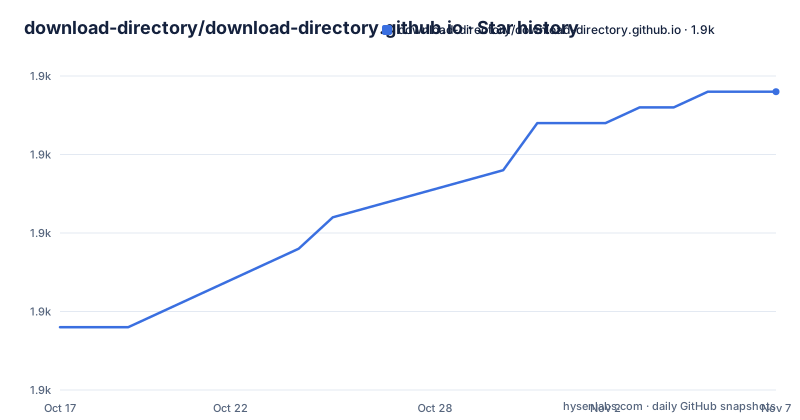
- download-directory/download-directory.github.io1,899 ★ · +15
| Repository | 2026-10-17 | 2026-11-07 |
|---|---|---|
| download-directory/download-directory.github.io | 1.9k | 1.9k |
15 Stars in the last 21 days, measured from the daily GitHub snapshot. Compare with other projects
Editorial analysis
The gap it fills: GitHub cannot give you one folder
GitHub does not let you download a single folder from a repository, which is the problem this tool is built around. The README frames it as something that might be necessary when you just need a few files from a large repository, which is a familiar situation: a build directory in a big project, a folder of examples, one package inside a monorepo.
The GitHub archive download gives you the whole repository as a zip, which is slow for a large repo and gives you a folder you then have to dig into. Cloning with sparse checkout does the same job from a terminal, at the cost of git and a working directory.
The approach here is neither. It is a web application, so the flow is: enter a token, paste or open a link to the directory, and the download starts automatically, with the result being a zip of the files in that directory.
The implementation is TypeScript, the project is MIT licensed and credited to Federico Brigante, and it is published as a static site at download-directory.github.io. The last push to the repository was on 2026-05-13, and there are no tagged releases, which is normal for a site rather than a library.
Everything is driven by two query parameters
The nice property of this design is that it is deep linkable. The download starts automatically when you visit the link to the GitHub directory passed as the url parameter.
?url=https://github.com/mrdoob/three.js/tree/dev/buildThe example is a build directory in the three.js repository, on the dev branch. Any directory URL of that shape works, because the tree URL is what identifies both the repository and the path within it.
The second parameter is the filename, and it controls the name of the archive you get back. The README shows the same directory with a filename added, and the result is saved as three-js-build.zip.
?url=https://github.com/mrdoob/three.js/tree/dev/build&filename=three-js-buildThat combination is what makes the tool usable from another page. A link can point at a specific folder and name the archive, and nothing else has to be configured, which is how the Refined GitHub browser extension described in the related section can add a link to this app on a GitHub directory page.
The other related project, list-github-dir-content, is a companion that lists the files in a GitHub repository directory, which is the discovery step you want before you commit to downloading a large folder.
The token, and what the README does not say about it
The usage note in the README is that the tool handles the download of all the files in a directory in a single click, after you have entered your token. The token is the input the application requires before it does anything.
What the README does not say is what the token is used for. It does not state which scopes are needed, whether the token is stored, or where the request that carries it is sent. That silence is the thing to weigh, because the application is a static site served from a github.io domain, which means the JavaScript doing the work is fetched from a domain operated by a third party, and the token is typed into that page.
The repository layout suggests the token is used in the browser rather than proxied through a server. There is an authenticated-fetch.ts module, with its own test file, alongside download.ts and repository-info.ts, each of which also has a matching test. The naming is a reasonable place to look for the answer.
The practical advice follows from that structure. If you need a token for this to work, treat it as a credential you are handing to a page you did not build, scope it as narrowly as you can, and if the token turns out to be unnecessary for public directories, do not enter it at all. Reading the source before trusting a credential with your account is cheap, and the project is small enough to read.
How it is built: three TypeScript modules and a Parcel bundle
The source is three modules with a test file each, which is a small enough surface to understand in one sitting.
authenticated-fetch.ts is the module that talks to GitHub with the credential, download.ts assembles the archive, and repository-info.ts resolves the repository and directory from the URL. The tests are named after the modules, with authenticated-fetch.test.ts, download.test.ts and repository-info.test.ts.
The runtime dependencies explain the shape of the solution. jszip is what produces the archive in the browser, list-github-dir-content is the package that enumerates the files in a directory, p-map limits how many of those requests run at once, and p-retry retries the ones that fail. Those two last ones are the interesting choices for a tool that fetches many small files from an API, since the naive approach is to request everything at once and get rate limited.
The build is Parcel, with a couple of unusual settings. The build script runs parcel build with a dist-dir of public and scope hoisting disabled, and there is a separate typescript script that runs tsc with noEmit, so types are checked without emitting. Linting is xo, and the test script runs lint, build and the vitest suite in parallel.
		"build:bundle": "parcel build --dist-dir public --no-scope-hoist",
		"build:typescript": "tsc --noEmit",
		"test": "run-p lint build test:*",
		"test:vitest": "vitest run",
The package is marked private, so it is not published to a registry. This is a website, not a library you install.
The bundler setting that keeps the download links cacheable
One configuration line deserves its own section, because it is the kind of detail that reveals how the author thinks about the problem.
	"parcelIgnore": [
		"/\\?url"
	]
The parcelIgnore list in package.json names the url parameter.
The filename parameter is not in the ignore list, and does not need to be, since it is handled by the application at runtime rather than by the bundler.
It is a small thing, and it is the difference between a demo that works and a service that is pleasant to link to.
GitZip, DownGit and the argument for a third option
The README positions this project as an alternative to two existing tools, GitZip and DownGit, and does so with a phrase that is worth taking apart, since it is the entire claim to difference.
The claim is that this is an alternative but without the cruft. The README does not define what the cruft is, so the comparison has to be made by trying them, and the honest statement is that all three do the same job, which is to turn a GitHub directory URL into a zip of that directory.
What can be said from the repository is where this implementation chooses to be minimal. The dependency list has four runtime packages, the source is three modules, and there is no account system, no server component and no configuration file. The comparison to the alternatives is therefore a comparison of surface area rather than of features.
The two other projects named in the related section point the other way, towards integration. list-github-dir-content gives you the file listing, and Refined GitHub is a browser extension that adds a link to this app to GitHub pages and, in the words of the README, much more. So the intended workflow is that the extension injects a link into a GitHub directory page, and the link opens this app with the url parameter filled in.
If you already have Refined GitHub installed, the integration is already in place, which is the strongest argument for this implementation over the alternatives it lists.
Maintenance, hosting and what is not documented
Three practical notes about the state of the project.
The first is that the repository has no tagged releases and the last push was on 2026-05-13. For a static site that is unremarkable, but it does mean there is no version to pin if you fork and deploy it yourself, and no changelog to check what changed.
The second is hosting. The application is a static site, which is why the whole flow happens in your browser, and why the tool has no server to run. A fork is therefore deployed by serving the built public directory, and the Docker free deployment options that a server based tool would offer do not apply. The parcel build output directory in the build script is public, which is where a fork would point its static host.
The third is what the documentation does not cover. There is no page on how to obtain a token with the right scope, no note on what the app does with the token after you enter it, and no explanation of the request rate behaviour when a directory contains thousands of files, although the presence of p-map and p-retry in the dependencies shows that the case was considered in the implementation.
The browser extension integration, the Refined GitHub link, and the list of related tools in the README are the recommended entry points, and the code is short enough that reading authenticated-fetch.ts is faster than waiting for a token to be misused.
Editorial conclusion
Adopt download-directory if you regularly need one folder out of a large GitHub repository and you would rather click a link than run a shallow clone, because the whole flow is a single query string and a zip. Do not paste a personal access token with repository scope into it, since the page is a static site operated by a third party and the README does not say what the token is used for or where it is sent. Before you use it on anything that matters, run the local development server and read authenticated-fetch.ts, which is where that request is made.
Frequently asked questions
How do I download a single folder from a GitHub repository?
Open download-directory.github.io with a url parameter pointing at the GitHub directory, for example ?url=https://github.com/mrdoob/three.js/tree/dev/build. The download starts automatically, and adding a filename parameter sets the name of the resulting archive.
Does download-directory need a GitHub token?
The README says the tool handles the download after you have entered your token. It does not state which scopes the token needs, whether it is stored, or where it is sent, so the repository module named authenticated-fetch.ts is the place to look before deciding what to enter.
How is download-directory built and tested?
It is a TypeScript project bundled with Parcel, linted with xo and tested with vitest. The source is split into authenticated-fetch.ts, download.ts and repository-info.ts, each with a matching test file, and the runtime dependencies are jszip, list-github-dir-content, p-map and p-retry.
How does download-directory compare with GitZip and DownGit?
The README describes it as an alternative to GitZip and DownGit but without the cruft, without spelling out what that means. What the repository shows is a small static site with four runtime dependencies and no server component, and an integration path through the Refined GitHub browser extension.
Official sources
Add this badge to your README
If you maintain this project, the badge below links readers to this analysis and shows its maintenance status from the daily GitHub snapshot. Paste the markdown into your README; add ?metric=license or ?metric=stars to the image URL for a different field.

[](https://hysenlabs.com/projects/download-directory-download-directory-github-io)Star history chart for your README
[](https://hysenlabs.com/projects/download-directory-download-directory-github-io)Was this useful?