DownThemAll! WE: mass downloading rebuilt on top of the browser download manager
The DownThemAll! WebExtension
At a glance
- What is it?
- DownThemAll! WE is the WebExtension rewrite of the DownThemAll! download manager, and its own documentation is blunt about what the browser platform took away, including its own download engine. The judgement is that the value left is the mass selection, renaming masks and queueing, and the cost is that the extension is now a filter in front of a downloader the project does not control.
- Who is it for?
- DownThemAll! WE fits a Firefox user who needs to select hundreds of links by pattern, rename them with a mask, and queue them so the browser does not fire them all at once.
- Can I use it commercially?
- Check first. The repository uses a licence we do not classify automatically, so read its LICENSE file before any commercial use.
- Is it still maintained?
- Yes. The repository last received commits 21 days ago.
- What is it written in?
- Mainly TypeScript, according to GitHub's language statistics.
Answers come from the project's GitHub data, last synced on November 7, 2026, and from our analysis. They are not legal advice.
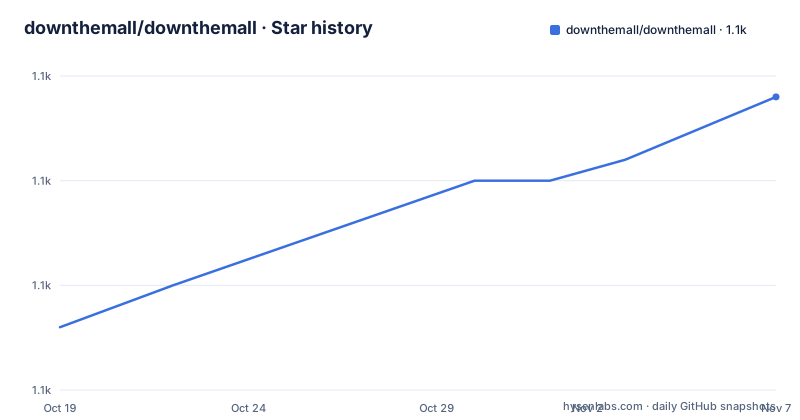
Star history
- downthemall/downthemall1,134 ★ · +11
| Repository | 2026-10-19 | 2026-11-07 |
|---|---|---|
| downthemall/downthemall | 1.1k | 1.1k |
11 Stars in the last 19 days, measured from the daily GitHub snapshot. Compare with other projects
Editorial analysis
A rewrite forced by the platform, not chosen for its features
DownThemAll! WE is the WebExtension version of DownThemAll!, described in the documentation as a complete re-development from scratch. The original extension, for those still on a supported browser, lives in a separate `downthemall-legacy` repository.
The reason for the rewrite is stated without hedging. Mozilla decided to adopt WebExtensions as the only extension type, and WebExtensions are described as extremely limited in what they can do. The consequence is that the WebExtension version lacks a lot of features the original had, and the documentation offers an apology for it followed by the explanation that there is no way around it.
What was lost is specific, and the most important item is the extension's own downloader. The original DownThemAll! could perform its own downloads; the WebExtension cannot, because every download has to go through the browser's built-in download manager. The documentation describes that manager as notoriously bad at handling certain quirks that real web servers show, and adds that it does not even handle regular 404 errors correctly.
So some bugs that were fixed in the original are back. That is a deliberate, documented regression rather than an oversight, and it is the single most important thing to understand about this project before evaluating it.
The remaining legacy code is a separate concern. The `package.json` `license` field says MIT, but the repository carries a custom licence GitHub cannot classify, and the root carries both `LICENSE.md` and `LICENSE.gpl-2.0.txt`, so the split matters if you reuse code.
The workaround attempts, and why none of them shipped
One passage in the documentation is unusually revealing, and it explains the shape of the project better than any feature list could.
The author describes spending countless hours evaluating workarounds to allow the extension to do its own downloads rather than relying on the browser's downloads API. The approaches listed are: using IndexedDB to store retrieved chunks fetched via XHR, and doing service-worker tricks to fake a download that the backend would then retrieve with XHR.
The second one is described as looking promising but not yet working in a manner that is reliable, performs well enough, and does not consume all the system memory. The conclusion is left open with a maybe in the future.
That paragraph tells you the real engineering constraint. An extension cannot simply run its own transfer pipeline in the background, because the browser owns the download surface. The fakes are attempts to route around a platform decision, and the honest assessment is that they do not yet work at acceptable quality.
The `TODO.md` file at the repository root is where the planned and explicitly impossible work is tracked, and the documentation points there for the full picture. The `lib/` directory is described as the backend stuff and assorted library routines and classes, and the `windows/` directory as the frontend stuff, meaning the HTML and the code that makes it interactive. The `uikit/` directory holds the shared interface kit, and `style/` holds the CSS and images.
The feature that survived is selection, renaming and queueing
The documentation is explicit about what the WebExtension version does keep, and it is a coherent set rather than a leftover list.
The mass selection, organizing and queueing tools of DownThemAll! were carried over, so you can queue up hundreds or thousands of files at once, and the stated benefit is that the downloads do not go up in flames because the browser tried to download them all at once. That is the core value proposition of this project as it exists today: a filter and a scheduler in front of a downloader it does not own.
The renaming masks are part of that. The `data/` directory and the `util/makexregexps.js` script, which generates `data/xregexps.json`, are how the project handles the pattern matching that both link selection and renaming depend on. The `xregexp` package at `^5.1.1` is the regular expression engine behind it, and the `psl` package with `@types/psl` handles public suffix list matching, which is what you need to decide whether a host is a registrable domain rather than a subdomain.
MIME type handling comes from `whatwg-mimetype`, and `localforage` at `^1.9.0` provides the storage layer, which in a WebExtension context means IndexedDB-backed local storage rather than the file system the original used.
The `uikit/` directory contains the pieces that make this possible. The `VirtualTable` implementation is the interactive HTML table with resizable and hideable columns you see in the Manager, Select and Preferences tabs, and the `ContextMenu` classes drive the HTML-based context menus. That is a fair amount of interface machinery to reimplement in HTML, which is the only option a WebExtension has.
The documentation is also candid that the interface never looks native and cannot offer deep OS integration, and that the code base is comparatively large for a WebExtension at over 11K lines of TypeScript, and that it is not as well organised as it should be in some places.
Building it takes node, yarn, python3 and web-ext
The development requirements are four tools, and one of them is unusual.
Node and yarn are the obvious pair. `python3` at version 3.6 or higher is needed to build the zips, which is not a common requirement for a browser extension and comes from the release packaging script. And `web-ext` is the Mozilla tool that runs the extension in a development profile.
The setup step is the standard one:
yarn
yarn watch
`yarn` installs the development dependencies including webpack, and `yarn watch` runs the bundler in watch mode, transpiling the TypeScript to JavaScript and updating the bundles as you edit. The documentation flags that you have to run `yarn watch` or `yarn build` at least once, because that is what produces the actual script bundles.
Running it in Firefox uses `web-ext run`, and the project recommends installing the `web-ext` tools from Mozilla directly. The reason given is dependency resolution: it is not listed as a dependency by design because it causes problems with yarn's resolver if installed alongside the rest of the dependencies. The command is `yarn webext`, run alongside `yarn watch`, and it uses the directory `../dtalite.p` to keep a development profile, which the documentation says you might need to create first. The same command watches for changes and reloads the extension automatically.
The `webext` script in `package.json` shows the flags in full: `web-ext run -i 'lib/*' -i '**/node_modules/**' --bc -p ../dtalite.p --keep-profile-changes`.
Chrome and Chromium are supported a different way. You build the bundles first, then put Chrome into Development Mode on the Extensions page and Load Unpacked the directory of your clone.
Release zips come from a python script, not from yarn alone
The packaging step is where python3 comes in, and it is worth understanding because it produces several different builds.
yarn build
python3 util/build.py --mode=release
The first command gives you a basic unofficial set of zips for Firefox and Chrome. The second produces release builds like the ones eventually published to the extension stores, and the output lands in `web-ext-artifacts`.
There are three flavours in that output directory. The `-fx.zip` files are Firefox builds. The `-crx.zip` files are Chrome and Chromium builds. The `-opr.zip` files are Opera builds, described as essentially like the Chrome one but without sounds.
That last detail tells you something about the structure. The `sounds/` directory at the repository root holds audio for the extension's own interface, and the Opera build simply drops it, which implies a Chrome build ships them and Opera was not worth the extra weight.
The AMO editors have a short version of the same procedure: install the requirements, run `yarn && python3 util/build.py --mode=release`, and look in `web-ext-artifacts/dta-*-fx.zip` for the Firefox build to submit.
The `package.json` scripts map onto this. `build` is `util/build.py`, `build:cleanup` removes the `bundles` directory with `rm -rf bundles`, `build:bundles` runs webpack, and `build:regexps` regenerates the regular expression data. The `stats` script runs `cloc` over the git history, excluding Markdown and SVG, and `test` runs mocha with `LANG=en` through ts-node with chai's expect plugin.
TypeScript contributions, minimum dependencies, and a quiet release record
The contribution guidance has three rules that reveal how the project wants to grow.
Code contributions should favour TypeScript over JavaScript, and external dependencies that ship with the final product, including all npm and yarn packages, should be kept to a bare minimum and need justification. The dependency list is consistent with that: six runtime dependencies, of which `webextension-polyfill` at `^0.10.0` is the shim that lets the code call the extension API the same way across browsers, and the rest are the storage, MIME, public suffix and regular expression pieces described earlier.
Before submitting a patch you should make sure eslint reports no open issues, patches go in as pull requests, and commits are rebased onto the current `master`.
The release record is where the story gets quiet. The listed releases are v4.0.3 from 2019-08-27, v4.0.4 from 2019-08-29 and v4.2.1 from 2019-10-06, all of them Beta. The `package.json` version is `4.0.0` and the package is named `dtalite`, described as DownThemAll! lite. The last push to the repository was on 2026-10-17, so the code is being worked on, but there are no release tags after 2019 and the extension stores have not had a new version in that time.
The dependency versions in the manifest are also from that era. TypeScript is `^3.6.3`, eslint is `^6.5.1`, mocha is `^6.2.1`, ts-node is `^8.4.1` and `@types/node` is `^12.7.8`, while webpack has been bumped to `^5.81.0`. The webpack move suggests the bundler was updated for compatibility reasons, and the rest of the toolchain has not been touched.
So the practical reading is that this is a maintained source tree attached to a stale release stream. A user installing from the extension store gets a 2019 build; a developer building from `master` gets something newer but must accept an old toolchain.
Editorial conclusion
DownThemAll! WE fits a Firefox user who needs to select hundreds of links by pattern, rename them with a mask, and queue them so the browser does not fire them all at once. It does not fit a user who needs the original extension's own download engine, since the WebExtension platform removed that possibility and the project says so directly, and it does not fit a user who needs a maintained release cadence, since the listed releases stop at v4.2.1 from 2019 even though the last push was on 2026-10-17. Verify first that the `web-ext` tooling runs on your machine and that a development profile directory exists, since the documented `yarn webext` command points at `../dtalite.p` and expects it to be created first, and that the browser's own download manager is configured with a sensible concurrency limit, because the queueing this extension provides is compensating for a downloader you do not control.
Frequently asked questions
Why was DownThemAll! rewritten as a WebExtension?
The documentation states that Mozilla decided to adopt WebExtensions as the only extension type, and that WebExtensions are extremely limited in what they can do. The rewrite is a complete re-development from scratch, and the original code for supported browsers lives in the separate downthemall-legacy repository.
What does DownThemAll! WE still do well?
It carries over the mass selection, organizing including renaming masks, and queueing tools, so you can queue hundreds or thousands of files without the browser attempting them all at once. It also drives the downloads through the browser's own download manager.
How do I build and run DownThemAll! WE in Firefox?
Install node, yarn, python3 3.6 or higher and the `web-ext` tool, then run `yarn` followed by `yarn watch` to build the bundles, and `yarn webext` to launch the extension in a development profile. The `yarn webext` command uses the `../dtalite.p` directory, which you may need to create first.
How do I produce release zips for DownThemAll! WE?
Run `yarn && python3 util/build.py --mode=release`, and the output appears in `web-ext-artifacts` as `-fx.zip` for Firefox, `-crx.zip` for Chrome and Chromium, and `-opr.zip` for Opera. A plain `yarn build` gives a basic unofficial set instead.
How do I run DownThemAll! WE in Chrome or Chromium?
Build the bundles first with `yarn build`, then put Chrome into Development Mode on the Extensions page and use Load Unpacked to load the directory of your clone.
Official sources
Add this badge to your README
If you maintain this project, the badge below links readers to this analysis and shows its maintenance status from the daily GitHub snapshot. Paste the markdown into your README; add ?metric=license or ?metric=stars to the image URL for a different field.

[](https://hysenlabs.com/projects/downthemall-downthemall)Star history chart for your README
[](https://hysenlabs.com/projects/downthemall-downthemall)Was this useful?