Flask-AppBuilder: auto CRUD, RBAC and security on top of Flask
Simple and rapid application development framework, built on top of Flask. includes detailed security, auto CRUD generation for your models, google charts and much more. Demo (login with guest/welcome) - http://flaskappbuilder.pythonanywhere.com/
At a glance
- What is it?
- Flask-AppBuilder generates admin views, REST APIs and a permission model from your SQLAlchemy models. It is a good fit for internal tools and a poor fit for public-facing products.
- Who is it for?
- Adopt Flask-AppBuilder if you need an authenticated internal admin panel over existing SQLAlchemy models and want permissions generated rather than hand-written. Do not adopt it if you are building a public-facing product with a custom UI, or if you need a frontend build pipeline, since the bundled UI is Bootstrap 3.1.1 with Select2 and DatePicker.
- Can I use it commercially?
- Yes. BSD-3-Clause is a permissive licence: you can use, modify and sell software built on it, as long as you keep its copyright and licence notices.
- Is it still maintained?
- Yes. The repository last received commits 10 days ago.
- What is it written in?
- Mainly Python, according to GitHub's language statistics.
Answers come from the project's GitHub data, last synced on November 15, 2026, and from our analysis. They are not legal advice.
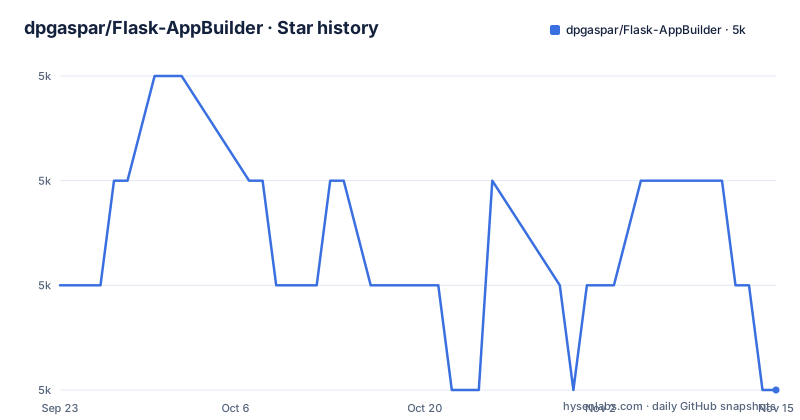
Star history
- dpgaspar/Flask-AppBuilder4,961 ★ · -1
| Repository | 2026-09-23 | 2026-11-15 |
|---|---|---|
| dpgaspar/Flask-AppBuilder | 5k | 5k |
-1 Stars in the last 53 days, measured from the daily GitHub snapshot. Compare with other projects
Editorial analysis
What Flask-AppBuilder solves, and for whom
Flask gives you routing, request handling and templating. It does not give you a user table, a login page, a role model, or a page that lists rows from your database with filters and edit forms. Every internal tool rebuilds those. Flask-AppBuilder is that layer, packaged as a framework on top of Flask rather than a library you call into.
The README describes it as a "Simple and rapid application development framework, built on top of Flask" with "detailed security, auto CRUD generation for your models, google charts and much more." The target user is a Python developer who already has SQLAlchemy models and needs an authenticated back office over them: an operations console, an internal data editor, an admin panel for a service. The README lists Superset and Airflow among projects using it, which is consistent with that audience. Both are data tools whose operators need a UI over a database, not a consumer product.
It is a poor fit when the UI is the product. The framework ships Bootstrap 3.1.1 with Select2 and DatePicker, and while the README says it integrates with "normal Flask/Jinja2 development," you are working inside its view and menu abstractions rather than around them.
How auto CRUD, permissions and the REST API are generated
The mechanism is declarative registration. You define SQLAlchemy models, then declare views over them. Flask-AppBuilder reads the model's columns and generates the list, add, edit and show pages, the filters, and the form validators from the column definitions. The README states it provides "Automatic base validators from model's definition" and "Automatic, Add, Edit and Show from Database Models." Labels and descriptions for each field come from the same declaration.
Security is generated the same way, and this is the part worth understanding before you adopt it. The README says permissions are looked up "based on exposed methods," that all permissions are granted to the Admin Role, and that the framework "Inserts on the Database all the detailed permissions possible on your application." So the permission set is a function of your code, not a list you write by hand. You then assign permissions to roles. Public (no authentication) and private permissions are both supported. Authentication backends listed are OAuth, OpenID, Database, LDAP and the REMOTE_USER environment variable, plus self user registration.
The REST API follows the same pattern: "Automatic CRUD RESTful APIs" with "Metadata for dynamic rendering," selectable columns and metadata keys, and configurable data validation. The README says it integrates with flask-jwt-extended to protect endpoints, and setup.py pins Flask-JWT-Extended to >=4.0.0, <5.0.0. Metadata endpoints are what let a client render a form without hardcoding the schema, which is the reason to use this API layer instead of writing your own.
Two details in the dependency list shape the architecture. Marshmallow and marshmallow-sqlalchemy are pinned for serialization, and apispec is pinned for OpenAPI generation, so the API surface is spec-driven rather than ad hoc. On the storage side, the README claims "SQLAlchemy, multiple database support: sqlite, MySQL, ORACLE, MSSQL, DB2 etc.," partial MongoDB support via MongoEngine, and multiple database connections for vertical partitioning.
Installing Flask-AppBuilder and running a first admin view
The package is published on PyPI as flask_appbuilder, which matches the setup.py name. The README points to a documentation site, a Google group, a Gitter channel and an examples directory rather than giving install steps inline. The repository also ships a docker-compose.yml.
Because the README gives no install command, the entry point is the package name registered in setup.py. The docker-compose.yml defines two services, postgres and ldap, with PostgreSQL 14 on port 5432 and OpenLDAP on port 1389:
services:
  postgres:
    container_name: fab-postgres
    image: postgres:14
    ports:
      - 5432:5432
  ldap:
    container_name: fab-ldap
    ports:
      - 1389:1389
setup.py registers a Flask CLI entry point in the flask.commands group, mapping fab to flask_appbuilder.cli:fab:
entry_points={
    "flask.commands": ["fab=flask_appbuilder.cli:fab"],
},
Beyond these, the README links an installation video on YouTube. For a first real application, the README points at the examples directory, where examples/quickhowto is the minimal case and examples/crud_rest_api shows the REST layer. The README also points to a hosted demo with guest/welcome credentials, which lets you see the generated views before writing any code.
The exact class and method names for registering a view are documented on the project's Read the Docs site rather than in the README, so check there before copying any snippet from a blog post, since the framework has changed across major versions.
Where Flask-AppBuilder gets in the way
The permission model is the sharpest edge. Because permissions are derived from exposed methods and inserted into the database, adding a new view or a new API endpoint changes the permission set. The README says all permissions are granted to the Admin Role automatically. That means an endpoint you add for an edge case is reachable by anyone in the Admin Role the moment it exists, and the only thing standing between it and a non-admin role is whether you remembered to assign it. There is no deny-by-default described in the README.
The frontend is dated by design. Bootstrap 3.1.1 is named explicitly, and the widget list (Select2, Datepicker, DateTimePicker) is the stack of that era. If your organization has moved to a modern component library, you will either accept the bundled look or override templates extensively. The README's claim that it integrates with "normal Flask/Jinja2 development" is true but does not mean the generated pages are easy to restyle.
The MongoDB story is explicitly partial. The README says "Partial support for MongoDB using MongoEngine," which is a caveat, not a feature. If your data is document-shaped, this is not the framework to reach for.
Finally, the dependency surface is wide. setup.py pins Flask, Flask-Babel, Flask-Limiter, Flask-Login, Flask-SQLAlchemy, Flask-WTF, Flask-JWT-Extended, SQLAlchemy, marshmallow, marshmallow-sqlalchemy, apispec, jsonschema, PyJWT, prison and more. Each pin is a constraint on your own dependency resolution. An application that already pins SQLAlchemy below 1.4 or Flask 4 or later will conflict, and setup.py requires SQLAlchemy >=1.4.0, <3 and Flask >=2, <4.
Flask-AppBuilder compared with Django admin
The obvious alternative is Django. Django ships an admin application that also generates CRUD from models and also has a permission system, but the difference is what you inherit. Choosing Django admin means adopting Django: its ORM, its settings module, its template language and its release cadence. If your application is already Flask, that is a rewrite, not a substitution.
Flask-AppBuilder keeps you in Flask. Your existing blueprints, your existing Jinja2 templates and your existing SQLAlchemy models keep working, and the framework adds views and permissions on top. That is the actual trade. You get the admin panel without changing web frameworks, and in exchange you accept a smaller ecosystem, a bundled UI you did not choose, and a permission model generated from your code rather than declared in a settings file.
A second alternative is writing the admin yourself with Flask-Admin or a set of hand-rolled blueprints. That gives you full control over the UI and the permission checks, at the cost of building the role tables, the login flow and the CRUD forms. For a handful of models that is a reasonable trade. For twenty models with LDAP login and per-role field visibility, it is not.
Maintenance, licence and upgrade cost
The repository is not archived, and the last push was on 2026-10-22. The most recent release listed is v5.3.0, published the same day, following v5.2.3 on 2026-09-16 and v5.2.2 on 2026-06-23. That is a maintained release line with a changelog in CHANGELOG.rst and a RELEASE.rst describing the process.
The versioning is worth noting for planning. The 5.x line is current. Expect to test upgrades against your view definitions, not just your requirements file.
The licence is BSD-3-Clause, and setup.py declares the license field as "BSD". That is a permissive licence, and the practical consequence is that you can use Flask-AppBuilder in a closed-source internal tool without publishing your own code. This is a description of the licence text, not legal advice; if you are redistributing a modified version, read the LICENSE file in the repository and the BSD-3-Clause conditions on attribution.
On upgrade cost, the pinned dependency ranges are the main ongoing tax. When Flask 4 arrives, or SQLAlchemy 3, the framework has to widen its pins before your application can move. The README's Python versions badge lists 3.8 through 3.12.
When to pick it, and what to check before you do
Pick Flask-AppBuilder when you have SQLAlchemy models and need an authenticated interface over them quickly, when your users are internal, when LDAP or OAuth login is a requirement rather than a nice-to-have, and when you want a REST API with metadata that a client can render from. The examples directory covers the common shapes: master-detail, composite keys, enums, filters, file and image upload, OAuth, and a factory application pattern.
Do not pick it when the UI is customer-facing, when your data is primarily document-oriented, or when you cannot accept the dependency pins. The MongoDB support is partial by the README's own wording, and the frontend stack is fixed at Bootstrap 3.1.1.
The first thing to verify is the permission behaviour on a real view. Add a view, start the application, and look at what appears in the security interface before you assign anything to a non-admin role. The README states that all permissions are granted to the Admin Role and that permissions are inserted into the database based on exposed methods, so the generated list is the thing you are actually governing. The second thing to verify is your dependency resolution: install the package alongside your existing requirements and confirm nothing breaks, because setup.py constrains Flask, SQLAlchemy, marshmallow and a long list of Flask extensions at once.
Editorial conclusion
Adopt Flask-AppBuilder if you need an authenticated internal admin panel over existing SQLAlchemy models and want permissions generated rather than hand-written. Do not adopt it if you are building a public-facing product with a custom UI, or if you need a frontend build pipeline, since the bundled UI is Bootstrap 3.1.1 with Select2 and DatePicker. Before committing, verify two things: that your Flask and SQLAlchemy versions satisfy the pinned ranges in setup.py (Flask >=2,<4 and SQLAlchemy >=1.4.0,<3), and that the permission model it generates matches the roles you actually intend to grant. Then run one of the examples under examples/ and inspect the generated permission list in the security UI.
Frequently asked questions
What is Flask-AppBuilder?
It is a framework built on top of Flask that adds automatic CRUD views from your models, a role-based permission system, authentication via OAuth, OpenID, Database, LDAP or REMOTE_USER, and automatic CRUD REST APIs. The README describes it as a rapid application development framework with detailed security.
How is Flask-AppBuilder different from Django admin?
Both generate CRUD from models and both have permissions, but Flask-AppBuilder keeps you in Flask: your existing blueprints, Jinja2 templates and SQLAlchemy models continue to work. Choosing Django admin means adopting Django's ORM, settings and template language instead.
How do I build a Flask app with Flask-AppBuilder?
Define your SQLAlchemy models, declare views over them, and register those views; the framework generates the list, add, edit and show pages plus the form validators from the model's definition. The README points to the examples directory and the Read the Docs site for the view classes and methods.
Is Flask-AppBuilder a backend or frontend framework?
It is backend code that generates frontend pages. It runs on Flask and generates HTML views from your models, with Bootstrap 3.1.1, Select2 and DatePicker for the interface, plus automatic CRUD RESTful APIs for clients that render their own forms.
Official sources
Add this badge to your README
If you maintain this project, the badge below links readers to this analysis and shows its maintenance status from the daily GitHub snapshot. Paste the markdown into your README; add ?metric=license or ?metric=stars to the image URL for a different field.

[](https://hysenlabs.com/projects/dpgaspar-flask-appbuilder)Star history chart for your README
[](https://hysenlabs.com/projects/dpgaspar-flask-appbuilder)Was this useful?