ungoogled-chromium swaps Google domains for qjz9zk and leaves its privacy tweaks off by default
Google Chromium, sans integration with Google
At a glance
- What is it?
- ungoogled-chromium is Google Chromium with the dependency on Google web services removed, kept as a drop-in replacement rather than a redesign, with the privacy-relevant changes implemented as configuration flags, patches and scripts that you activate yourself. The mechanism is visible in the source: Google domains become the non-existent qjz9zk, prebuilt binaries are pruned, and Safe Browsing goes with the rest of the Google-specific code.
- Who is it for?
- ungoogled-chromium fits a user who wants Chromium's own interface and release cadence without the background requests to Google, and who is willing to read docs/flags.md and switch things on deliberately. It does not fit someone who wants Safe Browsing's protection lists, since disabling Google-specific functionality takes that with it, and it does not fit a distribution without a maintained package.
- Can I use it commercially?
- Yes. BSD-3-Clause is a permissive licence: you can use, modify and sell software built on it, as long as you keep its copyright and licence notices.
- Is it still maintained?
- Yes. The repository last received commits 1 day ago.
- What is it written in?
- Mainly Python, according to GitHub's language statistics.
Answers come from the project's GitHub data, last synced on November 13, 2026, and from our analysis. They are not legal advice.
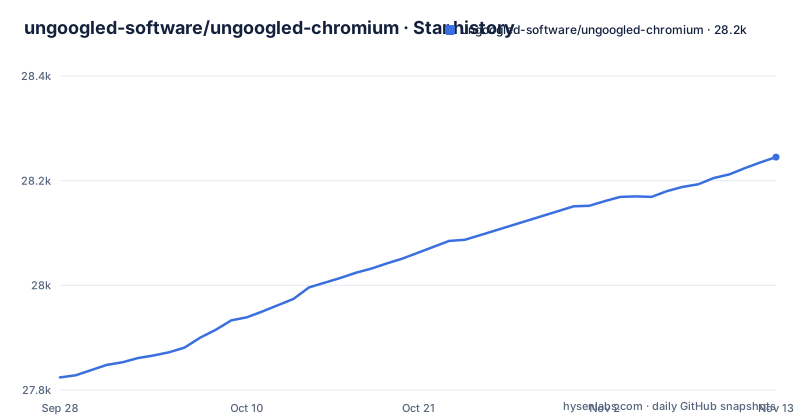
Star history
- ungoogled-software/ungoogled-chromium28,245 ★ · +421
| Repository | 2026-09-28 | 2026-11-13 |
|---|---|---|
| ungoogled-software/ungoogled-chromium | 27.8k | 28.2k |
421 Stars in the last 46 days, measured from the daily GitHub snapshot. Compare with other projects
Editorial analysis
Objective two is the constraint that shapes everything else
The three objectives are listed in descending order of significance, and the second one is the one that limits the project. First, ungoogled-chromium is Google Chromium without a dependency on Google web services. Second, it retains the default Chromium experience as closely as possible, and unlike other Chromium forks with their own visions of a browser, it is essentially a drop-in replacement for Chromium. Third, it adds tweaks that enhance privacy, control and transparency, and almost all of them must be activated manually.
There is also a tie-breaker: where the objectives conflict, the one of higher significance wins. That is a design document in three lines, and it explains the trade the project accepts. A feature that would change how the browser feels is off the table, and a feature that would make the browser safer can be switched off if it depends on a Google service.
For a reader, that means there is no visual identity to learn and no opinionated UI to fight. What you are evaluating is whether the privacy changes are worth the settings you have to turn on yourself.
qjz9zk is the whole fail-safe in one string
The most interesting mechanism in the project is domain substitution. Beyond disabling the individual Google components, ungoogled-chromium replaces many Google web domains in the source code with non-existent alternatives ending in `qjz9zk`, and then patches Chromium so that it blocks its own requests to any such domain. The result is that no connection to the `qjz9zk` domain is ever attempted.
The reason is a maintenance one, and it is the sentence to remember when a Chromium release lands. Disabling components by patch is a list that goes stale every time Google ships something new. Domain substitution is the backstop for that gap, a change that catches whatever the patches missed, at the cost of something that fails quietly rather than loudly.
It is also greppable, which matters for auditing. A reader who wants to know whether a code path still reaches a Google service can look for the substituted domains in the source, and the two lists that drive the rewrite, `domain_regex.list` and `domain_substitution.list`, are in the repository root where they can be read before a build.
Safe Browsing goes with the Google components
Disabling functionality specific to Google domains includes disabling Safe Browsing, and the README links its own FAQ for the rationale rather than arguing the point in place. The rest of that list is recognisable once you see it: Google Host Detector, Google URL Tracker, Google Cloud Messaging, Google Hotwording.
The consequence is the one a reader should weigh before installing. A user of ungoogled-chromium does not get Google's malicious-site warnings, because those warnings arrive through the service being removed. That is a deliberate trade and it is internally consistent with objective one, but it is a reduction in protection, and the honest summary is that the protection now comes from somewhere else or not at all.
Everything in this project is implemented as configuration flags, patches and custom scripts, and the design documentation is where the reasoning sits. The feature overview in the README is explicitly a summary, and it says the source code is the better reference for detail.
Binary pruning means the build fetches its own pieces
The third way the project addresses the dependency is to remove all uses of pre-made binaries from the source code and replace them with user-provided alternatives when possible, a step known as binary pruning. Chromium ships with binaries checked in, and those binaries have provenance, so the build replaces them.
The consequences for someone building it are concrete. The repository root is full of the inputs to that process: `downloads.ini` for fetching what the build needs, `pruning.list` for the binary pruning step, `domain_regex.list` and `domain_substitution.list` for the substitution, plus `chromium_version.txt` and `revision.txt` recording which Chromium the tree is tracking.
So a build is not a single checkout and compile. It is a script that resolves a version, fetches external artifacts, rewrites domains and applies patches, and the files in that root are the list of what it will reach for. Read them before running anything, particularly on a machine with network restrictions.
The enhancing features are off until you switch them on
The non-essential features are added as new command-line switches and `chrome://flags` entries that are disabled by default, with the exhaustive list in `docs/flags.md` and the build-time set visible in `flags.gn` at the repository root. A few are worth naming because their effect is not obvious from the name.
The search engine editor gains a Suggestions URL field for customising search engine suggestions, and the Omnibox gains a No Search provider so searching can be disabled outright. Pop-ups are forced into tabs, and automatic formatting of URLs in the Omnibox is disabled, so the browser stops stripping `http://` and hiding parameters. The intranet redirect detector is disabled to remove extraneous DNS requests, and the README states the cost plainly: it breaks captive portal detection, while captive portals still work.
Two more come from elsewhere. URLs with the `trk:` scheme are prevented from connecting, which is a change borrowed from Iridium Browser, as is the block on top-level `qjz9zk` domains. On Windows only, the Zone Identifier is not set on downloaded files. Each is a per-user decision, and the documentation is where the full list lives.
Four distributions carry maintained packages
The project publishes through software repositories rather than only as build instructions, and the README names Arch, Debian, Ubuntu and Fedora among them. Arch has it in the AUR, with the instructions in a separate ungoogled-chromium-archlinux repository. Debian has it in OBS, with distribution-specific instructions in ungoogled-chromium-debian. Ubuntu has it in the XtraDeb PPA as `ungoogled-chromium`. Fedora has it in COPR as `wojnilowicz/ungoogled-chromium`, and also in RPM Fusion.
Behind those repositories is a custom cross-platform build configuration and packaging wrapper for Chromium, which currently supports many Linux distributions, macOS and Windows, with the supported platform list in `docs/platforms.md`. Anything outside that list is discussed in the issue tracker rather than supported.
For a reader, the practical split is clean. On one of these distributions the package route is the whole installation. Elsewhere, check docs/platforms.md before planning a source build.
Four patch sources, and a release every few days
Beyond the features it introduces, ungoogled-chromium selectively borrows from other projects, listed in approximate order of significance: the Inox patchset, Bromite, Debian, and Iridium Browser. That list is the audit trail for a build, because when a new Chromium release breaks something, the first question is which borrowed patch needs to move.
The rest of the repository is the machinery. `patches/` holds the patch tree, `utils/` and `devutils/` the build and development scripts, `docs/` the design, flags, platforms and contributing documents, `shell.nix` a Nix shell, `.python-version` and `.style.yapf` the Python tooling for those scripts. There is a `SUPPORT.md`, a `CODEOWNERS` file, and a BSD-3-Clause licence.
The release line tracks Chromium closely: 156.0.8078.79-1 on 2026-10-30, 156.0.8078.73-1 on 2026-10-28, and 156.0.8078.47-1 on 2026-10-23. The repository is not archived and the last push was on 2026-10-30. A cadence that tight is the point: the value of this project is that it is Chromium, and the cost is that you follow Chromium's schedule rather than choosing your own.
Editorial conclusion
ungoogled-chromium fits a user who wants Chromium's own interface and release cadence without the background requests to Google, and who is willing to read docs/flags.md and switch things on deliberately. It does not fit someone who wants Safe Browsing's protection lists, since disabling Google-specific functionality takes that with it, and it does not fit a distribution without a maintained package. Before adopting, read the FAQ entry on Safe Browsing, decide which of the enhancing features you actually want enabled, and check docs/platforms.md for whether your platform has a maintained build rather than one you have to compile.
Frequently asked questions
What does ungoogled-chromium do?
It is Google Chromium with the dependency on Google web services removed, kept as close to the default Chromium experience as possible so it works as a drop-in replacement. It removes background requests to web services, removes Google-specific code, strips pre-made binaries in favour of user-provided alternatives, and disables the features that work through Google.
How do I install ungoogled-chromium?
Maintained packages exist for distributions including Arch in the AUR, Debian in OBS, Ubuntu in the XtraDeb PPA as ungoogled-chromium, and Fedora in COPR as wojnilowicz/ungoogled-chromium as well as in RPM Fusion. The project's own build configuration supports many Linux distributions plus macOS and Windows, with the list in docs/platforms.md.
How do I install ungoogled-chromium on Ubuntu?
The README lists Ubuntu as available in the XtraDeb PPA as ungoogled-chromium, which is the distribution-specific route. Debian builds are distributed through OBS with their own instructions, so an Ubuntu user does not need to build from source.
How do I install ungoogled-chromium on Arch?
It is available in the AUR, and the README points to a separate ungoogled-chromium-archlinux repository for the instructions, so the packaging details are maintained outside this repository.
How safe is ungoogled-chromium?
The README states that disabling Google-specific functionality includes disabling Safe Browsing, and it links its own FAQ for the rationale, so the malicious-site warnings that arrive through Google's services are not part of this build. Runtime blocking of Google domains is kept as a fail-safe, with those domains rewritten to the non-existent qjz9zk so no connection is attempted.
Official sources
Add this badge to your README
If you maintain this project, the badge below links readers to this analysis and shows its maintenance status from the daily GitHub snapshot. Paste the markdown into your README; add ?metric=license or ?metric=stars to the image URL for a different field.

[](https://hysenlabs.com/projects/ungoogled-software-ungoogled-chromium)Star history chart for your README
[](https://hysenlabs.com/projects/ungoogled-software-ungoogled-chromium)Was this useful?