dsh-univer-office: Office Editing Inside DeepSeek Harness, With Drafts You Can Approve or Discard
Preview, create, edit office spreadsheets, docs & slides inside DeepSeek Harness. Power by Univer.
At a glance
- What is it?
- dsh-univer-office adds spreadsheets, docs, slides, Base tables, and canvases to DeepSeek Harness through a single plugin. Its core design is isolated draft editing with live preview, which changes how agent-generated office files get reviewed.
- Who is it for?
- Adopt dsh-univer-office if you run DeepSeek Harness and want an agent to create or edit office files with a review step before anything is committed. Skip it if you need native Base export, Board export, or offline editing.
- Can I use it commercially?
- Yes. Apache-2.0 is a permissive licence: you can use, modify and sell software built on it, as long as you keep its copyright and licence notices.
- Is it still maintained?
- Yes. The repository last received commits 11 days ago.
- What is it written in?
- Mainly TypeScript, according to GitHub's language statistics.
Answers come from the project's GitHub data, last synced on November 12, 2026, and from our analysis. They are not legal advice.
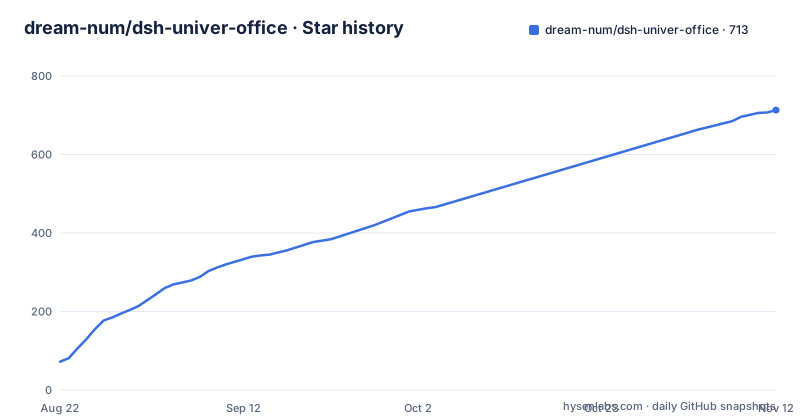
Star history
- dream-num/dsh-univer-office713 ★ · +641
| Repository | 2026-08-22 | 2026-11-12 |
|---|---|---|
| dream-num/dsh-univer-office | 72 | 713 |
641 Stars in the last 82 days, measured from the daily GitHub snapshot. Compare with other projects
Editorial analysis
What this plugin actually adds to DeepSeek Harness
DeepSeek Harness is a shell for agent workflows, but it does not ship with office document capabilities. dsh-univer-office closes that gap by embedding Univer, an open source office runtime, into the DSH conversation. The README describes it as giving DSH a real office environment. The plugin is for anyone who wants an agent to build a spreadsheet, a document, a slide deck, or a small database and then review the result before it becomes the final file. Without this plugin, the agent would have to generate raw file formats or text, and you would have no way to see intermediate states. The plugin makes the office content a first-class part of the conversation, not an export afterthought.
The draft-and-approve mechanism is the central design
Every write operation starts in an isolated draft, according to the README. The agent edits the Univer content in that draft, and you watch the changes live in a movable preview window. Review cards stay in the conversation, and you can fold them or open them fullscreen. From the embedded Univer page, you can continue editing, approve, or discard. This is a meaningful departure from letting an agent overwrite the current version directly. The draft model means the original file stays untouched until you explicitly approve. The README claims every content type supports isolated draft editing, review, revision, approval, and discarding. That is the core value: you get a versioned change set, not a silent replacement. The trade-off is that you must trust the draft isolation to be complete, and the README does not specify how conflicts are resolved if you edit the same file outside the conversation while a draft is open.
Installation and the exact commands to run
The README gives a three-step setup. First, if DSH is running, press Ctrl+C in the terminal that started it. You can run the install command while DSH is running, but the current process will not load the plugin automatically. The install command is `dsh plugin --profile web add dsh-univer-office`. Then restart DSH with `dsh web`. After DSH starts, refresh the browser page with Cmd+R on macOS or Ctrl+R on Windows and Linux. That is the entire installation. No config keys are mentioned. The plugin is distributed via npm, and the repository shows recent releases at v0.2.10, v0.2.7, and v0.2.6, which suggests active iteration. The README does not describe an upgrade path, so you will likely need to re-run the plugin add command with a version specifier or check the package page for update instructions.
What you can create, import, and export per content type
The capabilities table is the most concrete part of the README. Sheets support cells, formulas, styles, tables, charts, pivots, filters, validation, and images, with import from .xlsx, .csv, and .tsv and export to the same three formats. Docs support paragraphs, rich text, lists, tasks, tables, images, charts, headers, footers, and pagination, with .docx import and export. Slides support pages, text, shapes, images, tables, charts, SVG layouts, and transitions, with .pptx import and export. Base tables support fields, records, views, formulas, filters, sorting, and grouping, but have no import and only export to .xlsx, .csv, and .tsv. Boards support shapes, text, connectors, images, and native charts, but have no export at all. The README explicitly says Board file export is not yet supported. That is a real gap if you need to share a Board outside the DSH conversation.
Verification features: screenshots, linting, and recalculation
The plugin does not just let the agent create content; it also provides verification tools. For sheets, that means structured range inspection, recalculation, range and workbook screenshots, and live preview. For docs, document readback and page screenshots. For slides, structure inspection, text bounds, overflow and overlap lint, and page or contact-sheet screenshots. For Base, structured data checks and a workbench screenshot. For Boards, element and connector analysis and region screenshots. These checks are what make the draft workflow usable, because the agent can catch layout problems before you approve. The README gives an example of a slide deck about bubble sort where the agent checks every page for layout problems. The verification is per content type, so you cannot assume the same depth of checking across all five types. Board verification exists, but export does not, which is an odd asymmetry.
The single-file .univer format and cross-content references
One notable capability is that a single .univer file can contain Sheets, Docs, Slides, Bases, and Boards. Formulas and embedded content can reference other content in the same file. That means a spreadsheet formula could pull from a Base table, or a slide could embed a chart from a sheet, all within one container. The README does not explain how this file format is stored or versioned, only that it exists. This is a different model from separate .xlsx and .docx files. It is useful for complex projects, but it also means the .univer format is the native state, and export to standard formats is a separate step. If you plan to collaborate with people who use Excel or Word directly, you will need to remember to ask the agent to export after review. The README explicitly tells you to ask for export to .xlsx or .pptx after review, which implies the default delivery is the .univer file.
Limitations and cases where this is the wrong tool
The most obvious limitation is Board export. The README states it is not supported, so any Board work stays inside DSH. Base has no import, so you cannot bring an existing database into the plugin. The README also does not mention any support for formulas that reference external files, macros, or VBA. If your workflow depends on Excel macros, this plugin will not help. Another limitation is that the plugin only works inside DeepSeek Harness. It is not a standalone office suite. If you need a general-purpose editor that works outside an agent conversation, Univer itself is the better choice, but Univer does not have the draft-and-approve agent layer. The README also warns that the current DSH process will not load the plugin automatically after installation, so you must restart. That is a minor friction point, but it is documented.
Alternatives: Univer standalone and other agent office tools
The obvious alternative is to use Univer directly, without the DSH plugin. Univer is the underlying office engine, and you can embed it in your own application or use its web interface. The difference is that Univer itself has no agent, no draft isolation, and no natural-language editing. You would need to build the agent layer yourself. Another alternative is to have the agent generate files in raw formats like CSV or Markdown, then open them in Excel or Word. That loses the live preview and the verification features, but it avoids the .univer format and the restart requirement. A third alternative is a different office automation plugin for an agent framework, but the README does not name any. The key difference with dsh-univer-office is the integration depth: the plugin brings the office runtime into the conversation, so the agent can inspect, recalculate, and screenshot the content as it works.
Maintenance and license notes
The repository is licensed under Apache-2.0, which permits commercial use, modification, and distribution, provided you preserve the license notice. The plugin is published on npm as dsh-univer-office, and the last push was August 2026, with releases in the same month. The version numbers are low, v0.2.x, which suggests the project is still in early development. The README does not document a migration path between versions, so upgrading may involve re-adding the plugin and possibly breaking changes. Because the plugin depends on both DSH and Univer, you will need to track updates on both sides. The README does not mention any enterprise support or SLA. If you adopt this in a production workflow, you should budget time for version compatibility checks, especially since the draft isolation and verification features are not trivial to reimplement if the plugin changes its internal APIs.
Editorial conclusion
Adopt dsh-univer-office if you run DeepSeek Harness and want an agent to create or edit office files with a review step before anything is committed. Skip it if you need native Base export, Board export, or offline editing. Before relying on it, verify that the draft-and-approve flow works with your DSH version, test that .xlsx and .docx round trips preserve your formatting, and confirm that the agent's verification covers the content types you actually use.
Frequently asked questions
What does the dsh-univer-office plugin do?
It brings an office environment into DeepSeek Harness through Univer: spreadsheets, documents, presentations, multidimensional tables and canvases in one runtime. You describe the result in natural language, follow the work live in a movable preview window, and approve or discard the change in the conversation, with spreadsheets exported as .xlsx, documents as .docx and presentations as .pptx.
How do I install dsh-univer-office?
Supported Harness versions are 0.1.5-rc.3, 0.1.7-rc.1 and 0.2.0-rc.1. Press Ctrl+C in the terminal that started DSH, run dsh plugin --profile web add dsh-univer-office, start DSH again with dsh web, then refresh the existing browser page with Cmd+R or Ctrl+R. A DSH process that is already running does not load a newly added plugin automatically.
Can dsh-univer-office open existing Excel and Word files?
Yes. It imports .xlsx, .csv and .tsv into Sheets, .docx into Docs and .pptx into Slides, then exports the edited content in the matching format. Base tables and Boards have no import path at all, and Board file export is not yet supported, so those two content types exist only inside the plugin.
Official sources
Add this badge to your README
If you maintain this project, the badge below links readers to this analysis and shows its maintenance status from the daily GitHub snapshot. Paste the markdown into your README; add ?metric=license or ?metric=stars to the image URL for a different field.

[](https://hysenlabs.com/projects/dream-num-dsh-univer-office)Star history chart for your README
[](https://hysenlabs.com/projects/dream-num-dsh-univer-office)Was this useful?