SuiteSparse: a C toolkit for sparse linear algebra
The official SuiteSparse library: a suite of sparse matrix algorithms authored or co-authored by Tim Davis, Texas A&M University.
At a glance
- What is it?
- SuiteSparse combines several C packages for sparse matrix ordering, factorization, linear systems, and graph operations. It fits developers who need the individual libraries or the collection, but its package-specific dependencies and licensing require careful review.
- Who is it for?
- Adopt SuiteSparse when a C or MATLAB project needs one of its documented sparse linear algebra packages and can manage the relevant dependencies. Do not treat it as a single interchangeable solver, since CHOLMOD, KLU, UMFPACK and SPQR solve different classes of linear systems.
- Can I use it commercially?
- Check first. The repository uses a licence we do not classify automatically, so read its LICENSE file before any commercial use.
- Is it still maintained?
- Yes. The repository last received commits 5 days ago.
- What is it written in?
- Mainly C, according to GitHub's language statistics.
Answers come from the project's GitHub data, last synced on November 7, 2026, and from our analysis. They are not legal advice.
Star history
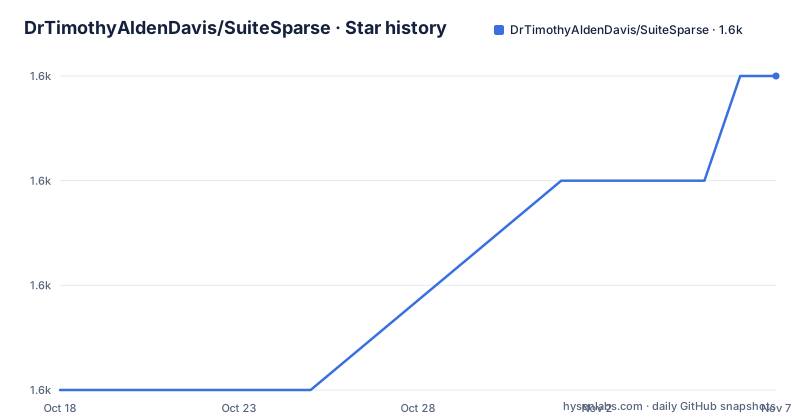
- DrTimothyAldenDavis/SuiteSparse1,563 ★ · +3
| Repository | 2026-10-18 | 2026-11-07 |
|---|---|---|
| DrTimothyAldenDavis/SuiteSparse | 1.6k | 1.6k |
3 Stars in the last 20 days, measured from the daily GitHub snapshot. Compare with other projects
Editorial analysis
Why SuiteSparse exists for sparse C and MATLAB workloads
SuiteSparse addresses the mismatch between general-purpose dense linear algebra and computations in which most matrix entries are zero. It is a collection rather than one solver. The repository contains separate packages for fill-reducing ordering, sparse Cholesky factorization, direct solution of linear systems, QR functionality, and graph operations. This structure matters because no single algorithm handles every sparse matrix well.
The collection is intended for engineers, numerical software developers, and MATLAB users who need sparse matrix primitives without implementing ordering algorithms, factorizations, and related data structures themselves. CHOLMOD provides sparse Cholesky factorization and requires AMD, COLAMD, CCOLAMD, BLAS, and LAPACK. KLU, UMFPACK, LDL, SPQR, GraphBLAS, and the other directories cover separate capabilities and should be selected according to the matrix and operation.
The primary language is C, while repository files also support C++, MATLAB, and graph algorithm work. The suite is not intended to hide sparse matrix complexity behind one universal command. Instead, it offers lower-level libraries with package-specific APIs. That gives an integrating developer more control, but it also means that choosing the right package, linking its dependencies, interpreting its return information, and installing the correct header and library files are application-level responsibilities.
Inside the AMD-to-GraphBLAS package architecture
The repository layout exposes SuiteSparse's central design decision: each algorithm family remains a separate package. AMD performs approximate minimum degree ordering, and the README identifies it as the built-in AMD function in MATLAB. CAMD and CCOLAMD provide constrained variants, while BTF computes a permutation to block triangular form. These ordering packages can prepare matrices for later factorization stages, but they are not matrix solvers on their own.
CHOLMOD builds on AMD, COLAMD, CCOLAMD, BLAS, and LAPACK. According to the README, it corresponds to MATLAB's `chol` and `x=A\b` operations. That relationship is useful context for MATLAB users, although it should not be interpreted as documentation that every C call has an identical MATLAB interface. CHOLMOD also has a `Modify` module and an embedded modified copy of METIS in its `SuiteSparse_metis` directory.
KLU, UMFPACK, LDL, and SPQR occupy other numerical roles, while GraphBLAS and LAGraph extend the collection into graph algorithms. LAGraph is described in the README as having its own substantial contributor list. Based on the directory structure, an application should link only the packages it needs rather than treating every directory as mandatory runtime code. The top-level Makefile still invokes a broad package build, so build scope may need to be managed through CMake or package-level targets even when only a few libraries matter to the application.
Building from the repository root and invoking the demo
The documented root Makefile exposes two useful build paths. `make library` compiles the packages without the default installation step. It exports `JOBS ?= 8`, `SUITESPARSE = $(CURDIR)`, and `CMAKE_OPTIONS ?=`, so those variables can also be edited or overridden in the build environment. The repository also includes a CMake configuration, but the README excerpt does not provide a short CMake invocation, so the Makefile is the clearest confirmed tutorial route here.
From the repository root, compile the library tree with the following command:
make libraryThe top-level rules enter package directories and invoke their Makefiles. `bin/` is described as the destination for programs placed by `make local`, while `build/` is the default build tree. A successful build may therefore place artifacts in several package-specific locations rather than one obvious top-level executable.
If the application should use a private copy under the repository's `lib/` and `include/` directories, use the documented local target:
make localThe Makefile distinguishes this from installation. The default `make install` installs libraries under `/usr/local/lib` and headers under `/usr/local/include`, or under the configured `CMAKE_INSTALL_PREFIX`. Because that changes system-level locations, the repository includes `SuiteSparse_install.m`, but the README excerpt does not state the exact platform-specific invocation. Review that script before using it, particularly on Windows.
For a first repository-provided exercise, MATLAB can be started from the source directory and asked to run `SuiteSparse_demo.m`:
matlabInside MATLAB, run the file named in the repository:
SuiteSparse_demoThe README does not enumerate the demo's expected output, so do not assume a specific printed result. The point of this first use is to exercise the repository's configured MATLAB entry point and inspect any package paths or diagnostics it reports.
Choosing between CHOLMOD, KLU, UMFPACK and the alternative packages
The real alternative to SuiteSparse is usually a narrower library or a separately implemented algorithm, not another single command within the same interface. A dense library can solve a system after storing many zero entries as ordinary values, but it does not provide SuiteSparse's sparse storage, ordering packages, and factorization-focused APIs. That is a different computational approach with potentially different memory and runtime behavior, but the repository does not provide comparative measurements.
Inside SuiteSparse, package choice is itself a design decision. CHOLMOD is documented for sparse Cholesky factorization and depends on ordering libraries plus BLAS and LAPACK. KLU is a separate package for sparse linear solving, while UMFPACK and SPQR serve other numerical roles that the truncated package list does not fully describe. A developer who selects CHOLMOD solely because MATLAB exposes similar operations may overlook package-specific C dependencies and data-model conventions.
GraphBLAS and LAGraph are also genuine alternatives to the numerical packages when the underlying problem is expressed as a graph algorithm rather than a direct sparse matrix solve. However, a graph-centric API changes the programming model and does not eliminate the need to understand whether the operation maps correctly to the matrix problem.
SuiteSparse is the wrong tool when a small, fixed matrix would be clearer with ordinary dense linear algebra. It is also a poor fit when the application cannot add its chosen package's external prerequisites or when one undifferentiated API is required across every operation. The collection is more useful when an application can select libraries by problem class and accept C-level integration work.
Build scope, package dependencies and operational limits
The first limitation is breadth. A build of the complete collection compiles many packages, while CHOLMOD alone already declares dependencies on AMD, COLAMD, CCOLAMD, BLAS, and LAPACK. The top-level Makefile also invokes CSparse and CXSPARSE, but its note says CSparse is compiled and not installed by `make install`; CXSparse is installed instead. This distinction can matter when packaging SuiteSparse for another machine or inside a software distribution.
The second limitation is that repository presence does not establish universal readiness. The README says the `dev` branch is intended to remain in working order, but its features are not finalized at a given time. It identifies `stable` as the most recent stable release. Since `dev` is the default branch shown here, source builds and packaged builds may not represent the same code unless the branch and release are recorded explicitly.
The third limitation is documentation depth. The README directs users to each package's `Doc` subfolder for package-specific documentation. The top-level documentation does not define complete C APIs, numerical failure policies, threading behavior, platform prerequisites, or rollback procedures. Those details cannot safely be inferred from the package names. A production integrator must inspect the selected package's documentation and headers.
Release work is visible. The repository lists versions 7.14.1, 7.14.0, and 7.13.0 in September and August 2026, and the last push was on 2026-10-15. That supports a recent development record, but it does not by itself guarantee compatibility for every package or platform.
License review across the top-level file and individual packages
The repository cannot be treated as having one uniform permissive license. GitHub classifies the project as using another, custom license, and the README says each package has its own license, copyright, and author information. The root `Makefile` states that just that file is under Apache-2.0. This distinction is direct: the presence of an SPDX identifier in one build file does not establish the license of AMD, CHOLMOD, KLU, UMFPACK, GraphBLAS, LAGraph, or every other directory.
The README also calls out the modified METIS copy under `CHOLMOD/SuiteSparse_metis`. It states that SuiteSparse includes that code through an open-source license provided by George Karypis and that the embedded version is modified. Any distribution involving CHOLMOD therefore needs review of the relevant package license and any notices included alongside it.
This is especially important for commercial or redistributed software. The repository contains `LICENSE.txt`, `Contributor_License/`, and package-specific README or license files. A source build does not remove those obligations, and installing compiled libraries does not make license review optional.
The upgrade cost is therefore more than downloading a new release. Record which branch or release was used, compare changes through `ChangeLog` and package-specific change logs, rebuild the applications that link each selected package, and review the files that changed license state. The README does not provide a rollback recipe, so that step must be planned around the application's existing dependency controls.
Editorial conclusion
Adopt SuiteSparse when a C or MATLAB project needs one of its documented sparse linear algebra packages and can manage the relevant dependencies. Do not treat it as a single interchangeable solver, since CHOLMOD, KLU, UMFPACK and SPQR solve different classes of linear systems. Before adoption, verify the selected package's license, required dependencies, installation prefix, output interface, and compatibility with the intended release. For a root build, start by confirming whether `make library`, `make local`, or `make install` matches the destination policy of the project.
Frequently asked questions
How do I build SuiteSparse from the repository root?
Run `make library` from the repository root to compile the package tree without the default installation step. The root Makefile uses CMake through its package targets and exposes `CMAKE_OPTIONS`, `JOBS`, and `SUITESPARSE`.
Where does `make local` install SuiteSparse libraries and headers?
The root Makefile says `make local` installs libraries in the repository's `SuiteSparse/lib` area and include files in `SuiteSparse/include`. This differs from the default `make install`, which uses `/usr/local` unless `CMAKE_INSTALL_PREFIX` is configured.
What dependencies does CHOLMOD require?
The README states that CHOLMOD requires AMD, COLAMD, CCOLAMD, BLAS, and LAPACK. It can optionally use METIS, including a modified copy embedded under `CHOLMOD/SuiteSparse_metis`.
Official sources
Add this badge to your README
If you maintain this project, the badge below links readers to this analysis and shows its maintenance status from the daily GitHub snapshot. Paste the markdown into your README; add ?metric=license or ?metric=stars to the image URL for a different field.

[](https://hysenlabs.com/projects/drtimothyaldendavis-suitesparse)Star history chart for your README
[](https://hysenlabs.com/projects/drtimothyaldendavis-suitesparse)Was this useful?