Sakana Widget v4 splits characters out of the core entry to shrink an ESM bundle
Sakana widget for Web. | 网页小组件版本的石蒜模拟器。
At a glance
- What is it?
- sakana-widget is an MIT-licensed TypeScript widget that drops a physics-driven animated character into any web page, with a default bundle of roughly 60 kB brotli compressed. Version 4 adds a core-only entry so you register the character images you actually use, and it is a decorative component with real constraints around bundlers, localStorage and BFC containers.
- Who is it for?
- Use sakana-widget if you want a small animated character on a page and can accept that it is decoration rather than an interface component. Do not adopt it if your build cannot handle an ESM-only package with a UMD fallback, or if you need the character to be part of your design system's accessible controls.
- Can I use it commercially?
- Yes. MIT is a permissive licence: you can use, modify and sell software built on it, as long as you keep its copyright and licence notices.
- Is it still maintained?
- Yes. The repository last received commits 43 days ago.
- What is it written in?
- Mainly TypeScript, according to GitHub's language statistics.
Answers come from the project's GitHub data, last synced on November 6, 2026, and from our analysis. They are not legal advice.
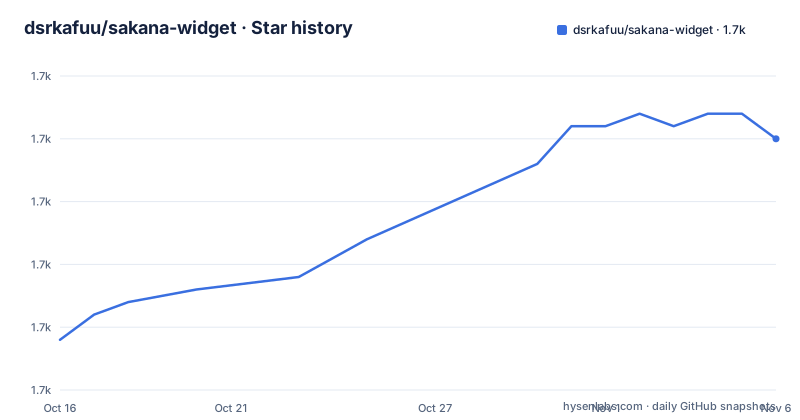
Star history
- dsrkafuu/sakana-widget1,690 ★ · +16
| Repository | 2026-10-16 | 2026-11-06 |
|---|---|---|
| dsrkafuu/sakana-widget | 1.7k | 1.7k |
16 Stars in the last 21 days, measured from the daily GitHub snapshot. Compare with other projects
Editorial analysis
What the widget does: a physics loop you can grab
The Sakana Widget is a small animated character that sits on a page and reacts to being dragged. The README describes the interaction precisely: press and hold the stand, drag it, and after releasing, the stand bounces in the opposite direction.
Underneath that is a damped spring simulation, which you can see in the parameter names the API exposes. The `i` parameter is inertia and `d` is damping, and the README's examples show both being set to unusual values to produce deliberately broken-looking behaviour, such as a super-slow character with `i: 0.001, d: 1`.
Beyond the drag interaction there is a control bar for switching roles, and an automatic mode that applies a force of random size at random intervals. So the component has two modes of motion: physical, when a user interacts with it, and random, when nobody is.
The framing matters for adoption. This is a decorative element for a personal site or a corner of a landing page. It is not a component library, and nothing in the repository suggests it is meant to carry interaction weight in a product interface.
Mounting from a script tag with the UMD bundle
The shortest path to a running widget needs no build step. Put a container in your HTML, define an init function, and load the UMD bundle:
<div id="sakana-widget"></div>
<script>
  function initSakanaWidget() {
    new SakanaWidget().mount('#sakana-widget');
  }
</script>
<script
  async
  onload="initSakanaWidget()"
  src="https://cdn.jsdelivr.net/npm/[email protected]/lib/index.umd.min.js"
></script>
The script is marked async and calls the init function from its `onload` handler, so the container may exist before the library arrives. Two CDN URLs are given as alternatives, jsDelivr and cdnjs.
The TypeScript path is a single import and a mount call:
import SakanaWidget from 'sakana-widget';
new SakanaWidget().mount('#sakana-widget');
The README notes that a manual CSS import is no longer needed, because the styles are imported in the JavaScript entry, with the old `import 'sakana-widget/lib/index.css';` line left commented out as a reminder of the change.
The default export is a class named `SakanaWidget`, and `mount()` appends the widget to the target element while keeping the element's existing children and listeners. `unmount()` removes only the widget, which matters if the container held something else.
Version 4 splits the characters out of the default entry
The most substantive change described in the README is the export map. `sakana-widget` has subpath exports for `.`, `./core`, `./characters/chisato` and `./characters/takina`, and the core entry contains no built-in character images at all.
That lets you build a bundle with only what you use:
import SakanaWidget from 'sakana-widget/core';
import chisato from 'sakana-widget/characters/chisato';

SakanaWidget.registerCharacter('chisato', chisato);
new SakanaWidget().mount('#sakana-widget');
The ordering constraint is explicit: registration must happen before creating a widget, and the README says so directly. If you skip `registerCharacter`, a character you reference by name has no image behind it.
The stated size figure for the default entry is roughly 60 kB all-in-one brotli compressed, including both built-in characters. That is the cost the split is designed to reduce. The default entry and the UMD bundle deliberately keep both characters, so existing script-tag users are unaffected by the change.
One adjustment is needed for custom images. If you register a character whose image is tall or wide rather than square, set `imageFit: 'contain'`, because the default `cover` fills the square image area and will crop.
Registering your own image, including a borrowed character object
The registration API is more flexible than the character list suggests. You can take an existing character object and swap its image, which is how the README demonstrates using GitHub's icon as a widget character:
const github = SakanaWidget.getCharacter('chisato');
github.image = `https://raw.githubusercontent.com/dsrkafuu/sakana-widget/main/docs/github.png`;
SakanaWidget.registerCharacter('github', github);
new SakanaWidget({ character: 'github' }).mount('#sakana-widget');
`getCharacter()` is a static method returning a character object you can modify. The image field accepts a URL or a base64 string, so you can embed an image rather than hosting one.
The same trick works for tuning the physics. Fetch a built-in character, override its `initialState`, and register the result under a new name:
const takina = SakanaWidget.getCharacter('takina');
takina.initialState = {
  ...takina.initialState,
  i: 0.001,
  d: 1,
};
SakanaWidget.registerCharacter('takina-slow', takina);
new SakanaWidget({ character: 'takina-slow' }).mount('#sakana-widget');
Because registration is just a name-to-object map, the extension point is not limited to the two built-in characters. Anything with an image and a state object works.
saveState, stateKey and the localStorage key collision
Hidden state is opt-in. With `saveState: true`, clicking the close button hides the widget with `display: none` and records the value `'hide'` in localStorage, and the widget restores that state on the next page load.
The default behaviour is different in a way that catches people out. With `saveState` false, which is the default, clicking close permanently unmounts the widget.
Multiple widgets on one page need distinct storage keys. The README shows this with `stateKey`:
new SakanaWidget({ saveState: true, stateKey: 'sakana-status-chisato' }).mount('#chisato');
new SakanaWidget({ saveState: true, stateKey: 'sakana-status-takina' }).mount('#takina');
Without unique keys, two persisted widgets on the same origin read and write the same localStorage entry, and one hides when the other does.
Reacting to visibility changes uses `addStateListener`, which returns the widget so calls can chain, and fires once on mount and then on every hide or show. A hidden widget is brought back with the instance method `show()`, which the README wires to a button elsewhere on the page.
Data between separate widget instances is otherwise independent, with roles as the shared exception, and non-static methods return the instance for chaining.
autoFit needs a block formatting context or the widget will not scale
Setting `autoFit: true` makes the widget scale to the size of its mount container, with a 120px minimum. The catch is a layout requirement that the README states plainly: the mounting container must be a block formatting context.
The easiest way to satisfy that is to set `position: relative` or `position: fixed` on the container. If the container does not establish a block formatting context, auto-scaling may not behave as documented.
Auto-scaling mode also inserts a wrapper container between the widget and your mount container and sets its width and height. That extra element is worth knowing about before you write CSS against the widget's internals, since it changes the DOM depth you assumed.
Given that the widget already claims a minimum of 120px, the practical case for autoFit is a responsive layout where the container can grow or shrink. If your container has a fixed size, leaving autoFit off keeps the DOM simpler.
An ESM-only package with a UMD fallback, built on Bun and tsdown
The package metadata explains what to expect from a bundler. `type` is `module`, `main` points at `./lib/index.js`, `unpkg` and `jsdelivr` point at `./lib/index.umd.min.js`, and each subpath export pairs a `.d.ts` types entry with an `import` and a `default` condition.
There is no `require` condition in the exports map. That means CommonJS `require('sakana-widget')` is not a supported path, and a legacy bundler without ESM support will not resolve this package. The UMD build exists for script tags, not for require.
Development is on Bun. The README specifies Bun 1.4.2 and the scripts are:
bun install --frozen-lockfile
bun run dev
bun run lint
bun run typecheck
bun run test
bun run build
`build` runs the library, UMD bundle and documentation builds in order. The underlying scripts map to tsdown for the library, `bun ./build.umd.ts` for UMD and `bun ./build.docs.ts` for the docs, with oxlint for linting and oxfmt for formatting. Typecheck and test both start with `build:lib`, so the type declarations have to exist before either runs.
Only `lib` is published, so the docs and the build scripts stay in the repository.
Maintenance and the licensing position
The repository is not archived and the last push was on 2026-09-26. There are no GitHub releases, but the package version is 4.0.0 and CHANGELOG.md sits at the repository root, so version history lives in the repository rather than in release tags.
The version number itself carries meaning. A 4.0.0 with a reorganised exports map and a split character entry is a breaking change for anyone relying on the previous default entry structure, and the README's note that the default entry and UMD bundle retain the built-in characters is there precisely to soften that for existing users.
The licence is MIT, declared in package.json with the LICENSE file at the repository root. That permits commercial use, modification and redistribution, which is a licensing note and not legal advice.
One thing to weigh is the asset question rather than the code question. The MIT licence covers the code in this repository; whether it extends to the bundled character images is a separate question that the README does not address, and it is the first thing to resolve before shipping this on a commercial page.
Editorial conclusion
Use sakana-widget if you want a small animated character on a page and can accept that it is decoration rather than an interface component. Do not adopt it if your build cannot handle an ESM-only package with a UMD fallback, or if you need the character to be part of your design system's accessible controls. Verify first that your mount container establishes a block formatting context when you enable autoFit; setting `position: relative` or `position: fixed` is the easiest documented way to do that.
Frequently asked questions
How do I add the Sakana Widget to my web page?
Add a container element and load the UMD bundle from a CDN, calling new SakanaWidget().mount('#sakana-widget') from the script's onload handler. With a bundler, run npm install --save sakana-widget and import SakanaWidget from 'sakana-widget'.
How do I use my own image as a character?
Fetch an existing character with the static getCharacter method, set its image property to a URL or base64 string, and register it under a new name with SakanaWidget.registerCharacter. Registration must happen before you create a widget instance.
Why does my widget not resize when I enable autoFit?
The README states the mounting container must be a block formatting context, which is easiest to do by setting position: relative or position: fixed on it. In auto-scaling mode the component also adds a wrapper container between the widget and your mount container.
How do I keep the widget hidden after the user closes it?
Enable saveState: true. The widget then persists its hidden state in localStorage and restores it on the next page load. If you run several widgets on one page, give each a unique stateKey so they do not overwrite each other.
Can I import only one of the two built-in characters?
Yes. Import SakanaWidget from 'sakana-widget/core' and the character you want from 'sakana-widget/characters/chisato' or 'sakana-widget/characters/takina', then call registerCharacter. The core entry contains no built-in character images.
What licence is sakana-widget under?
It is released under the MIT licence, declared in package.json with the LICENSE file at the repository root. This is a licensing note and not legal advice, and it does not address the bundled character images.
Official sources
Add this badge to your README
If you maintain this project, the badge below links readers to this analysis and shows its maintenance status from the daily GitHub snapshot. Paste the markdown into your README; add ?metric=license or ?metric=stars to the image URL for a different field.

[](https://hysenlabs.com/projects/dsrkafuu-sakana-widget)Star history chart for your README
[](https://hysenlabs.com/projects/dsrkafuu-sakana-widget)Was this useful?