Magic: An Enterprise AI Agent Platform That Bundles IM, Workflow, and Office Artifacts
Magicrew. The first open-source all-in-one AI productivity platform (Generalist AI Agent + Workflow Engine + IM + Online collaborative office system)
At a glance
- What is it?
- Magic positions itself as an open-source, all-in-one platform for enterprises that want AI agents to act on internal systems and produce finished deliverables. The repository is ambitious in scope, but GitHub reports its license as NOASSERTION, and its actual architecture is only partially documented.
- Who is it for?
- Adopt Magic if you run an enterprise or a one-person company and need AI agents that operate on internal systems, respect per-user and per-department budgets, and produce finished artifacts like PPTs or dashboards rather than raw text. Do not adopt it if you require a license GitHub can identify or a stable release history, because the license is reported as NOASSERTION and the repository has no GitHub releases.
- Can I use it commercially?
- Check first. The repository uses a licence we do not classify automatically, so read its LICENSE file before any commercial use.
- Is it still maintained?
- Yes. The repository last received commits 32 days ago.
- What is it written in?
- Mainly TypeScript, according to GitHub's language statistics.
Answers come from the project's GitHub data, last synced on November 25, 2026, and from our analysis. They are not legal advice.
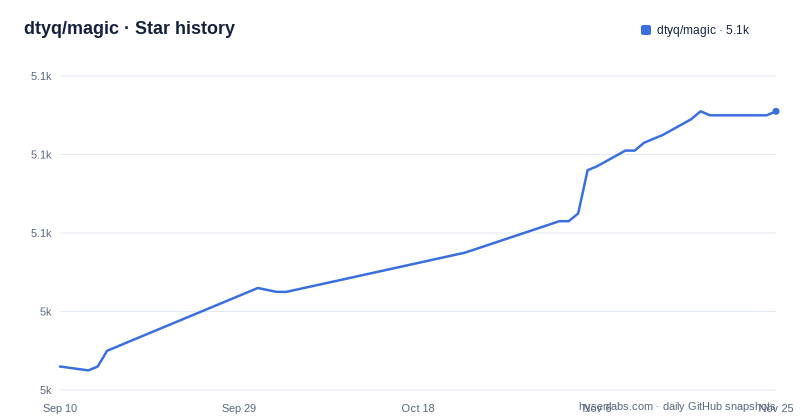
Star history
- dtyq/magic5,091 ★ · +65
| Repository | 2026-09-10 | 2026-11-25 |
|---|---|---|
| dtyq/magic | 5k | 5.1k |
65 Stars in the last 76 days, measured from the daily GitHub snapshot. Compare with other projects
Editorial analysis
What Magic claims to fix in enterprise AI
Magic addresses a specific gap: personal AI assistants, like the referenced OpenClaw, work for individuals but fail when brought into an organization. The README lists recurring problems: data stored in employee accounts disappears when staff leave, API costs are unpredictable, third-party tools expose core data, and AI actions like deleting files or sending emails carry risk. Magic's answer is a platform that wraps internal systems as digital employees, isolates agents in a sandbox, requires human approval for high-risk actions, and caps spending per department, user, and task. The target audience is broad, from solo founders to 10,000-person organizations, but the framing is enterprise governance. The platform also promises to convert AI output into finished deliverables, not just text, which is a differentiator from plain chat interfaces.
Architecture as described: sandbox, sidecar, and approval gates
The README describes a security model built on isolation. Every agent runs inside a proprietary sandbox container, separated from the main system in its own VPC, with connections made through private endpoints. A sidecar network proxy manages traffic per user, which the project says gives complete resource and data isolation across tenants. This is a strong claim. The human-in-the-loop control is clearer: when an agent attempts a high-risk operation, such as deleting data or sending an email, an approval workflow triggers. Routine actions run autonomously. That split between autonomous and gated actions is the core mechanism that separates this platform from a plain workflow engine, and it is the part that would need the most scrutiny in a real deployment.
How the workflow engine and digital employees fit together
Magic combines a generalist agent with a workflow engine, plus IM and collaborative office tools. The README's framing of digital employees is the key concept: internal systems like ERP, CRM, or databases are wrapped as reusable agents that any employee can invoke. This turns scattered API calls into shared assets. The collaboration feature lets multiple people share a project, each owning different modules, and progress can be reported automatically to WeCom, DingTalk, or Lark groups. That integration list is concrete and points to a China-centric enterprise user base.
Deliverables beyond text: PPTs, dashboards, and reports
A notable design choice is the built-in rendering framework that turns AI output into finished artifacts. The README lists PPTs, data dashboards, meeting summaries, professional reports, Excel files, and infinite canvases for image creation. This is more than a promise of formatted text; it implies the platform includes a presentation engine, a charting library, and a document generator. The practical implication is that Magic is not just an agent orchestration layer but also a document production system. That could reduce the need for manual formatting, but it also means the platform carries more complexity and more potential failure points.
Getting it running: what the README does not tell you
The README links to a section called '#self-hosted-deployment'. The repository language is TypeScript, and the top level holds backend/, frontend/, cli/, bin/, config/, docs/ and thirdparty/ directories plus a magicrew.yml file.
Limitations and cases where Magic is the wrong tool
The most obvious limitation is the license. The repository metadata says 'NOASSERTION': a LICENSE file exists, but GitHub does not match it to a standard license, so read it before using, modifying, or redistributing the code. For an enterprise, that alone can disqualify the project, because legal review would stall. A second limitation is the absence of any release history. The repository has no GitHub releases, so there is no stable version to pin, no changelog to inspect, and no evidence of a mature release process. The last push date is 24 October 2026, which suggests active development, but activity without releases is a risk. A third limitation is the marketing-heavy language. The README talks about 'the output of 100 people at the cost of 1' and 'command an entire AI workforce', which sets expectations that a codebase may not meet. If your use case is a simple automation script or a single chatbot, Magic is overkill and its enterprise controls would add unnecessary friction.
Alternatives and how they differ in approach
The README itself names OpenClaw as a personal AI assistant that connects to major IMs and runs autonomously. OpenClaw is the direct alternative for individual use, and the difference is clear: OpenClaw is built for a single user with no budget caps, no approval gates, and no enterprise data hub. Magic adds those controls on top of a similar agent concept. Another alternative is a general workflow engine like n8n or Temporal, which lets you orchestrate API calls and human approval steps, but those tools do not provide the sandbox, the digital employee packaging, or the artifact rendering. If your need is only workflow automation, a dedicated engine is lighter and more transparent. If your need is a managed AI assistant for one person, OpenClaw is simpler. Magic sits in the middle, and its value depends entirely on whether the enterprise controls are actually implemented as described.
Maintenance, upgrade cost, and license implications
Because there are no releases, there is no versioned upgrade path to evaluate. The project is on the default branch 'master', and the last push is recent, but without tags or release notes, you cannot plan an upgrade cycle. The README mentions a 'plugin security review' that catches malicious code before publishing, which implies a plugin ecosystem. The license being 'NOASSERTION' is a red flag for any organization that wants to redistribute or modify the code. NOASSERTION means GitHub could not match the LICENSE file to a standard license, so read that file before assuming commercial-use rights. The repository does ship CONTRIBUTING.md and CONTRIBUTING_CN.md.
Editorial conclusion
Adopt Magic if you run an enterprise or a one-person company and need AI agents that operate on internal systems, respect per-user and per-department budgets, and produce finished artifacts like PPTs or dashboards rather than raw text. Do not adopt it if you require a license GitHub can identify or a stable release history, because the license is reported as NOASSERTION and the repository has no GitHub releases. Before committing, verify the actual state of the sandbox isolation, the approval workflow, and the integration points with your ERP or CRM, and check whether the project has moved beyond its marketing claims into a usable codebase.
Frequently asked questions
What is Magic, also called Magicrew?
It is an open source AI productivity platform that bundles four things: a generalist AI agent, a workflow engine, IM, and an online collaborative office system. The repository is TypeScript, split into backend, frontend, cli, bin, config, docs and thirdparty directories, and its default branch is master.
What stops a Magic agent from taking a destructive action?
High risk operations trigger an approval workflow. Routine actions run autonomously, while destructive ones such as deleting data or sending email require explicit human confirmation. Spend is bounded separately, with daily budgets set per department, per user and per Agent.
Which external ecosystems can Magic load skills from?
It declares compatibility with the Anthropic Skills ecosystem and the OpenClaw Skills ecosystem, and says existing tools and skills plug in without migration.
What kinds of files does Magic output instead of chat text?
A built in rendering framework is said to produce presentations, data dashboards, meeting summaries, professional reports, Excel files and infinite canvases for image creation, with no post processing required.
How is a self hosted Magic deployment put together?
The page links to a self hosted deployment section and the repository provides backend, frontend, cli, bin, config, docs, thirdparty and a magicrew.yml file at the root. There is no compose file or Dockerfile at the top level.
Official sources
Add this badge to your README
If you maintain this project, the badge below links readers to this analysis and shows its maintenance status from the daily GitHub snapshot. Paste the markdown into your README; add ?metric=license or ?metric=stars to the image URL for a different field.

[](https://hysenlabs.com/projects/dtyq-magic)Star history chart for your README
[](https://hysenlabs.com/projects/dtyq-magic)Was this useful?