Shannon: An Autonomous White-Box Pentester That Exploits Your Code Before You Ship
Shannon is an autonomous white-box AI pentester that analyzes source code, finds attack paths and runs real exploits to prove vulnerabilities pre-production.
At a glance
- What is it?
- Shannon is an open-source AI agent that reads your web app's source, plans attacks, and runs real exploits against a live target. This review covers how it works, how to run it, and where its autonomy creates real risk.
- Who is it for?
- Adopt Shannon if you own the target, can provide a clean source checkout, and have checked your AI provider's policy on security testing. Do not use it against production or anything you lack written authorization to test.
- Can I use it commercially?
- Yes, with strict conditions. AGPL-3.0 is a network copyleft licence: if people use a modified version over a network, for example as a hosted service, you must offer them its source code under the same licence.
- Is it still maintained?
- Yes. The repository received new commits within the last day.
- What is it written in?
- Mainly TypeScript, according to GitHub's language statistics.
Answers come from the project's GitHub data, last synced on November 13, 2026, and from our analysis. They are not legal advice.
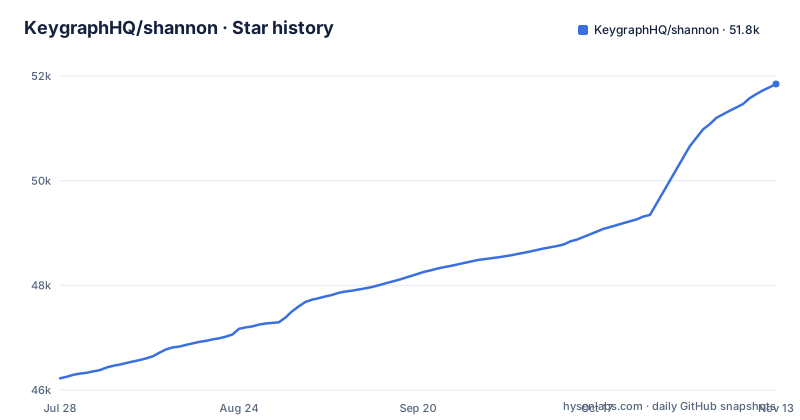
Star history
- KeygraphHQ/shannon51,848 ★ · +5,625
| Repository | 2026-07-28 | 2026-11-13 |
|---|---|---|
| KeygraphHQ/shannon | 46.2k | 51.8k |
5,625 Stars in the last 108 days, measured from the daily GitHub snapshot. Compare with other projects
Editorial analysis
The Gap Shannon Fills
Most teams run a penetration test once a year, if that. In between, code ships continuously. Shannon exists to close that gap by turning penetration testing into an on-demand, automated step that can run against every build or release. It is built for developers and security engineers who want to catch vulnerabilities before they reach production. The key word is 'prove'. Shannon does not produce a list of speculative warnings. It produces reports that include a working proof-of-concept for each finding. That is a different standard from most scanners, which flag potential issues and leave the confirmation to a human.
How It Works: Source Analysis Plus Live Exploitation
Shannon combines white-box analysis with dynamic testing. It analyzes your web application's source code to identify potential attack vectors, then uses browser automation and command-line tools to execute real exploits against the running application and its APIs. Only vulnerabilities with a working proof-of-concept are included in the final report, which the README sums up as "No exploit, no report." The repository's Docker files hint at the architecture: a Dockerfile builds a worker image that includes Chromium for Playwright, and a docker-compose.yml starts a Temporal server for the workflow engine.
Getting It Running: Commands and Configuration
The README's quick start centres on one command, `npx @keygraph/shannon@latest`, and the interactive launcher guides you through setup and your first pentest. The repository also ships a Dockerfile for the worker and a docker-compose.yml that starts Temporal for the workflow engine, so expect Docker to be involved. You also need credentials for an AI provider. The .env.example sets SHANNON_AI_API_KEY and a SHANNON_AI_MODEL in the form <provider>:<model-id>, with blocks for Anthropic (the default), OpenAI, xAI and AWS Bedrock, a custom base URL for gateways that speak the Anthropic Messages API or the OpenAI Responses API, and other providers such as OpenRouter through the same model setting.
The Safety Warning Is Not Decorative
Shannon executes real exploits against a running application, so treat it as an offensive tool. Run it only against applications and environments you own or have explicit written authorization to test, and not against production systems. The README has a Safety, Scope, and Limitations section that you should read before your first run. If it is pointed at the wrong target, the agent can cause damage. Your model provider is another factor to check in advance: its own policies on security-testing workloads may affect a scan, and that is a practical hurdle to plan for.
Limitations and Wrong Use Cases
Shannon is not a black-box scanner. It needs source code to work. If you only have a URL and no repository, this tool is the wrong choice. The white-box approach also means the quality of the analysis depends on the quality of your source checkout. A partial or obfuscated repository will produce weaker attack planning. Another limitation is provider dependency. Shannon runs on AI models from Anthropic, OpenAI, xAI, or Bedrock. If your provider blocks cyber workloads, or if their safeguards interrupt a scan, you get nothing. Finally, the README's sample reports come from scans of Photoview 2.4.0, an application used in Doyensec's comparison of AI testing platforms, so results on your own codebase will differ.
Editions and the Commercial Platform
Shannon is the agent. This repository is Shannon, the full open-source pentester you run yourself from your command line. The same Shannon also powers Keygraph's commercial editions, Pro and Enterprise, and the README has an Editions section that compares them with the open-source version and the Community Program. What matters for adoption is that the open-source version is self-contained. You bring Docker, an AI provider key, and the target, and Keygraph provides the agent.
Maintenance, License, and Upgrade Cost
The repository is licensed under AGPL-3.0. That is a strong copyleft license. If you modify Shannon and distribute it, you must release your changes under the same license. For internal use, the license has no practical cost, but if you build a product around Shannon, you need to understand the obligations. The project is actively maintained. The last push was October 27, 2026, with version v3.5.0 released the same day. Earlier releases were v3.4.0 (October 6) and v3.3.0 (September 21). That pace means you will see frequent updates. Upgrades come through npx and the worker image is built from the repository's Dockerfile, so check the release notes before upgrading.
Alternatives and the Real Difference
The obvious alternative is a traditional dynamic application security testing tool, such as OWASP ZAP or Burp Suite. Those tools scan a running web app by sending requests and analyzing responses. They do not read source code. Shannon's approach is different: it uses source analysis to guide dynamic testing and focus on realistic attack paths. That is the white-box advantage. It can find logic flaws that a black-box scanner would miss, because it knows the code paths. But ZAP and Burp are mature, have no AI provider dependency, and do not require you to clear cyber safeguards with a third party. They also do not produce proof-of-concept exploits automatically. Shannon trades that maturity and independence for the ability to prove a vulnerability end to end. If your team already uses a DAST tool and finds it sufficient, Shannon is an addition, not a replacement. If you need a report that says 'this exploit works', Shannon is the closer.
Editorial conclusion
Adopt Shannon if you own the target, can provide a clean source checkout, and have checked your AI provider's policy on security testing. Do not use it against production or anything you lack written authorization to test. Before your first scan, verify your provider's policy on cyber workloads, confirm Docker is available, and run the interactive launcher to configure credentials. Shannon is a real exploitation tool, not a scanner. Its value depends on the quality of your source and the honesty of its proof-of-concept reports. If you need a traditional DAST tool with no source access, look elsewhere. If you want to prove vulnerabilities before release, Shannon is a concrete, direct answer.
Frequently asked questions
How to install Shannon?
Run npx @keygraph/shannon@latest. The interactive launcher guides setup and your first pentest, and the repository also ships a Dockerfile plus a docker-compose.yml that starts Temporal for the workflow engine.
How to install Shannon AI?
There is no separate AI install. Copy .env.example to .env, uncomment one provider block, and set SHANNON_AI_MODEL in the form <provider>:<model-id>, which defaults to anthropic:claude-sonnet-4-6.
How do you use Shannon AI?
Give it a web application whose source code it can read and it maps attack paths before executing exploits with browser automation and command-line tools. Only vulnerabilities with a working proof of concept reach the final report.
Official sources
Add this badge to your README
If you maintain this project, the badge below links readers to this analysis and shows its maintenance status from the daily GitHub snapshot. Paste the markdown into your README; add ?metric=license or ?metric=stars to the image URL for a different field.

[](https://hysenlabs.com/projects/keygraphhq-shannon)Star history chart for your README
[](https://hysenlabs.com/projects/keygraphhq-shannon)Was this useful?