React Native Fast Image 10: SDWebImage and Glide behind one view, New Architecture only
Performant React Native image component.
At a glance
- What is it?
- react-native-fast-image replaces React Native's Image with a native view backed by SDWebImage on iOS and Glide on Android. Version 10 adds responsive sources, ThumbHash placeholders and web support, but it requires React Native 0.83 with the New Architecture and will not run in Expo Go.
- Who is it for?
- react-native-fast-image is the right pick for apps already on React Native 0.83 or later with the New Architecture that see flickering or cache misses with the built-in Image, especially in long recycled lists. Apps on the legacy architecture should stay on FastImage 9, and Expo users must accept a development build.
- Can I use it commercially?
- Yes. MIT is a permissive licence: you can use, modify and sell software built on it, as long as you keep its copyright and licence notices.
- Is it still maintained?
- Yes. The repository last received commits 22 days ago.
- What is it written in?
- Mainly TypeScript, according to GitHub's language statistics.
Answers come from the project's GitHub data, last synced on November 25, 2026, and from our analysis. They are not legal advice.
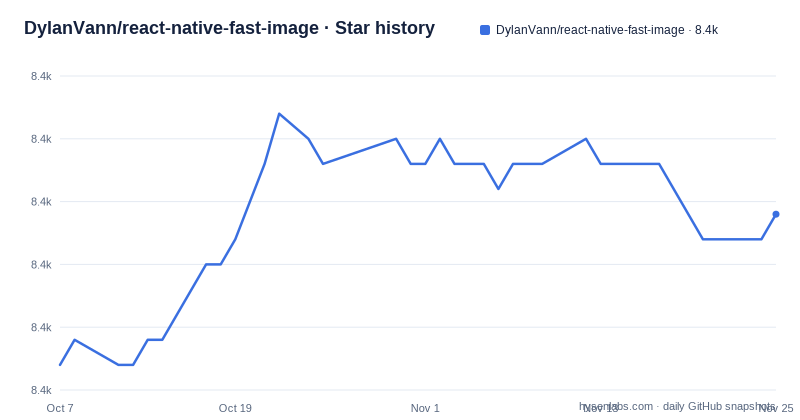
Star history
- DylanVann/react-native-fast-image8,417 ★ · +6
| Repository | 2026-10-07 | 2026-11-25 |
|---|---|---|
| DylanVann/react-native-fast-image | 8.4k | 8.4k |
6 Stars in the last 49 days, measured from the daily GitHub snapshot. Compare with other projects
Editorial analysis
A native view over SDWebImage and Glide instead of React Native's Image
React Native's own Image component caches roughly like a browser: when a server sends proper cache control headers, you get browser-style caching. The project exists because many apps still see flickering, cache misses and slow loads from cache with it. FastImage swaps the JavaScript-facing component for a single native view that wraps SDWebImage on iOS and Glide on Android, so caching and decoding happen in those libraries.
The project's own benchmarks in docs/benchmarks.md claim FastImage shows images about as fast as other React Native image components on iOS, among the fastest on Android, and uses among the least memory for large photos. Those are the maintainer's numbers, not an independent comparison.
Basic usage passes headers and a priority alongside the uri:
import FastImage from 'react-native-fast-image'

const YourImage = () => (
    <FastImage
        style={{ width: 200, height: 200 }}
        source={{
            uri: 'https://example.com/image.jpg',
            headers: { Authorization: 'someAuthToken' },
            priority: 'normal',
        }}
        objectFit="contain"
    />
)
Version 10 refuses the legacy architecture
The current line needs React Native 0.83 or later with the New Architecture (Expo SDK 55 or later), React 19, iOS or tvOS 15.1 or later, and Android 7.0 (API 24) or later. On tvOS it works with React Native tvOS. Installation for a bare app is the npm package plus CocoaPods:
npm install react-native-fast-image
cd ios && pod install
The consequence for older codebases is blunt: there is no compatibility mode. An app still on the legacy architecture, or on a React Native release below 0.83, has to stay on the previous major version:
npm install react-native-fast-image@9That pins you to a line that does not get the version 10 features such as responsive sources and web support. Moving from 9 to 10 is covered in docs/upgrading.md, but it only becomes possible after the app itself has migrated to the New Architecture.
Expo Go cannot load it
Expo support comes with a config plugin, shipped as app.plugin.js in the package, and installation goes through the Expo CLI:
npx expo install react-native-fast-imageFastImage has native code, so it needs a development build, for example via npx expo run:ios. It does not run inside Expo Go. For teams that prototype entirely in Expo Go, adding FastImage means switching the whole workflow to custom development builds, with the native build times that come with them. The package also has a browser entry, dist/index.web.js, which is how the web support is delivered.
An image stays cached until its url changes
Caching is deliberately aggressive: an image downloads once, then shows from disk or memory until its url changes, without flickering. Three controls adjust that behaviour: a freshness setting on source.cache, custom cache keys on source.cacheKey, and cache size limits configured at app start through native config.
The flip side is that a server which replaces an image while keeping the same url will not be noticed by default. Profile pictures and CMS images that are overwritten in place need either a versioned url, a cacheKey you change yourself, or a different freshness setting. Preloading is available too, with a result reported per image and access to the cached file's path, which helps when you want to warm a gallery before the user opens it.
Recycled list rows need recyclingKey
When source changes, the image that is showing stays until the new one has loaded. In views that get reused for other content, such as rows in FlashList or recyclerlistview, that behaviour shows the previous row's image in a recycled row until the new one arrives. Setting recyclingKey prevents it, so any recycled list should set it.
source can also be an array of the same image at several sizes, and the view loads the size closest to its own in pixels:
<FastImage
    style={{ width: 120, height: 120 }}
    source={[
        { uri: 'https://example.com/photo-200.jpg', width: 200, height: 200 },
        { uri: 'https://example.com/photo-800.jpg', width: 800, height: 800 },
    ]}
/>
The choice happens once the view has been laid out; a view with no size loads the largest. Each size is cached separately, so a cacheKey must be unique per size or the entries overwrite each other. FastImage itself does not take children; content over an image goes in FastImageBackground. A ref to the view supports measure and reload().
TIFF, ICNS and PSD decode only on iOS
Both platforms handle JPEG, PNG, APNG, GIF, WebP, AVIF, HEIC, SVG, ICO and BMP. TIFF, ICNS and PSD are iOS only, and PSD support means the flattened composite image as Photoshop saved it, not individual layers. If your app displays user uploads in those formats, Android users get no image for them, so convert on the server rather than relying on the client. docs/formats.md lists the iOS and Android versions each format needs and which decoder handles it.
Animated GIF, WebP, APNG and AVIF can loop and pause, transitions fade in and between images, and placeholders can be a ThumbHash, a tiny blurred image, a bundled image, or a url such as an already cached thumbnail. A width or height set to 'auto' follows the loaded image's aspect ratio.
Your own AppGlideModule or an old SDWebImage can break the build
Because FastImage sits on top of Glide and SDWebImage, it inherits their integration problems. On Android, an app with its own Glide AppGlideModule must follow the instructions in docs/android-build-settings.md first, or FastImage may not work at all. On iOS, FastImage needs SDWebImage 5.21.5 or later, and when pod install cannot find a compatible version the fix is:
cd ios && pod update SDWebImageApps that pin an older SDWebImage for another dependency face a real conflict here. The repository is busy: the last push was on 2 November 2026, the same day v10.10.2, v10.10.3 and v10.11.0 were tagged, with releases cut by semantic-release. package.json declares the license as MIT AND Apache-2.0.
Editorial conclusion
react-native-fast-image is the right pick for apps already on React Native 0.83 or later with the New Architecture that see flickering or cache misses with the built-in Image, especially in long recycled lists. Apps on the legacy architecture should stay on FastImage 9, and Expo users must accept a development build. Before adopting it, check your Android app for its own AppGlideModule, confirm SDWebImage resolves to 5.21.5 or later, and decide how images that change at the same url will be refreshed.
Frequently asked questions
How do you install React Native Fast Image?
Run npm install react-native-fast-image and then cd ios && pod install. With Expo, use npx expo install react-native-fast-image in a development build, since it does not run in Expo Go.
What is the react-native-fast-image library?
It is a replacement for React Native's Image component that wraps SDWebImage on iOS and Glide on Android. It adds aggressive caching, preloading, request headers, load priorities and placeholders.
How does React Native Fast Image compare with React Native's Image?
React Native's Image caches like a browser when servers send proper cache headers, but apps still report flickering and cache misses. FastImage targets those problems by caching each image until its url changes, through SDWebImage and Glide.
Official sources
Where developers are discussing it
Posts on Hacker News, dev.to and Lobsters that link to this repository, found by our scan of those communities. 0 in the last 30 days; newest first.
- This Week In React #302 : Next.js, React Router, DevTools, Security | RN 0.88, Expo 58, Navigation | TypeScript, PHP, CrUXdev.to · Oct 23, 2026 · 2 points · 0 comments
Add this badge to your README
If you maintain this project, the badge below links readers to this analysis and shows its maintenance status from the daily GitHub snapshot. Paste the markdown into your README; add ?metric=license or ?metric=stars to the image URL for a different field.

[](https://hysenlabs.com/projects/dylanvann-react-native-fast-image)Star history chart for your README
[](https://hysenlabs.com/projects/dylanvann-react-native-fast-image)Was this useful?