mpv-config is a Windows mpv setup where the config folder overrides the global one
本项目为 windows 下 mpv 播放器的配置文件 (This project is the configuration file of mpv player on Windows)
At a glance
- What is it?
- mpv-config is a configuration set for the mpv player on Windows, bundling shaders, Lua scripts, input bindings, fonts and an OSC style, with a bundled build published as releases. It suits someone who wants mpv's keyboard-driven interface with Chinese subtitle and pinyin search support out of the box, and the portable_config override, the UTF-8 requirement and the custom licence are the details to check first.
- Who is it for?
- mpv-config suits a Windows user who wants mpv configured rather than assembled, since the set ships scripts, shaders, fonts and bindings that would otherwise take an evening to piece together from documentation. It is the wrong choice if you already maintain your own mpv.conf, if your terminal or editor cannot be trusted with UTF-8 files with Unix line endings, or if you need a licence that permits redistribution in your own build.
- Can I use it commercially?
- Check first. The repository uses a licence we do not classify automatically, so read its LICENSE file before any commercial use.
- Is it still maintained?
- Yes. The repository last received commits 13 days ago.
- What is it written in?
- Mainly GLSL, according to GitHub's language statistics.
Answers come from the project's GitHub data, last synced on November 7, 2026, and from our analysis. They are not legal advice.
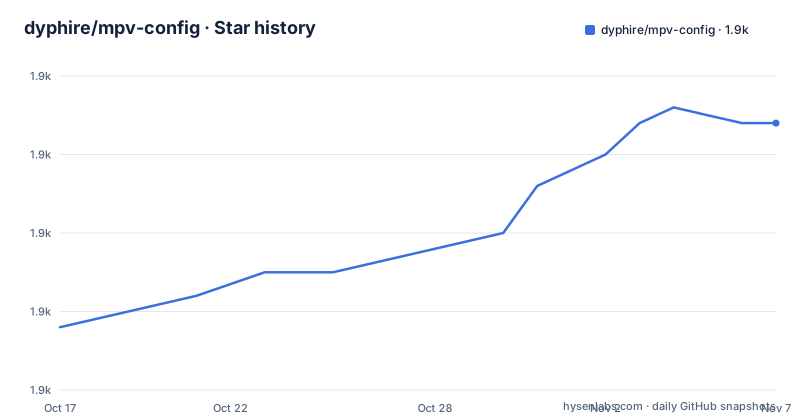
Star history
- dyphire/mpv-config1,934 ★ · +26
| Repository | 2026-10-17 | 2026-11-07 |
|---|---|---|
| dyphire/mpv-config | 1.9k | 1.9k |
26 Stars in the last 21 days, measured from the daily GitHub snapshot. Compare with other projects
Editorial analysis
Two install paths, and the portable one wins
There are exactly two places this configuration can go, and the README is explicit about how they interact.
The first is a portable_config folder beside mpv.exe, which is what you want if you keep mpv on a USB stick or in a self-contained tools folder. The second is the default mpv configuration path, %APPDATA%/mpv/, which applies globally to every mpv on the machine.
The rule that catches people is the second sentence: using portable_config overrides the global configuration. So a global config that you spent an hour tuning can be silently ignored because a portable_config folder exists next to whichever mpv.exe you launched. When settings appear not to apply, that precedence is the first thing to check, not the settings themselves.
The README also notes that mpv has no official Windows client and links the mpv installation page, recommending shinchiro's build, a daily build from zhongfly, and a build from the maintainer's own patched mpv fork. The maintainer publishes a bundled package with the configuration included in the Releases section, which is the shortest route if you do not want to assemble it yourself.
There is an English branch of the README as well as the default branch content.
Encoding and line endings decide whether any of this works
The README carries one warning that is more important than any feature list, and it is easy to skip because it is a note rather than a step.
The configuration files must be UTF-8 encoded with Unix line endings, otherwise mpv may fail to recognise them. That is a hard requirement, not a preference. A configuration set that looks correct in a Windows editor that silently writes UTF-8 with BOM, or that saves with CRLF, can produce an mpv that starts and then behaves as if none of the settings exist.
The practical consequence is about your editing habits rather than about mpv. If your default editor on Windows saves CRLF, you will reintroduce the problem the first time you tune one option. And if you diff this configuration against your own, line-ending noise will obscure real changes.
The top-level entries include .gitattributes, which is what a project uses to normalise line endings across platforms, so the repository itself is set up for this and expects you to preserve it.
The repository is mostly directories you do not write yourself
The top-level listing describes what this configuration actually contains, and the shape of it explains why it is hard to reproduce by hand.
There is mpv.conf at the root, which is the main configuration file and the only file most people edit. input.conf and inputevent_key.conf contain keyboard bindings. menu.conf holds the right-click menu, and osc-style/ holds the on-screen controller styling, which is why there is a separate directory rather than a setting inside mpv.conf.
The bulk is in directories: scripts/ for the Lua scripts, script-opts/ for their options, script-modules/ for the modules they depend on, shaders/ for the GLSL, fonts/ for the bundled fonts, and icc/ for colour profiles. archive/ holds older material.
That layout is the point of the project. mpv's own manual documents options, and hooke007's mpv manual and its Chinese translation are linked as references at the bottom of the README, but the options are only half of a usable setup: the scripts and shaders are the other half, and they are the part nobody wants to write.
Shaders and scripts are documented in the wiki, not the README
The README is short and points elsewhere for the substance. For the scripts it says their features are described in the wiki, with a link to a Chinese page about scripts, and for the shaders it says they are covered by the relevant content in mpv.conf rather than by a separate document.
That split matters if you maintain this configuration. The shader settings live in the file you are most likely to edit, so a shader change is a change to mpv.conf, while script behaviour lives in the wiki. There is a manager.json at the root as well, and the repository has no documentation in the README about what it manages.
The project publishes a config release roughly every few months. Recent tags are mpv_config-2026.08.12, mpv_config-2026.04.14 and mpv_config-2026.02.20, and the last push was on 2026-08-26. So this is a maintained snapshot rather than a stale one, and the tag naming by date means you can pin to a known state rather than tracking a moving branch.
It expects a specific front end, and covers three others by association
The README treats the player frontend as part of the configuration, which is an unusual position for a config repository to take.
For mpv itself it recommends the shinchiro Windows build, a daily build from zhongfly, and a build from a personal patched mpv fork maintained by the same author, with a discussion thread explaining what that patch changes. For a more complete interface it points at mpv.net, with a separate mpvnet directory in this repository holding the maintainer's own configuration for it.
Browser integration gets its own section: mpv-handler paired with the play-with-mpv userscript, and external-player as an alternative. It also points to umpv as a single-instance option.
Two features in the preview table are worth calling out because they are what a set like this is usually installed for: pinyin search that supports initials, and subtitle download. Those are scripts in scripts/ with their options in script-opts/, and they are the clearest example of the configuration doing work that mpv.conf alone cannot.
The licence is custom, and the split is between mpv and the config
GitHub cannot classify the licence here, and the file is LICENSE.MD. That is worth resolving before you redistribute anything built from it, since a config set that ships fonts and colour profiles is bundling third-party assets whose terms are separate from the config's own.
The fonts/ directory and the icc/ directory are the parts to look at first. Fonts in particular carry their own licences, and the GLSL shaders are code in the same sense as any other source file.
The reference links at the bottom of the README point to documentation rather than to any statement of terms, so the licence question is answered by reading LICENSE.MD rather than by the README.
For personal use on one machine this is unlikely to matter. For anyone who publishes a build, a screenshot pack or a curated bundle containing these files, the licence terms decide whether that is permitted, and that reading should happen before the bundle exists rather than after.
Editorial conclusion
mpv-config suits a Windows user who wants mpv configured rather than assembled, since the set ships scripts, shaders, fonts and bindings that would otherwise take an evening to piece together from documentation. It is the wrong choice if you already maintain your own mpv.conf, if your terminal or editor cannot be trusted with UTF-8 files with Unix line endings, or if you need a licence that permits redistribution in your own build. Before installing, decide between portable_config and %APPDATA%/mpv, because the portable folder wins and a leftover global config will be silently ignored, and take the encoding note seriously, since mpv may fail to recognise the configuration files.
Frequently asked questions
Where do I put the mpv-config files on Windows?
Either in a portable_config folder beside mpv.exe, or in the default mpv path %APPDATA%/mpv/ which applies globally. The README warns that using portable_config overrides the global configuration, so a global config can be silently ignored.
Why is mpv ignoring this configuration?
One possible cause is encoding. The README requires the files to be UTF-8 with Unix line endings and warns that mpv may not recognise the file otherwise. The second cause is precedence: a portable_config folder overrides anything in %APPDATA%/mpv/.
Which mpv build should I use on Windows?
The README recommends the shinchiro build, or a daily build from zhongfly, and also lists a build from the maintainer's patched mpv fork with a discussion explaining the patch. A bundled mpv with the configuration included is published in the Releases section.
What is in the mpv-config repository besides mpv.conf?
input.conf and inputevent_key.conf for bindings, menu.conf, osc-style/ for the on-screen controller, scripts/, script-opts/ and script-modules/ for the Lua side, shaders/ for GLSL, fonts/ and icc/ for fonts and colour profiles. The wiki documents the scripts.
Does mpv-config work with mpv.net and browsers?
The README treats front ends as part of the setup. It recommends mpv.net and includes a separate mpvnet configuration directory in the repository, covers browser playback through mpv-handler with the play-with-mpv userscript or external-player, and points to umpv for single instance playback.
Official sources
Add this badge to your README
If you maintain this project, the badge below links readers to this analysis and shows its maintenance status from the daily GitHub snapshot. Paste the markdown into your README; add ?metric=license or ?metric=stars to the image URL for a different field.

[](https://hysenlabs.com/projects/dyphire-mpv-config)Star history chart for your README
[](https://hysenlabs.com/projects/dyphire-mpv-config)Was this useful?