Echo Loop: A Self-Driving English Listening and Speaking Trainer Built on AGPL
Echo Loop AI App. Echo Loop is a scientific and efficient AI English listening and speaking training app. Through blind listening, intensive listening, following reading, retelling and spaced review, it automatically drives learners to truly understand, practice and speak each audio piece.
At a glance
- What is it?
- Echo Loop is a Dart-based mobile app that automates the blind listening, intensive listening, shadowing, retelling, and spaced review cycle for English learners. Its core value is removing the decision burden of what to practice next, but its AGPL license and platform limits deserve scrutiny.
- Who is it for?
- Echo Loop suits self-directed English learners who want a structured, repeat-based method without manually planning each practice step, and who are comfortable with an AGPL-3.0 codebase and a mobile-only footprint. It is not for learners who prefer freeform listening, who need desktop or web access, or who want to embed its code into a proprietary product.
- Can I use it commercially?
- Yes, with strict conditions. AGPL-3.0 is a network copyleft licence: if people use a modified version over a network, for example as a hosted service, you must offer them its source code under the same licence.
- Is it still maintained?
- Yes. The repository received new commits within the last day.
- What is it written in?
- Mainly Dart, according to GitHub's language statistics.
Answers come from the project's GitHub data, last synced on November 13, 2026, and from our analysis. They are not legal advice.
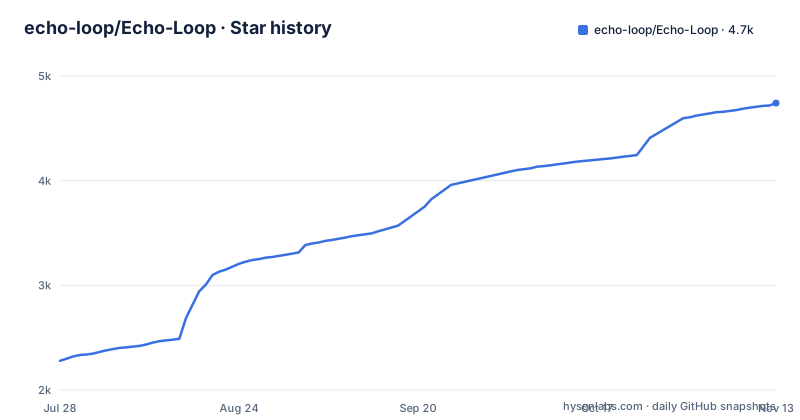
Star history
- echo-loop/Echo-Loop4,741 ★ · +2,462
| Repository | 2026-07-28 | 2026-11-13 |
|---|---|---|
| echo-loop/Echo-Loop | 2.3k | 4.7k |
2,462 Stars in the last 108 days, measured from the daily GitHub snapshot. Compare with other projects
Editorial analysis
The Problem: Decision Fatigue in Language Practice
Echo Loop targets a specific failure mode in English learning: not a lack of materials, but the overhead of deciding what to do with them. The README argues that learners hoard podcasts and speeches, listen once, forget, and never speak the content. The deeper issue, it claims, is that even when learners know the right method, executing it requires constant manual choices: which segment to practice, how many times to listen, when to reveal subtitles, which sentences to shadow, when to start retelling, and when to review. Echo Loop's premise is that this decision burden, not comprehension, is what exhausts learners. The app is designed for people who want to take one audio piece from unfamiliar to fully internalized, and who are willing to trade flexibility for a guided path. The target user is a serious, self-motivated English learner, likely one who has tried general listening apps and found them shallow.
The Method: A Fixed Five-Stage Pipeline with Spaced Repetition
The core mechanism is a five-stage workflow: intensive listening, shadowing, blind listening, retelling, and spaced review. The README provides a flowchart showing this sequence, with each stage feeding into the next. Blind listening means hearing the full audio once to check overall comprehension. Intensive listening breaks the audio into sentences, letting the learner mark difficult ones. Shadowing involves imitating pronunciation and intonation. Retelling asks the learner to express the content in their own words, which is the output stage. After that, spaced review schedules seven rounds of review at increasing intervals: 6 hours, 1 day, 2 days, 4 days, 7 days, 14 days, and 28 days. Each review round combines difficult-sentence practice and paragraph retelling, and every round from the second on adds blind listening. The app automatically drives this progression, so the learner does not decide when to review or what to do next. This is a strict, prescriptive model. It leaves little room for a learner who wants to skip stages or customize the intervals, at least in the current version.
How You Get It Running: Install, Import, and Practice
The README points to three distribution channels: the Apple App Store, Google Play, and GitHub Releases. There is no command-line installation, and the project is a Flutter app (Dart is the primary language), so running it from source would require setting up a Flutter development environment. The practical path for most users is to install the app from the App Store or Play Store. Once installed, the workflow starts by importing local audio. The app supports batch import of local audio files, and it can also import local subtitle files. If no subtitles exist, an AI transcription feature generates them automatically. After import, the learner taps start and the app guides them through the stages. The interface shows what to do next, and a resume feature remembers the learning phase and current sentence, so even five minutes of spare time can be used to practise. The README does not document any configuration keys or command-line options, because this is a consumer app, not a self-hosted service.
Feature Highlights: Chunking, Flashcards, and AI Evaluation
Several features distinguish Echo Loop from a simple audio player. Long and difficult sentences are divided into meaning groups, or chunks, to reduce comprehension load. This is a concrete mechanism: the app splits complex sentences into smaller units, presumably based on syntactic boundaries, though the README does not specify the algorithm. Difficult sentences can be bookmarked for focused review, which prevents the common pattern of marking something and forgetting it. Vocabulary and meaning groups can be saved as contextual flashcards, so review happens with the original sentence context rather than isolated word lists. The app also provides AI translation, sentence parsing, and word usage explanations, all on demand so they do not interrupt the flow. For speaking practice, the app includes an AI evaluation feature that aligns the learner's speech recognition result with the original text, highlights matched words, and gives a rating. It uses the device's built-in speech recognition. The README claims this is a full closed loop from listening to speaking, and the feature list supports that claim. However, the AI evaluation's accuracy is not documented with any metrics, so a user should test it with their own voice before relying on it.
Limitations: Platform Gaps, AI Roadmap, and Prescriptive Flow
The most obvious limitation is platform coverage. The README states that desktop macOS is under development, Windows is planned, and there is no plan for a web version. That means the app is effectively mobile-only for now. Android and iOS are covered. On a computer, the README's workarounds are installing the iOS version from the Mac App Store on an M-series Mac, or installing the Android APK through Tencent's 应用宝 on Windows; there is no browser option. A third limitation is the fixed workflow. The spaced review schedule is fixed at 6h to 28d, with no mention of user adjustment. This is a deliberate design choice, but it will frustrate advanced learners who have their own methods.
Alternatives: The Comparison Table and What It Misses
The README includes a comparison table against four apps: 每日英语听力 (Daily English Listening), 可可英语 (Keke English), 英语流利说 (Liulishuo), and Anki. The table shows that Echo Loop is the only one with fully app-driven learning rhythm, listening-to-speaking closure including retelling, long-sentence chunking, and collected-sentence focused review. The other apps have partial support for some features, and Anki lacks most, requiring manual card creation. The real difference in approach is that Echo Loop automates the sequence, while the alternatives leave the learner to decide the order and frequency. For instance, 每日英语听力 and 可可英语 are primarily content libraries with some practice tools, but they do not force a blind-listening-to-retelling pipeline. 英语流利说 has speaking evaluation but is more of a course-based app, not a tool for processing arbitrary local audio. Anki is a spaced repetition system, but it only handles flashcards, not the full listening and speaking workflow. The README's comparison is useful, but it omits a key alternative: a self-managed workflow using a general audio player plus a separate SRS like Anki. That approach gives full control but reintroduces the decision burden that Echo Loop eliminates. The trade-off is clear: automation versus flexibility.
Licensing and Maintenance: AGPL-3.0 and Active Releases
The project is licensed under AGPL-3.0. This has real implications. If you use Echo Loop as a user, the basic features are free and AI features come with a monthly free quota, with a paid membership beyond it, but if you intend to modify or embed its code, AGPL requires that any network service using the modified code must release its source under the same license. For a mobile app, that means if you distribute a modified version, you must make the source available. This is fine for personal use or for building another open-source project, but it is a barrier for commercial integration. The repository shows recent activity: the last push was on 2026-11-02, and the latest release is v1.0.45 from 2026-11-01. Previous releases were v1.0.44 on 2026-10-31 and v1.0.43 on 2026-10-25. That cadence suggests active maintenance. The README indicates that desktop support is still pending, so users should expect the app to evolve, but also that the current version may lack features they want. The AGPL license also means that if the project is abandoned, a fork is possible.
Editorial conclusion
Echo Loop suits self-directed English learners who want a structured, repeat-based method without manually planning each practice step, and who are comfortable with an AGPL-3.0 codebase and a mobile-only footprint. It is not for learners who prefer freeform listening, who need desktop or web access, or who want to embed its code into a proprietary product. Before adopting it, verify the AI transcription and evaluation features' accuracy with your own audio, confirm the App Store and Play Store versions are available in your region, and check the status of desktop support, which is not yet delivered.
Frequently asked questions
What is Echo Loop?
It is an open source English listening and speaking training app written in Dart, licensed AGPL-3.0 and released on the App Store and Google Play. It moves one piece of audio through intensive listening, following along aloud, blind listening, retelling and spaced review, and drives each step automatically.
How does the Echo Loop spaced review schedule work?
Each audio piece gets one first study session plus seven review rounds. Intervals run from 6 hours to 28 days: the first session covers intensive listening, following, blind listening and retelling, while the round at 6 hours covers difficult-sentence drills and retelling, and rounds at 1, 2, 4, 7, 14 and 28 days add blind listening.
Can I use my own audio files in Echo Loop?
Yes. Local audio can be imported in bulk, you can import subtitle files that already exist, or the app can transcribe the audio to generate them.
Is Echo Loop open source?
Yes, under the GNU Affero General Public License v3.0. The source is a Flutter project with the lib/, android/, ios/, macos/, linux/, windows/ and web/ directories at the top level.
Does Echo Loop have a desktop or web version?
macOS is in development, Windows is planned, and the README states there are no plans for a web version. The iOS and Android apps are the ones published today.
Does Echo Loop work offline?
The project's own comparison table lists offline use as supported. Keep in mind that the AI translation, sentence parsing and cloud subtitle transcription features draw on the AI quota and are the parts most likely to need a service, while shadowing scoring uses the device's own speech recognition, so the practice schedule and audio are local while the assistance may not be.
Official sources
Add this badge to your README
If you maintain this project, the badge below links readers to this analysis and shows its maintenance status from the daily GitHub snapshot. Paste the markdown into your README; add ?metric=license or ?metric=stars to the image URL for a different field.

[](https://hysenlabs.com/projects/echo-loop-echo-loop)Star history chart for your README
[](https://hysenlabs.com/projects/echo-loop-echo-loop)Was this useful?