OpenMontage: An Agentic Video Production Pipeline Built on Python and AGPL
OpenMontage coordinates agent tools and pipelines for scripting, assembling, and rendering video projects.
At a glance
- What is it?
- OpenMontage turns an AI coding assistant into a video production system, coordinating research, scripting, asset generation, editing, and rendering. This review looks at how it works, what it costs, and where it falls short.
- Who is it for?
- OpenMontage is for engineers and content teams who already rely on AI coding assistants and want to extend them into video production without leaving their chat interface. It is not for those who need a turnkey GUI or who cannot accept AGPL-3.0 obligations.
- Can I use it commercially?
- Yes, with strict conditions. AGPL-3.0 is a network copyleft licence: if people use a modified version over a network, for example as a hosted service, you must offer them its source code under the same licence.
- Is it still maintained?
- Yes. The repository last received commits 5 days ago.
- What is it written in?
- Mainly Python, according to GitHub's language statistics.
Answers come from the project's GitHub data, last synced on November 13, 2026, and from our analysis. They are not legal advice.
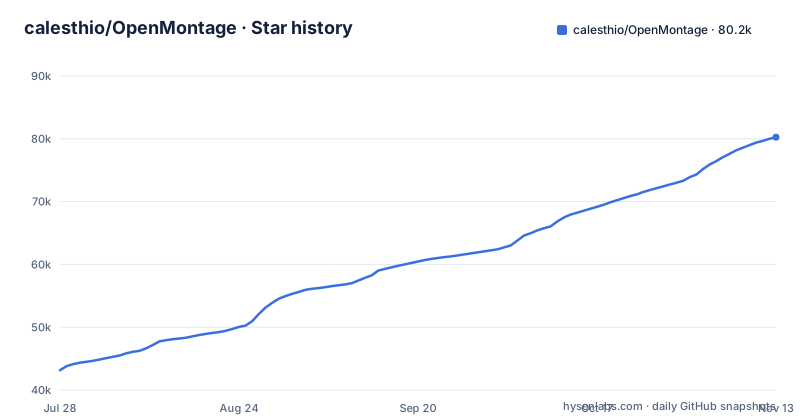
Star history
- calesthio/OpenMontage80,248 ★ · +37,092
| Repository | 2026-07-28 | 2026-11-13 |
|---|---|---|
| calesthio/OpenMontage | 43.2k | 80.2k |
37,092 Stars in the last 108 days, measured from the daily GitHub snapshot. Compare with other projects
Editorial analysis
What OpenMontage Actually Solves
OpenMontage addresses a specific gap: most AI video tools animate a handful of still images and call it video. The README explicitly distances itself from that trick. It claims to build a corpus from free stock footage and open archives, retrieve actual motion clips, edit them into a timeline, and render a finished piece. That is the core problem it solves: producing real video, not slideshows, using open-source workflows. The intended user is someone who already works with an AI coding assistant, such as those with guide files in the repository (CLAUDE.md, CODEX.md, CURSOR.md, COPILOT.md), and wants to command a full production pipeline through natural language. The project positions itself as the first open-source, agentic video production system. The target audience is not video editors but developers and AI enthusiasts who can tolerate a command-line and API-driven workflow.
How the Agentic Pipeline Is Supposed to Work
The README describes a flow where the agent handles research, scripting, asset generation, editing, and final composition. The mechanism is not a monolithic application but a coordination layer. It integrates agent tools and pipelines, meaning the AI assistant orchestrates external services. For example, one example uses Veo-generated motion clips, another uses Kling v3 via fal.ai, and another uses Google Chirp3-HD for narration. The agent assembles these into a Remotion composition, which is a React-based video rendering framework. The data flow is: user prompt, agent research and script, asset generation through provider APIs, timeline assembly, and rendering. The key architectural point is that OpenMontage is a bridge between an LLM's planning ability and external generation and rendering services. It does not itself generate video; it coordinates.
Getting It Running: Commands and Configuration
The repository's Makefile defaults to a `setup` goal and requires Python 3.10 or newer, reusing an active virtual or conda environment when one exists. Dependencies are listed in requirements.txt, requirements-dev.txt and requirements-gpu.txt, and provider keys go into a .env file copied from .env.example, for example FAL_KEY for the fal.ai gateway that serves FLUX, Veo and Kling models. The README also links a Quick Start section, a Try These Prompts section and a providers document at docs/PROVIDERS.md. The examples reference specific providers: Veo, Kling via fal.ai, Google Chirp3-HD, and Pixabay for music.
The Real Cost: Not Free, But Cheap
The README proudly cites production costs for its example videos. 'THE LAST BANANA' cost $1.33, 'Reimagine Your Universe' about $4, and 'Imagine the Possibilities' about $5. The README gives the first two as total cost and the third (about $5) as source generation cost. The cost structure is pay-per-API-call, depending on the provider. This is a genuine trade-off: OpenMontage is open-source software, but the actual video production is not free. Users must pay for model inference through the providers they use. The AGPL-3.0 license covers the code, not the media. This cost model is transparent, which is refreshing, but it means the total cost of a project is unpredictable and scales with the number of clips, narration, and music. For a 60-second short, $1.33 is cheap, but a longer documentary with many clips could be more expensive.
Where OpenMontage Is the Wrong Tool
The most obvious limitation is that it requires an AI coding assistant. The README says 'Turn your AI coding assistant into a full video production studio.' If you do not use such an assistant, or if you prefer a graphical interface, OpenMontage is not for you. The workflow is chat-driven, which means you need to be comfortable with iterative prompting and debugging agent behavior. Another limitation: the examples that state a duration run 50 to 100 seconds, so longer productions are untested in the examples shown. The README shows a 3D world example, but it is still 60 seconds. The pipeline depends on external providers, which can change APIs, pricing, or availability. A pipeline that uses a given provider depends on that provider being available. Also, the AGPL-3.0 license is a constraint. If you want to embed this in a proprietary product, you must open-source your entire application. That is a hard boundary for many commercial teams.
A Real Alternative: Remotion Alone
The README mentions Remotion as the composition framework. Remotion is a React-based video rendering library that lets you create videos programmatically. A direct alternative is to skip OpenMontage and use Remotion directly, writing your own scripts to fetch stock footage, generate assets, and assemble timelines. The difference in approach is control. With Remotion alone, you have full control over every frame, but you lose the agentic layer that plans and coordinates. OpenMontage adds an LLM that decides what clips to fetch and how to edit them. That is a trade-off: automation versus precision. If you know exactly what you want, Remotion alone is more predictable. If you want to describe a concept in plain language and let the system figure out the details, OpenMontage is the higher-level tool. The failure modes differ. With Remotion, you debug code. With OpenMontage, you debug prompts and agent decisions.
Maintenance, License, and Upgrade Cost
The repository has no recent releases listed, which suggests it is in active development but not yet stable. The README includes an 'Agent Guide' and a 'PR Review Guide', indicating a community contribution process. The license is AGPL-3.0, which has strong copyleft obligations. If you modify and distribute the software, you must provide source code under the same license. That is a legal consideration, not a technical one. The maintenance cost is twofold: you must keep up with provider API changes, and you must track updates to the OpenMontage codebase. Given the lack of releases, adopters should expect breaking changes. The setup.py version is 0.1.0, so treat it as early-stage software and plan additional engineering effort before production use.
Editorial conclusion
OpenMontage is for engineers and content teams who already rely on AI coding assistants and want to extend them into video production without leaving their chat interface. It is not for those who need a turnkey GUI or who cannot accept AGPL-3.0 obligations. Before adopting, verify the current state of the pipeline code, the provider integrations, and the rendering dependencies, since the README emphasizes examples over operational detail. If your workflow demands real motion clips from stock footage and open archives, OpenMontage's approach is distinct. If you prefer a simpler still-image animation tool, look elsewhere. Confirm the AGPL implications for your distribution model first.
Frequently asked questions
What is OpenMontage?
It is an open-source, agentic video production system written in Python. You describe the result in plain language and the agent handles research, scripting, asset generation, editing and final composition, with Remotion, Blender and FFmpeg all appearing in the examples.
How do I install OpenMontage?
The Makefile default goal is setup, and it requires Python 3.10 or newer, reusing an active virtual or conda environment when one exists. Dependencies live in requirements.txt, requirements-dev.txt and requirements-gpu.txt, and provider credentials go into a .env file copied from .env.example.
How do I use OpenMontage?
Start from a prompt rather than an API call: PROMPT_GALLERY.md holds example prompts and AGENT_GUIDE.md is the guide written for the assistant driving the system. The README also offers a Paste A Video entry point and per-provider documentation in docs/PROVIDERS.md.
Is OpenMontage free?
The code is AGPL-3.0 and available without charge. The generation calls are not free: the README quotes 1.33 US dollars for one 60-second short, about 4 dollars for another and about 5 dollars for a third, and a separate free workflow uses stock footage and open archives instead of paid models.
Official sources
Where developers are discussing it
Posts on Hacker News, dev.to and Lobsters that link to this repository, found by our scan of those communities. 0 in the last 30 days; newest first.
- Should I Go Out? A Local Gemma Agent That Picks One Outdoor Plan, Then Tells You to Put Your Phone Awaydev.to · Oct 9, 2026 · 3 points · 2 comments
Add this badge to your README
If you maintain this project, the badge below links readers to this analysis and shows its maintenance status from the daily GitHub snapshot. Paste the markdown into your README; add ?metric=license or ?metric=stars to the image URL for a different field.

[](https://hysenlabs.com/projects/calesthio-openmontage)
[](https://hysenlabs.com/projects/calesthio-openmontage)Star history chart for your README
[](https://hysenlabs.com/projects/calesthio-openmontage)Was this useful?