decode-js: one Babel-based tool for seven obfuscation targets, and one of them refuses to guess
JS混淆代码的AST分析工具 AST analysis tool for obfuscated JS code
At a glance
- What is it?
- decode-js parses obfuscated JavaScript with Babel and replays the specific transforms used by known obfuscators, one target per run. The interesting part is how its version-aware target reports uncertainty instead of emitting a half-resolved program.
- Who is it for?
- decode-js fits a security researcher or reverse engineer who needs to read a specific sample produced by a known obfuscator, and who is willing to pick the target that matches the tool that produced it. It is a poor fit for a general-purpose beautifier or a tool that must handle anything, since the coverage is per-target and the version-aware target is explicitly non-contiguous.
- Can I use it commercially?
- Yes, with conditions. GPL-3.0 is a copyleft licence: if you distribute software that includes it, you must release that software's source code under the same licence. Running it internally without distributing it does not trigger that obligation.
- Is it still maintained?
- Yes. The repository last received commits 1 day ago.
- What is it written in?
- Mainly JavaScript, according to GitHub's language statistics.
Answers come from the project's GitHub data, last synced on November 7, 2026, and from our analysis. They are not legal advice.
Star history
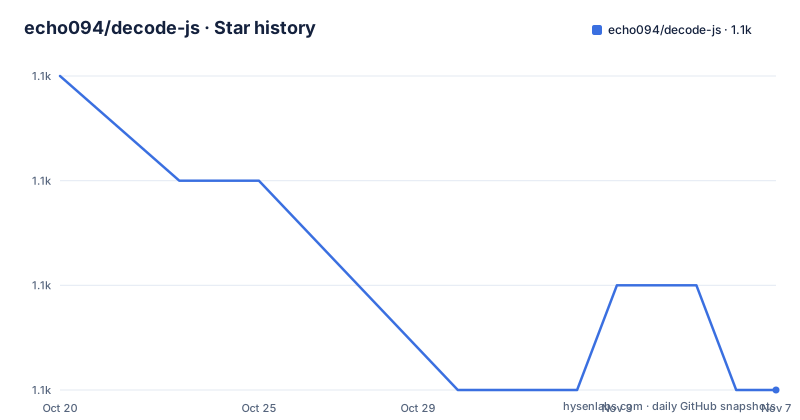
- echo094/decode-js1,069 ★ · -3
| Repository | 2026-10-20 | 2026-11-07 |
|---|---|---|
| echo094/decode-js | 1.1k | 1.1k |
-3 Stars in the last 18 days, measured from the daily GitHub snapshot. Compare with other projects
Editorial analysis
One target per run, chosen with a flag
decode-js is an AST analyzer and processor based on Babel that turns obfuscated JavaScript back into readable source. The design decision that shapes everything else is that a run targets exactly one obfuscation scheme, selected with the -t flag.
The available targets are common, which handles frequently-seen local obfuscation not tied to any one tool, covering unreachable code, nested blocks, constant expressions and raw strings. Then jjencode in the variant emitted by sojson.com, sojson, sojson v7, javascript-obfuscator (obfuscator.io), obfuscatorx, which is the version-aware variant of the same obfuscator, and jsconfuser for JS-Confuser.
That list is a compatibility table, not a promise of general coverage. The tool does not attempt to identify what produced a sample and then dispatch; you tell it, and it applies the transforms it knows for that target.
For the javascript-obfuscator target, the documented coverage is specific: stringArray including Rotate, Wrappers and ChainedCalls, deadCode, controlFlowFlattening using switch, transformer covering ObjectExpression, SplitString and others, and customCode covering self-defending, debug-protection and console-output. The jsconfuser target covers JS-Confuser 2.x up to and including the high preset, with a dedicated document recording which transforms are reversed, which are not, and why.
The common target is the odd one out and the most broadly useful, since it targets obfuscation that is not branded to a tool at all.
The version-aware target that declines instead of guessing
obfuscatorx is described as the same encoder as obfuscator, decoded era by era rather than against one shape. It is an additional target rather than a replacement, because obfuscator is widely depended on and is left untouched. The two are expected to disagree on some samples, which is a useful signal rather than a bug.
Two behaviours distinguish it.
The first is that it declines rather than half-decoding. Where a string-array layer is present and cannot be read, this entry returns nothing and says why, instead of emitting a partly-resolved program. A layer it does not own is a different case: it returns the partial decode so the output can be fed to another target, and logs what it left behind. So there are two kinds of incomplete: a layer it owns and cannot read, which is a refusal, and a layer someone else owns, which is a handoff.
The second is that it reports the encoder era. The version range is derived from the emitted shape and printed after the decode. Emitted output can only identify a range, never an exact version, and a sample carrying no evidence on an axis is reported as such rather than guessed at.
And the coverage is explicitly non-contiguous: the 2.x eras and the pinned 5.5.0, with 3.0.0 to 4.2.2 unverified. A sample whose range overlaps that gap is reported as unknown rather than treated as covered. This is the kind of honesty that is rare in this category of tool, and it changes how you use the output. A decode that reports a range and a set of unverified gaps tells you what to trust, whereas a decode that always emits a file tells you nothing about its own confidence.
Running it: Node 26, an npm script, and a target flag
The runtime requirement is Node 26.x, and the README is direct about where to look when something fails. If problems occur during installation and execution, check the requirements of isolated-vm first, because the required Node version depends on the isolated-vm version and its compatibility table.
The steps are short. Prepare a Node environment, install the dependencies with npm i, and then run one of the predefined commands:
# pre-defined command
npm run xxx
# or full command
npm run decode -- -t type [-i input.js] [-o output.js] [-v]
Each shorthand in the scripts field of package.json maps to one target. The deob script runs the obfuscator target, deobx runs obfuscatorx, dejsc runs jsconfuser, deso runs sojson and desov7 runs sojson v7, all against src/main.js, and the generic decode script takes the target as an argument.
The input and output defaults are input.js and output.js, and the -i and -o flags change them. The -v flag turns on per-pass progress tracing, which is off by default, and that flag is worth turning on the first time you run it, because a decode that produces nothing usually means one of the passes bailed out and the trace tells you which one.
There is one constraint on the input that is easy to trip over. The file cannot contain additional codes other than obfuscated code, such as non-obfuscated code. The tool is a decoder for a whole file, not a filter that skips the readable parts, so a bundle with a mix of obfuscated and plain modules is not a valid input.
The test suite runs on vitest with a vitest.config.js, and linting is eslint with a --fix on src, configured through eslint.config.mjs with prettier integration and a .prettierrc.json.
Why Babel and a sandboxed VM are both in the dependency list
The dependency list explains the architecture. @babel/parser, @babel/traverse, @babel/types and @babel/generator, all at 8.0.0 or newer, are the standard Babel toolchain: parse the file into an AST, walk and rewrite it, and print it back out. That is the right foundation for this problem, because obfuscation is a source-to-source transformation and undoing it is a source-to-source transformation in reverse.
The fifth dependency, isolated-vm at 7.0.0 or newer, is the interesting one. Decoding a string array means evaluating the code that builds the array, and that code is by definition untrusted and possibly hostile. Running it in the same process as the analyzer would mean running the attacker's code with your privileges. isolated-vm provides an isolated V8 environment, which is where that evaluation happens instead.
The consequence is that decode-js needs a Node version compatible with isolated-vm, and the README's advice to check the isolated-vm requirements first is not boilerplate. An install that fails to build the native module, or a runtime that fails to construct the isolate, is an environment problem rather than a bug in the tool.
The rest of the toolchain is conventional: prettier for formatting, eslint with a flat config, and vitest with coverage-v8 for the tests. The package is an ES module, type module, and the licence field reads GPL-3.0-or-later.
Where the boundaries of the tool sit
The first limitation is that the target list is the whole scope. A sample obfuscated with a tool that is not on the list, or obfuscated by hand in a way that does not match the documented transforms, is not going to be decoded, and the tool will not tell you so by identifying the producer. It will apply the transforms it has and produce output, which may be nothing useful. Choosing the right -t value is a step in the process rather than something the tool does for you.
The second limitation is coverage inside a target, and it varies. The javascript-obfuscator target enumerates a specific set of transforms, and a sample using a transform outside that list is only partly handled. The jsconfuser target has a dedicated document precisely because which transforms are reversed and which are not is not uniform, and the jsconfuser coverage stops at the high preset.
The third limitation is the era gap in obfuscatorx, and it is worth being concrete about the consequence. A sample whose obfuscator version falls in the 3.0.0 to 4.2.2 range is reported as unknown, and for the obfuscator target the two are expected to disagree on some samples because one works against a shape and the other works against an era. If you need a definitive answer, you may need to try both and compare.
On the subject of legality, the project is licensed under the GNU General Public License, version 3 or later, copyright 2022 the decode-js contributors, and the README links three related projects for people who want to compare approaches. The repository is not archived, the last push was on 2026-10-13, and there are no published GitHub releases, so the version you install is the tip of the main branch.
Editorial conclusion
decode-js fits a security researcher or reverse engineer who needs to read a specific sample produced by a known obfuscator, and who is willing to pick the target that matches the tool that produced it. It is a poor fit for a general-purpose beautifier or a tool that must handle anything, since the coverage is per-target and the version-aware target is explicitly non-contiguous. Before adopting, confirm the sample was produced by one of the listed tools, check whether the 3.0.0 to 4.2.2 era gap matters for your sample, and read the jsconfuser document, which records which transforms are reversed and which are not.
Frequently asked questions
What is decode-js and what does it do?
decode-js is an AST analyzer and processor based on Babel that turns obfuscated JavaScript back into readable source. It targets known obfuscation schemes rather than detecting them, and one target is selected per run with the -t flag.
How do I run decode-js on a file?
Prepare a Node 26.x environment, run npm i to install the dependencies, then either use a predefined script such as npm run deob for the javascript-obfuscator target or npm run dejsc for jsconfuser, or pass the target yourself with npm run decode -- -t type -i input.js -o output.js -v. The default input is input.js and the default output is output.js.
What is the difference between the obfuscator and obfuscatorx targets?
The obfuscator target decodes against one shape, while obfuscatorx decodes era by era and is version aware. It is an additional target rather than a replacement, it declines rather than emitting a partly-resolved program when it cannot read a string-array layer, and it prints the version range it inferred after the decode.
Why does decode-js need isolated-vm?
Decoding a string array means evaluating the obfuscated code that builds it, and that code is untrusted. isolated-vm provides an isolated V8 environment so the evaluation happens in a sandbox rather than in the analyzer's own process, which is also why the required Node version depends on the isolated-vm version.
What licence is decode-js released under?
It is licensed under the GNU General Public License, version 3 or later, copyright 2022 the decode-js contributors, with the full text in the LICENSE file at the root of the repository.
Official sources
Add this badge to your README
If you maintain this project, the badge below links readers to this analysis and shows its maintenance status from the daily GitHub snapshot. Paste the markdown into your README; add ?metric=license or ?metric=stars to the image URL for a different field.

[](https://hysenlabs.com/projects/echo094-decode-js)Star history chart for your README
[](https://hysenlabs.com/projects/echo094-decode-js)Was this useful?