Sprotty: a web diagramming framework built on SVG and TypeScript
A diagramming framework for the web
At a glance
- What is it?
- Sprotty is the client half of an Eclipse-hosted diagramming framework that renders diagrams as SVG in the browser, with animation in the core, a reactive TypeScript architecture, dependency injection for configuration, and server counterparts in Java or Node.js. The project spans four repositories and gives you a client you can also embed in VS Code or Theia.
- Who is it for?
- Adopt Sprotty if you are building a diagram or graph editor that has to run in a browser and you want SVG output, CSS styling, animation and a client-server split rather than a canvas component. Do not adopt it if you only need to render a fixed diagram, because the framework is built for interactive editing, and do not expect one package to give you everything, since the client, the server and the IDE glue live in separate repositories.
- Can I use it commercially?
- Yes, with conditions. EPL-2.0 is a weak copyleft licence: you can use it inside commercial and closed-source software, but if you distribute changes to its own files, you must publish those changes under the same licence.
- Is it still maintained?
- Yes. The repository last received commits 8 days ago.
- What is it written in?
- Mainly TypeScript, according to GitHub's language statistics.
Answers come from the project's GitHub data, last synced on November 7, 2026, and from our analysis. They are not legal advice.
Star history
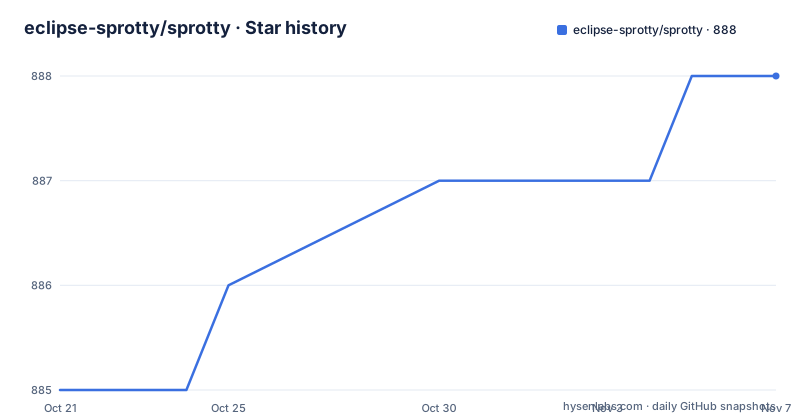
- eclipse-sprotty/sprotty888 ★ · +3
| Repository | 2026-10-21 | 2026-11-07 |
|---|---|---|
| eclipse-sprotty/sprotty | 885 | 888 |
3 Stars in the last 17 days, measured from the daily GitHub snapshot. Compare with other projects
Editorial analysis
The problem: an editor for diagrams that has to run in a browser
A diagramming tool for the web is a strange requirement to satisfy with the usual building blocks. Canvas gives you speed and no accessibility, SVG gives you crisp output, CSS styling and text you can select, and a good deal of the cost of a diagram editor is in the interaction model rather than in the drawing.
Sprotty is the client part of a next-generation, open-source diagramming framework built with web technologies, and the project description is a diagramming framework for the web. It is hosted under the Eclipse Sprotty project, which tells you something about the governance and about the audience: this is a framework for people building language tooling and developer tools, where the diagram is often a live projection of a model rather than a picture of one.
That audience explains the integration list. Sprotty integrates with Xtext, Langium, the Language Server Protocol, VS Code and Theia, which is the set of technologies a language workbench is assembled from. In that world a diagram is a view onto an AST, it updates as the model changes, and it has to run inside an IDE as well as in a plain web page.
The language is TypeScript, the licence is EPL-2.0, the homepage is sprotty.org, and the last push was on 2026-10-20. The published releases are v1.4.0 from 2024-12-17, v1.3.0 from 2024-07-23 and v1.2.0 from 2024-04-09, so the released line and the working tree are on different clocks, which is worth remembering before you pin a version.
The rendering model: SVG, CSS and animation in the core
The feature list is short, and the first three entries are the ones that decide whether the framework fits your project.
There is fast, scalable SVG rendering that is compatible with all modern browsers and stylable with CSS. The CSS part is the significant one, because it means a diagram in Sprotty is themed by stylesheets rather than by drawing code, and a design system can restyle every diagram in a product without touching the framework. SVG also means the output is inspectable in the browser, searchable, printable, and accessible to a screen reader, which a canvas based editor does not give you for free.
Animations are built into the core, rather than left to each application to layer on top. For a model driven view, animation is not decoration: it is how a user follows what changed when the model changes underneath them, and building that into the framework is the difference between a diagram that is merely correct and one that is comprehensible.
The third feature is the architecture: a fast, reactive client architecture implemented in TypeScript, and configuration via dependency injection. The reactive part is what makes the framework usable with the model editing tools in its ecosystem, where an edit to the model has to propagate to the view without the application reimplementing change detection. Dependency injection for configuration is a less obvious choice, and it is the one that decides how you extend it: a diagram type, a view and a command are all bound as services, so a project overrides behaviour by replacing a binding rather than by patching a class.
The platform is the same on both sides of the line: a Java or Node.js based server architecture, and the client can be run as a rich client as well as in the browser.
Four repositories, and which one you actually need
The Sprotty project spans four GitHub repositories, and the first thing to understand is which of them your project touches.
This repository, sprotty, holds the client code in the sprotty package, the shared code for Node.js servers in sprotty-protocol, the ELK layout integration in sprotty-elk, a library of prebuilt diagram elements in sprotty-library, a Yeoman project generator called generator-sprotty, and examples. So the client, the server protocol, the layout integration, the element library and the scaffolding tool all live here, which is convenient if you are starting fresh and noisy if you only want the client.
sprotty-server holds the server code for Java, and it includes server-side diagram layout, the extension of the Language Server Protocol, and the integration with the Xtext framework. That is the JVM side of the project, and it is a separate repository because the two halves have different toolchains and different audiences.
The other two are glue. sprotty-theia contains the glue code to integrate Sprotty views in the Theia IDE, and sprotty-vscode does the same for VS Code. If you are embedding a diagram in an editor, one of those two is your entry point, and if you are not, both are irrelevant to you.
The ELK integration deserves a word because layout is the part of a diagram editor that every project ends up needing. Doing layout in the browser means the diagram responds immediately to edits, and the project ships that as a package rather than expecting each application to solve it.
The project is built with GitHub Actions, the documentation is on the website at sprotty.org/docs/, and the version history is documented in the CHANGELOG, with changes tracked separately for each package, which is the right granularity when the client and the protocol move at different speeds.
Building the workspace: npm workspaces, Vitest and Node 24
The repository is an npm workspace, and the root package.json is the map of how the project is developed. The workspaces are packages/* and examples, and the scripts show the whole loop:
    "build": "tsc --build tsconfig.build.json && npm run build -w examples",
    "coverage": "vitest run --coverage --config vite.config.mts",
    "test": "vitest run --config vite.config.mts",
The build compiles the TypeScript project references first and then builds the examples, which is the right order: the examples are the consumer of the packages, so compiling them proves the packages are usable.
The lint script runs eslint with --max-warnings 0, because a warning in a diagram framework is usually a bug in a type or in a hook, and the project has decided not to tolerate a backlog.
Tests run on Vitest with a dedicated config file, and there is a separate coverage script using the v8 coverage provider. The watch script runs the example watcher and the TypeScript watcher together through concurrently, with separate colours for the two outputs, which is the detail that tells you the author has actually used this loop daily.
The toolchain is pinned and current: TypeScript around 5.9, Vite around 8, Vitest around 4, and the engines field requires Node 24 or newer with npm 11.2 or newer. For a framework that is a dependency of other people's IDE plugins, that floor is worth checking, because it is the kind of requirement that decides whether your build matrix can accommodate it.
The examples are the fastest route into the framework
The examples directory is unusually large for a framework repository, and it is the best documentation the project has.
There is a circlegraph, a classdiagram, a flowchart, an svg example, a styling example, a custom views example, a layout strategies showcase, a micro layout showcase, a multicore example, a random graph and a random graph distributed variant, a server example, a jsxample, and an index.html. Plus a browser-app.ts at the top level.
The names are a map of the framework's feature surface. A styling example tells you that CSS is the theming mechanism. A custom views example tells you that the view layer is replaceable. Layout strategies and micro layout examples tell you that layout is pluggable and that you can work at a granularity below the whole diagram. A multicore example tells you that rendering work is spread across workers. A random graph distributed example is about scale.
The three external references are worth reading alongside. The view filtering example uses filtering to efficiently navigate a large dataset of publications and citations, and the nested graphs example expands nested subgraphs in place to navigate a large project made of TypeScript modules. Both are about the same problem from different directions, keeping a large model interactive, and the Yangster VS Code extension for the YANG language is a real tool built on the framework.
There is also an examples/AGENTS.md and a CLAUDE.md, so the project has thought about how to work with coding agents in the tree, and the same convention appears at the repository root.
Licence, maintenance and where Sprotty is the wrong tool
The licence is EPL-2.0, with the licence text in the LICENSE file at the root of the repository. EPL-2.0 is the Eclipse choice, and it is a file level copyleft, which is a sensible fit for a framework that is meant to be extended by the organisations that use it.
The maintenance picture is mixed, and it is better to state it plainly. The repository is not archived and the last push was on 2026-10-20, so the work is happening. The published releases, however, are v1.4.0 from December 2024, v1.3.0 from July 2024 and v1.2.0 from April 2024, so anyone installing from a registry is getting a build that is about two years old, and the documentation notes that changes are tracked separately for each package, which means the packages in the workspace are at different versions.
Where Sprotty is the wrong tool is mostly about scope. If you need to display a diagram that someone else authored and never edit it, this is far more machinery than the job requires, and rendering it once with a simpler library is a better trade. If your editor is not a browser, the rich-client option exists but the framework's assumptions about DOM, SVG and CSS are still there.
And if your team is not building a language workbench, the integration surface that makes Sprotty attractive, Xtext, Langium, the Language Server Protocol, VS Code and Theia, is not much of an advantage, because you are paying for a framework designed around models changing underneath a view.
The judgement is that Sprotty is a good fit for a diagram that is a live projection of a model in a tool that runs in a browser or an IDE, and a poor fit for everything else. Before you commit, read the examples rather than the API documentation, because the examples show the shape of the model the framework expects, and check the tags in the repository rather than assuming the working tree is what you will get.
Editorial conclusion
Adopt Sprotty if you are building a diagram or graph editor that has to run in a browser and you want SVG output, CSS styling, animation and a client-server split rather than a canvas component. Do not adopt it if you only need to render a fixed diagram, because the framework is built for interactive editing, and do not expect one package to give you everything, since the client, the server and the IDE glue live in separate repositories. Before you start, read the examples, they are the fastest route to understanding what the framework expects of your model, and check the release tags, since the newest published version is from December 2024.
Frequently asked questions
What is Sprotty and what is it for?
It is the client part of a next-generation, open-source diagramming framework built with web technologies, hosted under the Eclipse Sprotty project. It provides fast, scalable SVG rendering that is stylable with CSS, animations built into the core, a reactive TypeScript client architecture, configuration via dependency injection, and integrations with Xtext, Langium, the Language Server Protocol, VS Code and Theia.
Which Sprotty repository should I depend on?
The sprotty repository holds the client code, the shared Node.js server code in sprotty-protocol, the ELK layout integration, the prebuilt diagram element library and the Yeoman generator. The Java server code lives in sprotty-server, and the IDE glue lives in sprotty-theia and sprotty-vscode. Most browser applications need only the client from this repository.
How do I build and test Sprotty locally?
The root package.json defines npm workspaces over packages/* and examples, with build running tsc --build tsconfig.build.json and then the examples build, lint running eslint with --max-warnings 0, and test running vitest run with vite.config.mts. The toolchain expects Node 24 or newer with npm 11.2 or newer.
How does Sprotty handle layout and theming?
Rendering is SVG, so styling is done with CSS rather than in drawing code, and the project ships an ELK layout integration in the sprotty-elk package so layout does not have to be solved per application. The examples include a styling example, a custom views example, and layout strategy and micro layout examples.
What licence is Sprotty released under, and how current is it?
EPL-2.0, with the licence text in the LICENSE file at the root of the repository. The repository is not archived and the last push was on 2026-10-20, but the published releases are v1.4.0 from 2024-12-17, v1.3.0 from 2024-07-23 and v1.2.0 from 2024-04-09, and changes are tracked separately for each package.
Official sources
Add this badge to your README
If you maintain this project, the badge below links readers to this analysis and shows its maintenance status from the daily GitHub snapshot. Paste the markdown into your README; add ?metric=license or ?metric=stars to the image URL for a different field.

[](https://hysenlabs.com/projects/eclipse-sprotty-sprotty)Star history chart for your README
[](https://hysenlabs.com/projects/eclipse-sprotty-sprotty)Was this useful?