OBLITERATUS: refusal removal for HuggingFace transformers
OBLITERATE THE CHAINS THAT BIND YOU
At a glance
- What is it?
- OBLITERATUS is an AGPL-3.0 Python toolkit that locates and projects out refusal directions in transformer weights without retraining. It is aimed at alignment researchers and red-teamers, and it ships both a CLI and a Gradio app.
- Who is it for?
- Adopt OBLITERATUS if you are doing mechanistic interpretability or red-team evaluation and you can read the activation artifacts it exposes; skip it if you need a turnkey content filter bypass or cannot run the GPU memory that a full SVD pass over a large model demands.
- Can I use it commercially?
- Yes, with strict conditions. AGPL-3.0 is a network copyleft licence: if people use a modified version over a network, for example as a hosted service, you must offer them its source code under the same licence.
- Is it still maintained?
- Yes. The repository last received commits 1 day ago.
- What is it written in?
- Mainly Python, according to GitHub's language statistics.
Answers come from the project's GitHub data, last synced on November 14, 2026, and from our analysis. They are not legal advice.
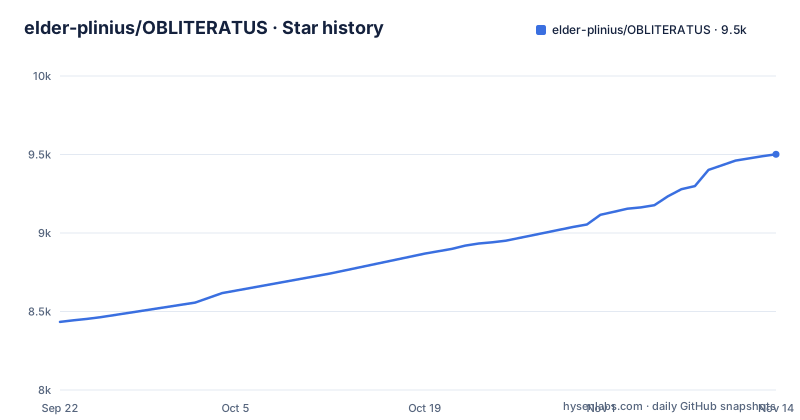
Star history
- elder-plinius/OBLITERATUS9,501 ★ · +1,067
| Repository | 2026-09-22 | 2026-11-14 |
|---|---|---|
| elder-plinius/OBLITERATUS | 8.4k | 9.5k |
1,067 Stars in the last 53 days, measured from the daily GitHub snapshot. Compare with other projects
Editorial analysis
The refusal-direction problem OBLITERATUS addresses
Post-training safety in most instruct models is not a separate module you can disable. It is a behaviour encoded across weights, and the research the project cites (Arditi et al. 2024) argues that a large part of it concentrates in a single direction in activation space. That makes it measurable, and measurability makes it removable. OBLITERATUS is built around that claim: find the direction, subtract it, keep the rest of the network intact.
The intended audience is narrow and stated plainly in the README. Alignment researchers studying refusal geometry, red-teamers checking whether safety survives weight-level intervention, evaluators who need an unrestricted baseline to compare against, and local-first practitioners running models on their own hardware. The README also lists who it is not for, and the warning is explicit that models produced by the tool have had safety guardrails removed and that the user carries responsibility for the output.
What separates this from a jailbreak prompt is the layer it operates on. Prompt-level attacks leave the weights untouched and are defeated by a new system prompt or a classifier in front of the model. A projection applied to the weights travels with the checkpoint. That is the whole point, and it is also why the licence and the responsible-use section are not boilerplate.
SUMMON to VERIFY: the six-stage pipeline
The README describes a six-stage flow: SUMMON loads the model and tokenizer, PROBE collects activations on restricted versus unrestricted prompts, DISTILL extracts refusal directions via SVD, EXCISE surgically projects out the guardrail directions, and VERIFY closes the run.
Four extraction strategies are named: PCA, mean-difference, sparse autoencoder decomposition, and whitened SVD. The default path the README shows is the SVD route. The distinction matters because mean-difference is cheap and assumes the refusal signal is roughly linear and unimodal, while sparse autoencoder decomposition tries to separate entangled features and costs considerably more compute. The project's claim is that you can quantify the compliance-versus-coherence tradeoff before committing to a modification, which is the honest way to frame this: every projection removes something, and the question is how much general capability leaves with it.
Beyond the CLI there is a Python API that exposes intermediate artifacts, including activation tensors, direction vectors, and cross-layer alignment matrices. That is the part with real research value. A tool that only returned a modified checkpoint would be a black box; returning the direction vectors lets you check whether the refusal subspace you extracted looks like the one in the cited literature. The repository also carries an examples/ directory with YAML study definitions (full_study.yaml, gpt2_layer_ablation.yaml, gpt2_head_ablation.yaml, preset_attention.yaml, preset_knowledge.yaml, preset_quick.yaml, remote_gpu_node.yaml), which suggests the ablation side is driven by declarative configs rather than flags.
Installing OBLITERATUS and running a first obliteration
The package is named obliteratus, version 0.1.4, and requires Python 3.11 or newer. The dependency list is the standard transformer-research stack: torch>=2.0, transformers>=4.40, datasets, accelerate, safetensors, scikit-learn, and optuna pinned to >=4.9,<5. Note that optuna is a hard dependency, not an optional one, so a hyperparameter search library lands in your environment even for a single run.
A plain install pulls the core dependencies declared in pyproject.toml, which requirements.txt mirrors:
pip install obliteratusIf you want the Gradio interface that app.py serves, the Dockerfile installs the spaces extra instead. The Dockerfile comment says that extra adds Gradio for app.py without pulling the quantization extra:
pip install ".[spaces]"The README's single-command example is the fastest way to see the pipeline run end to end. It names a specific model and a method flag, so substitute your own checkpoint if you are not using Llama:
obliteratus obliterate meta-llama/Llama-3.1-8B-Instruct --method advancedIf you would rather not install anything, the README points at a Colab notebook (notebooks/abliterate.ipynb) and a HuggingFace Space, both of which run the same pipeline. The Space runs on ZeroGPU and the README states it has a free daily quota with HF Pro. For a containerised local run, the repository's Dockerfile is python:3.11-slim, installs ffmpeg and libsndfile1, exposes port 7860, drops to a non-root appuser, and sets a healthcheck against http://localhost:7860/. The Dockerfile comments are explicit that this file is for local Docker use and is not what the HuggingFace Space uses.
Where OBLITERATUS is the wrong tool
The first limitation is stated by the project itself and is easy to skim past: telemetry. The README says that when you obliterate a model with telemetry enabled, the run contributes anonymous benchmark data to a crowd-sourced dataset. That is a reasonable design for a distributed experiment, and the README frames it as co-authoring the science. It is still a data egress path from a job that loads model weights, and anyone working under a data-handling policy needs to find the opt-out before running the CLI on a private checkpoint.
The second limitation is hardware. Extracting directions via SVD over activation tensors collected from a large model is not a laptop workload. The repository ships requirements-apple.txt, which implies Apple Silicon is considered, and a quantization extra exists, but quantization changes the activations you are probing. Probing a 4-bit model to find a refusal direction and then applying it to the full-precision model is an assumption, not a guarantee.
The third is scope. This removes refusal behaviour; it does not add capability, and it does not make a small model competent. If your actual problem is that a model gives bad answers, abliteration will give you bad answers without a refusal prefix. And if your goal is a production content filter, this is the opposite tool: it is the thing your filter is trying to catch.
How this differs from prompting-based jailbreaks and from fine-tuning
The obvious alternative is a prompt-level attack: a system prompt, a roleplay frame, or an adversarial suffix. The difference is persistence and transferability. A prompt attack is per-request, costs nothing to try, and can be blocked by a classifier sitting in front of the model without touching the weights. OBLITERATUS changes the artifact. The refusal direction is projected out of the checkpoint, so the modification survives a fresh system prompt and moves with the file.
The other alternative is fine-tuning on compliance data, which is how most uncensored community models are actually produced. Fine-tuning changes many weights in an uncontrolled way and can degrade reasoning, formatting, and instruction-following as collateral. The abliteration argument is that a targeted rank-limited projection is more surgical: you remove one subspace and leave the rest of the network where it was, with norm preservation to limit damage to the residual stream. Whether that holds in practice depends on how entangled refusal is with general capability in the specific architecture, which is exactly what the VERIFY stage and the coherence checks are meant to measure. The honest position is that this is a hypothesis under test, and the tool's value is that it lets you test it per model rather than taking it on faith.
A third comparison point is the evaluation harnesses the README cites, HarmBench and JailbreakBench. Those measure whether a model refuses under attack. OBLITERATUS is the intervention side. Running one against the other is the natural experiment, and it is the reason an unrestricted baseline is useful.
Licence, maintenance and the cost of upgrading
OBLITERATUS is licensed AGPL-3.0-or-later, with the pyproject declaring license = "AGPL-3.0-or-later" and shipping the LICENSE file. This is the strongest of the common copyleft licences and it has a network clause: if you modify the software and let users interact with it over a network, the AGPL's source-availability obligation is generally understood to apply to your modified version. That is a meaningful consideration for anyone planning to wrap the pipeline in an internal service. This is a description of the licence text, not legal advice; if you are building a product on top of it, get an actual opinion.
The more interesting licence question is the output. The AGPL covers the tool. It does not automatically relicense the model weights you produce, which are governed by the base model's own licence. If you obliterate a Llama checkpoint, Meta's terms still apply to the result. Nothing in the repository can change that, and the README's responsible-use section puts the burden on the user.
On maintenance: the repository is not archived, and the last push was on 2026-10-30. The most recent tagged release is v0.1.4 from 2026-10-15, and the pyproject classifies the project as Development Status 4 - Beta. Beta classification with a 0.1.x version series means the Python API surface, including the artifact names the README advertises, should be treated as movable. Pin the version in any harness you build, and read the release notes before bumping. The dependency pins are mostly lower bounds (torch>=2.0, transformers>=4.40), which means an unpinned install will drift forward with upstream releases; optuna (<5), pillow (<14) and filelock (<5) carry upper bounds. If you need reproducibility, pin the full lockfile, which the repository does ship as uv.lock.
Editorial conclusion
Adopt OBLITERATUS if you are doing mechanistic interpretability or red-team evaluation and you can read the activation artifacts it exposes; skip it if you need a turnkey content filter bypass or cannot run the GPU memory that a full SVD pass over a large model demands. Before committing, check the paper/ and docs/ directories for the evaluation protocol, confirm the optuna>=4.9,<5 pin resolves against your existing environment, and decide whether the AGPL-3.0-or-later network clause is compatible with how you plan to serve any derived model.
Frequently asked questions
What is OBLITERATUS?
It is an open-source Python toolkit for abliteration: identifying the internal representations that cause a language model to refuse prompts and removing them without retraining or fine-tuning. The README describes it as an alignment research tool that also functions as a distributed experiment, since runs with telemetry enabled contribute anonymous benchmark data.
How do I use OBLITERATUS?
The README gives a single command, obliteratus obliterate meta-llama/Llama-3.1-8B-Instruct --method advanced, which runs the SUMMON, PROBE, DISTILL, EXCISE and VERIFY stages. If you prefer not to install anything, the README points at a Colab notebook and a HuggingFace Space that run the same pipeline.
How to install obliteratus?
Install it with pip install obliteratus, which needs Python 3.11 or newer and pulls the core dependencies declared in pyproject.toml. Add the spaces extra if you want the Gradio interface that app.py serves.
What does "obliteration" mean in the context of OBLITERATUS?
In this project it refers to extracting a refusal subspace from a model's weights using SVD decomposition and projecting it out, a step the README calls EXCISE. The stated goal is to remove the refusal behaviour while preserving the model's core language capabilities.
how to use obliteratus
The README's entry point is the obliteratus obliterate command with a model identifier and a --method flag, run after installing the package. The same pipeline is also exposed through a Gradio interface and a Python API that returns activation tensors, direction vectors and cross-layer alignment matrices.
Official sources
Add this badge to your README
If you maintain this project, the badge below links readers to this analysis and shows its maintenance status from the daily GitHub snapshot. Paste the markdown into your README; add ?metric=license or ?metric=stars to the image URL for a different field.

[](https://hysenlabs.com/projects/elder-plinius-obliteratus)Star history chart for your README
[](https://hysenlabs.com/projects/elder-plinius-obliteratus)Was this useful?