Element Plus: The Vue 3 component library that grew up
A Vue.js 3 UI Library made by Element team. 中国大陆加速镜像站点 Breaking Change List The first stable release of Element Plus, suitable for production use, was released on February 7, 2022.
At a glance
- What is it?
- Element Plus is the Vue 3 rewrite of Element UI, now stable since February 2022. It offers a full component set, TypeScript support, and a migration tool, but its API stability and maintenance cadence demand scrutiny before adoption.
- Who is it for?
- Adopt Element Plus if you are building a Vue 3 app that needs a broad, battle-tested component set and you want a stable API that has not broken since February 2022. Skip it if you demand a smaller bundle or a design system built around your brand.
- Can I use it commercially?
- Yes. MIT is a permissive licence: you can use, modify and sell software built on it, as long as you keep its copyright and licence notices.
- Is it still maintained?
- Yes. The repository last received commits 1 day ago.
- What is it written in?
- Mainly TypeScript, according to GitHub's language statistics.
Answers come from the project's GitHub data, last synced on November 14, 2026, and from our analysis. They are not legal advice.
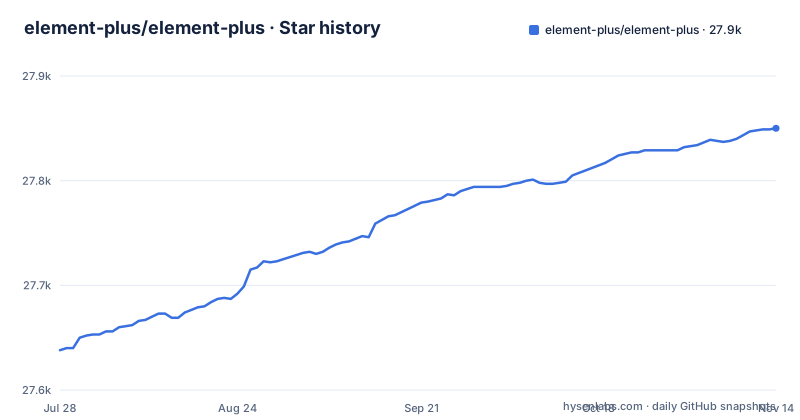
Star history
- element-plus/element-plus27,850 ★ · +212
| Repository | 2026-07-28 | 2026-11-14 |
|---|---|---|
| element-plus/element-plus | 27.6k | 27.9k |
212 Stars in the last 109 days, measured from the daily GitHub snapshot. Compare with other projects
Editorial analysis
What Element Plus actually delivers
Element Plus is a Vue 3 UI library written in TypeScript, maintained by the Element team. It solves a specific problem: teams that built admin panels or internal tools with Element UI, the Vue 2 library, need a path to Vue 3 without rewriting every component by hand. The library provides a full set of UI components, from buttons and tables to date pickers and dialogs, all built on the Composition API. The first stable release, suitable for production, came on February 7, 2022. That date matters. The README says the API is stable now. The project is not archived, and the last push was on 2026-11-02, with releases 2.14.5, 2.14.6, and 2.14.7 coming out between August 21 and September 30, 2026. For an engineer evaluating a dependency, that stability is the core value proposition.
How it works under the hood
The library is built with Vue 3's Composition API, which means components are written as composable functions rather than options objects. That is a design choice with consequences. For consumers, it means you can use the components declaratively in templates, but the internal logic is more modular and easier to tree-shake if you import selectively. The README emphasizes two points: Vue 3 Composition API and TypeScript. In practice, that means every component ships type definitions, so your editor can catch prop mismatches at compile time. The data flow is standard for a component library: you pass props, emit events, and use slots. There is no global state management or server integration, which keeps the library focused. The documentation portal, element-plus.org, hosts the full API reference and examples. The project also runs a playground at run.element-plus.org, where you can test components in the browser without installing anything. That is a practical way to evaluate a component before committing to it. The documentation does not describe any internal architecture beyond the Composition API, so if you need to extend a component deeply, you will have to read the source. That source is TypeScript, which is a plus for maintainability.
Getting it running in your project
The README does not list installation commands, which is a gap. It points to the Getting Started page on element-plus.org, so you will need to visit that page for the exact npm command. Based on standard practice for a Vue 3 library, you would install it with npm or yarn, then register the components. The README does give one concrete tool: a migration tool built on gogocode. That tool is for moving from Element UI to Element Plus. The README claims they tested it on Vue Element Admin, a popular admin template, and you can inspect the transpiled code in a separate repository. That is a concrete artifact you can verify yourself. For a fresh project, the playground at run.element-plus.org is the fastest way to see the library in action. The README also links a CodeSandbox demo. The absence of explicit install commands in the README is a minor friction point, but the documentation site likely fills the gap. If you are migrating, the gogocode tool is the key piece to evaluate, not the component API.
The migration path from Element UI
Element Plus is not a drop-in upgrade from Element UI. The README links to a dedicated Breaking Change List, which is a discussion thread on GitHub. That list exists because the API changed between Vue 2 and Vue 3. The team provides a migration tool, a gogocode plugin, that automates part of the conversion. They tested it on Vue Element Admin, and the transpiled output is available for inspection. That is a strong signal for teams with large existing codebases. However, the tool is not a silver bullet. It handles mechanical changes, like component names and props, but it cannot reason about your business logic or test that the rendered output looks correct. You will still need manual review and visual regression testing. The breaking change list is the authoritative source, but it is a discussion thread, not a formal changelog. The existence of the list, though, is better than many libraries that silently break APIs.
Where it falls short
The biggest limitation is the bundle size. Element Plus is a full component library, not a modular set of primitives. If you only need a table and a date picker, you still pull in a large dependency unless you use tree-shaking, which requires a bundler setup that supports it. The documentation does not state bundle sizes, so you cannot verify the exact cost without measuring. Another limitation is the translation coverage. The README says they only provide English and Chinese versions due to limited resources. You can help translate through the project's Crowdin page. The project also has a governance model that is not fully transparent from the README. It mentions joining the development team and a Discord, but it does not explain the decision-making process for API changes. For a library you depend on for years, that is a risk. Finally, the README's sponsors section is prominent, which is fine, but it suggests the project relies on corporate funding. If that funding shifts, maintenance could slow. None of these are deal-breakers, but they are real trade-offs.
A concrete alternative: Naive UI
If Element Plus feels too heavy or too tied to the Element aesthetic, consider Naive UI. Naive UI is another Vue 3 component library.
Maintenance and upgrade cost
Element Plus is actively maintained. The release history shows a consistent schedule: 2.14.7 on September 30, 2026, 2.14.6 on September 18, and 2.14.5 on August 21. That is roughly a release every two to four weeks. The project is not archived, and the default branch is dev, which suggests ongoing development. The MIT license means you can use it freely, even in commercial products, with no obligation to share your code. That is a low legal barrier, though this is not legal advice. The upgrade cost within the 2.x line appears low, since the API has been stable since the first stable release. However, the README warns about breaking changes from Element UI, so if you are on the old library, the migration is a project, not a weekend task. The maintenance cost for you is mostly about keeping up with minor releases and checking the breaking change list before major upgrades. The project also relies on community contributions for translations and testing, so if you need a fix for an obscure component, you might have to submit a pull request yourself. That is a real cost if your team is not prepared to contribute upstream.
Editorial conclusion
Adopt Element Plus if you are building a Vue 3 app that needs a broad, battle-tested component set and you want a stable API that has not broken since February 2022. Skip it if you demand a smaller bundle or a design system built around your brand. Before adopting, verify the current release notes for any breaking changes, test the migration tool on a non-critical branch, and check the component you rely on most is in the stable set, not a deprecated one.
Frequently asked questions
Is Element Plus free?
Yes. Element Plus is open source software licensed as MIT, and the LICENSE file is in the repository. There is no paid tier described anywhere in the project, and the documentation site is where the install instructions live.
How do I install Element Plus?
The repository's README does not contain an install command. It says outright that developers building websites with Element Plus should visit the Getting Started page on element-plus.org, and it links a separate mirror site for mainland China at cn.element-plus.org/zh-CN/. You can also try the components in the built-in playground at run.element-plus.org without installing anything.
What is Element UI?
Element UI is the predecessor library, hosted at element.eleme.io, and Element Plus is the upgrade path from it. The project keeps a full breaking change list for moving between the two, and points at the gogocode migration tool, which it tested on Vue Element Admin with the transpiled result published for comparison.
What is element plus?
Element Plus is a Vue 3 UI library built by the Element team, using the Vue 3 Composition API and written in TypeScript. Its first stable release suitable for production use was February 7, 2022, and the current line is 2.14.x, published as patch releases through 2026.
element plus vs tailwind
They are different shapes rather than competitors, and the repository makes no comparison. Element Plus ships finished components that you import and configure, with theming handled by a separate theme-chalk package. A utility-CSS approach like Tailwind ships no components and composes appearance from classes in your own markup. The project itself offers no guidance on that choice.
Official sources
Add this badge to your README
If you maintain this project, the badge below links readers to this analysis and shows its maintenance status from the daily GitHub snapshot. Paste the markdown into your README; add ?metric=license or ?metric=stars to the image URL for a different field.

[](https://hysenlabs.com/projects/element-plus-element-plus)Star history chart for your README
[](https://hysenlabs.com/projects/element-plus-element-plus)Was this useful?