hucre's tree-shaking comment says 2 KB and its size table says 3.7 KB
Project brief: Zero-dependency spreadsheet engine. Read & write XLSX, CSV, ODS. Pure TypeScript, works everywhere.
At a glance
- What is it?
- hucre is a zero-dependency spreadsheet engine for six formats with per-format import paths, and it publishes exact gzipped bundle measurements that a continuous integration budget enforces. It also still carries a stale figure from before that measurement existed, in a code comment two hundred lines above the table that corrects it.
- Who is it for?
- The documentation is more useful than most because it tells you where the edges are rather than claiming there are none. Thirteen conditional formatting types means eleven fully plus two lossy.
- Can I use it commercially?
- Yes. MIT is a permissive licence: you can use, modify and sell software built on it, as long as you keep its copyright and licence notices.
- Is it still maintained?
- Yes. The repository last received commits 19 days ago.
- What is it written in?
- Mainly TypeScript, according to GitHub's language statistics.
Answers come from the project's GitHub data, last synced on November 14, 2026, and from our analysis. They are not legal advice.
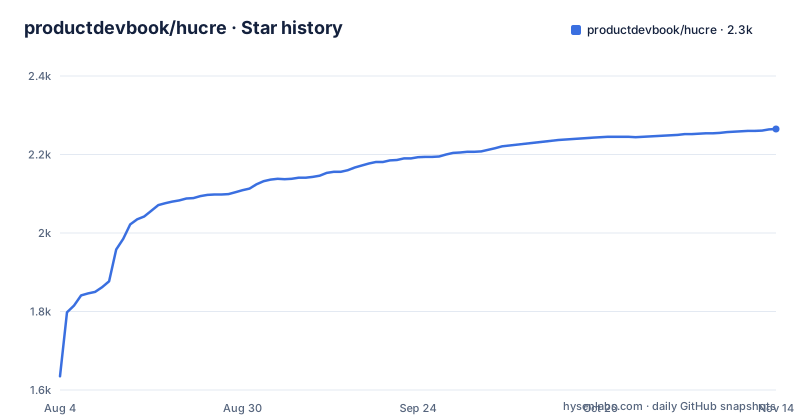
Star history
- productdevbook/hucre2,265 ★ · +630
| Repository | 2026-08-04 | 2026-11-14 |
|---|---|---|
| productdevbook/hucre | 1.6k | 2.3k |
630 Stars in the last 102 days, measured from the daily GitHub snapshot. Compare with other projects
Editorial analysis
The old number is still in a code comment
The bundle size story is the strongest part of this front page, and it starts with an admission:
> They are in the README because they had already drifted once. The previous figures (2.3 / 32 / 64 / 114 KB) were true when written and were enforced by nothing.
So the project published wrong numbers, noticed, and responded by adding a size budget file that continuous integration checks against. That is the right response and the fact that it is written down is unusual.
And then the number is wrong again, in a different place. The tree-shaking section annotates each import with a size:
import { parseCsv, writeCsv } from "hucre/csv" // CSV only (~2 KB gzipped)Roughly two kilobytes. The footnote below the comparison table, the one measured by the budget tooling, says the same import pair is 3.7 KB. The other three figures in that footnote are quoted as precise decimals with no approximations at all.
So the code comment is a pre-enforcement measurement that nobody updated, sitting directly above a footnote explaining that pre-enforcement measurements are exactly what should not be trusted. A reader who trusts the comment is off by nearly half, and the only clue is to read far enough down to find the correction.
Four numbers, four budgets, and a 35x spread
The measured figures, minified and gzipped against the built output, are four separate bundles:
{ parseCsv, writeCsv } from "hucre/csv" = 3.7 KB
{ readXlsx } from "hucre/xlsx" = 34 KB
{ readXlsx, writeXlsx } = 68 KB
the entire library = 129 KB
The headline figure in the comparison table is a range, 4 to 129 KB, and the footnote explains why: the library is fully tree-shakeable, so there is no single number. A thirty-five times spread between the smallest useful import and importing everything.
That range is the actual argument for the design. If the whole library were 129 KB and you needed CSV, you would pay 129 KB. The format subpaths are what make the small end of the range reachable, and the import map in the package manifest backs them up with one entry per format, each pointing at its own build output and its own type declaration.
The measurements name their bundler, which is what makes them reproducible rather than anecdotal. And the budget file means a pull request that adds nine kilobytes to the CSV path fails the build rather than making the README wrong again.
Thirteen conditional formatting types means eleven plus two lossy
The feature table claims thirteen types of conditional formatting. The footnote underneath is where the actual contract is, and it lists all thirteen by name, then explains that two of them do not survive a round trip.
Those two round-trip only in their default form, because the writer emits none of the attributes that distinguish a top-ten rule from a plain one, and none of the attributes that distinguish the above-average rule from a plain one. A rule that ranks, that picks the bottom three, or that compares against a moving average, will come back out as a generic rule.
A thirteenth type, time period based rules, is described differently: they are dropped on read. Not degraded, dropped.
So the table's thirteen is eleven fully functional types, two that write as defaults, and one that does not come back at all. Every competitor row in the same table lists conditional formatting as a flat yes, with no footnote, because none of them published the breakdown.
This is the single most useful paragraph in the document and it exists only because someone took the trouble to check what each of the thirteen actually does on the way back out.
Pivot tables are written as a skeleton with no values
In the comparison against other-language libraries, pivot tables are the one row where this project writes something the others mostly do not. The entry reads read plus write, with a qualifier in parentheses, and the qualifier is explained below the table.
What is written: the pivot cache, the layout, and the relationships between them.
What is not written: the pre-computed value cells.
The reason given is that the spreadsheet application fills those in on first open. So a pivot table that hucre writes is structurally complete and numerically empty until a human opens it in something that recalculates.
For a library whose headline feature is round-trip preservation, that is a meaningful gap, and the table could have said write, skeleton. It says skeleton in parentheses after claiming write, and the explanation arrives two paragraphs later.
The same row shows read-only for one competitor and no for two others, and limited for the fourth, so this is a feature only this project and one other offer. Formula evaluation, the row immediately below, is a row where this project and three of the four competitors all say no, and only the Java library says yes. It is worth knowing that reading a formula and evaluating it are different jobs and this one does the first.
A command line tool is built, shipped, and never mentioned
The package manifest declares a binary. The published file list is three entries: the build output, a migration guide, and a parity document. The build output therefore contains a command line tool, and it is installed when someone adds this package.
The front page never mentions it. There is no section, no example, no flag. The quick start goes from installing the package to importing two functions, and the rest of the document is about the programmatic interface and the format subpaths.
The exports map is where the other half of this shows up. It declares seven entry points: the package root, and then one each for spreadsheet files, comma-separated values, the other spreadsheet format, two data-serialisation formats, tabular markup, and a lower-level OOXML path. The tree-shaking section documents five of those seven. The lower-level OOXML path and one of the data serialisation paths are reachable by import and absent from the documentation.
The parity document being shipped inside the tarball is worth noting on its own. Most libraries keep their feature-comparison notes in the repository. This one puts the file in the package, so the consumer gets the same honesty the author read.
The registry summary lists three formats fewer than the front page
The front page banner advertises six formats: the two spreadsheet containers, comma-separated values, and three serialisation formats including a line-delimited variant and tabular markup.
The package summary on the registry lists three of them:
Zero-dependency spreadsheet engine. Read & write XLSX, CSV, ODS.
Schema validation, streaming, tree-shakeable. Pure TypeScript, works everywhere.
So three of the six never appear in the description a user sees before deciding whether to install. The summary also swaps one claim in, dropping the format list's completeness in favour of tree-shakeability, which is the better selling point anyway.
This is the sort of drift that has a mechanical cause. The manifest has a fixed length limit, the front page does not, and whenever a feature is added the long text gets updated and the short one gets edited down to whatever fits. Nobody chose to hide three formats.
The keyword list in the same file is more complete and does include the serialisation formats alongside the two spreadsheet ones, so the information is in the package, just not in the sentence that renders as its description.
The comparison table names a competitor as stale and another as eval-based
There are two comparison tables, one against JavaScript and TypeScript libraries and one against libraries in other languages. Both are unusually blunt, and both are worth reading for the footnote markers as much as the cells.
The JavaScript table marks one competitor's registry publication as stale. It marks another's spreadsheet and image support as available only in a paid tier, in a column headed with the community edition. It marks a third as not compliant with a strict content security policy, with the reason given inline: that one uses eval.
And the dependencies row carries two asterisks on the same competitor in two columns, resolved by a single note: that competitor removed itself from the registry and must be installed from a content delivery network tarball. So its zero-dependency status is real but its distribution channel is a downloaded archive.
The other-language table is calmer. It compares streaming modes with the actual constant names, chart counts as fifteen-plus, nine, and twelve-plus, and gives the same project's multi-format support as three formats against one for everyone else.
That last row is the real argument for this library, and it is the one a reader scanning a comparison table is least likely to notice.
Editorial conclusion
The documentation is more useful than most because it tells you where the edges are rather than claiming there are none. Thirteen conditional formatting types means eleven fully plus two lossy. Pivot tables written by hucre have no values until opened in a spreadsheet. Formatting round-trips within ODS but not out of XLSX into it. Read those footnotes before designing around the feature table, and fix the CSV comment yourself or it will be the number your team quotes.
Frequently asked questions
How do I install hucre and read an XLSX file?
Install the package from the registry, then call the XLSX reader with a buffer. The result exposes a list of sheets, each with a name, a rows array of cell values, and a merges array of merge ranges. Reading options let you filter sheets by index or name or by a predicate, parse cell styles, and auto-detect the 1900 or 1904 date system.
How do I keep a hucre bundle small?
Import from the per-format subpaths rather than the package root. The documented measurements are 3.7 KB gzipped for the CSV reader and writer, 34 KB for reading spreadsheets, 68 KB for reading and writing, and 129 KB for the whole library, and those four figures are pinned in a size budget file that continuous integration checks.
Does hucre support pivot tables and formula evaluation?
Pivot tables are read and written as a skeleton: the cache, the layout and the relationships are written but the pre-computed value cells are not, and the spreadsheet application fills those in on first open. Formula evaluation is not supported, a row this project shares with most of the libraries it compares itself against.
Does hucre lose formatting when converting from XLSX to ODS?
Yes, and the documentation is specific about what. Values, formulas and merges round-trip in full and cell styling covers six facets, but borders, alignment, column widths, freeze panes, validation, named ranges, images and page setup are not modelled in either direction, so ODS to ODS is lossless while XLSX to ODS drops them.
Official sources
Add this badge to your README
If you maintain this project, the badge below links readers to this analysis and shows its maintenance status from the daily GitHub snapshot. Paste the markdown into your README; add ?metric=license or ?metric=stars to the image URL for a different field.

[](https://hysenlabs.com/projects/productdevbook-hucre)Star history chart for your README
[](https://hysenlabs.com/projects/productdevbook-hucre)Was this useful?