Wallos: a self-hosted PHP subscription tracker with cron-driven reminders
Wallos: Open-source, self-hostable personal subscription tracker. Visualize your recurring expenses, manage your budget, and save money.
At a glance
- What is it?
- Wallos is a GPL-3.0 PHP web application that stores recurring subscriptions in a local SQLite database and nudges you about upcoming payments through cron jobs. The design is deliberately small, which makes it easy to self-host and equally easy to outgrow.
- Who is it for?
- Adopt Wallos if you run a small server, want your recurring charges in a SQLite file you control, and are willing to keep a handful of cron entries alive. Do not adopt it if you need multi-user household accounting with role separation, or if you cannot run cron at all, because the payment dates and notification emails are produced by those jobs rather than by the web request.
- Can I use it commercially?
- Yes, with conditions. GPL-3.0 is a copyleft licence: if you distribute software that includes it, you must release that software's source code under the same licence. Running it internally without distributing it does not trigger that obligation.
- Is it still maintained?
- Yes. The repository last received commits 6 days ago.
- What is it written in?
- Mainly PHP, according to GitHub's language statistics.
Answers come from the project's GitHub data, last synced on November 13, 2026, and from our analysis. They are not legal advice.
Star history
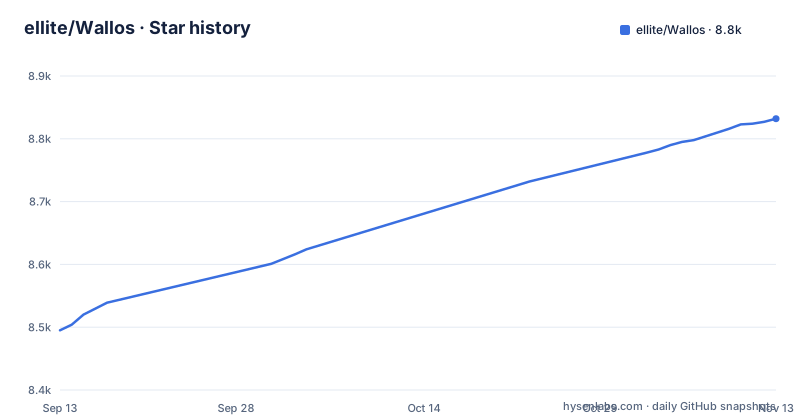
- ellite/Wallos8,832 ★ · +337
| Repository | 2026-09-13 | 2026-11-13 |
|---|---|---|
| ellite/Wallos | 8.5k | 8.8k |
337 Stars in the last 61 days, measured from the daily GitHub snapshot. Compare with other projects
Editorial analysis
The problem Wallos solves, and the person it is built for
Recurring charges are the part of a budget that a spreadsheet handles badly. A monthly row is easy; a yearly renewal that lands in a different month each time is not, and neither is a subscription priced in dollars while your card is billed in euros. Wallos is a web application for that specific job: a list of subscriptions, each with a price, a billing cycle and a next payment date, plus notifications when a date approaches. It is aimed at one person tracking their own spending on a server they already own. The README frames it as an alternative to spreadsheets and to paid financial software, and the feature list stays inside that frame: subscriptions, categories, currencies, statistics, notifications. There is no invoicing, no bank import, no shared ledger with permissions. The demo instance at demo.wallosapp.com resets its database every two hours and uses demo/demo as credentials, which tells you the intended scale: a personal tracker, not a multi-tenant service.
SQLite, PHP endpoints and cron jobs: the actual mechanism
The storage layer is a single SQLite file. The baremetal instructions ask you to rename /db/wallos.empty.db to /db/wallos.db, and the Docker run command mounts a host directory onto /var/www/html/db. Migrations run automatically the first time you open the registration page, and for later upgrades you call /endpoints/db/migrate.php either through the browser or from the CLI. That layout means the application has no database server to configure, and it also means the whole dataset is one file you can copy.
The behaviour that makes the tracker useful does not live in the request cycle. It lives in the cron entries the README lists. updatenextpayment.php runs at 01:00 and advances the next payment date for each subscription. updateexchange.php runs at 02:00 and refreshes exchange rates. sendnotifications.php runs at 09:00 and sends the upcoming payment alerts. sendcancellationnotifications.php runs at 08:00. sendverificationemails.php runs every two minutes for account verification emails. If cron is not running, the web interface still renders, but the dates stop advancing and no notification is ever sent. That is the single most important operational fact about Wallos.
Getting it running: Docker first, baremetal if you must
The Docker path is one command. The README gives it with two volumes, one for the database and one for uploaded logos, plus a timezone variable and a port mapping:
docker run -d --name wallos -v /path/to/config/wallos/db:/var/www/html/db -v /path/to/config/wallos/logos:/var/www/html/images/uploads/logos -e TZ=Europe/Berlin -p 8282:80 --restart unless-stopped bellamy/wallos:latest
The image is bellamy/wallos, not a name matching the GitHub owner, which is worth noticing when you write your compose file. The README also documents --health-cmd=NONE for Docker versions below 25 or when you want faster startup reporting. The compose equivalent it provides uses the same two volumes, a TZ environment variable and the 8282:80 port mapping.
Baremetal is more work and the README is explicit about what it requires: NGINX or Apache, PHP 8.3, and the curl, dom, gd, intl, openssl, sqlite3, zip, mbstring and fpm modules. You copy the repository into the web root, rename the empty database, open the app so migrations run, and then paste five cron lines into crontab -e. The README notes that if your web root is not /var/www/html you have to adjust the cron job paths yourself. Updating baremetal means pulling the files again, rechecking the extension list, and running php /var/www/html/endpoints/db/migrate.php.
Currency conversion outsources a core number to Fixer
Multi-currency support is listed as a feature, and the mechanism behind it is the Fixer API. Wallos does not ship exchange rates; it calls out to a third party and stores what comes back, refreshed by the 02:00 cron job. So the total in your main currency is only as good as that external response and the key you configured. This is a real trade-off rather than a footnote. A user who wants no outbound calls from a finance tool has to either accept single-currency tracking or supply the rates another way. The same pattern appears twice more: the logo search feature queries the web for subscription logos when you have none to upload, and the AI recommendations feature can send data to ChatGPT, Gemini, OpenRouter, a local Ollama instance or any OpenAI-compatible API. The local Ollama option keeps that traffic on your own hardware. If the appeal of self-hosting is that financial data never leaves the machine, these three features are the exceptions, and each one has to be switched off or pointed locally on purpose.
Where Wallos stops being the right tool
The narrowest constraint is cron. Wallos has no scheduler inside the application that the README describes. On a shared host without cron access, next payment dates will not advance and notifications will not fire. You would be left with a static list of subscriptions, which a spreadsheet already does.
Notifications are also only as reliable as the channel you pick. The README lists email, Discord, Pushover, Telegram, Gotify and webhooks. Each of those is an external dependency with its own failure mode. A missed renewal reminder is the exact failure the tool exists to prevent.
The database choice has a second edge. SQLite in a single mounted directory is simple, but it assumes one writer and a filesystem that behaves. Running two containers against the same db volume, or mounting that path over a network share, is best avoided. Finally, the README describes a registration page, an OIDC option with OAuth, and household members added in settings; check how users are separated before treating it as multi-tenant. If two people in a household need separate views of separate cards, this is the wrong shape of application.
What it is not: the comparison that matters
The obvious alternative for a self-hoster is a general personal finance manager such as Firefly III. The difference is not cosmetic. Firefly III models accounts, transactions and double-entry bookkeeping: money moves between accounts, and a subscription is one kind of transaction among many. Wallos models a subscription directly, as an object with a price, a cycle and a next payment date, and the cron job updatenextpayment.php exists precisely because that date is the primary thing being tracked. You get a renewal calendar and a reminder without ever recording a transaction. The cost of that shortcut is that Wallos cannot tell you what you actually spent, only what you are scheduled to spend. If your question is "what is about to hit my card", Wallos answers it faster. If your question is "where did last month's money go", it does not answer it at all. A spreadsheet sits between the two: more flexible than Wallos, less structure than Firefly III, and with no cron to maintain.
Maintenance cost, licence and what to check before you commit
The project is active. Releases v5.10.2, v5.10.3 and v5.10.4 landed between 2026-10-23 and 2026-11-01, and the repository is not archived. That cadence is a maintenance signal in both directions: fixes arrive quickly, and a baremetal install that pulls from git will need to run the migration endpoint often. The Docker image tag used in the README is latest, which means an unattended restart can move you across a schema change. Pinning a version tag in your compose file is the cheaper habit.
Licensing is GPL-3.0. For someone running Wallos on their own server for their own subscriptions, that is unremarkable. It matters if you intend to modify the code and distribute it, or to offer it as a hosted service, because the copyleft terms attach to distribution. This is a description of the licence identifier, not legal advice; read the licence text if your use is commercial.
Before deploying, the concrete checks are these. Confirm your PHP build reports the sqlite3, intl, gd, zip, curl, dom, openssl, mbstring and fpm extensions, since a missing one surfaces at runtime rather than at install. Decide whether the Fixer API call, the logo search and the AI recommendation endpoint are acceptable outbound traffic, and if not, plan to disable them or point the recommendation job at Ollama. Confirm that whatever host you choose will actually run the cron entries from the README, because without them updatenextpayment.php never fires and the tracker quietly becomes a list.
Editorial conclusion
Adopt Wallos if you run a small server, want your recurring charges in a SQLite file you control, and are willing to keep a handful of cron entries alive. Do not adopt it if you need multi-user household accounting with role separation, or if you cannot run cron at all, because the payment dates and notification emails are produced by those jobs rather than by the web request. Before deploying, verify that your PHP build has the sqlite3, intl, gd and zip extensions the README lists, and confirm that the Fixer API key you intend to use is acceptable to you, since currency conversion is delegated to that third party.
Frequently asked questions
What is Wallos?
Wallos is an open-source, self-hostable web application for tracking recurring subscriptions and payments, with categories, multi-currency support, statistics and notifications. It is written in PHP, licensed under GPL-3.0, and its site is wallosapp.com.
Are Wallos safe to use?
As a self-hosted application your financial data stays on your own server, and the project ships a SECURITY.md file, TOTP support in totp.php, OIDC with OAuth, and an SSRF allowlist setting. The Docker example publishes port 8282 directly with no TLS described, so put a reverse proxy in front of it before exposing it.
Are Wallos hard to use?
Under Docker it is a single run command with two volume mounts, and the first visit asks you to create a user account before you add an avatar, household members, categories and currencies. A bare metal install needs NGINX or Apache plus PHP 8.3 with the modules curl, dom, gd, intl, openssl, sqlite3, zip, mbstring and fpm, plus five crontab entries.
Who invented Wallos?
The project lives in the ellite/Wallos repository on GitHub under the GPL-3.0 license, with documentation and a demo at wallosapp.com. The repository is owned by the ellite account, and the repository and homepage are the authoritative reference.
Official sources
Add this badge to your README
If you maintain this project, the badge below links readers to this analysis and shows its maintenance status from the daily GitHub snapshot. Paste the markdown into your README; add ?metric=license or ?metric=stars to the image URL for a different field.

[](https://hysenlabs.com/projects/ellite-wallos)Star history chart for your README
[](https://hysenlabs.com/projects/ellite-wallos)Was this useful?