elmish: Elm's model view update shape inside idiomatic F#
Elm-like abstractions for F# apps
At a glance
- What is it?
- Elmish is an F# library that implements the model, view and update abstractions made famous by Elm, without modelling any view itself, so it can drive React, React Native or a VirtualDOM renderer from F# code.
- Who is it for?
- elmish fits F# teams that want the Elm programming model while keeping React or React Native as the renderer, and that value typed state updates more than they value the size of the ecosystem. It does not fit a team that wants a finished view layer, since the library deliberately models no view, and it does not fit a project that needs a single package across Fable, WebSharper and CLR targets without picking one of the three published package names.
- Can I use it commercially?
- Check first. The repository uses a licence we do not classify automatically, so read its LICENSE file before any commercial use.
- Is it still maintained?
- Yes. The repository last received commits 26 days ago.
- What is it written in?
- Mainly F#, according to GitHub's language statistics.
Answers come from the project's GitHub data, last synced on November 7, 2026, and from our analysis. They are not legal advice.
Star history
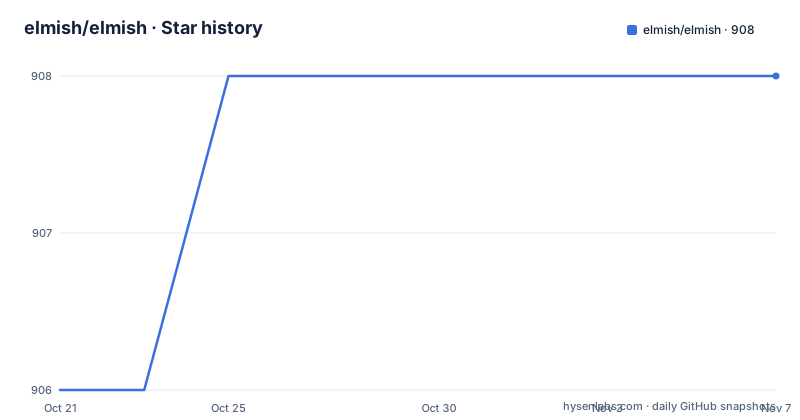
- elmish/elmish908 ★ · +2
| Repository | 2026-10-21 | 2026-11-07 |
|---|---|---|
| elmish/elmish | 906 | 908 |
2 Stars in the last 17 days, measured from the daily GitHub snapshot. Compare with other projects
Editorial analysis
Elmish models the update loop and leaves the rendering to somebody else
Elmish is a small F# library, not a framework with a runtime. The README is explicit about the boundary: the library implements core abstractions that can be used to build applications following the model view update style of architecture, as made famous by Elm, but it does not model any view and is intended for use in conjunction with a DOM or renderer such as React, React Native or VirtualDOM.
That constraint is the design, and it is what separates elmish from a full Elm port. Elm ships its own renderer, its own virtual DOM implementation and its own packaging model. Elmish ships the shape of the program: a model, an update function, a view function, and the discipline that comes with them. Everything that touches pixels is delegated.
The audience is therefore narrow and clearly identified. An F# developer who likes Elm's insistence on a single immutable state value and a total update function, but who also works in a React codebase or wants to reuse an existing React Native app, can adopt Elmish without leaving F#. The README also points out that developers familiar with Redux may find Elmish a more natural fit when targeting React or React Native, because it lets them stay completely in idiomatic F#.
The abstractions are designed to resemble Elm's look and feel
Elmish abstractions have been carefully designed to resemble Elm's look and feel, and anyone familiar with post-Signal Elm terminology will find themselves at home. That sentence is a design brief, and it explains why the library is comfortable for Elm people even though it is written in F#.
In practice this means the vocabulary is the one Elm users already have in their heads: a model, an update, a view, and commands or effects for the things a program cannot do purely by returning state. F# adds its own layer on top, and the two languages agree here more than you might expect, because F# discriminated unions, pattern matching and immutable records are a natural way to express a state machine with a small number of cases.
The repository layout backs the claim that this is a library rather than an application framework. At the root there is Elmish.slnx, a netstandard/ folder holding the actual library, src/, tests/, a websharper/ folder, a docs/ folder, build.fsx, global.json, and both .nacara/ and nacara.config.json for the documentation site. The presence of tests/ and of a solution file next to the library folder is the shape of a normal open source .NET repository, not of a framework that expects to own your application.
Three package names, one library, and the target decides which you add
This is where most first-time users trip. Elmish is not published as one package. From v2.0 onwards the releases use the dotnet SDK and can be installed with dotnet nuget or paket, and there are three names depending on where the code will run.
For a Fable project:
paket add nuget Fable.Elmish -iFor a WebSharper project:
paket add nuget WebSharper.Elmish -iAnd if you are targeting the CLR:
paket add nuget Elmish -iThe -i flag is what tells paket to install the dependencies interactively, resolving them into the project rather than only resolving the dependency graph.
The choice is forced by the compilation target. Fable and WebSharper both compile F# to JavaScript, but they are different compilers with different bindings, so the library ships a distinct assembly for each, while the plain Elmish package targets the .NET runtime directly. If your project changes compiler later, the package reference changes with it, and the README gives no guidance on running two of them side by side.
Building the library needs the dotnet SDK 8 and a fake script
Contributors do not use a normal dotnet build here. Elmish depends on dotnet SDK 8, and the README gives the build as a fake script invocation:
dotnet fsi build.fsxOn a unix system, the same thing can be run as ./build.fsx. The build.fsx file at the repository root is the F# interactive script that drives the build, and global.json sits alongside it to pin the SDK version the script expects. That is the cost of a build that has to work across several compilation targets, since the Fable and WebSharper outputs need more than the standard dotnet build pipeline can do.
The CI configuration is equally old fashioned. appveyor.yml at the root carries a Windows build status badge, and the README badge points at the v4.x branch, while the default branch of the repository is v5.x. That mismatch is a small warning sign: the visible build status is not necessarily the status of the code you would take from the default branch.
The documentation site is built separately again. The package.json at the root is a private package named hmr whose scripts are docs:watch, docs:build and docs:publish, all delegating to nacara, with a docs_deploy folder as the publish target. The published docs live at https://elmish.github.io/elmish/, which is where the README sends you for more information.
Branches per major version, and no GitHub releases to go with them
Elmish does not publish GitHub releases. The repository has no release entries, and the version history is carried by branches instead. The README points at four of them: v1.x, v2.x, v3.x and v4.x, each holding the release information for that line.
This has a practical consequence for adoption. When you reference the library through paket, you are pulling from a package feed, and the version you get is decided by what the feed publishes rather than by a tag on the repository. The branch layout tells you which major lines still exist and where to look for the notes of each, but the README does not document a deprecation policy for the older branches, and it does not say which of them receive fixes.
The repository also keeps RELEASE_NOTES.md at the root, which is where a release history can be read if the NuGet feed is not convenient. A project whose versions are only discoverable by reading a notes file in a branch is different from a project with a tagged release trail, and the difference matters when you have to answer a colleague asking which version is current. The repository is not archived and the last push was on 2026-10-13, so the code is moving.
A custom licence that GitHub cannot classify
The licence of the project is not one of the standard permissive ones. GitHub could not classify it, so the file to read is LICENSE.md at the root of the repository, and that file is the only place the terms live. There is no separate NOTICE file in the repository.
That is worth flagging in a way that MIT is not. A permissively licensed dependency can be vendored, modified and shipped inside a closed source product without a conversation with anyone. A custom licence can carry conditions that are not visible from a badge, and the only way to know what they are is to read the text. This article does not interpret the terms, and the point for an engineering team is procedural: read LICENSE.md before Elmish goes into a product, and treat the fact that GitHub could not classify it as a reason to read rather than a reason to worry.
There is also a scope question that the licence does not settle for you. Elmish gives you the Elm style of program structure, and React, React Native or VirtualDOM give you the rendering. If the team later decides to move away from Elmish, the state and update code is F# that has to be rewritten, while the React components stay. Keeping the Elmish surface small and the rendering ordinary makes that migration cheap, and it is a reason to prefer the library over a heavier Elm-like framework.
Editorial conclusion
elmish fits F# teams that want the Elm programming model while keeping React or React Native as the renderer, and that value typed state updates more than they value the size of the ecosystem. It does not fit a team that wants a finished view layer, since the library deliberately models no view, and it does not fit a project that needs a single package across Fable, WebSharper and CLR targets without picking one of the three published package names. Before adopting it, read the LICENSE.md file in the repository root, because the licence is a custom one that GitHub cannot classify, and check which of the v2.x, v3.x and v4.x branches still matches the dotnet SDK 8 toolchain you have. The last push was on 2026-10-13.
Frequently asked questions
How do I add Elmish to an F# project?
From v2.0 onwards, releases use the dotnet SDK and are installed with dotnet nuget or paket. The package name depends on the target: Fable.Elmish for Fable, WebSharper.Elmish for WebSharper, and Elmish when targeting the CLR.
Does Elmish include a view layer or a renderer?
No. The README says the library does not model any view and is intended for use in conjunction with a DOM or renderer, such as React, React Native or VirtualDOM. Elmish supplies the model, view and update abstractions only.
What is the difference between Elmish and Elm for F# developers?
Elmish borrows Elm's model view update style and its terminology, including the post-Signal vocabulary, but it stays a library inside your existing stack rather than bringing its own renderer. Developers coming from Redux may find it a natural fit when targeting React or React Native.
How do I build Elmish from source?
Elmish depends on dotnet SDK 8, and the build is driven by the build.fsx script, run either as dotnet fsi build.fsx or as ./build.fsx on a unix system. The documentation site is built separately with the nacara scripts in package.json.
What licence does Elmish use?
GitHub could not classify the licence, so the terms live in the LICENSE.md file at the root of the repository. Read that file before using Elmish in a product, since a custom licence can carry conditions that a standard badge would not show.
Official sources
Add this badge to your README
If you maintain this project, the badge below links readers to this analysis and shows its maintenance status from the daily GitHub snapshot. Paste the markdown into your README; add ?metric=license or ?metric=stars to the image URL for a different field.

[](https://hysenlabs.com/projects/elmish-elmish)Star history chart for your README
[](https://hysenlabs.com/projects/elmish-elmish)Was this useful?