EmbedPDF: a framework-agnostic PDF viewer for React, Vue, Svelte and vanilla JS
A PDF viewer that seamlessly integrates with any JavaScript project
At a glance
- What is it?
- EmbedPDF is an Apache-2.0 licensed PDF viewer that drops into any JavaScript project through a pluggable, tree-shakable plugin architecture. The stable line is v2; the v3 branch is still labelled not ready for production, and one server component is not Apache-2.0.
- Who is it for?
- Adopt the v2 branch if you need a viewer inside a JavaScript app and want to compose features as plugins rather than accept a fixed toolbar. Do not adopt the v3 branch for production: the README states it is under active development and not yet recommended for production use.
- Can I use it commercially?
- Check first. The repository uses a licence we do not classify automatically, so read its LICENSE file before any commercial use.
- Is it still maintained?
- Yes. The repository received new commits within the last day.
- What is it written in?
- Mainly TypeScript, according to GitHub's language statistics.
Answers come from the project's GitHub data, last synced on November 22, 2026, and from our analysis. They are not legal advice.
Star history
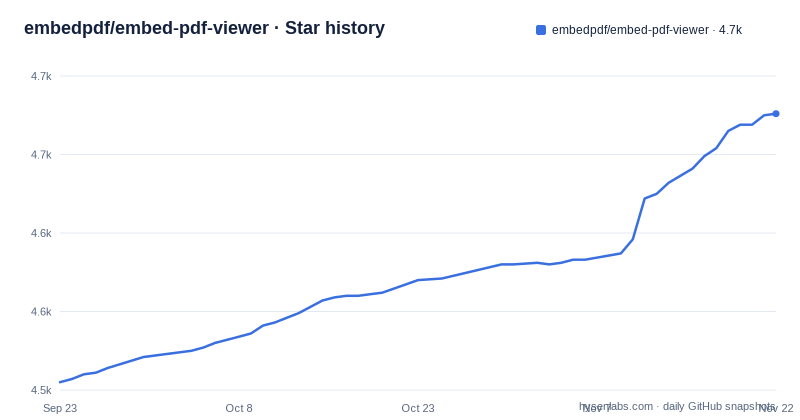
- embedpdf/embed-pdf-viewer4,676 ★ · +171
| Repository | 2026-09-23 | 2026-11-22 |
|---|---|---|
| embedpdf/embed-pdf-viewer | 4.5k | 4.7k |
171 Stars in the last 60 days, measured from the daily GitHub snapshot. Compare with other projects
Editorial analysis
What EmbedPDF solves, and who is actually supposed to use it
The default way to put a PDF on a web page is an object or iframe tag pointing at the file. That works until you need a highlight, a search box, a redaction, or control over the toolbar. At that point you are either writing viewer chrome against a rendering library or paying for a hosted viewer. EmbedPDF positions itself in that gap: a viewer you install as packages, rendered inside your own component tree, with the feature set exposed as plugins you opt into. The README lists annotations (highlight, sticky notes, free text, ink), search, text selection, zoom, rotation, smooth virtualized scrolling, and redaction where, in its words, "content is actually removed." The intended audience is a JavaScript team already building a React, Vue, Svelte, Preact or vanilla front end, not someone who wants a WordPress shortcode or a no-code embed. The repository ships separate example directories for React, Angular and a snippet variant, which tells you the framework story is the main story. It is framework-agnostic in the sense that the core is not tied to one renderer, not in the sense that you get a ready-made widget with zero integration work.
The plugin and runtime architecture behind the viewer
Two design decisions shape everything else. First, the viewer is assembled from plugins rather than shipped as one bundle, and the README describes them as "pluggable" and "tree-shakable." That means an app that only needs paging and zoom does not pay for the annotation or redaction code paths. Second, the rendering engine is not PDF.js. The README states the engine is powered by EmbedPDF Runtime, described as a fork of PDFium, the Google project, and licensed under Apache License 2.0. PDFium is a C++ rendering library, so the runtime is a compiled artifact rather than pure TypeScript, which explains why the repository contains an engine-runtime-demo example and a verify:engine-runtime-packages script in the root package.json. The root manifest also carries a check:plugin-boundaries script, a sign that plugin isolation is checked by tooling rather than left to convention. The practical consequence for an adopter is that your bundle contains a compiled engine, and your build pipeline has to handle whatever that artifact requires. The README does not document bundle sizes or a WebAssembly loading strategy, so treat those as things to measure in your own build rather than assume.
Installing EmbedPDF and rendering a first PDF
The README points at https://www.embedpdf.com for "installation guides, API reference, and examples" and does not inline an install command, so the exact package names are the one thing you should confirm on the docs site before running anything. What the repository does give you is the example layout: examples/react/, examples/angular/ and examples/snippet-react/, plus a live demo at https://app.embedpdf.com where you can load your own file. The workspace is a pnpm monorepo pinned to [email protected] in the root package.json, so if you want to read working integration code rather than guess at an API, clone and install the workspace at the repository root:
pnpm install
pnpm dev
The dev script is turbo run dev --parallel, which runs the workspace dev tasks in parallel. Open the React example and you have a running viewer to compare against your own integration. For a real project, the sequence is: read the framework-specific example, copy its imports into your app, and then add only the plugins you need. There is a build:release script that filters ./packages/** and then builds the CloudPDF side, which is a useful map of where the publishable viewer packages stop and the commercial server begins.
The v3 branch is not production, and the README says so plainly
The most important line in the repository is the warning block: "EmbedPDF v3 is under active development and is not yet recommended for production use," with a pointer to the v2 branch for the current stable release. That is unusually direct, and it should govern how you read the release list. The recent releases are v3.0.0-next.20, v3.0.0-next.19 and v3.0.0-next.18, so the next line is moving quickly. If you install from the default branch or from a next tag, you are opting into an API that is still changing between prereleases. Beyond versioning, the honest limitation is scope: this is a viewer and annotation layer, not a document pipeline. There is no OCR, no server-side conversion, and no signing workflow in the README's feature list. If your requirement is to take an uploaded file, extract text on the server, and store a canonical rendering, EmbedPDF is the wrong layer. It is also the wrong tool if you want a zero-JavaScript embed, since the whole value proposition is a viewer running inside your app.
How EmbedPDF differs from pdf.js and vue-pdf-embed
The obvious comparison is PDF.js, and the difference is one of altitude. PDF.js is a rendering and parsing library; you get pages on a canvas and then build selection, search UI, annotation storage and toolbar state yourself. EmbedPDF sits above that level: it ships the viewer behaviour as plugins, which is why the README can promise annotations and redaction as features rather than as a starting point. The trade is control. With PDF.js you own every pixel and every state transition; with EmbedPDF you accept its plugin contracts and its engine. The second comparison is vue-pdf-embed, a single-framework component that renders a document and little else. EmbedPDF's bet is the opposite: one core, many framework bindings, with the feature surface growing through plugins. If you are building a Vue app that only needs to display a PDF, a small single-purpose component is less machinery. If you need annotations, search and redaction across more than one framework in the same organisation, the shared plugin layer is the reason to pick EmbedPDF. Neither choice is about rendering quality; both ultimately render pages.
Licence: Apache-2.0 for the viewer, Fair Source for the server
The repository is Apache-2.0 with one carve-out, and the carve-out matters commercially. The README states that everything is Apache License 2.0 except cloudpdf/server, the self-hostable CloudPDF server, which is Fair Source under the Fair Core License, FCL-1.0-ALv2. Inspecting, copying and modifying that source is permitted within the FCL's terms, but the README is explicit that this "does not make the server free to run": running or self-hosting it requires a valid CloudPDF license, either a license key for a connected deployment or a signed certificate for an air-gapped one. It also prohibits moving, changing, disabling or circumventing the license-key functionality, enabling protected functionality without a valid license, and Competing Uses as defined in the FCL. Each release converts to Apache-2.0 two years after publication. For a team that only wants the client viewer, none of this applies. For a team that wants the server, the licensing map in LICENSING.md is the document to read before writing code, not after. This is a description of what the repository states, not legal advice.
Maintenance, upgrade cost and what the repository tells you
The last push to the default branch was on 2026-11-02, and the repository is not archived. The release cadence is visible: v3.0.0-next.18 on 2026-10-29, v3.0.0-next.19 on 2026-10-30 and v3.0.0-next.20 on 2026-11-02, so the next line is receiving frequent work. The upgrade cost is concentrated in the v2 to v3 transition. The README's warning implies API movement in the next line, and the presence of a .changeset directory plus changeset and ci:version scripts in the root package.json means versioning and changelogs are generated deliberately rather than hand-edited. Practically, that means you can track what changed between releases, but it also means prereleases can carry breaking changes without a major version bump in the usual semver sense, because they are already prereleases. Pin your dependency to the v2 line, read the changeset entries before bumping, and treat any move to v3 as a migration project rather than a version bump. The repository also carries an AGENTS.md and a .agents directory, which suggests automated agent workflows are part of the project's own tooling; that is a maintenance signal, not a guarantee about your integration.
Editorial conclusion
Adopt the v2 branch if you need a viewer inside a JavaScript app and want to compose features as plugins rather than accept a fixed toolbar. Do not adopt the v3 branch for production: the README states it is under active development and not yet recommended for production use. Before committing, verify two things in your own checkout: which packages your chosen framework example actually imports, and whether anything you plan to ship touches cloudpdf/server, which is Fair Source under FCL-1.0-ALv2 and requires a valid CloudPDF license to run or self-host.
Frequently asked questions
How can I embed a PDF viewer in HTML with EmbedPDF?
The README describes EmbedPDF as a framework-agnostic viewer that drops into any JavaScript project, including vanilla JS, and points to https://www.embedpdf.com for installation guides and examples. The repository includes examples/snippet-react/ and a live demo at https://app.embedpdf.com where you can load your own PDF. The README does not inline the install command, so confirm the package name on the docs site first.
Is EmbedPDF free to use?
The README states that everything in the repository is licensed under the Apache License, Version 2.0, with one exception: cloudpdf/server is Fair Source under the Fair Core License, FCL-1.0-ALv2. Running or self-hosting that server requires a valid CloudPDF license, and each release becomes Apache-2.0 two years after publication.
Which frameworks does EmbedPDF support?
The README lists React, Vue, Svelte, Preact and vanilla JS, and describes the viewer as framework-agnostic. The repository ships separate example directories for React and Angular, plus a snippet variant, and the live demo at https://app.embedpdf.com shows the viewer in use.
Is EmbedPDF v3 ready for production?
No. The README carries a warning that EmbedPDF v3 is under active development and is not yet recommended for production use, and it points to the v2 branch for the current stable release. The recent release list shows v3.0.0-next prereleases, up to v3.0.0-next.20.
What engine does EmbedPDF render PDFs with?
The README states the engine is powered by EmbedPDF Runtime, described as a fork of PDFium, which is licensed under the Apache License, Version 2.0. PDFium is a Google project, and the README notes that EmbedPDF is not affiliated with or endorsed by Google.
Does EmbedPDF support annotations and redaction?
The README lists annotations (highlight, sticky notes, free text, ink) and true redaction, where content is actually removed, among the features. It also lists search, text selection, zoom, rotation and smooth virtualized scrolling.
Official sources
Add this badge to your README
If you maintain this project, the badge below links readers to this analysis and shows its maintenance status from the daily GitHub snapshot. Paste the markdown into your README; add ?metric=license or ?metric=stars to the image URL for a different field.

[](https://hysenlabs.com/projects/embedpdf-embed-pdf-viewer)Star history chart for your README
[](https://hysenlabs.com/projects/embedpdf-embed-pdf-viewer)Was this useful?