fswatch: one file change monitor spread across seven platform APIs
A cross-platform file change monitor with multiple backends: Apple macOS File System Events, *BSD kqueue, Solaris/Illumos File Events Notification, Linux inotify and fanotify, Microsoft Windows and a stat()-based backend.
At a glance
- What is it?
- A C++ file change monitor that puts FSEvents, kqueue, inotify, fanotify, ReadDirectoryChangesW and a stat polling loop behind a single command line, with the awkward parts of each backend documented honestly.
- Who is it for?
- fswatch earns its place when the same watcher has to run on more than one operating system and nobody on the team wants to maintain four event loops. The README is unusually candid about where each backend breaks, which is the part worth reading before you commit: inotify gives you no user information and is not recursive, kqueue needs a file descriptor per file, and the Windows monitor cannot watch a single file at all.
- Can I use it commercially?
- Yes, with conditions. GPL-3.0 is a copyleft licence: if you distribute software that includes it, you must release that software's source code under the same licence. Running it internally without distributing it does not trigger that obligation.
- Is it still maintained?
- Yes. The repository last received commits 93 days ago.
- What is it written in?
- Mainly C++, according to GitHub's language statistics.
Answers come from the project's GitHub data, last synced on October 22, 2026, and from our analysis. They are not legal advice.
Star history
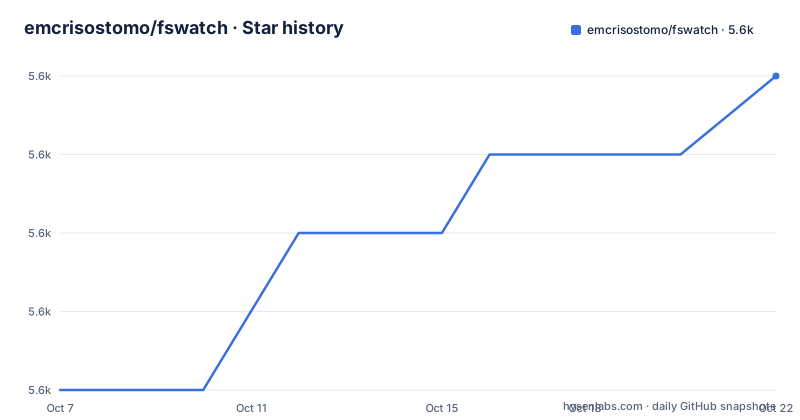
- emcrisostomo/fswatch5,609 ★ · +4
| Repository | 2026-10-07 | 2026-10-22 |
|---|---|---|
| emcrisostomo/fswatch | 5.6k | 5.6k |
4 Stars in the last 15 days, measured from the daily GitHub snapshot. Compare with other projects
Editorial analysis
Seven backends behind one command
The pitch is simple: run the same binary and get change notifications regardless of what the kernel underneath actually offers. The README lists the monitors in full. There is one built on Apple's File System Events API, one on kqueue from FreeBSD 4.1 and the BSDs that inherited it, one on the Solaris File Events Notification API, one on Linux inotify, one on Linux fanotify, one on the Windows ReadDirectoryChangesW API, and a last resort that periodically calls stat(2), records modification times in memory and works out the differences by hand.
That last entry matters more than it looks. Because the stat based monitor only needs stat(2), fswatch can build and run on a platform where none of the native notification APIs exist. It is the reason the README can claim the tool builds and works correctly on any system shipping one of the named APIs, and it is the escape hatch when a container or an unusual filesystem leaves the event interfaces unavailable.
The repository layout backs up the split. The `fswatch/` directory holds the command line program and `libfswatch/` holds the library underneath it, with `test/`, `man/`, `po/` and `scripts/` alongside. There are per platform README files for Linux, macOS, the BSDs, FreeBSD, Solaris, illumos, SmartOS and Windows, plus a `README.gnu-build-system` and a `README.libfswatch.md`, so the top level document is deliberately a map rather than a manual. The topics on the repository match: c, c-plus-plus, inotify, kqueue, change-monitor and windows.
The limitations section is the most useful part of the README
Most projects list what their tool does. fswatch spends a long section listing what each backend will not do, and that section is the reason to read the project carefully.
The inotify monitor on Linux is the one most people will actually run, and the README enumerates its edges: it reports no information about the user or process behind an event, so a watcher cannot easily tell its own writes from someone else's. It sees only events that go through the filesystem API, which means nothing arrives for remote changes on network filesystems, and pseudo-filesystems such as `/proc`, `/sys` and `/dev/pts` cannot be watched at all. Changes made through `mmap(2)`, `msync(2)` and `munmap(2)` are invisible. Directory monitoring is not recursive, so every subdirectory needs its own watch, and on a large tree creating those watches takes real time. And the event queue can overflow, in which case events are simply lost.
kqueue has a different failure mode. It needs a file descriptor opened for every file being watched, so it scales badly as the watched set grows and starts misbehaving once the process runs out of descriptors, dumping one error line to standard error per file it cannot open. The fanotify monitor only generates directory events when the directory itself is opened, read and closed, so adding or removing children produces nothing for the parent, and the README warns that using `FAN_CREATE` to catch new subdirectories is racy because events can disappear before the new mark lands.
Windows watches directories, so a single file needs its parent
The Windows backend has the most restrictive rule in the whole project and it is stated without hedging: the monitor can only establish a watch on directories, never on files. To follow one file you have to watch its parent directory and receive change events for every child, recursively, at any depth. You can then filter those events down to the file you actually care about.
That single design decision shapes how you write the rest of the integration. A path filter is not an optimisation on Windows, it is the only way to express the thing you wanted in the first place. The same is true of the poll monitor, which is available on every platform but whose performance degrades linearly with the number of watched files, trading correctness and CPU for reach.
The recommendations the README gives are worth repeating because they are short: on macOS use only FSEvents, which is the default; on Solaris and its derivatives use File Events Notification; on Linux use inotify, also the default. The defaults are the well tested paths. Choosing fanotify or poll is opting into a monitor the project supports but does not point you at first, which is reasonable for a whole filesystem or a network mount and questionable otherwise.
Filter evaluation modes and pruning versus excluding
The command line gained real filtering controls in release 1.21.0, published on 2026-05-09, and the distinction it draws is the kind of detail that usually only exists in a changelog.
The legacy behaviour stays the default: include filters may still override exclude filters, so a path caught by an exclude pattern can come back if an include pattern also matches it. The new `--filter-mode=conjunctive` changes the arithmetic. Include filters define the candidate set, exclude filters subtract from it, and a path is accepted when it matches an include filter (or when no include filters were given at all) and matches no exclude filter. If you have ever written a filter configuration where an exclusion silently stopped working because a broad include matched too, this is the switch that fixes it.
The second addition, `--prune`, is not a filter at all and the release notes are careful to say so. `--exclude` filters events as they are emitted. `--prune` prevents recursive traversal from descending into matching directories in the first place, on whichever monitor does the traversal. On a tree with a large `node_modules` or build output directory, pruning saves the watch setup cost rather than filtering the results afterwards, which is a different saving with a different failure mode.
libfswatch, the Go binding and a CMake package
The command line tool is the front end. The reusable part is `libfswatch`, a library with C, C++ and Go bindings, and the Go one lives in a separate repository rather than in this tree. If you are writing a daemon rather than wiring something into a shell pipeline, the library is the reason to look at this project at all, because it lets a long running process hold the event loop instead of paying process startup per watch.
Release 1.21.0 also started installing CMake package configuration files for `libfswatch`, so consumers can use `find_package(libfswatch CONFIG)`. Before that, using the library from CMake meant pointing includes and libraries at a source tree by hand. This is a small change that mostly matters to distribution packaging, where a config file is the difference between a clean dependency declaration and a patch in the build file.
The other recent release worth noting is 1.22.0 on 2026-07-22, which is the same date as the last push recorded for the repository. It fixed inotify MovedFrom and MovedTo events on Linux so they report the complete child path for one sided moves and paired renames, while still forwarding the kernel's rename correlation cookie unchanged. A rename that previously arrived as a bare name now arrives as a full path, and the pairing information needed to recognise it as a rename survives.
Building from source and what the docs leave out
The repository carries both an autotools path and a CMake path. At the top level you will find `autogen.sh`, `configure.ac` and `Makefile.am` for the autotools route, and `CMakeLists.txt` plus `full-build-with-cmake.zsh` and `build-from-scratch.sh` for the CMake route. The conventional autotools sequence is short:
./autogen.sh
./configure
make
Release 1.22.0 added an experimental static Linux x86_64 archive to the release workflow, which is worth trying before compiling anything, though the word experimental is doing real work in that sentence.
Where the README stops is the interesting part. It points you at the per platform documents for actual build instructions on your operating system, and at a project site for the rest. For a project at this level of polish that is a reasonable split: the top level document explains what the monitors do and how they fail, the per platform files handle toolchain specifics, and the site handles usage detail. What you will not find in the repository is a worked example of driving the library from your own code, so if the command line output format is not what you need, expect to read `libfswatch/` to find out how the record format is assembled. The README does say the record format is customizable, without saying how.
Editorial conclusion
fswatch earns its place when the same watcher has to run on more than one operating system and nobody on the team wants to maintain four event loops. The README is unusually candid about where each backend breaks, which is the part worth reading before you commit: inotify gives you no user information and is not recursive, kqueue needs a file descriptor per file, and the Windows monitor cannot watch a single file at all. For a Linux-only service that just needs to know a directory changed, a few dozen lines against inotify directly is still less code than linking this. Start on the platform you deploy first, pick the monitor the README recommends for it, and only reach for libfswatch from C, C++ or Go once you have confirmed the command line tool cannot express the filter you need.
Frequently asked questions
Which fswatch monitor should I use on Linux?
The inotify monitor, which is the default on Linux. The README recommends it explicitly. Keep in mind its documented limits: no information about which user or process triggered an event, no coverage of changes made through mmap, and directory watches that are not recursive.
Can fswatch watch a single file on Windows?
Not directly. The Windows monitor can only establish watches on directories, so you watch the parent directory, receive change events for all of its children recursively, and filter down to the file you want. The README describes this as the only available approach.
What is the difference between --exclude and --prune in fswatch?
--exclude filters events as they are emitted, while --prune stops recursive traversal from descending into matching directories at all. Added in release 1.21.0, --prune saves the cost of watching a subtree rather than discarding its events afterwards.
Does fswatch ship a library, or only a command line tool?
Both. The command line program is a front end for libfswatch, a library with C, C++ and Go bindings. Since release 1.21.0 the library also installs CMake package configuration files, so CMake consumers can use find_package(libfswatch CONFIG).
Official sources
Add this badge to your README
If you maintain this project, the badge below links readers to this analysis and shows its maintenance status from the daily GitHub snapshot. Paste the markdown into your README; add ?metric=license or ?metric=stars to the image URL for a different field.

[](https://hysenlabs.com/projects/emcrisostomo-fswatch)Star history chart for your README
[](https://hysenlabs.com/projects/emcrisostomo-fswatch)Was this useful?