emqx/neuron: an open source IIoT gateway for MQTT publishing
Open source industrial connectivity server
At a glance
- What is it?
- Neuron is a C-based industrial connectivity server for collecting data from factory equipment and publishing it through MQTT. It suits developers and integrators who need protocol adapters and management APIs, but its open-source distribution has documented feature and Dashboard limitations.
- Who is it for?
- Adopt Neuron when a small, source-built gateway with MQTT output and API-based device management is the priority. Do not choose it by itself when the required protocols, cloud connectors, advanced Dashboard features or ongoing Dashboard development matter.
- Can I use it commercially?
- Yes, with conditions. LGPL-3.0 is a weak copyleft licence: you can use it inside commercial and closed-source software, but if you distribute changes to its own files, you must publish those changes under the same licence.
- Is it still maintained?
- Yes. The repository last received commits 25 days ago.
- What is it written in?
- Mainly C, according to GitHub's language statistics.
Answers come from the project's GitHub data, last synced on October 23, 2026, and from our analysis. They are not legal advice.
Star history
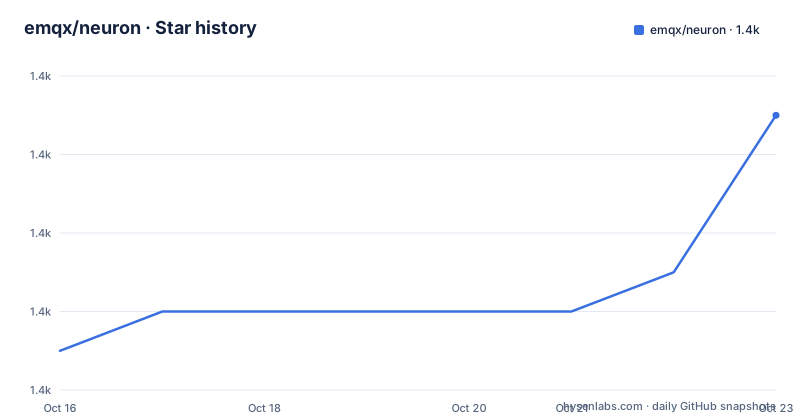
- emqx/neuron1,421 ★ · +6
| Repository | 2026-10-16 | 2026-10-23 |
|---|---|---|
| emqx/neuron | 1.4k | 1.4k |
6 Stars in the last 7 days, measured from the daily GitHub snapshot. Compare with other projects
Editorial analysis
What Neuron connects, and who needs it
Neuron addresses a specific boundary in industrial systems: equipment and control networks on one side, modern data platforms on the other. The README describes it as an Industrial IoT connectivity server that bridges industrial devices with platforms and converts industrial protocol data into MQTT. The intended users are engineers building shop-floor data paths, especially teams that need to collect PLC or device data without building a complete protocol gateway from scratch.
The project supports Modbus, OPC UA, Ethernet/IP, IEC 60870-5-104, BACnet and other protocols. Northbound access is described for MES, ERP, SCADA, historians and analytics, including Sparkplug B. Device and tag management is available through HTTP and MQTT APIs. That combination makes Neuron relevant when an application must consume standardized MQTT data while the field equipment speaks several industrial protocols.
The repository is primarily written in C and is built with CMake. Neuron can run as native binaries or containers, and the README names ARM, x86 and RISC-V as supported hardware targets. Its compact footprint and ability to run near equipment fit edge-oriented deployments, although the documentation does not provide a hardware sizing guide or device throughput figures.
Neuron’s adapter and MQTT data path
Based on the repository layout, Neuron is organized as a core application with a `plugins` directory, configuration files, API documentation, persistence code and tests. The README calls the architecture loosely coupled and modular, with pluggable device and application modules. It also states that plugins can be hot-plugged, allowing device and application modules to be updated at runtime.
The visible data path is therefore a protocol adapter layer feeding an application layer. A southbound plugin collects values from an industrial device, while northbound application modules send those values toward MQTT-oriented destinations or related platforms. The README specifically identifies MQTT as the conversion target and links Neuron with EMQX, NanoMQ and eKuiper. It also says Neuron includes stream processing through eKuiper for rules and AI or ML analytics. The README does not explain plugin lifecycle internals, buffering policy or delivery guarantees, so those details should be checked in the relevant plugin and API documentation before relying on them.
Configuration is split across `neuron.conf`, `default_plugins.json`, `zlog.conf` and `sdk-zlog.conf`. This separation means an installation has a main configuration file, a default plugin set and separate logging settings. The HTTP and MQTT API documents are listed separately under `docs/api/english/`, which is important because the web interface is not the only management path.
Building Neuron and reaching the web interface
The README offers both release archives and a source build. The source build is the clearest first route when a team needs to inspect the version and plugins used. First install the dependencies described by the repository, then clone the source and create a build directory. The following commands are copied from the README and compile the project:
$ git clone https://github.com/emqx/neuron
$ cd neuron && mkdir build && cd build
$ cmake .. && make
The README then places a separately released Dashboard archive in the build directory. This archive is needed because the open-source Dashboard is not contained in the commands above:
$ wget https://github.com/emqx/neuron-dashboard/releases/download/2.6.3/neuron-dashboard.zip

# Unzip neuron-dashboard.zip to the build directory
$ unzip neuron-dashboard.zip
Start Neuron from the build directory after the Dashboard files have been placed there:
$ ./neuron --logThe browser interface is then available at `http://localhost:7000`. The documented default credentials are username `admin` and password `0000`, so the credentials should be changed or protected before exposing the interface outside a trusted network. The README does not document a reverse-proxy setup, TLS configuration or authentication hardening procedure.
Keys, plugins and the first Modbus-to-MQTT route
Neuron automatically creates `neuron.key` and `neuron.key.pub` in the configuration directory on first startup when they do not already exist. A manual key-generation path is also documented. This matters for deployment planning because the key pair is part of the local configuration state, and the README does not say how to rotate it after production use has begun.
For a first data flow, the README points to a Modbus TCP collection and MQTT publishing quick start. The application sequence is concrete: configure the Modbus TCP device, define the tags to collect, configure an MQTT application, then publish the collected values. The repository exposes this workflow through the HTTP and MQTT APIs as well as the Dashboard. The quick-start document does not include its exact endpoint, request body or tag definition in the README, so those fields should be taken directly from `docs/quick_start/quick_start.md` rather than inferred from the Dashboard.
Plugin configuration is represented by `default_plugins.json`, while `neuron.conf` holds the main settings. The README states that hot-pluggable plugins support runtime updates, but it does not specify compatibility guarantees across plugin versions. Operators should therefore record the Neuron release and plugin versions together, especially in a factory deployment where changing an adapter can alter the data path.
Limits of the open-source distribution
The clearest limitation is stated in the README itself: the open-source Dashboard is version 2.6.3, and development and maintenance for that Dashboard have been suspended. NeuronEX, the commercial distribution, is presented as offering a more complete Dashboard, additional protocols, enterprise plugins, cloud connectors and enhanced security features. That means the open-source project has a narrower management experience than the commercial product, even though both are connected to the same Neuron name.
Protocol coverage also needs careful interpretation. The README lists broad protocol support, but the NeuronEX section identifies additional industrial protocols, including OPC UA, Siemens S7 and Ethernet/IP, as commercial extensions. The README is therefore inconsistent about whether every listed protocol is available in every Neuron edition. Confirm the plugin supplied with the exact release before selecting Neuron for a PLC integration.
The documented footprint is under 10 MB and CPU use is described as low, but no benchmark, device count, latency percentile or resource configuration is supplied. Those claims cannot be translated into a capacity promise for a particular factory network.
Neuron versus NeuronEX and broker-level alternatives
The most direct documented alternative is NeuronEX. It is not a separate kind of protocol converter with a different basic role; it is the commercial distribution of Neuron. According to the README, it adds protocol support, a fuller Dashboard, enterprise plugins, direct cloud connectors and security features such as enhanced encryption, auditing and compliance. A team that needs those capabilities may find the commercial distribution more aligned than the open-source package.
For deployments centered on MQTT rather than broad industrial ingestion, EMQX or NanoMQ are named as compatible platforms, not replacements with identical functions. EMQX and NanoMQ are named as compatible platforms, while Neuron handles the device-facing protocol and conversion work. eKuiper is named as the stream-processing component. The practical distinction is scope: Neuron is the field connectivity server, while the named projects address selected northbound or stream-processing layers.
The project should not be chosen as a full SCADA, MES or ERP application. Its documented role is connectivity and data transport. Those systems remain destinations or surrounding platforms in the described architecture.
License, maintenance and upgrade work
The repository identifies the project as licensed under `LGPL-3.0`. The README specifically says the core framework and the Modbus, MQTT and eKuiper plugins are available under LGPLv3. Other plugin licensing and any distribution obligations are not detailed in the README, so legal review should be performed against the repository `LICENSE` and relevant plugin files before redistribution.
The repository is not archived. Its last push was on 2026-09-28, and recent releases include `v2.9-daily`, `v2.8-daily` and `v2.7-daily`, each dated 2026-09-24. These facts indicate recent repository activity, but the README separately says that the open-source Dashboard version 2.6.3 has been suspended for development and maintenance. Project activity and Dashboard activity should therefore be tracked as separate maintenance signals.
An upgrade can involve more than replacing the Neuron binary. The Dashboard archive is versioned separately, plugin compatibility is not documented in the README, and configuration includes key files, plugin lists and logging settings. Back up those files and compare the target release notes before changing a running gateway.
Editorial conclusion
Adopt Neuron when a small, source-built gateway with MQTT output and API-based device management is the priority. Do not choose it by itself when the required protocols, cloud connectors, advanced Dashboard features or ongoing Dashboard development matter. Check plugin availability, deployment format, credentials, and the documented NeuronEX boundary before committing.
Frequently asked questions
How do I build and start emqx/neuron from source?
Install the dependencies listed in `Install-dependencies.md`, clone the repository, run `cmake .. && make`, place the documented Dashboard archive in the build directory, and start the binary with `./neuron --log`. The web interface is then served at `http://localhost:7000`.
What protocols does emqx/neuron support?
The README lists Modbus, OPC UA, Ethernet/IP, IEC 60870-5-104, BACnet and additional industrial protocols. It also states that NeuronEX adds protocol support, so edition and plugin availability should be checked for the required device family.
Can emqx/neuron publish industrial data to MQTT?
Yes. Neuron converts industrial protocol data into MQTT and documents a Modbus TCP collection and MQTT publishing quick start. EMQX and NanoMQ are named as compatible platforms, while eKuiper provides stream processing for rules and analytics.
Official sources
Add this badge to your README
If you maintain this project, the badge below links readers to this analysis and shows its maintenance status from the daily GitHub snapshot. Paste the markdown into your README; add ?metric=license or ?metric=stars to the image URL for a different field.

[](https://hysenlabs.com/projects/emqx-neuron)Star history chart for your README
[](https://hysenlabs.com/projects/emqx-neuron)Was this useful?