NextStep drives product tours from a steps array and a navigation adapter
Lightweight onboarding library for Next.js
At a glance
- What is it?
- NextStep is a MIT licensed TypeScript onboarding library for Next.js and React that renders step-by-step tours with motion animations, lets you replace the card component, and routes between steps through a pluggable navigation adapter with separate packages for Next.js, React Router and Remix. It ships ESM only and needs a Vite alias and a mock for Next.js navigation outside Next.js.
- Who is it for?
- NextStep fits a product team that wants a guided tour in a Next.js app within an afternoon, since the steps array, the provider and the component are three pieces of configuration, and it fits a team on React Router or Remix that accepts the Vite mock and alias setup. It does not fit a project that needs a heavyweight product tour platform with analytics, segmentation or content management, and it does not fit a CommonJS setup without changing the Next.js config.
- Can I use it commercially?
- Yes. MIT is a permissive licence: you can use, modify and sell software built on it, as long as you keep its copyright and licence notices.
- Is it still maintained?
- Yes. The repository last received commits 110 days ago.
- What is it written in?
- Mainly TypeScript, according to GitHub's language statistics.
Answers come from the project's GitHub data, last synced on November 6, 2026, and from our analysis. They are not legal advice.
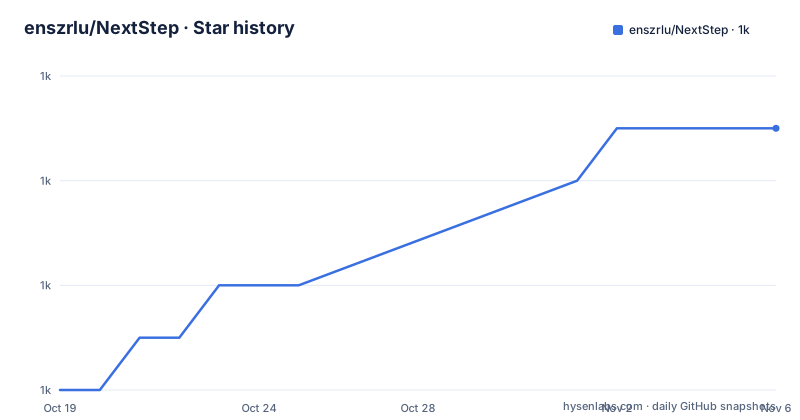
Star history
- enszrlu/NextStep1,047 ★ · +5
| Repository | 2026-10-19 | 2026-11-06 |
|---|---|---|
| enszrlu/NextStep | 1k | 1k |
5 Stars in the last 18 days, measured from the daily GitHub snapshot. Compare with other projects
Editorial analysis
The steps array is the whole content model
NextStep is described as a lightweight onboarding library for Next.js and React applications, using motion for smooth animations, and supporting Next.js, React Router and Remix. The listed use cases are guiding new users with step-by-step tours, making help documentation interactive so users learn by doing, showing users exactly what to fix with tailored tours instead of generic toasters, and triggering custom tours after key actions.
The content model is an array of step objects, and the README shows it in use in a provider and a component pair.
// app/layout.tsx or pages/_app.tsx
import { NextStep, NextStepProvider } from 'nextstepjs';

export default function Layout({ children }) {
  return (
    <NextStepProvider>
      <NextStep steps={steps}>{children}</NextStep>
    </NextStepProvider>
  );
}
There is a NextStepProvider and a NextStep component, and the steps are passed in. The provider holds the state that the tour needs, and the component renders it, so the wiring is a two component pattern rather than a hook with a complicated argument list.
The steps array is deliberately plain. A step is an object with content and a title and whatever targeting information a step needs, and there is no separate authoring format, no markdown pipeline and no schema to learn. That is the lightweight claim in practice, and it cuts both ways: the content is easy to produce, and it is also easy to produce badly, since nothing forces a step to name a real element on the page.
Navigation adapters are separate packages so the bundle stays small
NextStep 2.0 introduced a framework-agnostic routing system through navigation adapters, and the design decision that matters is that each adapter is packaged separately, so only the adapter you import ends up in your bundle.
For Next.js nothing needs to be imported, because the Next.js adapter is the default. The README warns, though, that you should make sure to import the adapter you need in your app to access full functionality, and that without an adapter, navigation features like nextRoute and prevRoute may not work properly. That is a slightly awkward default, since a Next.js user who reads only the quick start has a working tour whose next and previous buttons may not navigate.
For React Router as a framework, the adapter is imported from a subpath.
import { NextStepProvider, NextStepReact, type Tour } from 'nextstepjs';
import { useReactRouterAdapter } from 'nextstepjs/adapters/react-router';

export default function App() {
  return (
    <NextStepProvider>
      <NextStepReact navigationAdapter={useReactRouterAdapter} steps={steps}>
        <Outlet />
      </NextStepReact>
    </NextStepProvider>
  );
}
The Remix example is the same shape with useRemixAdapter, and the component is NextStepReact rather than NextStep, which is what tells you the two render paths are different components rather than one component with a prop.
A custom adapter is just an object with two methods, push and getCurrentPath, which is a small surface to implement.
const useCustomAdapter = (): NavigationAdapter => {
  return {
    push: (path: string) => {
      // Your navigation logic here
    },
    getCurrentPath: () => {
      return window.location.pathname;
    },
  };
};
The peer dependencies confirm the design, with next at >=13.0.0, react and react-dom at >=18, motion at >=11, react-router at >=7.0.0 and @remix-run/react at >=1.0.0. The next, react-router and @remix-run/react entries are all marked optional in peerDependenciesMeta, so the package does not force any of the routers on you.
Outside Next.js, Vite needs an alias and a mocked next/navigation
The most useful thing in this README is the section on what it takes to use the library in a Vite project that is not Next.js, because it is a specific and non-obvious requirement.
First, the ssr noExternal configuration, so that Vite bundles the library rather than externalising it.
export default defineConfig({
  ssr: {
    noExternal: ['nextstepjs', 'motion'],
  },
});
Second, and more awkwardly, Vite also requires next/navigation to be mocked in order to work properly. The library reaches for the Next.js router, and in a Vite app that import has to resolve to something. The README gives a complete mock file for that, with useRouter returning stub methods, usePathname returning an empty string, useSearchParams returning a new URLSearchParams, and useParams returning an empty object.
The mock is then wired in through a resolve alias in vite.config.mts.
import path from 'node:path';
import { defineConfig } from 'vite';
import react from '@vitejs/plugin-react';

export default defineConfig({
  plugins: [react()],
  resolve: {
    alias: [
      {
        find: 'next/navigation',
        replacement: path.join(process.cwd(), 'src/mocks/next-navigation.ts'),
      },
    ],
  },
});
This is a fair amount of setup for a library billed as framework-agnostic, and it is worth being clear-eyed about it. The adapters make the tour logic framework independent, but the package still carries a dependency on the shape of next/navigation somewhere in its module graph, and a Vite user pays for that with a mock file and an alias. In a Next.js project none of this is needed.
ESM only, and the two config lines that fix it
The troubleshooting section addresses a specific and confusing failure, an error related to module exports when using the Pages Router, which the README attributes to a mismatch between ES modules and CommonJS modules. The nextstepjs package uses ES module syntax, and a Next.js project set up for CommonJS will not load it.
The fix is three lines of configuration.
/** @type {import('next').NextConfig} */
const nextConfig = {
  reactStrictMode: true,
  experimental: {
    esmExternals: true,
  },
  transpilePackages: ['nextstepjs'],
};

export default nextConfig;
transpilePackages tells Next.js to run the package through its own compiler, and esmExternals turns on experimental handling of ES module externals. Both are needed, and the second one lives under experimental, so a project that is strict about experimental flags has to accept one.
The package.json confirms the ESM-only nature. The main field points at dist/index.js, the types field at dist/index.d.ts, and the exports map has an import condition for the root entry and separate entries for the adapter subpaths, with the adapters for next, react-router and remix each in their own export. The files array ships only dist, README.md and LICENSE, so the published package contains the compiled output and nothing else.
The build is a plain TypeScript compile, tsc --project tsconfig.json, with a watch mode for development, and the prepack script runs the build so the published artefact is always compiled from the current source. The peer dependency on motion at >=11 is why the installation instructions include motion in every package manager command, since NextStep animates with it rather than with a CSS transition.
The card is a replaceable component, and that is the main extension point
NextStep lets you use custom cards, meaning tooltips, for easier integration, and the README documents the card's props as a table.
| Prop | Type | Description | | ------------- | -------- | ------------------------------------------------------------------------------- | | `step` | `Object` | The current `Step` object from your steps array, including content, title, etc. | | `currentStep` | `number` | The index of the current step in the steps array. | | `totalSteps` | `number` | The total number of steps in the onboarding process. | | `nextStep` | | A function to advance to the next step in the onboarding process. | | `prevStep` | | A function to go back to the previous step in the onboarding process. | | `arrow` | | Returns an SVG object, the orientation is controlled by the steps side prop | | `skipTour` | | A function to skip the tour |
The shape of that prop list tells you the design. The card is a pure presentational component that receives the current step, the position in the sequence, and the four actions it can trigger. It does not know where the tour state lives and it does not call the router.
So replacing the card means writing your own component with that prop contract, and the example shows it as a client component with a typed props object.
'use client';
import type { CardComponentProps } from 'nextstepjs';

export const CustomCard = ({
  step,
  currentStep,
  totalSteps,
  nextStep,
  prevStep,
  skipTour,
  arrow,
}: CardComponentProps
The arrow prop returning an SVG object is a small detail with a real consequence, since the orientation of the pointer is controlled by a side prop on the step. That means a card that is not positioned in a conventional way, floating in a corner rather than anchored to a target element, still has to honour the arrow orientation, or the pointer will point at nothing.
The gap in this design is that the card is replaceable but the tour logic is not. There is no documented hook for adding a step programmatically, for branching, or for waiting for a condition. The four actions and the steps array are the whole vocabulary.
Where NextStep is the wrong tool
The first wrong case is a product that needs a full onboarding platform. NextStep renders tours from an array of steps in your own code. There is no content management interface, no audience segmentation, no analytics on step completion, no A/B testing of tour variants and no remote targeting. If your onboarding is a growth function that several people need to change without a deploy, this library is a component, not a platform, and the CMS and analytics work is yours to build.
The second wrong case is a project with heavy server rendering needs that the library does not address. The package is a client side tour with a custom card example marked with use client, and the React Router and Remix paths require a Vite alias and a mock for next/navigation. In a non-Next.js setup, the friction is real and it is the kind that shows up as a build error rather than a runtime one.
The third wrong case is a CommonJS Next.js project that cannot change its config. The troubleshooting section's fix requires transpilePackages and an experimental flag. A project that is not allowed to enable experimental features, or that has a build setup that does not permit transpiling a dependency, has no path here.
The fourth wrong case is a team that expects a maintained library. The release list ends with v2.3.1-beta.0 on 2026-07-20 and v2.3.0 on the same day, with a v2.3.0-beta.0 from 2026-06-14 before it, and the last push to main was on 2026-07-20. The project is on a 2.x line with a beta tag as the newest artefact, and the README asks for stars rather than contributors, which is the profile of a project maintained by one author between other work.
How it differs from writing a tour by hand
The comparison worth making is with the alternative most teams start from, which is a modal component with an index into an array of strings and two buttons.
That approach is about forty lines of code and it works for a first version. What it does not do is anchor the tour to a real element on the page, animate the transition, handle the overlay and the scroll, and manage the interaction with the underlying page while the tour is open. Each of those is where the cost is in a hand rolled implementation, and each of them is where the bugs live, particularly the anchoring, which has to survive a responsive layout change, a route change and a slow first paint.
NextStep takes that work as given and adds the parts that are genuinely hard to get right on top, the motion library integration, the custom card contract so the visual design stays in your design system, and the adapter system so the same tour can run in a Next.js app and a React Router app.
The difference in approach on the framework support is the interesting one. A library that only supported Next.js could import next/navigation directly and be simpler. NextStep instead makes routing an injected dependency, which is why there is a NavigationAdapter interface with two methods and why each router gets its own package. The cost of that abstraction is the Vite mock, because the library's module graph still mentions next/navigation somewhere. The benefit is that a team with a mixed router estate, or a plan to move, can keep one tour implementation.
The other difference worth noting is what is left to you. The steps are yours, the card is yours, the trigger logic is yours. NextStep supplies the machinery between the anchor and the tooltip and nothing above or below that, which is a reasonable line to draw for a library of this size.
Editorial conclusion
NextStep fits a product team that wants a guided tour in a Next.js app within an afternoon, since the steps array, the provider and the component are three pieces of configuration, and it fits a team on React Router or Remix that accepts the Vite mock and alias setup. It does not fit a project that needs a heavyweight product tour platform with analytics, segmentation or content management, and it does not fit a CommonJS setup without changing the Next.js config. Before adopting it, read the troubleshooting section on ES module exports, add transpilePackages: ['nextstepjs'] and experimental.esmExternals: true to your next.config.js, and pin a stable release rather than the beta, since the newest tag is v2.3.1-beta.0 from 2026-07-20 with the last push on the same day.
Frequently asked questions
How do I install NextStep?
Install the package and motion, which is a peer dependency used for the animations: npm i nextstepjs motion, or the pnpm, yarn and bun equivalents. NextStep also requires react and react-dom at >=18, next at >=13.0.0, and the peer dependencies on next, react-router and @remix-run/react are all marked optional.
How do I use NextStep with React Router or Remix?
Import the matching adapter, useReactRouterAdapter from nextstepjs/adapters/react-router or useRemixAdapter from nextstepjs/adapters/remix, and pass it as the navigationAdapter prop to NextStepReact. Each adapter ships as a separate package entry so only the one you import is included in your bundle.
Why does NextStep fail to load in my Next.js project?
An error about module exports usually means a mismatch between ES modules and CommonJS. The nextstepjs package uses ES module syntax, so the README advises adding transpilePackages: ['nextstepjs'] and experimental.esmExternals: true to your next.config.js.
Can I replace the tooltip card in NextStep?
Yes, the library allows custom cards for easier integration. A card component receives step, currentStep, totalSteps, nextStep, prevStep, arrow and skipTour as props, and the CardComponentProps type is exported from nextstepjs.
What is the latest NextStep release?
The tagged releases are v2.3.0-beta.0 on 2026-06-14, v2.3.0 on 2026-07-20 and v2.3.1-beta.0 on 2026-07-20, and the last push to main was on 2026-07-20. The package is MIT licensed with the repository at github.com/enszrlu/NextStep and the demo site at nextstepjs.com.
Official sources
Add this badge to your README
If you maintain this project, the badge below links readers to this analysis and shows its maintenance status from the daily GitHub snapshot. Paste the markdown into your README; add ?metric=license or ?metric=stars to the image URL for a different field.

[](https://hysenlabs.com/projects/enszrlu-nextstep)Star history chart for your README
[](https://hysenlabs.com/projects/enszrlu-nextstep)Was this useful?