React Native Reanimated DnD: drag-and-drop rebuilt on Reanimated 4 worklets
A powerful, performant drag-and-drop library for React Native built on Reanimated 4 and Gesture Handler. Smooth 60fps animations, sortable lists & grids, collision detection, and full TypeScript support.
At a glance
- What is it?
- react-native-reanimated-dnd is a drag-and-drop library for React Native built on Reanimated 4 and worklets, with sortable lists, sortable grids, three collision detection algorithms, and a 70kb unpacked footprint. It targets the New Architecture and Expo SDK 55, and version 2.0.0 arrived in March 2026.
- Who is it for?
- react-native-reanimated-dnd fits a React Native team that needs drag-and-drop running on the UI thread through Reanimated worklets, particularly sortable lists and grids where the animation has to stay smooth while JavaScript is busy. It is the wrong choice for a React Native 0.79 or older app, for a project that cannot adopt the New Architecture, or for a web drag-and-drop need.
- Can I use it commercially?
- Yes. MIT is a permissive licence: you can use, modify and sell software built on it, as long as you keep its copyright and licence notices.
- Is it still maintained?
- Yes. The repository last received commits 100 days ago.
- What is it written in?
- Mainly TypeScript, according to GitHub's language statistics.
Answers come from the project's GitHub data, last synced on November 7, 2026, and from our analysis. They are not legal advice.
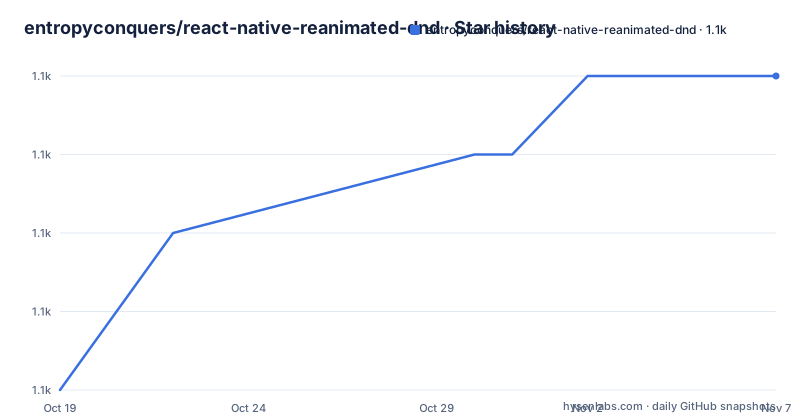
Star history
- entropyconquers/react-native-reanimated-dnd1,076 ★ · +4
| Repository | 2026-10-19 | 2026-11-07 |
|---|---|---|
| entropyconquers/react-native-reanimated-dnd | 1.1k | 1.1k |
4 Stars in the last 19 days, measured from the daily GitHub snapshot. Compare with other projects
Editorial analysis
The animation runs on the UI thread, not over the bridge
The technical claim at the centre of this library is that the drag interaction is not a JavaScript animation pretending to be native. The feature list is explicit about the mechanism: the library is built with Reanimated 4 and Worklets for 60fps animations, and the repository description names Reanimated 4 and Gesture Handler as its foundations.
That matters for a specific reason. A drag gesture produces a stream of position updates, and if each one has to cross the bridge to JavaScript and come back as a style change, the interaction degrades exactly when the app is doing other work, which is precisely when a user is dragging. Worklets move the gesture handler onto the UI thread so the position update and the layout animation both happen there, without a round trip.
The project frames this as being designed specifically for mobile rather than ported from the web, and the contrast with the web is the sharpest framing in the documentation. Web drag-and-drop libraries tend to assume a DOM, a mouse, and a layout model that the browser will do the work for. On a phone you have a touch screen, a native scroll view, a platform that may take over the gesture, and a list that may be virtualised. Every one of those is a place where a web-derived implementation falls down.
The consequence is a set of capabilities that only make sense on a touch device: drag handles that give you a dedicated region so a row can still scroll, pre-drag delay so a long press does not conflict with the list's scroll gesture, and auto-scrolling when you drag near the edge of a list. Those are the details that separate a library written for the platform from one that was adapted to it.
The component suite covers drag, drop, and sort as separate primitives
The library is not one component. The feature list names a complete component suite with Draggable, Droppable, Sortable, and more, and the example app shows how those pieces are used separately rather than as one monolithic list widget.
The example list is the clearest specification of the API surface, and it names eighteen interactive demos. There is a Sortable Music Queue for complete list reordering with drag handles, a Horizontal Sortable for a reorderable horizontal scrolling list, a Sortable Grid for 2D grid reordering with insert and swap modes, and a Dynamic Heights list where items vary in height. Then there is Basic Drag & Drop, where items are dragged to drop zones with a pre-drag delay, and a Drag Handles demo with dedicated drag regions for precise control.
The rest cover the harder cases. Custom Animations covers spring, timing, bounce and easing curves, Active Drop Styles gives visual feedback on hover, Alignment & Offset handles precise drop positioning with offsets, Boundary Constraints covers axis-locked and bounded dragging, Collision Detection demonstrates the three algorithms, and a Dropped Items Map tracks items across multiple zones. Two demos are about the plumbing rather than the interaction: a Drag State demo with a state enum and an onStateChange lifecycle, and a Custom Draggable demo showing a useDraggable hook implementation, which is how you build your own draggable on top of the library.
The useDraggable hook is the important one for extensibility. A library that only exposes a Sortable component forces you to use its model of what a sortable list is. A library that exposes the underlying draggable primitive lets you assemble a different interaction from the same parts.
Collision detection is three algorithms, and the choice is a real design decision
Smart collision detection with multiple algorithms is listed as a feature, and the names are centre, intersect, and contain. The examples spell out that all three are demonstrated.
The difference between them is what counts as a hit. A centre algorithm asks whether the midpoint of the dragged item is over the target, which is simple and predictable, and which means a large drop target only responds near its middle. An intersect algorithm asks whether the dragged item and the target overlap at all, which is forgiving and natural for a user aiming loosely, and which means a large target is easy to hit but a small one is easy to hit by accident. A contain algorithm asks whether the dragged item is fully inside the target, which is the strictest of the three, and the one to use when dropping into a container should require the whole item to be inside it.
Choosing wrongly is a common source of a drag-and-drop that feels broken. A drop zone that responds to intersection is fine for rearranging tiles, and it is wrong for a form where the user must place a card inside a specific region, because an accidental brush past the edge triggers the drop.
Positioning is handled by a separate mechanism, a 9-point alignment system with custom offsets, and the alignment and offset demo covers it. Nine points means the corners, the edge midpoints, and the centre, so a dropped item can be aligned to any of nine positions relative to the target rather than only centred.
Boundary constraints round out the positioning story, keeping draggables within specific areas, with both axis-locked and bounded dragging demonstrated.
List rendering is the part most sortable libraries get wrong
Two features in the list are about lists specifically, and they are the ones that decide whether a sortable list works on a real dataset.
The first is FlatList performance, described as optional FlatList rendering for large datasets with virtualization. The word optional matters. A sortable list implemented as plain mapped children has to render every item, because the library needs to know each item's position to decide where the dragged one should land. With a hundred items that is fine. With ten thousand it is not, and the app starts dropping frames during the drag itself, which is the one moment where smoothness is the entire feature.
The optional FlatList path is how a library solves that. FlatList virtualises, so only the visible window is rendered, and a sortable implementation built on top of it can keep the rendered set small. The cost is that the interaction has to work with a virtualised list rather than replacing it, which is a harder problem, because the items outside the window do not exist as views to reorder.
The second feature is dynamic heights, which is the other classic list problem. A sortable list where every item has the same height is easy, because the index to position mapping is a multiplication. With variable heights, the list has to measure items and maintain a running offset, and the library treats that as a supported case rather than something to work around.
The combination of automatic scrolling for both vertical and horizontal sortable lists, dynamic heights, and an optional FlatList path is what makes the difference between a demo and a component you would put in a settings screen with four hundred rows.
The peer dependency floor is what will block your install
The package.json states the peer dependencies, and they set the real constraint on adoption:
"peerDependencies": {
  "react": ">=18.0.0",
  "react-native": ">=0.80.0",
  "react-native-gesture-handler": ">=2.28.0",
  "react-native-reanimated": ">=4.2.0",
  "react-native-worklets": ">=0.7.0"
}
Five peer dependencies, and the floors are all recent. React Native 0.80.0 or newer, gesture-handler 2.28.0 or newer, reanimated 4.2.0 or newer, worklets 0.7.0 or newer, and React 18 or newer.
The React Native floor is the hard gate, and it is not arbitrary. The library is New Architecture ready, built for the modern React Native architecture used by Expo SDK 55 and later, and the badge states React Native 0.80+. The New Architecture is the reason for the floor, because the worklet-based approach this library relies on is tied to the newer architecture rather than the old bridge-based one.
Note that react-native-worklets is a separate peer dependency, which makes it the dependency most likely to trip up an install if it is missing or below the 0.7.0 floor.
The package also declares `sideEffects: false` in its package.json, which lets a bundler drop unused exports, and the feature list claims a 70kb unpacked size, which is the number to check against your own bundle budget. The library is published as an ES module with `main` and `module` both pointing at `lib/index.js`, types at `lib/index.d.ts`, and the version is 2.0.0.
A small project with a lot of surface area, and a licence you can read
The repository layout is worth a look before you depend on it, because it shows how much of this library is a package and how much is a surrounding project.
The actual library is `components/`, `hooks/`, `context/`, `utils/`, and `types/`, with `index.ts` at the root as the public entry point. The `types/` directory and the `types` field in package.json point to full TypeScript definitions, and the feature list claims full type safety with comprehensive definitions. The `hooks/` directory is where the useDraggable hook lives.
Around the library there is an `example-app/` directory, which is also declared as a workspace, since the package.json workspaces list contains only example-app. There is a `documentation/` directory with images, a `scripts/` directory holding the build script that the minify step invokes, and `app.json` for the Expo app configuration. `CONTRIBUTING.md` and `DEVELOPMENT.md` are both present.
Then there are three directories that say something about how the project is maintained. `.agents/`, `.claude/`, and `.claude-plugin/` mean the repository carries configuration for coding agents and a plugin directory, and `skills/` is a further set of agent-facing resources. The `skills/` directory in particular suggests the project ships reusable instruction files alongside the code, which is a pattern more common in agent tooling than in library repositories, and it means part of the intended user experience is that an assistant knows how to use the library.
The licence is MIT, recorded both in the package.json and in a LICENSE file at the root, which is the most permissive of the common choices and removes any question about using it in a closed app.
The last push was on 2026-07-30, and the release history shows v1.0.0 in June 2025, v1.1.0 in June 2025, and v2.0.0 in March 2026. A 2.0.0 with no 1.x tag since mid 2025 tells you the 1.x line was the old architecture generation and 2.0.0 is the New Architecture one, which is the kind of break that leaves the older tags behind on purpose.
Editorial conclusion
react-native-reanimated-dnd fits a React Native team that needs drag-and-drop running on the UI thread through Reanimated worklets, particularly sortable lists and grids where the animation has to stay smooth while JavaScript is busy. It is the wrong choice for a React Native 0.79 or older app, for a project that cannot adopt the New Architecture, or for a web drag-and-drop need. Verify three things before you install: that your React Native version is 0.80.0 or newer and that the peer dependencies on gesture-handler 2.28.0, reanimated 4.2.0, and worklets 0.7.0 are satisfied, that your list rendering approach is compatible with the optional FlatList path if you have large datasets, and that the MIT licence plus the absence of a 2.x tag older than 2026-03-16 leaves you room to pin a version you can reproduce.
Frequently asked questions
What are the peer dependencies of react-native-reanimated-dnd?
The package requires react at 18.0.0 or newer, react-native at 0.80.0 or newer, react-native-gesture-handler at 2.28.0 or newer, react-native-reanimated at 4.2.0 or newer, and react-native-worklets at 0.7.0 or newer. The React Native floor comes from the library being built for the New Architecture used by Expo SDK 55 and later.
Which collision detection algorithms does react-native-reanimated-dnd support?
Three: centre, intersect, and contain. The example app demonstrates all three, and the choice determines whether a drop counts when the midpoint crosses the target, when the two overlap at all, or only when the dragged item is fully inside the target.
Does react-native-reanimated-dnd work with large lists?
There is an optional FlatList rendering path for large datasets with virtualization, alongside support for variable item heights and automatic scrolling in both vertical and horizontal sortable lists. The FlatList path is optional, so a plain mapped list is still the default.
How do I try react-native-reanimated-dnd before installing it?
The project ships an example app with 18 interactive demos that can be scanned with Expo Go, and it links to a live demo and to the example app source. The published package is `react-native-reanimated-dnd` on npm, and the documentation site is at reanimated-dnd-docs.vercel.app.
Official sources
Add this badge to your README
If you maintain this project, the badge below links readers to this analysis and shows its maintenance status from the daily GitHub snapshot. Paste the markdown into your README; add ?metric=license or ?metric=stars to the image URL for a different field.

[](https://hysenlabs.com/projects/entropyconquers-react-native-reanimated-dnd)Star history chart for your README
[](https://hysenlabs.com/projects/entropyconquers-react-native-reanimated-dnd)Was this useful?