open-pstack: Porting Cursor's Agent Workflow to Claude Code and Codex
pstack for Claude Code and Codex, tracking Cursor pstack upstream
At a glance
- What is it?
- open-pstack translates Lauren Tan's pstack plugin for Cursor into skills and workflows that run inside Claude Code and Codex. It keeps the original's evidence-first approach but swaps Cursor-specific hooks for command-line model tools.
- Who is it for?
- Adopt open-pstack if you use Claude Code or Codex as your primary coding environment and want an agent workflow that emphasizes learning before changing and verifying real behavior. Skip it if you rely on Cursor, where the original pstack is the better fit, or if you cannot install Bun or sign in to multiple command-line tools.
- Can I use it commercially?
- Yes. MIT is a permissive licence: you can use, modify and sell software built on it, as long as you keep its copyright and licence notices.
- Is it still maintained?
- Yes. The repository last received commits 18 days ago.
- What is it written in?
- Mainly TypeScript, according to GitHub's language statistics.
Answers come from the project's GitHub data, last synced on October 4, 2026, and from our analysis. They are not legal advice.
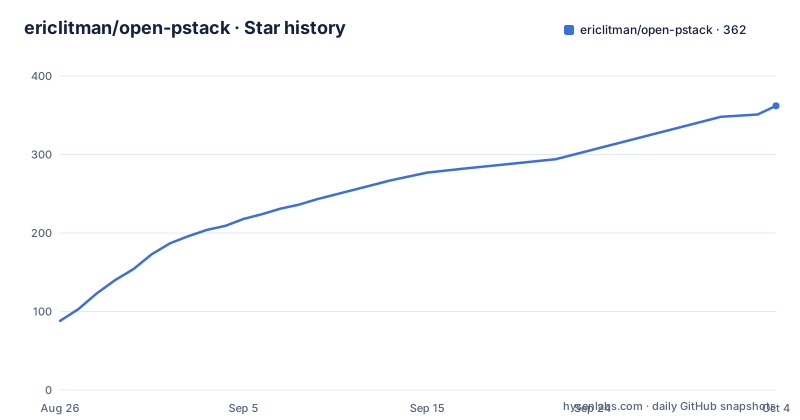
Star history
- ericlitman/open-pstack362 ★ · +274
| Repository | 2026-08-26 | 2026-10-04 |
|---|---|---|
| ericlitman/open-pstack | 88 | 362 |
274 Stars in the last 39 days, measured from the daily GitHub snapshot. Compare with other projects
Editorial analysis
Why a Cursor plugin needs a port
Lauren Tan built pstack at Cursor, and it is tightly coupled to that environment. The plugin gives coding agents engineering rules, step-by-step workflows, focused skills, and small local tools. But the original lives in the Cursor plugins repository and depends on Cursor's interfaces. open-pstack is an unofficial community port that translates those Cursor-dependent parts so the same workflow can run in Claude Code and Codex. The README is explicit about the trade-off: if Cursor is your main environment, use the original; if Claude Code or Codex is your main environment, use this repository. That positioning matters. This is not a fork that improves on the original. It is a translation layer with a narrow audience.
The poteto-mode entry point and its workflow
The normal entry point is a skill called poteto-mode. You give it a plain-language task, and it chooses a workflow that fits. The README lists what that workflow does: it learns how the current system works before changing it, compares designs when the choice matters, favors small changes, and runs the code to check real behavior instead of stopping at passing tests. It also carries the work through review, CI, and a ready-to-merge pull request when asked. The key design idea is that the agent should not be trusted on day one. Instead, it leaves evidence you can inspect. The documentation suggests starting with supervised work and only letting it run more in parallel after its checks have earned trust in your own repositories. That is a cautious stance, and it is refreshing for an agent plugin.
Installation: two paths, one shared skill set
Installation differs by client, but both paths point at the same repository. In Claude Code, you run three commands inside the app: /plugin marketplace add ericlitman/open-pstack, then /plugin install pstack@open-pstack, then /reload-plugins. In Codex, you run two shell commands: codex plugin marketplace add ericlitman/open-pstack --ref main and codex plugin add pstack@open-pstack. You also need to enable Codex subagents in ~/.codex/config.toml with [features] multi_agent = true, and start a new Codex task after installation so it can discover the new skills. The README notes that you need a current Claude Code or Codex installation, plus Bun to run the small local tool that starts models outside the app. The full four-model review requires signed-in Claude Code, Codex, and Grok command-line tools, but you can still use core workflows with fewer models.
Model setup: defaults and the no-silent-fallback rule
After installation, you run setup-pstack. In Claude Code, that is /pstack:setup-pstack. In Codex, you ask the agent to use pstack:setup-pstack. The setup checks which models you can actually run, shows how each one will start, and asks before saving choices. The current default group uses Fable 5, GPT-5.6 Sol, Grok 4.6, and Opus 5. Each model run uses the subscription and token allowance of its own command-line tool. A model from the app you are using runs inside that app; other models run through their own command-line tools. The README states that open-pstack does not quietly replace a failed model with a weaker one. That is a notable guarantee, but it also means a failed model can stall a workflow. The setup lets you choose the models, one requested effort per model family, and how many run in parallel.
The skill library: from how to babysit
Beyond poteto-mode, the plugin ships a set of skills you can call directly. The how skill explains how part of the system works. The why skill gathers evidence for why the system was built that way. The architect skill is for changes that cross a function or module boundary and need the design settled first. The arena skill produces several complete attempts and then compares their best parts. The interrogate skill has different models try to break a design or diff. There are also two maintenance skills: create-verification-skill for projects with no repeatable way to prove real behavior, and maintain-verification-skill for when verification instructions no longer match the product. The babysit skill handles CI failures and review comments on a pull request until it is ready. Finally, reflect improves the next run after a hard task. These skills are named with a pstack: prefix, and you invoke them differently in each client. In Claude Code, you use a slash command like /pstack:architect. In Codex, you ask for the skill by name.
Claude Code versus Codex: the same skills, different starts
Both clients read the same skills, but they start them differently. In Claude Code, poteto-mode loads a small startup instruction that can route non-trivial work into it, or you can run /pstack:poteto-mode yourself. In Codex, you ask for pstack:poteto-mode by name, and Codex does not load the Claude startup instruction. That difference matters for how automatic the workflow feels. Claude Code can catch tasks without you explicitly invoking the skill; Codex requires you to name it. The model routing also differs. In Claude Code, Claude models stay inside the app, while Codex and Grok run through their signed-in command-line tools. In Codex, the Sol model stays inside Codex, while Claude and Grok run through their tools. Grok can take part in a multi-model review, but you cannot use Grok as the main app running pstack. That is a hard constraint that the README states plainly.
Limitations and the wrong-tool cases
The most obvious limitation is the dependency on multiple paid subscriptions. The full four-model review requires Claude Code, Codex, and Grok command-line tools, each with its own token allowance. If you only have one model, you lose the parallel review skills like arena and interrogate, and you are left with a single-model workflow that is not much different from using the agent without pstack. Another limitation is that open-pstack is a port, not a rewrite. The README says it stays as close to Lauren's original work as possible, which means any Cursor-specific behavior that was not translated is simply absent. The documentation also does not specify what happens when a model tool fails mid-workflow, beyond the no-silent-fallback rule. That could leave a workflow hanging. Finally, this is the wrong tool if you are on Cursor, because the original pstack is the intended path. It is also wrong if you cannot install Bun or if you do not want to manage multiple command-line tools.
Alternatives and maintenance realities
The direct alternative is Lauren Tan's original pstack in the Cursor plugins repository. The difference is not in the workflow philosophy but in the environment. The original runs inside Cursor and uses Cursor's own model integration, so you do not need to install Bun or manage separate command-line tools. open-pstack exists specifically because that integration does not work in Claude Code or Codex. Another alternative is to use Claude Code's or Codex's built-in agent features without any plugin, which gives you less structure but also fewer dependencies. On maintenance, the repository is under the MIT license, which allows free use and modification. The project tracks the Cursor upstream, meaning it will need updates whenever Lauren changes pstack. The last push was August 2026, with version 1.0.1 released the same day, so the port is actively maintained as of that date. But the README is clear that it is an unofficial community project, so you should not expect the same support cadence as a commercial product.
Editorial conclusion
Adopt open-pstack if you use Claude Code or Codex as your primary coding environment and want an agent workflow that emphasizes learning before changing and verifying real behavior. Skip it if you rely on Cursor, where the original pstack is the better fit, or if you cannot install Bun or sign in to multiple command-line tools. Before adopting, verify that your model subscriptions cover the models you plan to use, that your Codex config has multi_agent enabled, and that you are comfortable with the plugin's use of external model tools for parallel reviews.
Frequently asked questions
What is the pstack command?
The normal entry point is poteto-mode. In Claude Code you run it as a slash command such as /pstack:poteto-mode with your task, and Claude can also load a small startup instruction that routes non-trivial work into it; in Codex you ask for pstack:poteto-mode by name.
How do I install pstack on Linux?
Open Pstack documents two installs with no Linux-specific step: three slash commands inside Claude Code, or two shell commands for Codex using codex plugin marketplace add and codex plugin add. It needs a current Claude Code or Codex installation, and Bun runs the small local tool that starts models from outside the app.
Which models does Open Pstack use by default?
The default review panel uses Opus, GPT-5.6 Sol and Grok 4.7, and setup probes only the models your roles use while leaving Fable available. Getting the full three-model review running means installing and signing in to the Claude Code, Codex and Grok command-line tools.
Does Open Pstack swap in a weaker model when one fails?
No. It does not quietly replace a failed model with a weaker one, and a stale grok:grok-4.6 entry in a model sheet keeps running until the next setup run asks you to replace it.
How close does Open Pstack stay to Cursor's pstack?
Its stated goal is to stay as close to the original as possible while translating only the parts that depend on Cursor, and both apps read the same pstack skills with only the startup mechanism differing. The root keeps README-UPSTREAM.md, UPSTREAM.md and a NOTICE.md, along with separate licences for the cursor-team-kit and superpowers components.
Official sources
Add this badge to your README
If you maintain this project, the badge below links readers to this analysis and shows its maintenance status from the daily GitHub snapshot. Paste the markdown into your README; add ?metric=license or ?metric=stars to the image URL for a different field.

[](https://hysenlabs.com/projects/ericlitman-open-pstack)Star history chart for your README
[](https://hysenlabs.com/projects/ericlitman-open-pstack)