tmux-powerline: a status bar you rebuild by editing bash, not a config file
⚡️ A tmux plugin giving you a hackable status bar consisting of dynamic & beautiful looking powerline segments, written purely in bash.
At a glance
- What is it?
- A tmux plugin that draws powerline segments from a folder of shell scripts, so the status bar is something you generate and recolour rather than something you configure through a plugin manager.
- Who is it for?
- The right reader for tmux-powerline is someone who already lives in tmux, already edits their dotfiles as code, and wants the status bar to be generated rather than hand-maintained. That reader will recognise the value immediately, because generate_config.sh plus a themes directory plus a folder of independent scripts is a better arrangement than a growing block of status-left settings.
- Can I use it commercially?
- Yes. BSD-3-Clause is a permissive licence: you can use, modify and sell software built on it, as long as you keep its copyright and licence notices.
- Is it still maintained?
- Yes. The repository last received commits 15 days ago.
- What is it written in?
- Mainly Shell, according to GitHub's language statistics.
Answers come from the project's GitHub data, last synced on October 20, 2026, and from our analysis. They are not legal advice.
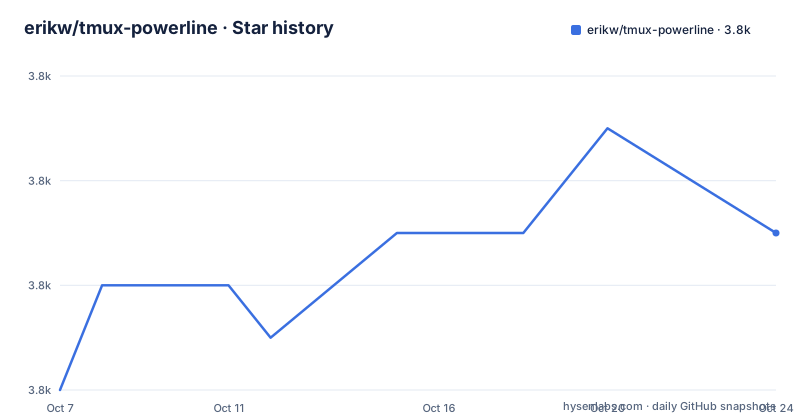
Star history
- erikw/tmux-powerline3,845 ★ · +5
| Repository | 2026-10-07 | 2026-10-20 |
|---|---|---|
| erikw/tmux-powerline | 3.8k | 3.8k |
5 Stars in the last 13 days, measured from the daily GitHub snapshot. Compare with other projects
Editorial analysis
A status bar assembled from shell scripts
The plugin's own description is that it gives you a slick and hackable powerline status bar consisting of segments, and that it is easily extensible with custom segments and themes. What makes that more than marketing is the language choice: the README says the plugin is implemented purely in bash, thus minimizing system requirements, and that you can write a segment in any language you want as long as you wrap it in a shell call.
That decision shows up in the repository layout. `main.tmux` is the entry point, `segments/` holds one script per data source, `themes/` holds the arrangement, `lib/` holds the shared helpers, and `powerline.sh` plus `color_palette.sh` do the drawing and the colour maths. There is also `generate_config.sh`, which produces the tmux configuration that references the generated status bar.
The interesting consequence is that extending this status bar means writing a bash script that prints a line of text, not learning a plugin API. A contributor who wants a segment for their own service writes the script, then names it in a theme.
The repository is not archived and the last push was on 2026-09-20. It publishes no GitHub releases, so version tracking happens through tags and a CHANGELOG.md rather than a release feed.
The three requirements, and the font is the one people miss
The README states the library requirements compactly, and the middle one carries a parenthetical that matters:
tmux -V >= 2.9
bash --version >= 3.2
The note that bash does not have to be your default shell is the practical bit, because the plugin invokes bash itself rather than inheriting whatever your login shell happens to be. The Nerd Font requirement is the one that generates support questions. The README links to font installation instructions and then adds an escape hatch: you can use other substitute symbols instead, with the substitutions set in `config.sh`. That is the right kind of escape hatch, since the glyphs are a presentation choice rather than a dependency.
Behind those three sit per-segment requirements, and the README is explicit that you only need the ones matching the segments your theme enables. Several need `jq` and `curl`, such as `github_notifications.sh` and `claude_code.sh`, and the Claude Code segment additionally needs `ccusage` if you switch on accumulated cost. `cpu_temp.sh` wants `lm_sensors` on Linux and `smctemp` on macOS, which is the pattern to watch: one segment file, two platform implementations.
`weather.sh` is listed with a provider of yrno and its own `jq` and `curl` requirement, and `xkb_layout.sh` needs X11 and XKB. The tennis segment stands out because it requires a dedicated free Live Tennis API key.
Themes decide which segments exist and what they look like
Screenshots in the README make the layout concrete. The left status carries the current tmux session, window, pane, hostname, and LAN and WAN IP address. The right status carries new mail, now playing, average load, weather, date, and time. A dual-line status bar is also shown.
The screenshots document a behaviour that is easy to miss from a feature list: segments disappear when they have nothing to report. The caption under one image says that after reading the inbox the mail segment disappears, and another shows the Now Playing segment gone after pausing the music, with the weather output changing at the same time. Empty segments are omitted rather than padded with placeholder text, which is what keeps the bar readable when half your services are idle.
A battery segment appears in a laptop mode screenshot. That is the mechanism in miniature: the theme describes a layout, and the data available at render time decides which parts of it show up.
This is also where the colour work lives. `color_palette.sh` sits beside `powerline.sh`, and `mute_powerline.sh` is a separate entry point, so the drawing behaviour can be toggled or replaced without touching the segment scripts.
The segment catalogue and the cost of enabling it
The README lists the available segments and it is a long list, which is the honest measure of what this plugin does. Network segments cover LAN and WAN IP addresses plus download and upload speed through `ifstat.sh`. Music is the deepest corner: MPD, Spotify on GNU/Linux natively or through wine on macOS, iTunes, Rhythmbox, Banshee, MOC, Audacious, Rdio, cmus, Pithos, and a last scrobbled track from Last.fm.
Mail is covered for GMail, Maildir, mbox, mailcheck, and Apple Mail. System information includes load, CPU usage, uptime, and battery on both GNU/Linux and macOS. Version control is covered for Git, SVN, and Mercurial branch in the current working directory. The tmux-native segments are session, window and pane state, a mode indicator for normal, prefix, mouse, and copy modes, the pane working directory, and tmux info generally. Weather is available in Celsius, Fahrenheit, and Kelvin. There are also segments for the current X keyboard layout and for earthquake warnings.
One entry shows how the project tracks current tooling rather than just server daemons. The Claude Code segment reports session and weekly limits, time remaining for session, weekly, and billing cycle, and an optional accumulated cost.
The cost of that breadth is dependency sprawl. Each segment is an independent integration with its own failure mode, and the README's `mailcount.sh` entry is a good illustration: gmail needs `wget`, while mailcheck needs mailcheck installed from your distribution.
doctor.sh and the tooling around the status bar
Two scripts in the tree deserve more attention than a status plugin usually gets. `doctor.sh` exists because a plugin with thirty optional external integrations will, sooner or later, fail on somebody's machine for a reason that has nothing to do with tmux. `generate_config.sh` exists because the configuration the plugin needs is derived output: segments and themes are assembled into a status line, and generating it keeps the theme file free of repetition.
The rest of the repository is the usual scaffolding a project acquires once it has real contributors. There is a `tests/` directory, a `CHANGELOG.md`, a `CONTRIBUTING.md`, an `.editorconfig`, a `.vscode/` directory, a `.devcontainer/` directory, and an `OSSMETADATA` file that feeds the Netflix OSS tracker badge in the README. There is a `scripts/` directory and an `img/` directory holding the screenshots. Topics on the repository include bash, tmux-plugin, tpm, statusbar, powerline, segments, and themes.
Maintenance is shared. The README names a co-maintainer, xx4h, who is helping with developing, maintaining, and managing the project. The licence is BSD-3-Clause, which is the permissive choice that lets the segment scripts be copied into a personal configuration without much ceremony.
Where tmux-powerline sits against tmux itself
It helps to be blunt about what this is not. tmux draws a status line through its own status-style and status-left options, and those accept format strings, so a hand-written status line costs nothing but patience and is fully supported upstream. tmux-powerline exists because that approach stops scaling: once you want a mail count, a now-playing field, a weather reading, and per-field colours, you are maintaining a format string by hand and reloading the server after every change.
Other tmux status plugins exist in the same ecosystem, and searches for this project surface tmux-powerkit and tmux-plugins alongside tmux-powerline itself. The difference worth naming is the extension path. Writing a new field here is a standalone bash script in a directory, with a wrapper if the language is not bash, and no registration beyond naming it in a theme. That is a low bar, and it is also the main risk: a status bar that runs your mail client, your music daemon, and a weather API on every refresh is a lot of background work for decoration, and the per-segment requirement list exists precisely because that work is easy to forget.
The README does not claim the segments replace anything in tmux. It claims they fill in the status bar, and it publishes a list of segments you choose from rather than a bundle you accept.
Editorial conclusion
The right reader for tmux-powerline is someone who already lives in tmux, already edits their dotfiles as code, and wants the status bar to be generated rather than hand-maintained. That reader will recognise the value immediately, because generate_config.sh plus a themes directory plus a folder of independent scripts is a better arrangement than a growing block of status-left settings. The boundaries are equally clear: the plugin draws and polls, it does not own your session, and every enabled segment can drag in an external binary or a network call, which is why the README lists per-segment requirements instead of a single dependency list. Start by confirming tmux 2.9 and bash 3.2, then run doctor.sh to see which segment scripts fail on your machine before enabling them in a theme.
Frequently asked questions
What do I need installed before tmux-powerline will work?
The README lists tmux 2.9 or newer, bash 3.2 or newer, and a Nerd Font, though it notes that other substitute symbols can be used instead by setting them in config.sh. Individual segments have their own requirements, so only the ones your theme enables need to be met. For example the weather segment needs jq and curl.
How do I add my own segment to the status bar?
Segments are bash scripts kept in the segments directory, and the README states that a segment can be written in any language as long as it is wrapped in a shell call. You add your script to that directory and then name it in one of the themes that live in the themes directory.
Why do segments disappear from my status bar?
That is intended behaviour rather than a fault. The README screenshots show the mail segment disappearing once the inbox is read and the now playing segment disappearing after the music is paused. A segment with nothing to report is left out of the bar.
Is tmux still worth using for a status bar in 2026?
The README does not take a position on tmux's own development, and this article will not either. It sets a floor of tmux 2.9, which is the version claim worth checking against your own install. What the project contributes is a way to assemble that status line from scripts rather than a format string.
Official sources
Add this badge to your README
If you maintain this project, the badge below links readers to this analysis and shows its maintenance status from the daily GitHub snapshot. Paste the markdown into your README; add ?metric=license or ?metric=stars to the image URL for a different field.

[](https://hysenlabs.com/projects/erikw-tmux-powerline)Star history chart for your README
[](https://hysenlabs.com/projects/erikw-tmux-powerline)Was this useful?