MSYS2 MINGW-packages: Building MinGW-w64 Software from Scripts, Not Binaries
Project brief: Package scripts for MinGW-w64 targets to build under MSYS2. MINGW-packages This repository contains package scripts for MinGW-w64 targets to build under MSYS2.
At a glance
- What is it?
- A look at the MSYS2 MINGW-packages repository, which holds the build scripts behind the UCRT64 binary packages, and what it means for engineers who need to compile their own MinGW-w64 ports.
- Who is it for?
- Adopt MINGW-packages if you need to build MinGW-w64 software from source under MSYS2, either to get a version not yet in the UCRT64 repo or to customize a build. Skip it if you only consume binaries, because pacman -S handles that without touching this repository.
- Can I use it commercially?
- Yes. BSD-3-Clause is a permissive licence: you can use, modify and sell software built on it, as long as you keep its copyright and licence notices.
- Is it still maintained?
- Yes. The repository received new commits within the last day.
- What is it written in?
- Mainly Shell, according to GitHub's language statistics.
Answers come from the project's GitHub data, last synced on November 14, 2026, and from our analysis. They are not legal advice.
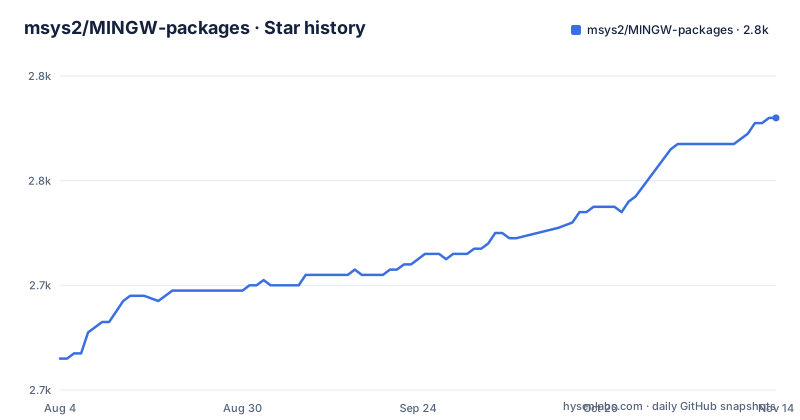
Star history
- msys2/MINGW-packages2,772 ★ · +46
| Repository | 2026-08-04 | 2026-11-14 |
|---|---|---|
| msys2/MINGW-packages | 2.7k | 2.8k |
46 Stars in the last 102 days, measured from the daily GitHub snapshot. Compare with other projects
Editorial analysis
What This Repository Actually Is
The MINGW-packages repository is not a collection of compiled binaries. It is a set of package scripts, mostly written in Shell, that describe how to build MinGW-w64 targets under MSYS2. The README is explicit: these scripts are for building software that runs on Windows using the MinGW-w64 toolchain, and MSYS2 provides the Unix-like environment that makes porting POSIX software to Windows possible. The repository is the source of truth for the binary packages that appear in the MSYS2 UCRT64 repo, but it is not the binary repo itself. This distinction matters. If you are an engineer who just wants to install a library or tool, you do not need this repository. If you want to build that library yourself, or you need a version that has not been published yet, this is where you start.
The Pre-built Path: pacman -S
The README describes the common way to use these packages: install pre-built binaries from the MSYS2 UCRT64 repo using pacman. The command is simple: pacman -S ${package-name}. This pulls the compiled binaries, libraries, headers, and man pages onto your machine. The documentation points to the MSYS2 website for details on finding the correct package name. This path is the default for most users because it requires no compilation and no interaction with the repository's scripts. However, the README warns that not every package in the repository is immediately available as a binary. After a change is merged into the git repository, it can take a few days for the compiled package to appear in the UCRT64 repo. Some packages only have the most recent version available, while others keep older versions. That delay is the gap that the source-build path fills.
The Source-build Path: makepkg-mingw
For those who need to build from source, the README gives a concrete workflow. After ensuring you have a properly installed MSYS2 environment with build tools, you clone or download the package folder for the software you want. Then you run makepkg-mingw -sLf from inside that folder. The MINGW_ARCH=ucrt64 environment variable tells the build system which MinGW-w64 target to use, in this case the UCRT64 variant. The -s flag installs dependencies, -L enables logging, and -f forces a rebuild even if the package already exists. The output is a .pkg.tar.zst file, which you install with pacman -U ${package-name}*.pkg.tar.zst. This is the same tooling that Arch Linux users know from makepkg, adapted for the MinGW-w64 cross-compilation context. The README does not go into the contents of the PKGBUILD files, but the mechanism is clear: each package directory contains the instructions for building that specific piece of software.
The Build Scripts as a Porting Tool
The repository's purpose is not just to produce binaries. It is a resource for porting POSIX software to Windows. The README describes MSYS2 as an independent rewrite of MSYS that provides a Unix-like command-line interface on Windows, making it possible to port software that normally runs on Linux, BSD, or Unix. The package scripts encode the build steps, patches, and dependency resolutions that make a given POSIX program compile and run under MinGW-w64. For an engineer porting a new piece of software, reading an existing PKGBUILD for a similar project can be more instructive than the official build instructions, because the script has already solved the Windows-specific issues. This is a side benefit of the repository, but it is a real one. The scripts are documentation in executable form.
A Genuine Limitation: The Stale Repository
The repository's last push was on August 16, 2020. That is a significant fact. The README may be current, but the scripts in the master branch have not been updated in years. This does not mean the packages are broken, but it does mean that if you clone the repository today, you are building against a snapshot from 2020. The MSYS2 environment itself has likely moved on, with newer toolchains and library versions. The README's build command may still work, but the dependencies specified in the PKGBUILDs may no longer match what is available in the current MSYS2 repos. This is the wrong tool if you expect to get the latest version of a library or if you need a build that tracks current upstream releases. For that, you would need to update the scripts yourself or rely on the binary repo, which may have newer builds even if the git repository is stale.
The Alternative: The Binary Repo and Direct Upstream Builds
The obvious alternative is to skip the source scripts entirely and use pacman -S to install the pre-built packages from the UCRT64 repo. That is the approach the README recommends as the common way. The difference is in control and freshness. The binary repo gives you a working package without compilation, but you are tied to the versions and build options that the MSYS2 maintainers chose. The source scripts give you the ability to change those options, but they are stale and require you to maintain the build yourself. A second alternative is to build the software directly from its upstream source using the MSYS2 environment, without the MINGW-packages scripts at all. That gives you full control but loses the dependency resolution and packaging that the scripts provide. Each approach trades effort for flexibility. The scripts are a middle ground, but only if they are kept up to date.
Maintenance and Licence Considerations
The maintenance cost of using MINGW-packages is non-trivial. If you adopt the source-build path, you are responsible for keeping the PKGBUILDs working as the MSYS2 environment evolves. The stale repository means you may need to patch the scripts yourself. The README points to the MSYS2 documentation for creating packages, which suggests that the maintainers expect users to contribute fixes. The licence is BSD-3-Clause, which is permissive. You can use, modify, and redistribute the scripts, including in commercial projects, as long as you retain the copyright notice and the disclaimer. This is not legal advice, but the licence is one of the most permissive open-source licences, so the scripts themselves are unlikely to be a barrier to adoption. The bigger cost is the time spent debugging builds, not the legal terms.
Editorial conclusion
Adopt MINGW-packages if you need to build MinGW-w64 software from source under MSYS2, either to get a version not yet in the UCRT64 repo or to customize a build. Skip it if you only consume binaries, because pacman -S handles that without touching this repository. Before adopting, verify that your target package has a working PKGBUILD and check the MSYS2 documentation for the current build toolchain requirements, since the repo's last push was in August 2020 and the build process may have shifted.
Frequently asked questions
How can I list the installed packages in MSYS2?
This repository does not document a listing command; it documents two installation commands, `pacman -S ${package-name}` for a prebuilt package from the UCRT64 repository and `pacman -U ${package-name}*.pkg.tar.zst` for one you built yourself. Package details are pointed at the MSYS2 package management documentation.
Which MSYS2 should I use for MINGW-packages?
The file assumes a properly installed MSYS2 environment, and the prebuilt binaries come from the MSYS2 UCRT64 repository. It does not compare MSYS2 environments or recommend one over another, and it describes MSYS2 as an independent rewrite of MSYS providing a Unix-like environment for Windows.
What is MINGW-packages used for?
It holds the package scripts for MinGW-w64 targets that build under MSYS2, which is how the prebuilt binary packages, libraries, headers and man pages in the UCRT64 repository are produced. You normally consume those binaries rather than building from this repository.
How long after merging a change does the package become available?
Not every package is built and available right away, and the file says it can take a few days after merging changes before compiled and built packages are accessible. Version retention also varies: some packages keep older versions in the repository, others only have the most recent.
Can I build a MINGW-packages package for a different architecture?
The documented build command sets the architecture inline with `MINGW_ARCH=ucrt64 makepkg-mingw -sLf`, and ucrt64 is the only value that appears in the file. Building for another target means changing that variable yourself.
Official sources
Add this badge to your README
If you maintain this project, the badge below links readers to this analysis and shows its maintenance status from the daily GitHub snapshot. Paste the markdown into your README; add ?metric=license or ?metric=stars to the image URL for a different field.

[](https://hysenlabs.com/projects/msys2-mingw-packages)Star history chart for your README
[](https://hysenlabs.com/projects/msys2-mingw-packages)Was this useful?