nannernest: A Python Tool That Optimizes Banana Placement on PB and Banana Sandwiches
Optimal peanut butter and banana sandwiches
At a glance
- What is it?
- nannernest takes a photo of your bread and banana, segments them, and computes how to slice and arrange the banana for maximum coverage. It is a niche hobby project with real geometry code and a few installation rough edges.
- Who is it for?
- Adopt nannernest if you are a Python hobbyist who enjoys quirky geometry problems and is willing to fight through a C dependency chain. Skip it if you need a polished, production tool or if you are not comfortable installing boost and cmake.
- Can I use it commercially?
- Yes, with strict conditions. AGPL-3.0 is a network copyleft licence: if people use a modified version over a network, for example as a hosted service, you must offer them its source code under the same licence.
- Is it still maintained?
- Probably not. The repository last received commits 39 months ago, on July 23, 2023.
- What is it written in?
- Mainly Python, according to GitHub's language statistics.
Answers come from the project's GitHub data, last synced on October 21, 2026, and from our analysis. They are not legal advice.
Star history
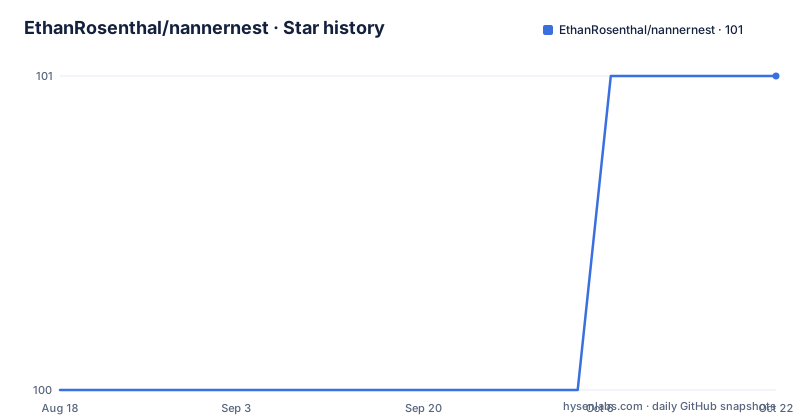
- EthanRosenthal/nannernest101 ★ · +1
| Repository | 2026-08-18 | 2026-10-21 |
|---|---|---|
| EthanRosenthal/nannernest | 100 | 101 |
1 Stars in the last 64 days, measured from the daily GitHub snapshot. Compare with other projects
Editorial analysis
What Problem It Solves and Who It Is For
nannernest addresses a problem that almost no one has formally optimized: how to arrange banana slices on a peanut butter and banana sandwich so that every bite gets some banana. The README frames it as a small package for optimizing banana coverage, and the accompanying blog post goes into the details. This is not a tool for commercial kitchens or meal-prep services. It is for engineers and Python hobbyists who enjoy seeing algorithms applied to food. The target user is someone who can take a top-down photo of a banana and a slice of bread, run a command, and appreciate the output without needing a production-grade system. The package is a side project, and its scope reflects that: it does one thing, and it does it with a specific pipeline.
The Mechanism: From Photo to Cutting Plan
The core workflow starts with a single image that contains both the banana and at least one slice of bread. The CLI takes that image and runs a segmentation step to separate banana from bread. The segmentation mask has a threshold parameter, --mask-threshold, which defaults to 0.6. After segmentation, the tool determines how many slices to cut the banana into, controlled by --num-slices, which defaults to 22. That number defines slice thickness. The package then uses a nesting library called nest2D to find an arrangement of the banana slices on the bread that maximizes coverage. The README mentions a --peel-scaler option, which presumably accounts for the fraction of each slice that is peel, though the exact formula is not spelled out in the available material. The output is a cutting and placement plan, which the user follows manually. The whole thing is a pipeline: image in, segmentation, slicing, nesting, plan out.
Installation: The C Dependency Hurdle
Installation is the most demanding part of using nannernest. The README states that Python 3.7+ is required. The package itself is pip installable, but it depends on nest2D, which has C dependencies and an outstanding pull request that the author works around by using a fork. The recommended path is to install boost and cmake first. On Linux, the README suggests sudo apt-get install libboost-all-dev. On macOS, the author used conda for cmake and brew for boost: conda install cmake and brew install boost. Then you pip install the fork directly from GitHub: pip install git+https://github.com/EthanRosenthal/nest2D.git@download-dependencies. Finally, pip install nannernest. This is a multi-step process that requires system-level package managers, and it will likely fail if you skip any step. The README is honest about this, calling the nest2D situation an outstanding PR. For a user accustomed to pure-Python packages, this is a significant barrier.
CLI Usage and Configuration Options
Once installed, the CLI is straightforward. You run nannernest my_image.jpg with a photo that contains your banana and bread. The command has three documented options. --num-slices sets the total number of banana slices, which defines thickness; the default is 22. --mask-threshold adjusts the segmentation mask threshold, defaulting to 0.6, which lets you tune how aggressively the tool separates banana from background. --peel-scaler is mentioned but truncated in the README, so the exact default and meaning are not fully clear from the material. The CLI help output shows that IMAGE_PATH is a required argument. This is a simple interface: one input, a few knobs. The user is expected to experiment with the threshold and slice count to get a result that looks right. There is no mention of batch processing or video input, so this is a single-image tool.
Limitations and Failure Modes
The most obvious limitation is the installation friction. If boost or cmake are not available on your system, or if the nest2D fork does not compile, the package will not work. The README only confirms Linux and macOS install paths; Windows users are left to figure it out themselves. The tool also depends on the quality of the input image. The README says to take a top-down picture, but it does not specify lighting, background, or banana ripeness. A photo with shadows or a cluttered background could break the segmentation, and the --mask-threshold option is the only lever to fix that. The nesting step assumes the banana slices are represented as 2D shapes, which means real-world thickness and curvature are ignored. The result is an idealized plan, not a physical guarantee. If your banana is curved or the bread is not a regular shape, the coverage optimization may not translate to reality. The README does not mention any error handling for images without a banana or bread, so a bad input could produce garbage output or a crash.
Alternatives and Why They Differ
A direct alternative is doing the layout by hand, which is what most sandwich makers do. That approach has no code, no segmentation, and no optimization, but it also has no installation cost. If you want a computational approach without the C dependencies, you could build a simple grid-based heuristic yourself: slice the banana into equal rounds and place them in a repeating pattern on the bread. That would not guarantee maximum coverage, but it would be a pure-Python solution with no nest2D dependency. Another alternative is to use a general-purpose 2D nesting library that is not tied to this project, such as the original nest2D or a pure-Python nesting package. The key difference is that nannernest bundles a specific workflow: segmentation, slicing, and nesting, all tuned for this one food problem. A generic nesting library would require you to write the segmentation and slicing logic yourself. So the alternative is either manual placement or a more general tool that demands more engineering effort.
Maintenance, License, and Upgrade Cost
The repository has no recent releases and the last push is unknown, which suggests it is not actively maintained. The README references a blog post from August 2020, so the project is likely a few years old. The dependency on a fork of nest2D is a maintenance risk: if the upstream nest2D PR is merged, the fork might become stale, and if the fork disappears, installation breaks. The license is AGPL-3.0, which is a strong copyleft license. That means if you incorporate nannernest into a larger project, you may be required to release that project's source code under the same license, especially if you distribute it. This is a significant consideration for any commercial or closed-source use. The README does not mention any upgrade path or changelog, so upgrading likely means reinstalling from source. Given the small scope, the maintenance cost is low in terms of code changes, but the external dependency makes it fragile. You should check the nest2D fork's status before relying on this package for anything beyond a one-off experiment.
Editorial conclusion
Adopt nannernest if you are a Python hobbyist who enjoys quirky geometry problems and is willing to fight through a C dependency chain. Skip it if you need a polished, production tool or if you are not comfortable installing boost and cmake. Before using it, verify that your Python version is 3.7+ and that the nest2D fork builds on your operating system, since the README only confirms Linux and macOS paths. The tool is a demonstration of an algorithm, not a kitchen utility, so treat it as a learning exercise or a fun weekend project, not a daily driver.
Frequently asked questions
How do I install nannernest?
Python 3.7 or later is required. Install boost and cmake first, for example sudo apt-get install libboost-all-dev on Linux, or conda install cmake and brew install boost on a Mac. Then run pip install git+https://github.com/EthanRosenthal/nest2D.git@download-dependencies and pip install nannernest.
What kind of picture does nannernest need?
A top-down picture containing your banana and at least one slice of bread. You pass it on the command line as nannernest my_image.jpg, and the bread defines the boundary the banana coverage is measured against.
What does the num-slices option do in nannernest?
It is the total number of slices to cut the banana into, and that number defines the slice thickness. The default is 22.
What is the mask-threshold and peel-scaler option in nannernest?
mask-threshold is the threshold of the segmentation mask and defaults to 0.6. peel-scaler is a float described as the fraction of a slice that is assumed to belong, though the help text for it is cut off in the documented output.
Official sources
Add this badge to your README
If you maintain this project, the badge below links readers to this analysis and shows its maintenance status from the daily GitHub snapshot. Paste the markdown into your README; add ?metric=license or ?metric=stars to the image URL for a different field.

[](https://hysenlabs.com/projects/ethanrosenthal-nannernest)Star history chart for your README
[](https://hysenlabs.com/projects/ethanrosenthal-nannernest)